Iron's Spells 'n Spellbooks Needed by Iron's Spells 3D Cast Preview iss_ponder-forge1.20.1-1.0.2-all.jar
requiredMatching file found Matched file: v1.20.1-3.16.2
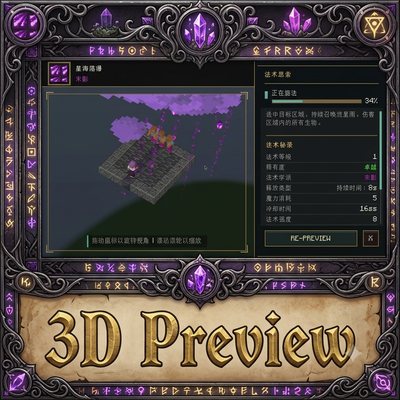
CurseForge · Minecraft mod
Add Iron's spells 3D cast preview.
Quick answer
Iron's Spells 3D Cast Preview iss_ponder-forge1.20.1-1.0.2-all.jar targets 1.20.1 with Forge. The project page does not say whether this file belongs on the client, dedicated server, or both. All 5 required mods have matching files.
Where it goes
The project page does not say whether this file belongs on the client, dedicated server, or both.
The source does not explicitly classify this release as client-only or server-only.
iss_ponder-forge1.20.1-1.0.2-all.jar. Change the file and its required mods may change too.
Install Iron's Spells 'n Spellbooks, playerAnimator, Iron's Lib, Curios API and 1 more first. We found matching files for this game-version and loader setup. 5 come through another mod in the chain.
5 extra mods were pulled in by other dependencies. Indented rows show who needs each one. We only count dependency files that match this setup. A file for another loader does not fill the gap.
Before you install it
Built for Iron's Spells 3D Cast Preview iss_ponder-forge1.20.1-1.0.2-all.jar. Pick another file and the loader, install side or required mods may change.
Use iss_ponder-forge1.20.1-1.0.2-all.jar. It targets 1.20.1 with Forge; another release may have different loader, side or dependency requirements.
Install Iron's Spells 'n Spellbooks, playerAnimator, Iron's Lib, Curios API and 1 more first. We found matching files for this game-version and loader setup. 5 come through another mod in the chain.
The project page does not say whether this file belongs on the client, dedicated server, or both.
Use the “Get this file” button beside iss_ponder-forge1.20.1-1.0.2-all.jar. It opens that exact file at the source.
About this project
Iron's Spell Scroll Ponder adds an interactive spell preview to scrolls from Iron's Spells 'n Spellbooks. Hover a valid spell scroll and hold Ponder's configurable key (W by default) to open a live preview.
Instead of maintaining a hand-authored scene for every spell, the mod casts the selected spell on a server-side simulated player in an isolated preview dimension. Entities, blocks, particles, sounds, cast state, and selected Iron's Spellbooks client packets are projected into a Ponder virtual level. This gives built-in spells and many add-on spells a useful preview without per-spell scene code.
Most Iron's Spellbooks add-ons work automatically because this mod discovers their registered spells through SpellRegistry and executes the real spell on a server-side simulated player. It then projects the resulting entities, particles, sounds, block changes, cast state, and reviewed visual packets into the Ponder scene. An ordinary add-on spell that uses Iron's standard casting and world APIs does not need a dedicated integration.
Complex spells may require an adapter when their important behavior happens after the initial cast, such as a recast, a later physical attack, an effect removal callback, or another gameplay interaction. Add-on authors can register a server-side SpellPreviewAdapter during common initialization:
SpellPreviewAdapters.register(
        ResourceLocation.fromNamespaceAndPath("your_mod", "complex_spell"),
        new SpellPreviewAdapter() {
            @Override
            public void onCastCompleted(SpellPreviewContext context) {
                // Prepare any state required by the follow-up demonstration.
            }

            @Override
            public Action tickAfterCast(SpellPreviewContext context) {
                if (context.ticksSinceLastCast() == 12) {
                    context.performPhysicalAttack(1.0F);
                }
                return context.ticksSinceLastCast() >= 20 ? Action.COMPLETE : Action.WAIT;
            }
        });
The adapter lifecycle also provides onSceneReady, beforeRecast, and onSessionClosed, while SpellPreviewContext exposes bounded helpers for common interactions. Return false from allowsSimulation for spells that cannot be isolated safely, such as persistent portals or cross-dimension travel. Custom client-only packets are not automatically trusted: prefer standard entity, particle, sound, and block APIs, or contribute a narrowly reviewed projection handler for that packet. See SpellPreviewAdapter and SpellPreviewContext for the complete API.
7 x 7 arena with a simulated caster and three targets.Iron's Spellbooks and its normal runtime dependencies are still required. Install this mod on both the client and server.
The Ponder key can be changed in Minecraft's key bindings. The generated config/iss_ponder-client.toml file also provides tooltip.showScrollSpellDescription; set it to false to stop adding the spell's guide description to scroll tooltips without disabling the preview prompt.
Spell code is executable mod code, so automatic compatibility can never be absolute. The preview limits a cast to 15 seconds and isolates each player in a distant cell of iss_ponder:spell_preview. The built-in pocket_dimension, recall, and portal spells are information-only because they can change dimensions or persistent world state.
Add-on spells that depend on a biome, structure, block interaction, real player inventory, or a second gameplay action may need a dedicated adapter. Custom client packets also require explicit review before they are replayed in the virtual level.
The project includes dedicated follow-up adapters for multi-stage, recast, reactive defense, and subsequent-projectile mechanics. See SPECIAL_SPELLS.md for the test matrix and TECHNICAL_NOTES.md for the verified architecture, source references, and upgrade checklist.
Project description from CurseForge.
Pick your setup
Choose the version and loader you play, then open the matching release.
Check the dependencies, then try the file in a copied instance before changing a world you care about.
Recent files
3 Aug 2026
3 Aug 2026
31 Jul 2026
31 Jul 2026
30 Jul 2026
29 Jul 2026
Looking for an older file? The official CurseForge project page is in Resources.
 mod
modA Minecraft mod that adds giant swords and shields to the game. A re-make of the original Asgard Shield, made popular by the 1.5 modpack Hexxit.
 mod
modThe mod adds alchemy and alchemical circles from the anime and manga Fullmetal Alchemist. You can learn transformation circles for further use on the assigned key (initially G)
 mod
modAdditions and tweaks for my modpack - Souls of Avarice