Mekanism Generators Needed by Infernos MekaCC infernos_mekacc-1.3.37-neoforge-1.21.1.jar
requiredMatching file found Matched file: MekanismGenerators-1.21.1-10.7.19.85.jar

CurseForge · Minecraft mod
Bridge Mekanism QIO and CC:Tweaked advanced computers/turtles. Equip a Portable QIO Dashboard as a turtle upgrade, craft and build multiblocks from QIO stock, remote terminals, auto-refuel, and dig-through paxel builds. NeoForge 1.21.1.
Quick answer
Infernos MekaCC infernos_mekacc-1.3.37-neoforge-1.21.1.jar targets 1.21.1 with NeoForge. The project page does not say whether this file belongs on the client, dedicated server, or both. All 3 required mods have matching files.
Where it goes
The project page does not say whether this file belongs on the client, dedicated server, or both.
The source does not explicitly classify this release as client-only or server-only.
infernos_mekacc-1.3.37-neoforge-1.21.1.jar. Change the file and its required mods may change too.
Install Mekanism Generators, CC: Tweaked, Mekanism first. We found matching files for this game-version and loader setup. 19 come through another mod in the chain.
19 extra mods were pulled in by other dependencies. Indented rows show who needs each one. We only count dependency files that match this setup. A file for another loader does not fill the gap.
Before you install it
Built for Infernos MekaCC infernos_mekacc-1.3.37-neoforge-1.21.1.jar. Pick another file and the loader, install side or required mods may change.
Use infernos_mekacc-1.3.37-neoforge-1.21.1.jar. It targets 1.21.1 with NeoForge; another release may have different loader, side or dependency requirements.
Install Mekanism Generators, CC: Tweaked, Mekanism first. We found matching files for this game-version and loader setup. 19 come through another mod in the chain.
The project page does not say whether this file belongs on the client, dedicated server, or both.
Use the “Get this file” button beside infernos_mekacc-1.3.37-neoforge-1.21.1.jar. It opens that exact file at the source.
About this project
Minecraft 1.21.1 - NeoForge only - Advanced computers and turtles only
This mod turns Mekanism's QIO storage network into something CC:Tweaked can drive like a real automation brain: turtles pull materials, craft, place multiblocks, list other machines on the same network, and open remote terminals - without a forest of peripheral.find calls.
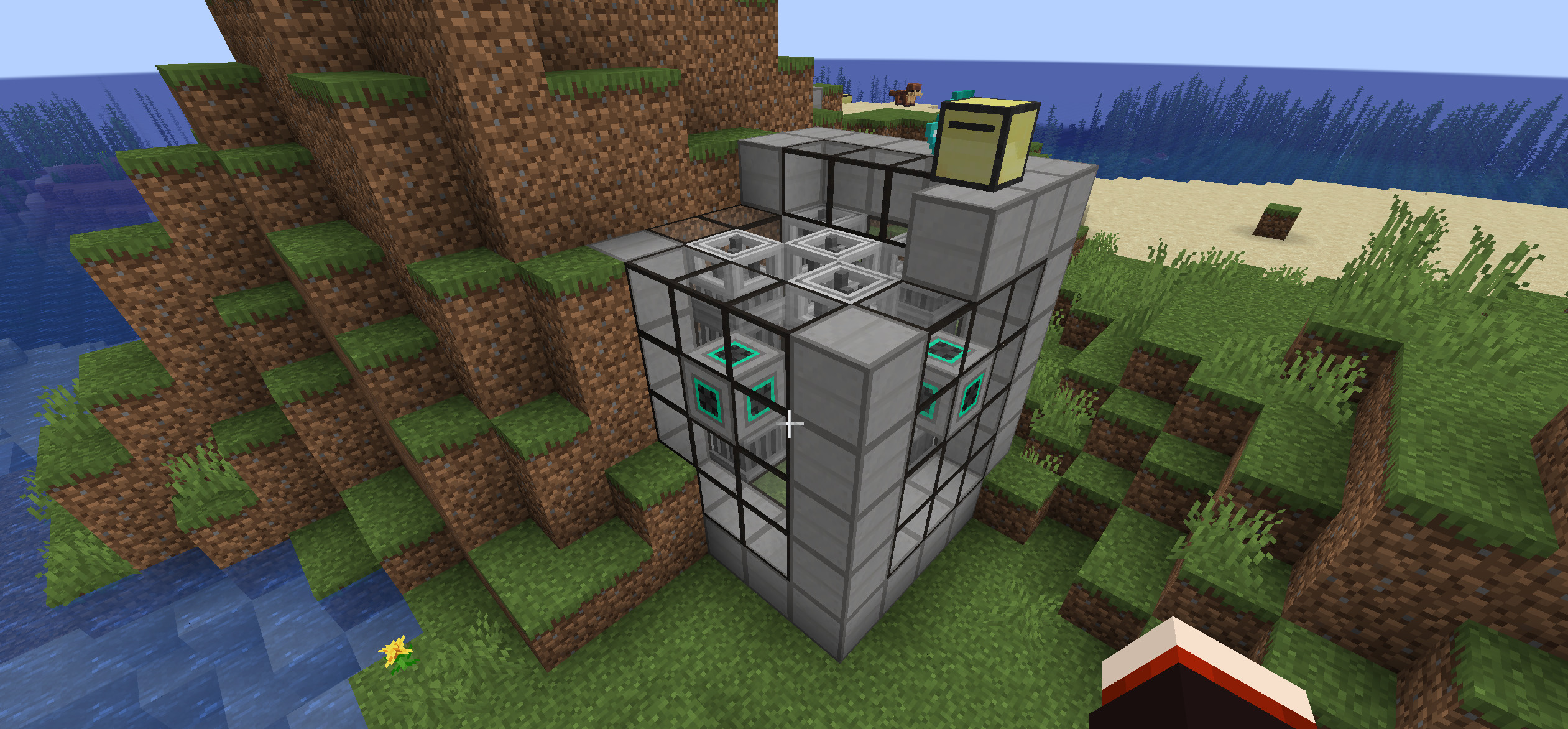
Advanced QIO turtle with dig paxel builds a full Mekanism fission reactor from QIO stock.
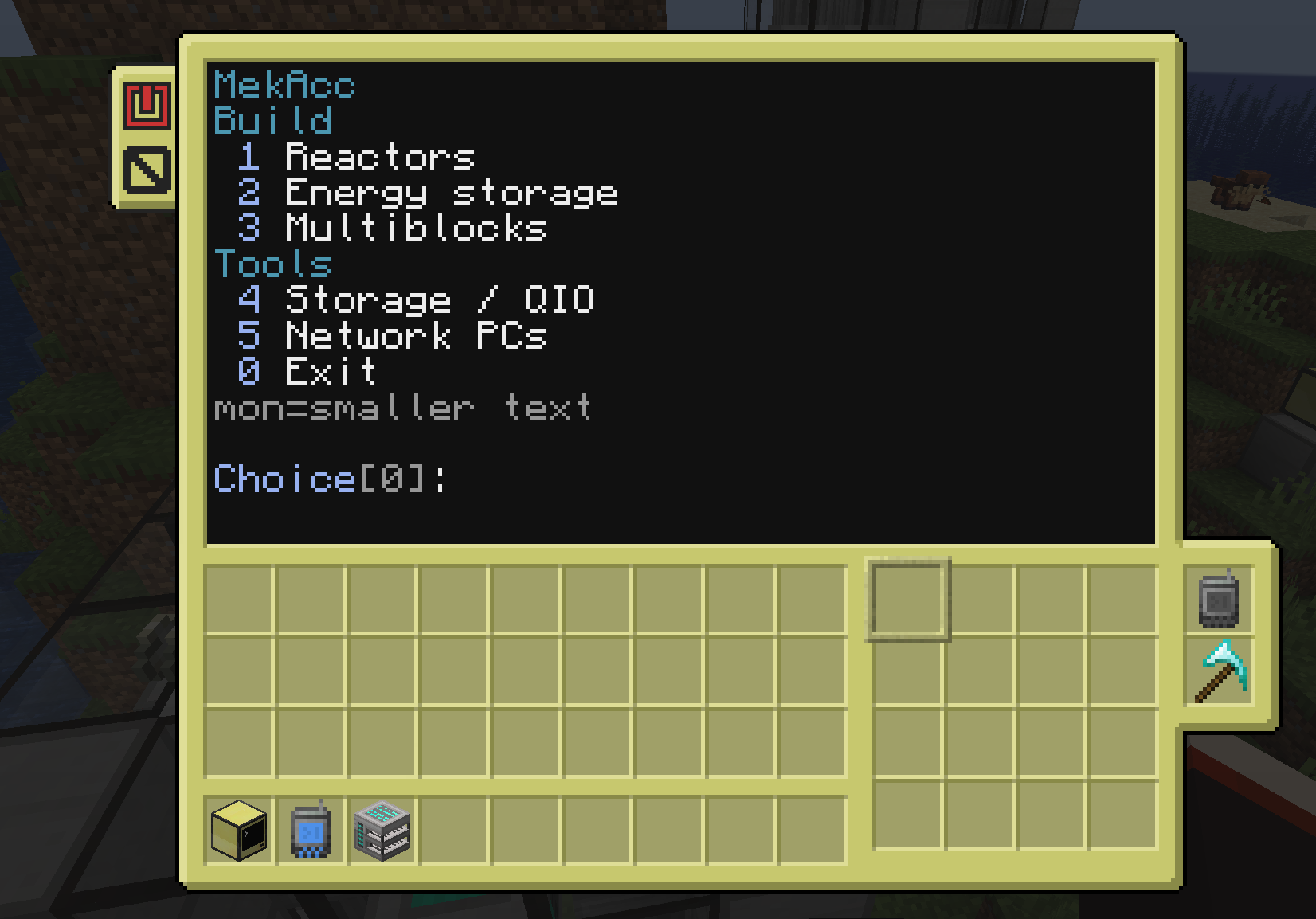
Run the mekanism program on a QIO-linked advanced turtle - reactors, energy storage, multiblocks.
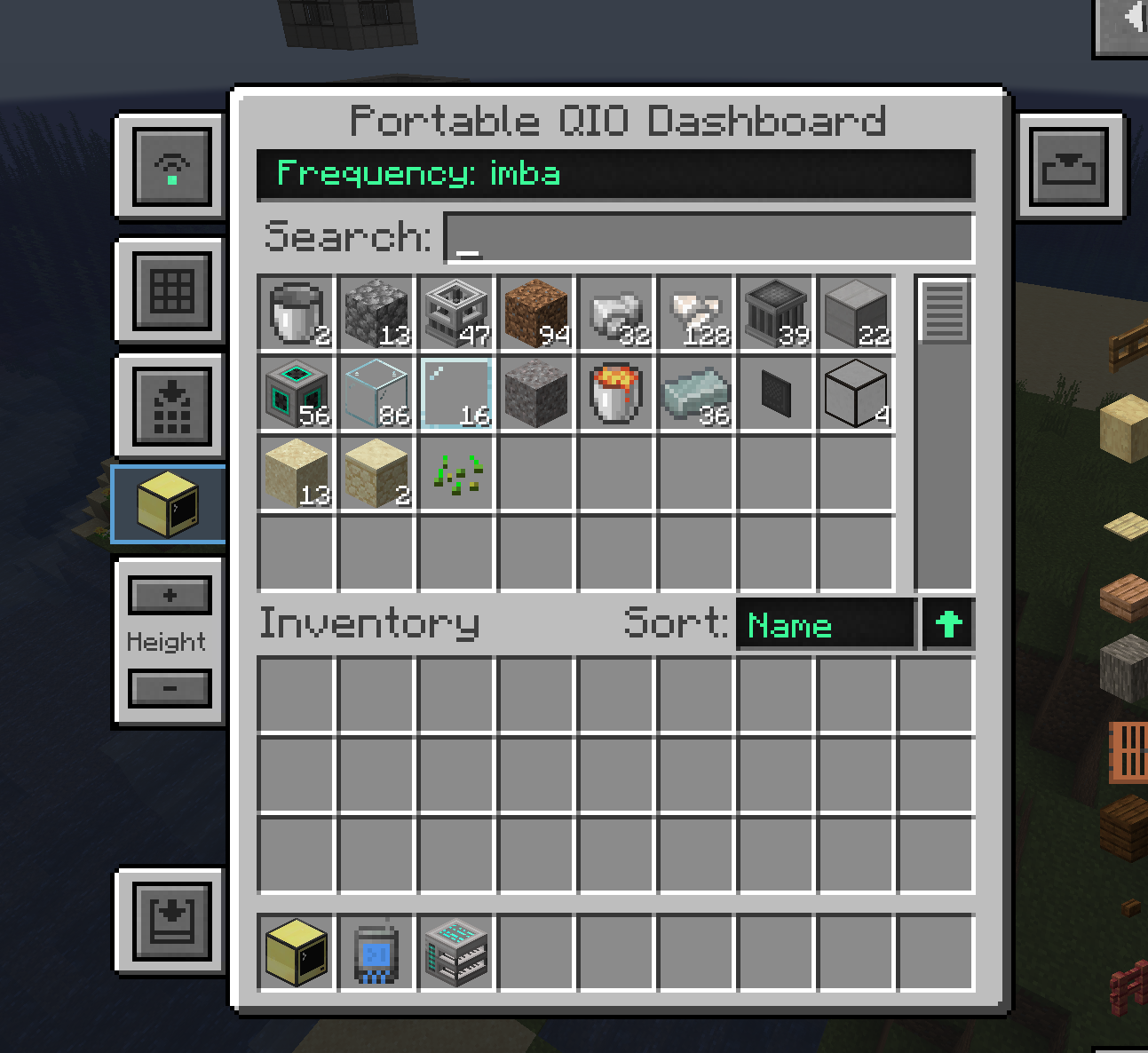
Browse your QIO network inventory from the portable dashboard (remote terminal ready with flash drive).
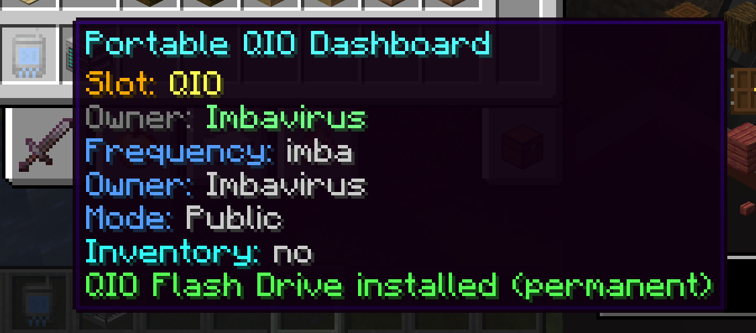
Permanently install a QIO Flash Drive for remote ComputerCraft terminal access on the frequency.
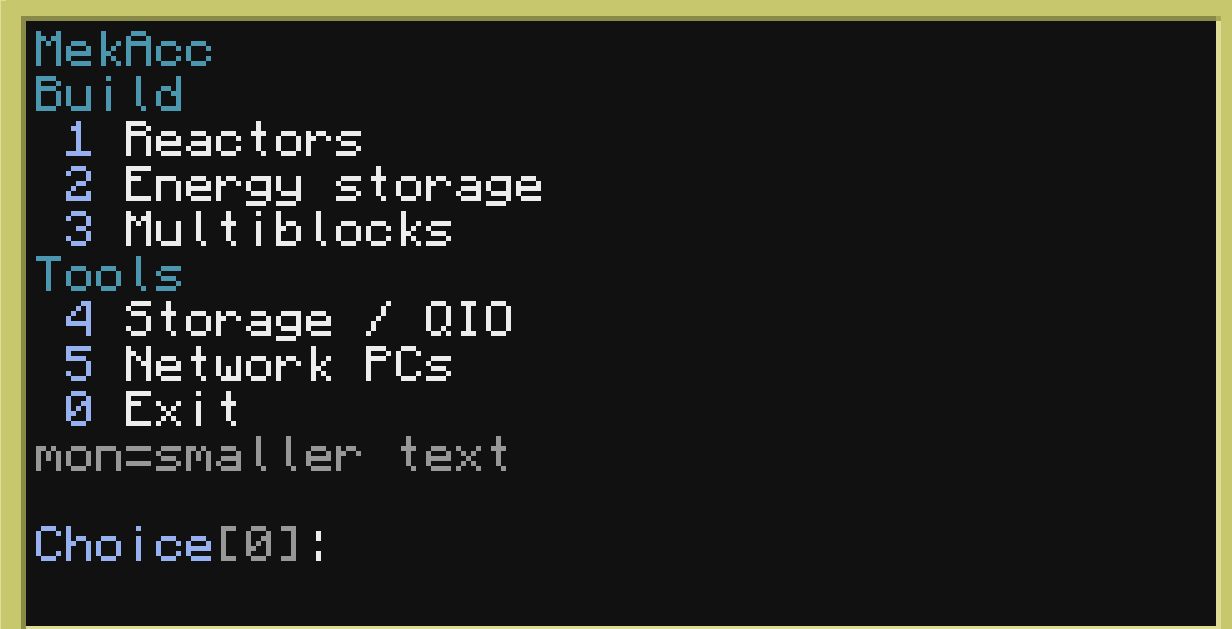
Compact TUI: build tools, storage / QIO, and network PCs.
MekAcc treats a QIO frequency as a shared computer network. There are two ways to join that network:
A server computer is an advanced ComputerCraft computer placed next to a wall QIO Dashboard, on a set frequency.
| Piece | Role |
|---|---|
| Wall QIO Dashboard | Mekanism block; set the QIO frequency here (same as normal Mekanism). |
| Advanced computer touching that dashboard | Becomes the network server for that frequency ("ethernet"). |
Why it matters
Typical setup
You can have multiple advanced computers next to dashboards on the same frequency; they all register as server endpoints. You only need one for remote/wifi features to work.
Equip a Portable QIO Dashboard in a turtle's left or right upgrade slot (not the inventory grid).
The turtle then:
Important: builders and dig-through paths need the Turtle Diamond Paxel (see below).
The QIO Flash Drive permanently upgrades one Portable QIO Dashboard so it can open a ComputerCraft terminal UI from the dashboard screen (the Computer button), as long as a server computer exists on that frequency.
| Without flash | With flash |
|---|---|
| Portable dashboard is still a normal Mekanism QIO item | Dashboard GUI gains a Computer control |
| No remote CC terminal from the handheld dashboard | Opens a remote CC terminal when a server computer is online on the same frequency |
Wall dashboards do not need a flash drive: if a computer is physically next to the wall dashboard, the Computer button uses that local/ethernet link.
On an advanced turtle (with QIO upgrade) or advanced computer, open the shell and type:
mekanism
That launches the MekAcc TUI (text UI) for QIO + builders + plant control.
QIO status - frequency, stock tools, network info.
Network list - other computers/turtles on the same frequency; rename endpoints; open remote sessions when allowed.
Plant control - scan formed fission / fusion / turbine / boiler / SPS; status, SCRAM, setpoints.
Multiblock builders - guided construction of Mekanism structures from QIO stock, for example:
Fission reactor - Fusion reactor - SPS - Turbine / boiler / TEP - Induction matrix (and related) - Extra structures when Mekanism Extras is installed (e.g. Naquadah)
Crafting / BOM - full bill of materials from QIO first; recursive grid crafting through the QIO craft path; no half-built reactors because glass was short.
The turtle walks the structure, places blocks, crafts missing craftable parts, and deposits leftovers back to QIO.
| Command | Purpose |
|---|---|
| mekanism | Full menu (builders + network + plants on turtles) |
| qio | CLI helpers: status, set frequency, list items/computers, refuel, open remote, rename |
| qio.help() / mekacc.help() in Lua | API hints |
Multiblock placement often needs the turtle to move through solid blocks (path above the place layer, dig obstacles, clear the build volume).
| Requirement | Detail |
|---|---|
| Item | Turtle Diamond Paxel (infernos_mekacc:diamond_paxel) from the Infernos MekAcc tab - or Mekanism Tools Diamond Paxel if that mod is installed |
| Where | Turtle left or right upgrade slot (same kind of slot as the Portable QIO Dashboard), not a normal inventory slot |
| Why | Builders only dig when a paxel upgrade is equipped. Without it you get "Blocked - equip diamond paxel to dig" and the path stops. |
| Creative | Prebuilt Advanced Paxel Turtle / Advanced QIO Paxel Turtle already have it installed |
Minimum turtle for real builds
On a QIO-linked advanced turtle or an advanced computer next to a wall dashboard:
qio.isAvailable()
qio.setFrequency("MainBase")
qio.setFrequency("PublicNet", true)
qio.getItemCount("minecraft:iron_ingot")
qio.listComputers()
qio.refuel()
qio.scanPlants()
qio.plantStatus("fission_...")
qio.help()
Pack authors can opt in to the Infernos website bridge so players with a linked Minecraft username can monitor plants and open terminals from the web/app. Off by default - never phones home unless configured. See docs/BRIDGE.md in the repo / config comments for bridgeEnabled, bridgeUrl, bridgeToken.
| Need | Detail |
|---|---|
| Minecraft | 1.21.1 |
| Loader | NeoForge 21.1.x only |
| Required mods | Mekanism, Mekanism Generators, CC:Tweaked |
| Machines | Advanced computers and/or advanced turtles only |
| Dig builds | Diamond paxel turtle upgrade required |
| Optional | Mekanism Tools (their diamond paxel), Mekanism Extras (extra blueprints e.g. Naquadah) |
| Option | Detail |
|---|---|
| enableChunkLoading | Force-load QIO-linked chunks |
| chunkLoadRadius | Extra radius (0-2) |
| maxListedItemsPerCall | Cap for listItems |
| enableRemoteTerminals | Computer button on dashboards opens CC terminal |
| enablePlantControl | SCRAM / status / setpoints via qio |
| bridgeEnabled / bridgeUrl / bridgeToken | Opt-in Infernos web bridge (off by default) |
Project description from CurseForge.
Pick your setup
Choose the version and loader you play, then open the matching release.
Check the dependencies, then try the file in a copied instance before changing a world you care about.
Recent files
15 Aug 2026
11 Aug 2026
11 Aug 2026
10 Aug 2026
10 Aug 2026
10 Aug 2026
10 Aug 2026
10 Aug 2026
9 Aug 2026
7 Aug 2026
6 Aug 2026
6 Aug 2026
Looking for an older file? The official CurseForge project page is in Resources.