Minecraft version
Back to mods 
CurseForge · Minecraft mod
Gouge
Slam your pickaxe into a wall mid-fall to slow your descent or lock yourself in place before you hit the ground.
Choose a version Pick your version below, then grab the matching file.
Quick answer
Which Gouge release matches 26.2?
Best match for your filters Gouge 1.8.4 (NeoForge 26.2)
Game version 26.2
Loader NeoForge
Gouge 1.8.4 (NeoForge 26.2) targets 26.2 with NeoForge. The project page does not say whether this file belongs on the client, dedicated server, or both. No extra mods listed for this file.
Where it goes
Is Gouge required on the client, server, or both?
The project page does not say whether this file belongs on the client, dedicated server, or both.
Client Source doesn’t say
Dedicated server Source doesn’t say
Loader for this release NeoForge
Required install it here Optional supported, not mandatory Not supported do not install here Source doesn’t say do not assume
The source does not explicitly classify this release as client-only or server-only.
What else does Gouge 1.8.4 (NeoForge 26.2) need?
Gouge 1.8.4 (NeoForge 26.2) on 26.2. Every mod below is checked against that same setup.
This file does not list any required mods. Do not add a library just because a different file uses it.
This file does not list any required or optional mods.
Before you install it
Add Gouge without breaking your instance.
Built for Gouge 1.8.4 (NeoForge 26.2) on 26.2. Pick another file and the loader, install side or required mods may change.
- 01
Stick to this file
Use Gouge 1.8.4 (NeoForge 26.2). It targets 26.2 with NeoForge; another release may have different loader, side or dependency requirements.
- 02
Bring the mods it needs
This file does not list any required mods. Do not add a library just because a different file uses it.
- 03
Put it on the correct side
The project page does not say whether this file belongs on the client, dedicated server, or both.
- 04
Pick the file you checked
Use the “Get this file” button beside Gouge 1.8.4 (NeoForge 26.2). It opens that exact file at the source.
About this project
What does Gouge add?

Slam your pickaxe into a wall mid-fall and stop yourself before you splat.




Overview
Falling toward a wall? Right-click it with a pickaxe. It bites into the surface and friction bleeds off your downward speed as you scrape along the edge. Harder blocks provide more resistance, slowing you down significantly faster.
Once you've caught on, you can hang on, slide, climb up, shimmy sideways, or kick off.
Note: Higher-tier pickaxes hold onto surfaces longer and drain durability at a lower rate.
| Block Type | Behavior | Effect |
|---|---|---|
| Hard Blocks (Stone, Obsidian) | Friction eats momentum every tick until you stop dead, hanging in place until grip or durability expires. Hold a pickaxe in both hands for 1.5x hang time by default. Hold Space to climb, then mantle onto ledges you can stand on. | Full Stop / Lock-In / Climbable |
| Soft Blocks (Dirt, Sand) | No locking mechanic. You slide continuously down the face of the wall. | Reduced Damage |
Moves
| Move | How | What it does |
|---|---|---|
| Climb | Hang on a hard block with a pickaxe in each hand, then hold Space | Climb the wall and mantle onto ledges |
| Shimmy | Hang with a pickaxe in each hand, then hold A or D | Move sideways along the wall. Stops at corners and at the edge of the rock |
| Launch | Climb under a cap of 1 to 3 soft blocks (dirt, sand, grass) and keep holding Space | Push off and land on top of the cap |
| Quick Escape | Double-tap Crouch within 0.7 seconds | Kick off the wall at any time: hanging, climbing or sliding |
Enchantments
Apply these to pickaxes via an Enchanting Table or Anvil:
| Enchantment | Max Level | Effect |
|---|---|---|
| Grip | III | Extends how long you can hang onto a wall before slipping |
| Momentum | III | Reduces the forced cooldown length after slipping |
| Spring | III | Stronger launch over soft caps and stronger wall kicks |
| Shimmy | III | Faster sideways movement along walls |
Configuration
Every value lives in config/gouge.toml, including a [block_grip] table to make specific blocks or tags easier or harder to hold. Every new feature can be switched on or off and tuned.
If you have Cloth Config installed (plus Mod Menu on Fabric), the main options also get an in-game screen. It is optional, and the mod runs the same without it.
Visual Showcase
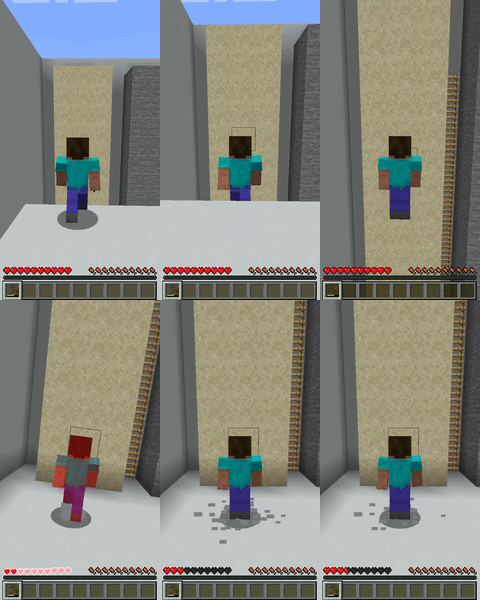
Soft Block Dampening
Reduces fall damage roughly in half, capped so even a massive slide won't kill you.
| Standard Fall | Wall Slide |
|---|---|
 |
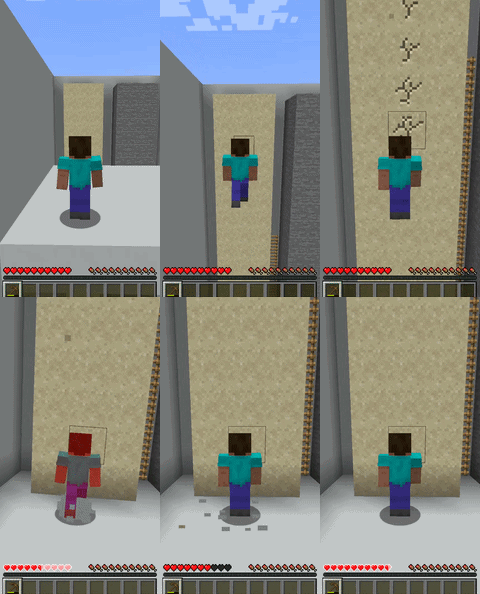 |
| No slide (Full Damage) | Sliding (Half Damage) |
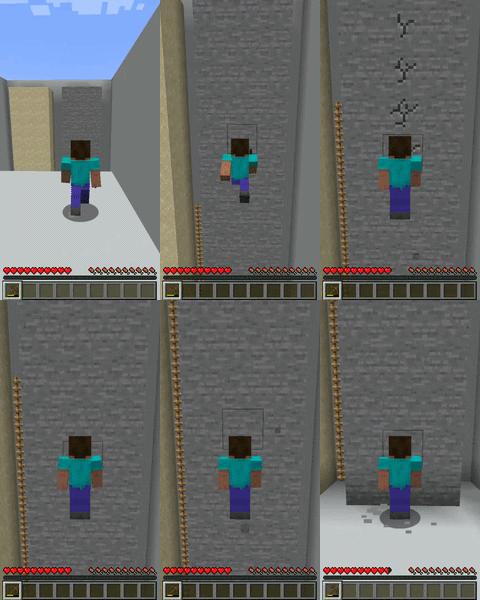
Hard Block Grip & Wall Climbing
Lock on, climb with two pickaxes, or kick off whenever you want.
| Hard Block Catch | Wall Climbing | Wall Kick Jump |
|---|---|---|
 |
 |
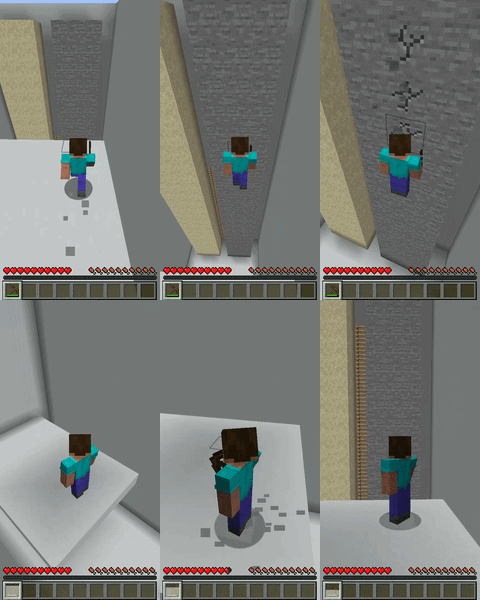 |
| Bleeds speed until fully locked | Hold Space with two pickaxes to climb and mantle | Double-tap crouch to kick off mid-hang |
Soft Launch & Lateral Travel
Spring over a soft cap on top of the rock, or shimmy sideways along the wall.
| Soft Launch | Lateral Travel |
|---|---|
 |
 |
| Keep holding Space against the cap to push off and land on top | Hold A or D with two pickaxes to move along the wall |
Compatibility
Tested and confirmed to work seamlessly alongside:
- Tinkers' Construct (Credit: Elizabeth_Mahiko)
- Mekanism / Mekanism Tools
- Silent Gear
- ParCool (Credit: Brizo)
- Zipline: Rezipped (Credit: greetedsnow)
- Wall-Jump TXF (Credit: ANormalRaft)
Project description from CurseForge.
Pick your setup
Gouge by Minecraft version and loader
Choose the version and loader you play, then open the matching release.
Minecraft version
26.2
3 loader buildsMinecraft version
26.1.2
3 loader buildsMinecraft version
1.21.11
3 loader buildsMinecraft version
1.21.4
3 loader buildsMinecraft version
1.21.1
3 loader buildsMinecraft version
1.20.4
3 loader buildsMinecraft version
1.20.1
3 loader buildsCheck the dependencies, then try the file in a copied instance before changing a world you care about.
Recent files
Gouge versions and loaders
Gouge 1.8.4 (NeoForge 26.2)
gouge-1.8.4-mc26.2-neoforge.jar
21 Nov 2026
Client Source doesn’t say Server Source doesn’t say Dependencies No extras listed Listed on Release listing
Check the 26.2 · NeoForge setup NeoForge26.2 release
Gouge 1.8.4 (Forge 26.2)
gouge-1.8.4-mc26.2-forge.jar
21 Nov 2026
Client Source doesn’t say Server Source doesn’t say Dependencies No extras listed Listed on Release listing
Check the 26.2 · Forge setup Forge26.2 release
Gouge 1.8.4 (Fabric 26.2)
gouge-1.8.4-mc26.2-fabric.jar
21 Nov 2026
Client Source doesn’t say Server Source doesn’t say Dependencies 2 required · 2 unchecked Listed on Release listing
Check the 26.2 · Fabric setup Fabric26.2 release
Gouge 1.8.3 (NeoForge 26.2)
gouge-1.8.3-mc26.2-neoforge.jar
20 Nov 2026
Client Source doesn’t say Server Source doesn’t say Dependencies No extras listed Listed on Release listing
Check the 26.2 · NeoForge setup NeoForge26.2 release
Gouge 1.8.3 (Forge 26.2)
gouge-1.8.3-mc26.2-forge.jar
20 Nov 2026
Client Source doesn’t say Server Source doesn’t say Dependencies No extras listed Listed on Release listing
Check the 26.2 · Forge setup Forge26.2 release
Gouge 1.8.3 (Fabric 26.2)
gouge-1.8.3-mc26.2-fabric.jar
20 Nov 2026
Client Source doesn’t say Server Source doesn’t say Dependencies 2 required · 2 unchecked Listed on Release listing
Check the 26.2 · Fabric setup Fabric26.2 release
Gouge 1.8.2
gouge-1.8.2-mc26.2-forge.jar
14 Nov 2026
Client Source doesn’t say Server Source doesn’t say Dependencies No extras listed Listed on Release listing
Check the 26.2 · Forge setup Forge26.2 release
Gouge 1.8.2
gouge-1.8.2-mc26.2-neoforge.jar
14 Nov 2026
Client Source doesn’t say Server Source doesn’t say Dependencies No extras listed Listed on Release listing
Check the 26.2 · NeoForge setup NeoForge26.2 release
Gouge 1.8.2
gouge-1.8.2-mc26.2-fabric.jar
14 Nov 2026
Client Source doesn’t say Server Source doesn’t say Dependencies No extras listed Listed on Release listing
Check the 26.2 · Fabric setup Fabric26.2 release
1.8
gouge-1.8-mc26.2-neoforge.jar
6 Nov 2026
Client Optional Server Optional Dependencies No extras listed Listed on Release listing
Check the 26.2 · NeoForge setup 26.2NeoForge release
1.8
gouge-1.8-mc26.2-forge.jar
6 Nov 2026
Client Optional Server Optional Dependencies No extras listed Listed on Release listing
Check the 26.2 · Forge setup 26.2Forge release
1.8
gouge-1.8-mc26.2-fabric.jar
6 Nov 2026
Client Optional Server Optional Dependencies 1 required · 1 unchecked Listed on Release listing
Check the 26.2 · Fabric setup 26.2Fabric release
Looking for an older file? The official CurseForge project page is in Resources.
 mod
CurseForge + Modrinth · Minecraft
Hybrid Blocks
A mod that adds a variety of decorative and colorful blocks to the game
 mod
CurseForge + Modrinth · Minecraft
Fantastic Fishery
A Minecraft mod that adds various imaginary fish to your world
 mod
CurseForge + Modrinth · Minecraft
Fish N' Ships
Fish N' Ships is a mod that adds new types of boats to Minecraft, including sailboats, canoes, rafts, and an all-new fishing ship