Minecraft version
Back to mods 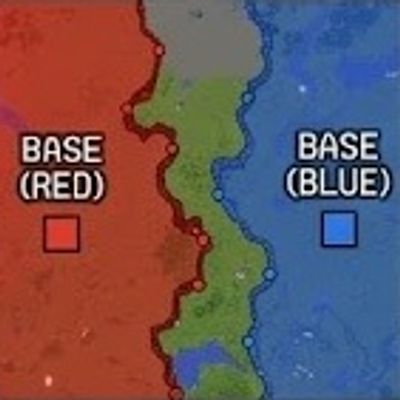
CurseForge · Minecraft mod
Frontline
"Real-time dynamic frontline and territory control system powered by strategic flag points for tactical combat servers."
Choose a version Pick your version below, then grab the matching file.
Quick answer
Which Frontline release should I use?
Latest stable file Frontline-1.0.1.jar
Game version 1.21.1
Loader NeoForge
Frontline-1.0.1.jar targets 1.21.1 with NeoForge. The project page does not say whether it belongs on the client. The project page does not say whether it belongs on the dedicated server. No extra mods listed for this file.
Where it goes
Is Frontline required on the client, server, or both?
The project page does not say whether it belongs on the client. The project page does not say whether it belongs on the dedicated server.
Client Source doesn’t say
Dedicated server Source doesn’t say
Loader for this release NeoForge
Required install it here Optional supported, not mandatory Not supported do not install here Source doesn’t say do not assume
The source does not explicitly classify this release as client-only or server-only.
What else does Frontline-1.0.1.jar need?
Frontline-1.0.1.jar. Change the file and its required mods may change too.
This file does not list any required mods. Do not add a library just because a different file uses it.
This file does not list any required or optional mods.
Before you install it
Add Frontline without breaking your instance.
Built for Frontline-1.0.1.jar. Pick another file and the loader, install side or required mods may change.
- 01
Stick to this file
Use Frontline-1.0.1.jar. It targets 1.21.1 with NeoForge; another release may have different loader, side or dependency requirements.
- 02
Bring the mods it needs
This file does not list any required mods. Do not add a library just because a different file uses it.
- 03
Put it on the correct side
The project page does not say whether it belongs on the client. The project page does not say whether it belongs on the dedicated server.
- 04
Pick the file you checked
Use the “Get this file” button beside Frontline-1.0.1.jar. It opens that exact file at the source.
About this project
What does Frontline add?
⚡ Frontline Mod — Command Reference
Welcome to the **Frontline** command documentation! Below is a comprehensive guide to all available commands for both players and server administrators.
🖥 Client-Side Commands
*No special permissions required. These commands affect only the local client rendering.*
* /fl render — Toggles 3D in-world rendering elements on or off.
* /fl poimode — Toggles POI rendering mode:
* **Arcade**: Visible both in the 3D world and on the minimap.
* **Realistic**: Visible **ONLY** on the minimap.
* /fl mapsize <40-200> — Changes the local minimap render size in pixels.
🛠 Server & Admin Commands
*Requires **OP Permission Level 2+** unless stated otherwise.*
💰 Economy System
* /economy add <targets> <amount> — Grants specified coins to target players.
* /economy remove <targets> <amount> — Deducts specified coins from target players.
* /economy set <targets> <amount> — Sets the exact coin balance for target players.
🗺 Zone & Base Setup
* /frontline zone set <x1> <z1> <x2> <z2> — Defines the global **Warzone** rectangular boundaries.
* /frontline team create <id> <colorHex> — Registers or updates a team profile with a HEX color *(e.g. /frontline team create red FF3333)*.
* /frontline team base set <team> — Sets the team's HQ base (spawnpoint & starting territory tile) at the execution location.
📍 Points of Interest (POI)
* /frontline poi add <name> — Creates a new POI marker at the player's current chunk.
* /frontline poi remove <name> — Deletes an existing POI marker by name.
* /frontline poi list — Displays all active POIs and their chunk coordinates.
⚔️ Match Control
* /frontline match start <flagsPerPlayer> — Starts the match and gives all team members specified flag banners (1-64).
* /frontline match restart — Resets all captured tiles and unfreezes gameplay (preserves teams, bases, and zones).
* /frontline match threshold <1-100> — Sets the required territory ownership percentage needed for victory.
* /frontline match status — Displays active match status, total territory tiles, and current team progress.
🎒 Kit Management
* /frontline kit create <team> <name> — Saves the player's current inventory as a custom team kit loadout.
* /frontline kit give <team> <targets> <name> — Clears targets' inventories and equips them with the saved kit.
* /frontline kit delete <team> <name> — Deletes a kit loadout from the database.
* /frontline kit list — Lists all registered kit loadouts.
🌐 Global Minimap Controls (Server-Wide)
* /frontline map position <top-left|top-right|bottom-left|bottom-right> — Forces the minimap position corner for **ALL players**.
* /frontline map size <60-250> — Adjusts global minimap size (in pixels) for **ALL players**.
🛒 Shop System
* /shop — *(Available to all players)* Opens the interactive GUI shop menu.
* /sell item <price> — *(Admin)* Adds the item stack held in your main hand (including NBT/components) to the global GUI shop for the specified price.
Project description from CurseForge.
Pick your setup
Frontline by Minecraft version and loader
Choose the version and loader you play, then open the matching release.
Check the dependencies, then try the file in a copied instance before changing a world you care about.
Recent files
Frontline versions and loaders
Frontline-1.0.1.jar
1 Aug 2026
Client Source doesn’t say Server Source doesn’t say Dependencies No extras listed Listed on Release listing
Check the 1.21.1 · NeoForge setup 1.21.1NeoForge release
Frontline-1.0.0.jar
31 Jul 2026
Client Source doesn’t say Server Source doesn’t say Dependencies No extras listed Listed on Release listing
Check the 1.21.1 · NeoForge setup 1.21.1NeoForge release
Looking for an older file? The official CurseForge project page is in Resources.
 mod
mod CurseForge · Minecraft
Kingdom Keys - Re:Mind
Adds more to Kingdom Keys. (Previously Magicks Addon)
 mod
mod CurseForge · Minecraft
Suedenic Balancing Act
A mod made for the Suedenic minecraft server that adds balance changes and content for several mods.
 mod
mod CurseForge · Minecraft
Catalytic Tweaks
Changes mods behaviour, in a way to optimize them, fix some issues or extends their functionalities, most of them with configurations. Currectly affects Modular Machinery Reborn, SFM keywords colors, KJS in different ways , Pipez and more!