Minecraft version
Back to mods 
CurseForge · Minecraft mod
World Preview (Unofficial Port)
Allows you to preview a map / seed in the new world screen. Community fork ported to Minecraft 1.21.11 and later with new features and a redesigned UI.
Choose a version Pick your version below, then grab the matching file.
Quick answer
Which World Preview (Unofficial Port) release should I use?
Latest stable file world_preview-1.5.2.jar
Game version 26.2
Loader NeoForge
World Preview (Unofficial Port) world_preview-1.5.2.jar targets 26.2 with NeoForge. The project page does not say whether this file belongs on the client, dedicated server, or both. No extra mods listed for this file.
Where it goes
Is World Preview (Unofficial Port) required on the client, server, or both?
The project page does not say whether this file belongs on the client, dedicated server, or both.
Client Source doesn’t say
Dedicated server Source doesn’t say
Loader for this release NeoForge
Required install it here Optional supported, not mandatory Not supported do not install here Source doesn’t say do not assume
The source does not explicitly classify this release as client-only or server-only.
What else does World Preview (Unofficial Port) world_preview-1.5.2.jar need?
world_preview-1.5.2.jar. Change the file and its required mods may change too.
This file does not list any required mods. Do not add a library just because a different file uses it.
This file does not list any required or optional mods.
Before you install it
Add World Preview (Unofficial Port) without breaking your instance.
Built for World Preview (Unofficial Port) world_preview-1.5.2.jar. Pick another file and the loader, install side or required mods may change.
- 01
Stick to this file
Use world_preview-1.5.2.jar. It targets 26.2 with NeoForge; another release may have different loader, side or dependency requirements.
- 02
Bring the mods it needs
This file does not list any required mods. Do not add a library just because a different file uses it.
- 03
Put it on the correct side
The project page does not say whether this file belongs on the client, dedicated server, or both.
- 04
Pick the file you checked
Use the “Get this file” button beside world_preview-1.5.2.jar. It opens that exact file at the source.
About this project
What does World Preview (Unofficial Port) add?
World Preview is a mod for visualizing Minecraft world seeds before they are generated.
This is a community-maintained fork of the original World Preview by Caeruleus Draconis & Taiterio. The original project has not been updated since Minecraft 1.21. This fork upgrades the mod for Minecraft 1.21.11 and later, adding new features — all while preserving the original experience.
Installation
Download the latest World Preview JAR file for Minecraft 1.21.11 and later . For the Fabric Loader, you also need Fabric API. Save both jar files to the mods folder of your Minecraft instance.
Usage
World Preview adds a new Preview tab to the Singleplayer menu.
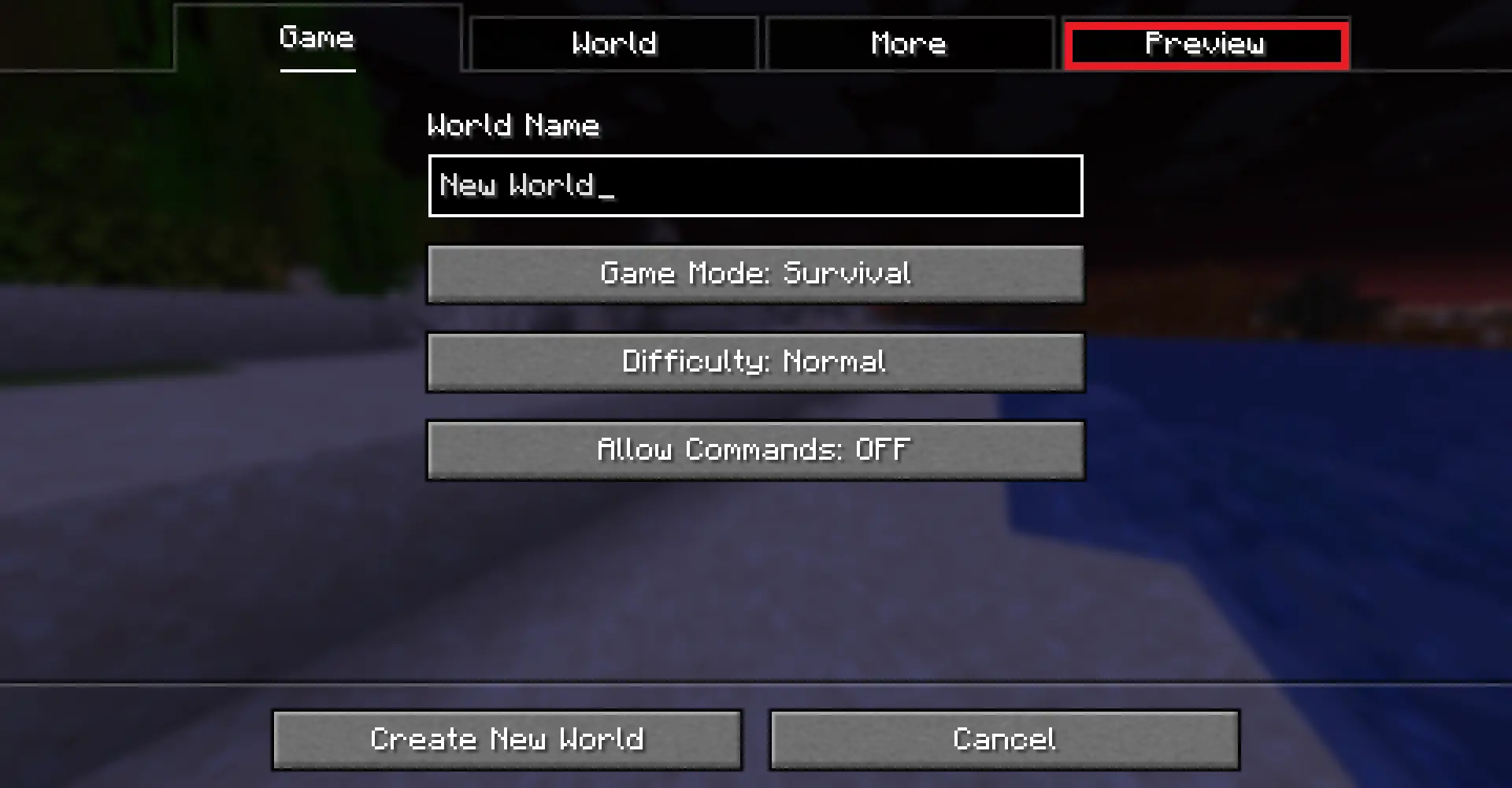
Upon opening that tab, a random seed is selected and a map of biomes is generated:
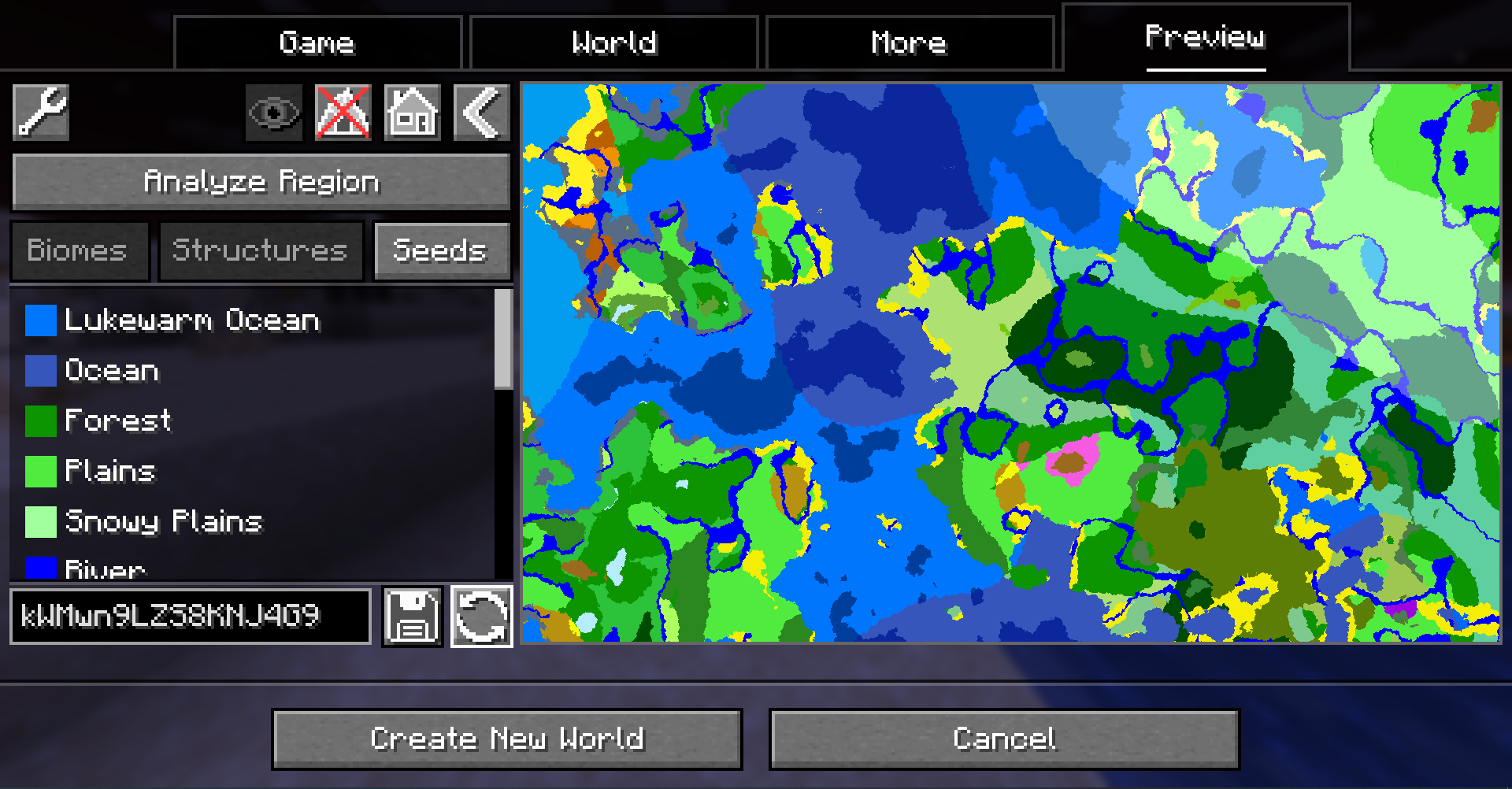
By default, the overworld dimension will be generated, structures will not be shown and no heightmap will be generated. This can be changed in the Settings (top-left button in the Preview tab).
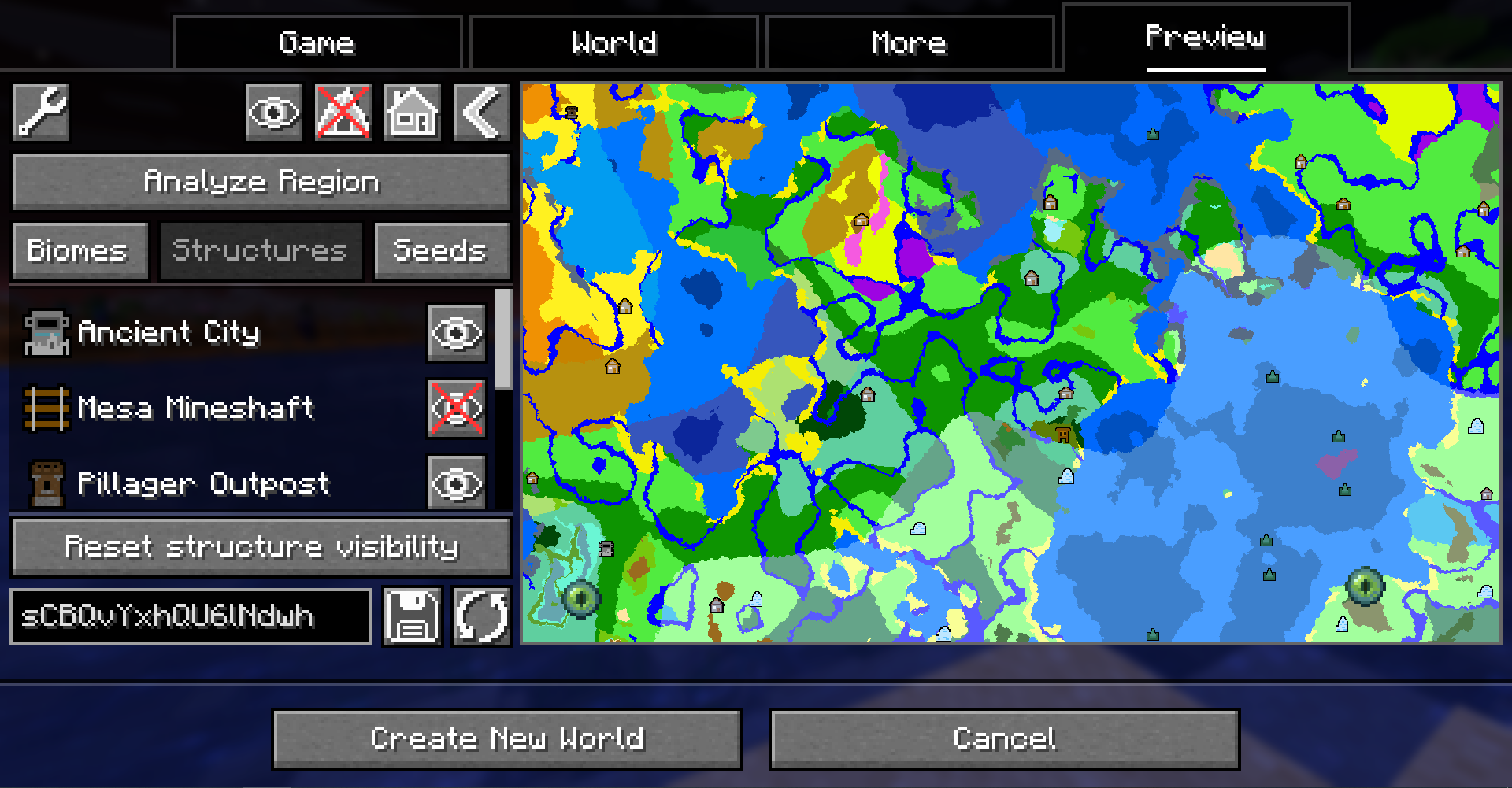
When structure sampling is enabled, the visibility of individual types of structures on the preview can be toggled:
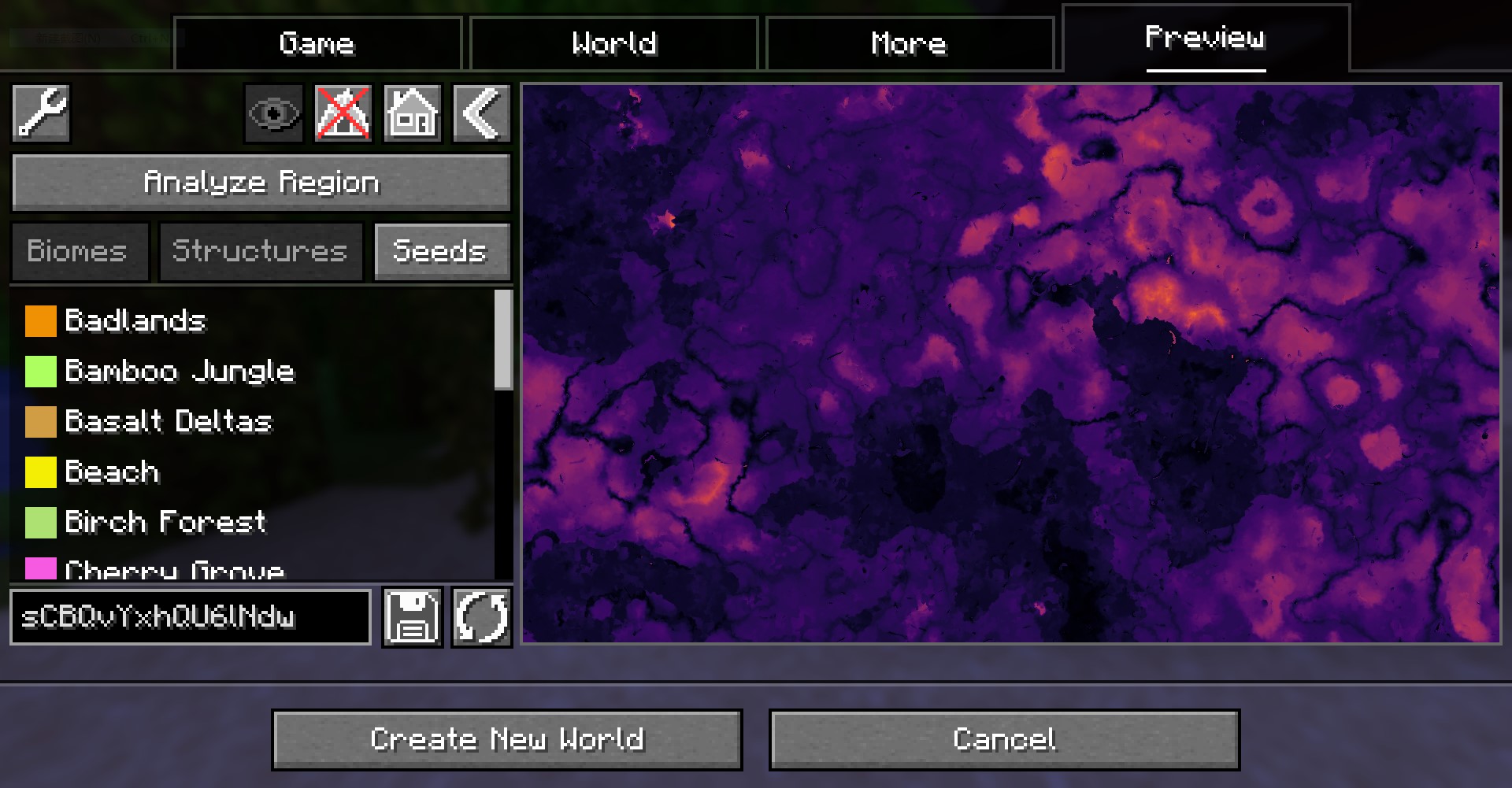
When height sampling is enabled, the preview can be toggled between the biome map and a colorized heightmap:
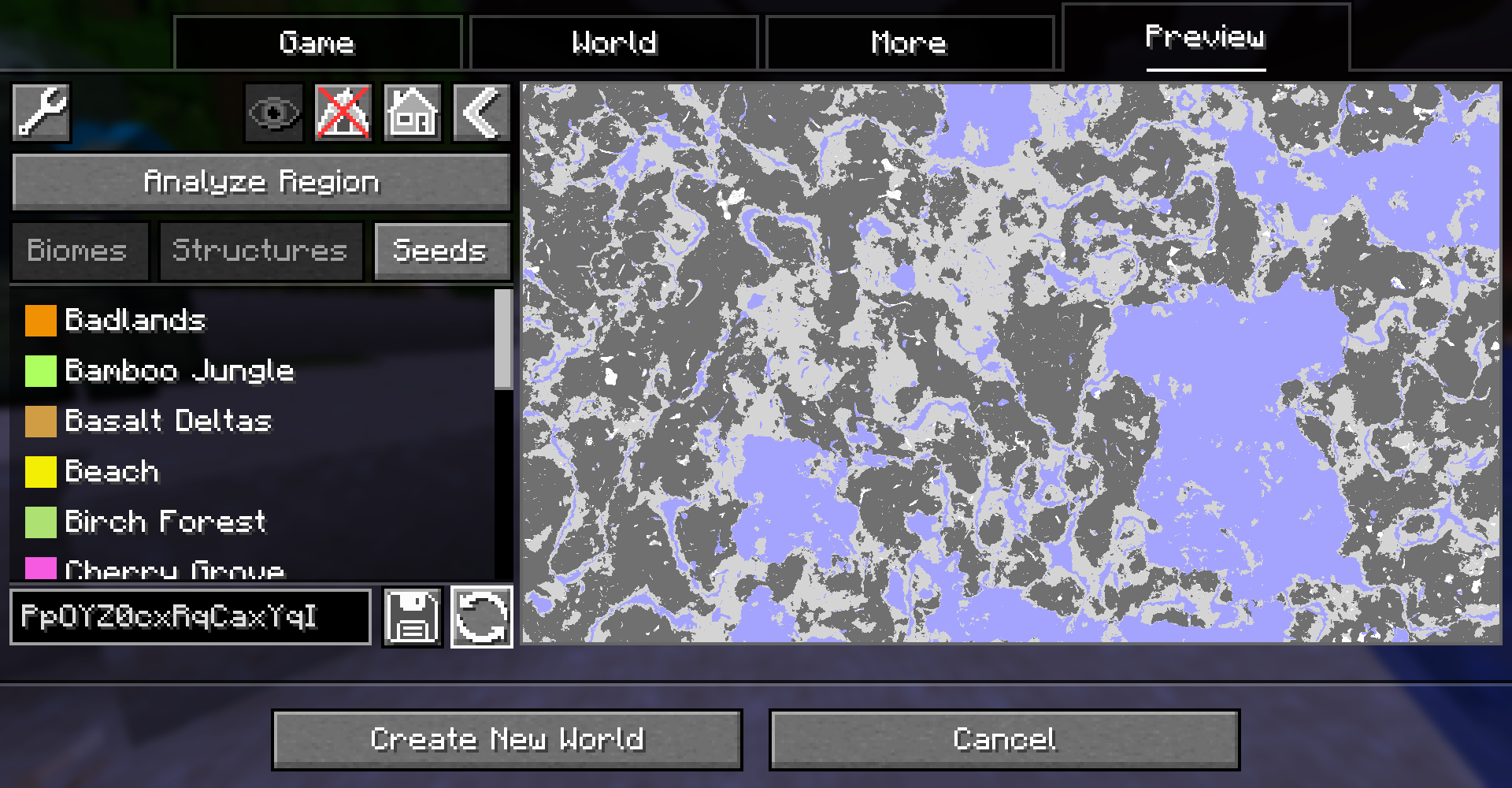
When y-layer intersection sampling is enabled, the preview can also show the blocks on the current y-layer. Additionally, the y-layer one step below is also shown in a lighter color:
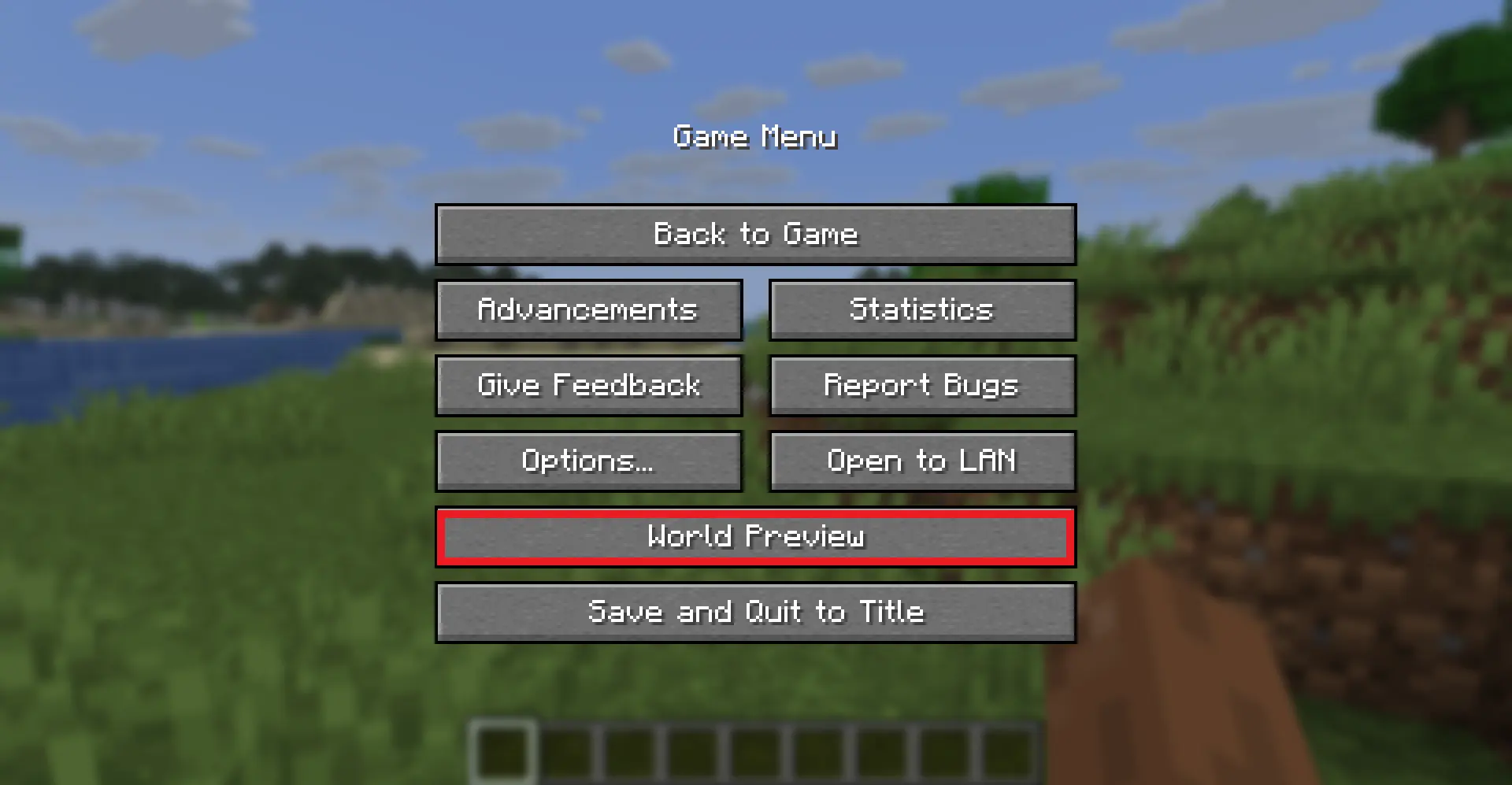
Since version 1.1.0, there is also experimental support for opening the preview in-game for a single-player worlds:
What's new in this fork(1.3.2)
- Updated to Minecraft 1.21.11 and later
- Zoom levels — 32px and 64px per chunk, with Ctrl+scroll to zoom in/out
- Preload system — preloads areas beyond the visible range to reduce drag stuttering
- Arrow key panning and Home key center reset
- World analysis engine — region-level biome and height metrics with profile sampling
- Mod compatibility framework — auto-detects mods like TerraFirmaCraft and applies workarounds
- Improved settings UI — reworked to sidebar + page architecture
Moving on the preview
Clicking and dragging on the map-part of the preview tab will move along the x and z axis. This will cause the following load sequence:
- Any biomes that are not yet sampled on the current y-level
- Structures (if enabled)
- Height map (if enabled)
- Adjacent y-layers (if enabled)
Scrolling does not zoom into the map by default (there is a setting to enable scroll-wheel zoom, or use Ctrl+scroll to zoom). By default, scrolling travels along the y-axis. This allows cave biomes to be seen as well. Please note that non-cave biomes span the entire world height beyond that. Alt+scroll always adjusts Y, regardless of zoom mode.
Other features
- Works with mods! Tested with:
- Terralith
- Biomes O' Plenty
- Persistent seed storage
- Highlighting specific biomes
- Highly configurable and extendable
Supported version
| Minecraft Version | Status |
|---|---|
1.21.11+ |
Supported |
FAQ
Q: Will older Minecraft versions be supported?
A: No. This fork targets 1.21.11 and later only.
Q: Will Multiplayer be supported?
A: No.
Q: Scrolling does not zoom the preview!
A: By default, scrolling moves the y-level up and down. To change the zoom level, use Ctrl+scroll, or enable "Scroll wheel zooms map" in Settings. To change the visual size of a chunk, go to Settings (top left wrench) -> Resolution.
Q: The preview is completely white for the y-intersections view.
A: The starting y-layer is now set to approximately sea level (Y=64) instead of the build limit. If you still see white, try scrolling down to a lower y-layer.
Q: My CPU is at 100%!
A: You can limit the number of used cores in Settings (top left wrench) -> General. By default, World Preview tries to compute the biome preview / structures / heightmap as quickly as possible. These calculations require a lot of CPU power.
Mod incompatibilities
This mod should be compatible with most mods (including those adding new biomes and dimensions).
TerraFirmaCraft (TFC)
World Preview is compatible with TFC, however, there is a known issue:
The Y intersections view will always be a white screen for all Y levels with TFC, because the TFCChunkGenerator has a dummy implementation for the getBaseColumn method.
To clarify: This doesn't mean that TFC is broken / does something wrong (it clearly works on its own and does its job). It just means that TFC does not provide the specific information World Preview needs in this case.
Adding support for new biomes and structures
New biomes, structures, and more can be registered via the Minecraft datapack mechanism. See the World Preview dataformat docs for more information.
Credits
- Original mod by Caeruleus Draconis & Taiterio
- Community fork maintained for Minecraft 1.21.11 and later
- Licensed under Apache-2.0
Project description from CurseForge.
Pick your setup
World Preview (Unofficial Port) by Minecraft version and loader
Choose the version and loader you play, then open the matching release.
Minecraft version
26.1.2
2 loader buildsMinecraft version
1.21.11
2 loader buildsCheck the dependencies, then try the file in a copied instance before changing a world you care about.
Recent files
World Preview (Unofficial Port) versions and loaders
world_preview-1.5.2.jar
12 Sept 2026
Client Source doesn’t say Server Source doesn’t say Dependencies No extras listed Listed on Release listing
Check the 26.2 · NeoForge setup NeoForge26.2 release
world_preview-1.5.2.jar
12 Sept 2026
Client Source doesn’t say Server Source doesn’t say Dependencies 1 required · 1 unchecked Listed on Release listing
Check the 26.2 · Fabric setup Fabric26.2 release
world_preview-1.5.2.jar
12 Sept 2026
Client Source doesn’t say Server Source doesn’t say Dependencies No extras listed Listed on Release listing
Check the 26.1.2 · NeoForge setup NeoForge26.1.2 release
world_preview-1.5.2.jar
12 Sept 2026
Client Source doesn’t say Server Source doesn’t say Dependencies 1 required · 1 unchecked Listed on Release listing
Check the 26.1.2 · Fabric setup Fabric26.1.2 release
world_preview-1.5.2.jar
12 Sept 2026
Client Source doesn’t say Server Source doesn’t say Dependencies No extras listed Listed on Release listing
Check the 1.21.11 · NeoForge setup NeoForge1.21.11 release
world_preview-1.5.2.jar
12 Sept 2026
Client Source doesn’t say Server Source doesn’t say Dependencies 1 required · 1 unchecked Listed on Release listing
Check the 1.21.11 · Fabric setup Fabric1.21.11 release
world_preview-1.5.1.jar
5 Sept 2026
Client Source doesn’t say Server Source doesn’t say Dependencies No extras listed Listed on Release listing
Check the 26.2 · NeoForge setup NeoForge26.2 release
world_preview-1.5.1.jar
5 Sept 2026
Client Source doesn’t say Server Source doesn’t say Dependencies 1 required · 1 unchecked Listed on Release listing
Check the 26.2 · Fabric setup Fabric26.2 release
world_preview-1.5.1.jar
5 Sept 2026
Client Source doesn’t say Server Source doesn’t say Dependencies No extras listed Listed on Release listing
Check the 26.1.2 · NeoForge setup NeoForge26.1.2 release
world_preview-1.5.1.jar
5 Sept 2026
Client Source doesn’t say Server Source doesn’t say Dependencies 1 required · 1 unchecked Listed on Release listing
Check the 26.1.2 · Fabric setup Fabric26.1.2 release
world_preview-1.5.1.jar
5 Sept 2026
Client Source doesn’t say Server Source doesn’t say Dependencies No extras listed Listed on Release listing
Check the 1.21.11 · NeoForge setup NeoForge1.21.11 release
world_preview-1.5.1.jar
5 Sept 2026
Client Source doesn’t say Server Source doesn’t say Dependencies 1 required · 1 unchecked Listed on Release listing
Check the 1.21.11 · Fabric setup Fabric1.21.11 release
Looking for an older file? The official CurseForge project page is in Resources.
 mod
mod CurseForge + Modrinth · Minecraft
More Heads
Adds survival-friendly access to mob heads and player heads, using intentional hoe-based drops to avoid farm pollution and preserve vanilla progression.
 mod
mod CurseForge + Modrinth · Minecraft
Tab Info
Shows useful player stats like deaths, kills, playtime, position, and current dimension to everyone through a compact, configurable readout in the player list.
 mod
mod CurseForge + Modrinth · Minecraft
Vine Cork
Stop vines from growing using a shear (only required server-side)