VillagersPlus (Forge) Optional for VillagersTradingPlus 1.1.0 (NeoForge) 26.3
optionalNo matching file

CurseForge · Minecraft mod
Add or replace the trades of any villager, change the currency, gate trades behind conditions and reprice them, all from a datapack.
Quick answer
VillagersTradingPlus 1.1.0 (NeoForge) 26.3 targets 26.3 with NeoForge. The project page does not say whether this file belongs on the client, dedicated server, or both. No extra mods listed for this file.
Where it goes
The project page does not say whether this file belongs on the client, dedicated server, or both.
The source does not explicitly classify this release as client-only or server-only.
VillagersTradingPlus 1.1.0 (NeoForge) 26.3 on 26.3. Every mod below is checked against that same setup.
This file does not list any required mods. Do not add a library just because a different file uses it.
2 extra mods were pulled in by other dependencies. Indented rows show who needs each one. We only count dependency files that match this setup. A file for another loader does not fill the gap.
Before you install it
Built for VillagersTradingPlus 1.1.0 (NeoForge) 26.3 on 26.3. Pick another file and the loader, install side or required mods may change.
Use VillagersTradingPlus 1.1.0 (NeoForge) 26.3. It targets 26.3 with NeoForge; another release may have different loader, side or dependency requirements.
This file does not list any required mods. Do not add a library just because a different file uses it.
The project page does not say whether this file belongs on the client, dedicated server, or both.
Use the “Get this file” button beside VillagersTradingPlus 1.1.0 (NeoForge) 26.3. It opens that exact file at the source.
About this project
VillagersTradingPlus is a library that lets mods and datapacks define villager trades in JSON.
Add or replace the trades of any villager, change the currency, gate trades behind conditions and reprice them, all from a datapack.
Versions: 1.20 to 1.20.1, 1.21 to 1.21.1, 1.21.6 to 1.21.8, 1.21.11, 26.1.2, 26.2, 26.3
Support my work on


VillagersTradingPlus is a library. On its own it adds no villagers, blocks or items: it replaces the machinery behind villager trading so that mods and datapacks can define trades in JSON.
VillagersPlus is the reference mod built on top of it.
merchant_predicate format, for example to limit a trade to one villager type (1.21.1 and newer).config/villagertradingplus/villagertradingplus-1.0-config.json5
These apply to every trade the library builds, no matter which mod or datapack defined it.
| Option | Default | What it does |
|---|---|---|
trade_offers_per_level |
2 | Max new trades a villager gains per level. |
trade_offers_wandering_trader |
5 | Max trades the wandering trader offers. |
trade_price_multiplier_scale |
1.0 | Scales how strongly prices swing from demand and reputation. 0.0 freezes both. Does not change a trade's starting price. |
trade_cost_scale |
1.0 | Multiplies the base cost of every trade (first input slot only). 2.0 doubles all prices. Result is clamped to 1 .. one stack. |
enable_conditional_trades |
true | Whether condition-gated trades are actually checked. false makes every trade always appear. |
enable_time_of_day_pricing |
false | Randomly nudges a trade's cost based on the in-game time it is unlocked. The price is locked in at unlock and does not keep changing. |
time_of_day_price_variance |
0.15 | How far that nudge can go, as a fraction of the cost. Only used when the option above is on. |
All three allow_ options are off by default. The catalog is open to any player. The re-roll buttons and the level control need the permission level in reroll_permission_level. They are meant for creative building and testing rather than survival servers.
| Option | Default | What it does |
|---|---|---|
allow_trade_reroll |
false | Buttons to re-roll a villager's or wandering trader's trades, all at once or one level at a time. |
allow_set_villager_level |
false | A control to set a villager's level (1-5) and regenerate its trades. Wandering traders have no levels and ignore it. |
reroll_permission_level |
0 | Command permission level (0-4) a player needs for the re-roll buttons and the level control. 0 means every player, 2 means game masters. |
allow_view_all_trades |
false | A button that opens a read-only catalog panel listing every trade a villager could roll at a chosen level, with weights, chances and conditions. |
Trade files go into a datapack under your own namespace. Three folders are read:
| Folder | What it does |
|---|---|
data/<namespace>/default_villager_trades/<profession>.json |
Replaces a profession's trades outright. |
data/<namespace>/villager_trades/<profession>.json |
Adds to a profession's trades. |
data/<namespace>/wandering_trader_trades/<any name>.json |
Wandering trader trades. |
A profession file names the profession and holds five tier arrays:
{
    "profession": "minecraft:butcher",
    "trades": {
        "novice": [],
        "apprentice": [],
        "journeyman": [],
        "expert": [],
        "master": []
    }
}
Every snippet below is a single trade object that goes inside one of those five arrays.
Notice: the jar ships every vanilla trade in this format under data/villagertradingplus/vanilla_trades. Copy a file into your datapack to replace a profession.
These are left out of the examples below to keep them short:
| Field | Meaning |
|---|---|
max_uses |
How often the trade can be used before it locks. |
villager_experience |
Experience the villager gains per use. |
price_multiplier |
How strongly reputation and Hero of the Village move this trade's price. |
demand |
Seeds vanilla's demand pricing: the cost climbs with use and decays over time. |
conditions / logic |
See Conditions further down. |
Trade types are namespaced villagertradingplus:. The old villagersplus: namespace is still accepted for datapacks written before the split, but it logs a deprecation warning on load, so write new files against the new one.
The villager sells an item for a price.
{
  "type": "villagertradingplus:sell_item",
  "sell": { "item": "minecraft:oxeye_daisy", "count": 1 },
  "priceIn": { "item": "minecraft:emerald", "count": 2 }
}
The villager buys an item and pays you.
{
  "type": "villagertradingplus:buy_item",
  "buy": { "item": "minecraft:wheat_seeds", "count": 4 },
  "reward": { "item": "minecraft:emerald", "count": 1 }
}
Sells one random member of an item tag. The member is chosen when the offer is generated, so two villagers with this trade will usually sell different things. Vanilla trades match a concrete item, so this is not an "any of" match at the counter.
{
  "type": "villagertradingplus:sell_tagged_item",
  "sell": { "tag": "minecraft:saplings", "count": 1 },
  "priceIn": { "item": "minecraft:emerald", "count": 3 }
}
The same idea for buying.
{
  "type": "villagertradingplus:buy_tagged_item",
  "buy": { "tag": "minecraft:flowers", "count": 8 },
  "reward": { "item": "minecraft:emerald", "count": 1 }
}
Takes convertible plus priceIn and returns sell, the classic "bring me raw material" trade.
{
  "type": "villagertradingplus:process_item",
  "convertible": { "item": "minecraft:dead_tube_coral", "count": 1 },
  "priceIn": { "item": "minecraft:emerald", "count": 5 },
  "sell": { "item": "minecraft:tube_coral", "count": 1 }
}
Two inputs, one output. Vanilla has exactly two buy slots, so one of the two inputs is the currency.
{
  "type": "villagertradingplus:multi_input",
  "input_a": { "item": "minecraft:emerald", "count": 5 },
  "input_b": { "item": "minecraft:book", "count": 1 },
  "sell": {
    "item": "minecraft:enchanted_book",
    "enchantments": [ { "id": "minecraft:mending", "lvl": 1 } ]
  }
}
Picks one of several trades by weight when the offer is generated. Below, the daisy is ten times as likely as the wither rose.
{
  "type": "villagertradingplus:weighted_pool",
  "pool": [
    {
      "weight": 10,
      "trade": {
        "type": "villagertradingplus:sell_item",
        "sell": { "item": "minecraft:oxeye_daisy", "count": 1 },
        "priceIn": { "item": "minecraft:emerald", "count": 1 }
      }
    },
    {
      "weight": 1,
      "trade": {
        "type": "villagertradingplus:sell_item",
        "sell": { "item": "minecraft:wither_rose", "count": 1 },
        "priceIn": { "item": "minecraft:emerald", "count": 8 }
      }
    }
  ]
}
Takes convertible plus priceIn and returns sell, for potion-shaped trades. sell.count sets the stack size.
{
  "type": "villagertradingplus:sell_potion",
  "convertible": { "item": "minecraft:potion", "count": 3 },
  "priceIn": { "item": "minecraft:emerald", "count": 5 },
  "sell": { "item": "minecraft:splash_potion", "count": 1 }
}
Sells a filled map pointing at a structure. structure_id is a structure tag. name is a translation key; leave it out to keep the vanilla map name.
{
  "type": "villagertradingplus:sell_map",
  "structure_id": "minecraft:on_woodland_explorer_maps",
  "name": "filled_map.mansion",
  "buy": { "item": "minecraft:compass", "count": 1 },
  "priceIn": { "item": "minecraft:emerald", "count": 2 },
  "price_multiplier": 0.2
}
Sells a tool with a random enchantment, vanilla-style. The price scales with what was rolled.
{
  "type": "villagertradingplus:sell_enchanted_tool",
  "sell": { "item": "minecraft:diamond_pickaxe", "count": 1 },
  "basePriceIn": { "item": "minecraft:emerald", "count": 2 }
}
Sells a tool with a fixed enchantment at a fixed level, a guaranteed result rather than a roll. enchantment defaults to minecraft:fortune, level to 1.
{
  "type": "villagertradingplus:sell_specific_enchanted_tool",
  "sell": { "item": "minecraft:diamond_pickaxe", "count": 1 },
  "basePriceIn": { "item": "minecraft:emerald", "count": 32 },
  "enchantment": "minecraft:efficiency",
  "level": 4
}
Sells a randomly enchanted book, vanilla-style.
{
  "type": "villagertradingplus:sell_enchanted_book",
  "currency": { "item": "minecraft:emerald" },
  "price_multiplier": 0.2
}
Sells a book with a fixed enchantment and level. There is no sell field, the item is always a book. enchantment defaults to minecraft:unbreaking, level to 1.
{
  "type": "villagertradingplus:sell_specific_enchanted_book",
  "basePriceIn": { "item": "minecraft:emerald", "count": 20 },
  "enchantment": "minecraft:mending",
  "level": 1
}
Sells an enchanted book drawn from a weighted list you define, so you control exactly which enchantments a librarian can offer. Cost is base_cost + cost_per_level * level, multiplied by treasure_multiplier for treasure enchantments.
{
  "type": "villagertradingplus:sell_enchanted_book_from_list",
  "currency": { "item": "minecraft:emerald" },
  "enchantments": [
    { "id": "minecraft:sharpness",  "min_level": 1, "max_level": 3, "weight": 5 },
    { "id": "minecraft:unbreaking", "min_level": 1, "max_level": 3, "weight": 5 },
    { "id": "minecraft:mending",    "min_level": 1, "max_level": 1, "weight": 1 }
  ],
  "base_cost": 2,
  "cost_per_level": 3,
  "treasure_multiplier": 2,
  "price_multiplier": 0.2
}
Add a conditions array to any trade to gate it. The default logic is AND; set "logic": "or" on the trade to require only one of them.
Timing matters. Conditions are evaluated once, at the moment the offer is generated as the villager levels up, not continuously. Location conditions (biome, dimension, job_site_block, config_flag) are stable for a settled villager and therefore reliable. World-state conditions (weather, day_night, moon_phase, gamerule) are a snapshot of that moment: a trade gated on night stays available in broad daylight once it has been rolled.
Conditions can be switched off globally with enable_conditional_trades.
| Type | Fields | Example |
|---|---|---|
biome |
tag (string) or biomes (array) |
{ "type": "biome", "tag": "minecraft:is_ocean" } |
dimension |
dimension |
{ "type": "dimension", "dimension": "minecraft:overworld" } |
weather |
state: clear, rain, thunder |
{ "type": "weather", "state": "rain" } |
day_night |
time: day or night |
{ "type": "day_night", "time": "night" } |
moon_phase |
phases (array of 0-7); also requires night by default, set "require_night": false for the bare lunar day |
{ "type": "moon_phase", "phases": [0] } |
config_flag |
field (a boolean config field name), optional value |
{ "type": "config_flag", "field": "allow_trade_reroll" } |
gamerule |
rule (a boolean gamerule), optional value |
{ "type": "gamerule", "rule": "doInsomnia", "value": true } |
job_site_block |
blocks (array) or wood_variant (string matched against the block id) |
{ "type": "job_site_block", "blocks": [ "villagersplus:oceanographer_table" ] } |
Note that biomes, blocks and phases take arrays, while tag, dimension and wood_variant take a single string.
{
  "type": "villagertradingplus:sell_item",
  "sell": { "item": "minecraft:heart_of_the_sea", "count": 1 },
  "priceIn": { "item": "minecraft:emerald", "count": 30 },
  "logic": "or",
  "conditions": [
    { "type": "biome", "tag": "minecraft:is_ocean" },
    { "type": "day_night", "time": "night" }
  ]
}
price_multiplier and demand work on any trade and feed vanilla's own price machinery:
price_multiplier - how strongly reputation and Hero of the Village move this trade's price.demand - seeds vanilla's demand tracking. The cost climbs as the trade is used and decays again over time.Both are scaled server-wide by trade_price_multiplier_scale (swing size) and trade_cost_scale (base cost). Reputation and Hero of the Village discounts are applied by vanilla on top.
{
  "type": "villagertradingplus:sell_item",
  "sell": { "item": "minecraft:diamond", "count": 1 },
  "priceIn": { "item": "minecraft:emerald", "count": 12 },
  "price_multiplier": 0.1,
  "demand": 10
}
Any item stack in any trade type accepts this sugar, no special trade type needed:
| Field | Meaning |
|---|---|
name |
Display name. Plain string or a raw JSON text component. |
lore |
Array of lore lines. |
enchantments |
Array of { "id": ..., "lvl": ... }. |
color |
Hex colour for dyeable armour. |
potion |
Potion id for potion items. |
skull_owner |
Player name for player heads. |
book |
{ "title": ..., "author": ..., "pages": [...] } for written books. |
nbt |
Raw SNBT, applied last as an escape hatch. |
{
  "type": "villagertradingplus:sell_item",
  "sell": {
    "item": "minecraft:diamond_sword",
    "name": "{\"text\":\"Excalibur\",\"color\":\"gold\",\"italic\":false}",
    "lore": [ "A blade of legend" ],
    "enchantments": [ { "id": "minecraft:sharpness", "lvl": 5 } ],
    "nbt": "{Unbreakable:1b}"
  },
  "priceIn": { "item": "minecraft:emerald", "count": 40 }
}
Create a datapack with this directory structure:
data/<namespace>/wandering_trader_trades
Any file name works. Instead of the five villager tiers, the wandering trader has up to three:
buying - the offers where the trader buys something for emeralds (1.21.8 and newer; on 1.21.1 only with the Trade Rebalance experiment). A file without this tier keeps the vanilla buying offers.common - level 1. Several are picked, the count is set by trade_offers_wandering_trader.rare - level 2. Exactly one is picked.Set "replace": true to drop the vanilla wandering-trader trades and use only yours. Omit it (or set false) to add on top of vanilla. Every trade type, the conditions block and pricing all work here exactly as they do on villagers. A tier without custom trades keeps the vanilla trades, even with replace set to true.
{
  "replace": false,
  "trades": {
    "common": [
      {
        "type": "villagertradingplus:sell_item",
        "sell": { "item": "minecraft:glowstone_dust", "count": 4 },
        "priceIn": { "item": "minecraft:emerald", "count": 2 },
        "conditions": [ { "type": "day_night", "time": "night" } ],
        "max_uses": 6,
        "villager_experience": 1
      }
    ],
    "rare": [
      {
        "type": "villagertradingplus:sell_item",
        "sell": {
          "item": "minecraft:trident",
          "name": "{\"text\":\"Traveler's Trident\",\"color\":\"aqua\",\"italic\":false}",
          "enchantments": [ { "id": "minecraft:loyalty", "lvl": 3 } ],
          "nbt": "{Unbreakable:1b}"
        },
        "priceIn": { "item": "minecraft:emerald", "count": 30 },
        "max_uses": 2,
        "villager_experience": 1
      }
    ]
  }
}
Inside the jar under data/villagertradingplus/available_trade_examples you will find complete, copyable files for the cases a snippet cannot show well:
full_profession.json - one profession across all five tiers, mixing many trade types.conditions_and_pricing.json - conditions and pricing on realistic trades.wandering_trader.json - a complete wandering trader file.Questions, screenshots and help on Discord.
VanillaTales is a collection of small, independent mods that add little stories to vanilla content. Install only the ones you want.
Project description from CurseForge.
Pick your setup
Choose the version and loader you play, then open the matching release.
Check the dependencies, then try the file in a copied instance before changing a world you care about.
Recent files
villagertradingplus-neoforge-mc26.3-1.1.0.jar
27 Oct 2026
villagertradingplus-fabric-mc26.3-1.1.0.jar
27 Oct 2026
Looking for an older file? The official CurseForge project page is in Resources.
 mod
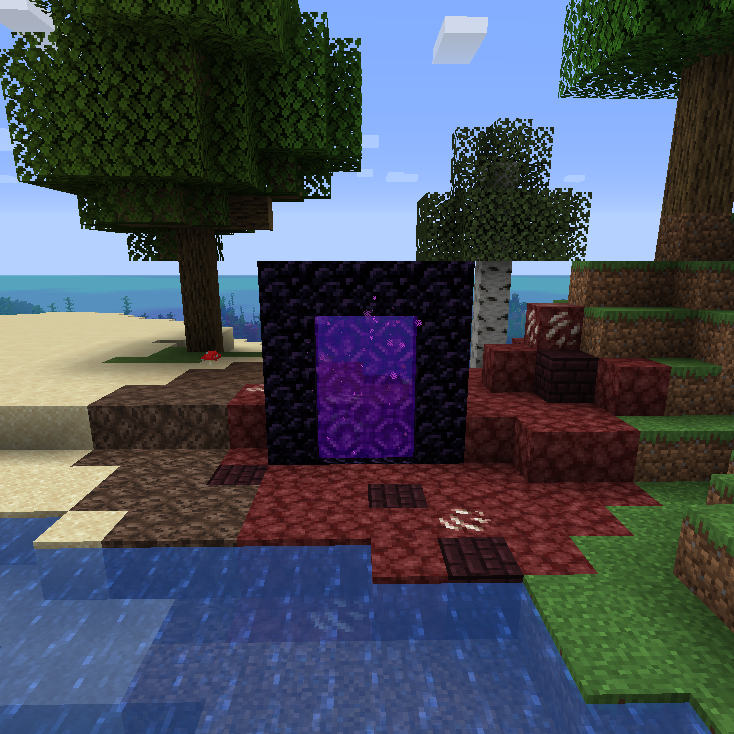
mod🔮 Spreads (nether) blocks to the overworld around nether portals in a configurable radius.
 mod
modLose hearts when dying, gain a heart when eating enchanted golden apples (similar to LifeDrain LifeSteal)
 mod
modLose hearts when dying, gain a heart when eating enchanted golden apples (similar to LifeDrain LifeSteal)