FTB Ranks (Fabric) Optional for INVTOOLS - Inventory Rollback INVTOOLS 3.0 - Fabric - 26.3
optionalNo matching file

CurseForge · Minecraft mod
Inventory, accessory, backpack, and backup administration for Minecraft servers.
Quick answer
INVTOOLS - Inventory Rollback INVTOOLS 3.0 - Fabric - 26.3 targets 26.3 with Fabric. The project page does not say whether this file belongs on the client, dedicated server, or both. No extra mods listed for this file.
Where it goes
The project page does not say whether this file belongs on the client, dedicated server, or both.
The source does not explicitly classify this release as client-only or server-only.
INVTOOLS 3.0 - Fabric - 26.3 on Fabric. Every mod below is checked against that same setup.
This file does not list any required mods. Do not add a library just because a different file uses it.
We only count dependency files that match this setup. A file for another loader does not fill the gap.
Before you install it
Built for INVTOOLS - Inventory Rollback INVTOOLS 3.0 - Fabric - 26.3 on Fabric. Pick another file and the loader, install side or required mods may change.
Use INVTOOLS 3.0 - Fabric - 26.3. It targets 26.3 with Fabric; another release may have different loader, side or dependency requirements.
This file does not list any required mods. Do not add a library just because a different file uses it.
The project page does not say whether this file belongs on the client, dedicated server, or both.
Use the “Get this file” button beside INVTOOLS 3.0 - Fabric - 26.3. It opens that exact file at the source.
About this project
Inventory, accessory, backpack, and backup administration for Minecraft servers.

INVTOOLS provides server administrators with tools for viewing, editing, backing up, and restoring player inventories. Manage online or offline players, inspect accessories (CuriosAPI) and Cosmetic Armor, access compatible backpacks (Sophisticated Backpacks), and recover inventory data through a centralized panel accessible with /inv gui.

🌐 Kinetic Hosting is proudly sponsoring this mod! Start your adventure with friends and enjoy a reliable, high-performance Minecraft server powered by Kinetic Hosting.
Inventory Management: View and edit the main inventory, armor, and offhand slots of online or offline players through a secure administrative interface.


CuriosAPI Management: View, edit, and restore accessories stored in Curios slots when the integration is installed.

Accessories Management: View, edit, and restore accessories stored in Accessories slots when the integration is installed.

Cosmetic Armor Management: Inspect, modify, and restore equipment stored in Cosmetic Armor Reworked slots.

Sophisticated Backpacks Management: Safely browse and edit Sophisticated Backpacks, including their contents and installed upgrades.


Backpacked Management: Safely browse and edit Backpacked, including their contents and checks for blocked slots that haven't been purchased.


Automatic Backups: Creates inventory backups during important player events such as death, joining, leaving, and changing dimensions.


Rollback System: Browse backups by date and category, inspect their contents, teleport to the backup location, or restore selected modules or the complete player inventory.


No required dependencies for vanilla inventory management and backup functionality.
Features associated with missing integrations remain disabled without preventing the rest of INVTOOLS from loading.
English is the default language. Spanish is fully supported through the es_es and es_mx language files, including administrative panels, backup interfaces, notifications, and command feedback. Each player can select their preferred language from the Minecraft client settings.
Every main inventory management module can be accessed directly through commands. These provide a convenient alternative when the main GUI navegation is unavailable or when administrators prefer working directly from chat.
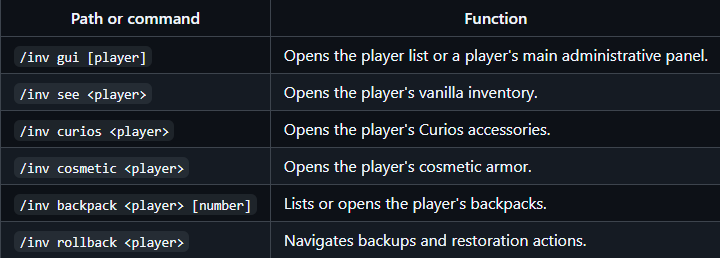
When running on a hybrid server with LuckPerms, INVTOOLS supports permission nodes such as invtools.admin, which grants complete access to every module. On pure Forge or NeoForge servers, permissions are handled through Minecraft's operator levels.
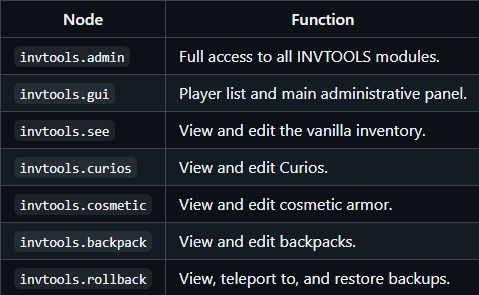
SundGGs © 2026
INVTOOLS is proprietary software distributed under an All Rights Reserved license. The source code, documentation, and resources may not be copied, modified, redistributed, or used to create derivative works without prior written authorization.
Project description from CurseForge.
Pick your setup
Choose the version and loader you play, then open the matching release.
Check the dependencies, then try the file in a copied instance before changing a world you care about.
Recent files
invtools-fabric-26.3-3.0.jar
24 Nov 2026
invtools-fabric-26.2-3.0.jar
24 Nov 2026
invtools-fabric-26.1.2-3.0.jar
24 Nov 2026
invtools-fabric-1.21.11-3.0.jar
24 Nov 2026
invtools-fabric-1.21.1-3.0.jar
24 Nov 2026
invtools-stripped-fabric-26.3-2.1.2.jar
13 Oct 2026
invtools-stripped-fabric-26.3-2.1.1.jar
12 Oct 2026
invtools-fabric-26.3-2.1.1.jar
28 Sept 2026
invtools-fabric-26.3-2.1.jar
26 Sept 2026
invtools-fabric-26.2-2.1.jar
4 Sept 2026
invtools-fabric-26.1.2-2.1.jar
4 Sept 2026
invtools-fabric-1.21.11-2.1.jar
4 Sept 2026
Looking for an older file? The official CurseForge project page is in Resources.
 mod
An API to add custom villager professions and villager biome types with custom trades without writing code.
 mod
More weapons, same vanilla feel: 22 melee weapons in every vanilla material from wood to netherite, plus 4 bows and 2 crossbows, each with its own abilities.
 mod
Blink and SCP-173 moves. Survive night breaches in abandoned Foundation sites: keycard doors, MTF squads, Chaos raiders, sanity and hallucinations, and a growing roster of SCPs hunting you.