Back to mods
Coasters Simulated: Track Styles project artwork

CurseForge · Minecraft mod

Coasters Simulated: Track Styles

An unofficial addon for Create: Coasters Simulated that adds track styles based off real life coaster manufacturer track.

Choose a version Pick your version below, then grab the matching file.

Quick answer

Which Coasters Simulated: Track Styles release should I use?

Updated 22 days ago
Latest stable file coasterssimulatedextratypes-1.1.0-hotfix1.jar
Game version 1.21.1
Loader NeoForge

Coasters Simulated: Track Styles coasterssimulatedextratypes-1.1.0-hotfix1.jar targets 1.21.1 with NeoForge. The project page does not say whether this file belongs on the client, dedicated server, or both. All 3 required mods have matching files.

Where it goes

Is Coasters Simulated: Track Styles required on the client, server, or both?

The project page does not say whether this file belongs on the client, dedicated server, or both.

Client Source doesn’t say
Dedicated server Source doesn’t say
Loader for this release NeoForge
Required install it here Optional supported, not mandatory Not supported do not install here Source doesn’t say do not assume

The source does not explicitly classify this release as client-only or server-only.

What else does Coasters Simulated: Track Styles coasterssimulatedextratypes-1.1.0-hotfix1.jar need?

coasterssimulatedextratypes-1.1.0-hotfix1.jar. Change the file and its required mods may change too.

All 3 required mods have matching files

Install Create: Coasters Simulated, Create, Sable first. We found matching files for this game-version and loader setup. 3 come through another mod in the chain.

1 listed on this file 3 pulled in by those mods
Create: Coasters Simulated Needed by Coasters Simulated: Track Styles coasterssimulatedextratypes-1.1.0-hotfix1.jar
required
Matching file found Matched file: Create: Coasters Simulated 0.1.5
Create Needed by Create: Coasters Simulated
pulled in
Matching file found Matched file: Create 6.0.10 for mc1.21.1
Sable Needed by Create: Coasters Simulated
pulled in
Matching file found Matched file: Sable NeoForge 2.0.5 for mc1.21.1
ImGuiMC Needed by Sable
pulled in
Matching file found Matched file: ImGuiMC NeoForge 2.0.5 for mc1.21.1

3 extra mods were pulled in by other dependencies. Indented rows show who needs each one. We only count dependency files that match this setup. A file for another loader does not fill the gap.

Before you install it

Add Coasters Simulated: Track Styles without breaking your instance.

Built for Coasters Simulated: Track Styles coasterssimulatedextratypes-1.1.0-hotfix1.jar. Pick another file and the loader, install side or required mods may change.

  1. 01

    Stick to this file

    Use coasterssimulatedextratypes-1.1.0-hotfix1.jar. It targets 1.21.1 with NeoForge; another release may have different loader, side or dependency requirements.

  2. 02

    Bring the mods it needs

    Install Create: Coasters Simulated, Create, Sable first. We found matching files for this game-version and loader setup. 3 come through another mod in the chain.

  3. 03

    Put it on the correct side

    The project page does not say whether this file belongs on the client, dedicated server, or both.

  4. 04

    Pick the file you checked

    Use the “Get this file” button beside coasterssimulatedextratypes-1.1.0-hotfix1.jar. It opens that exact file at the source.

About this project

What does Coasters Simulated: Track Styles add?

Coasters Simulated: Track Styles

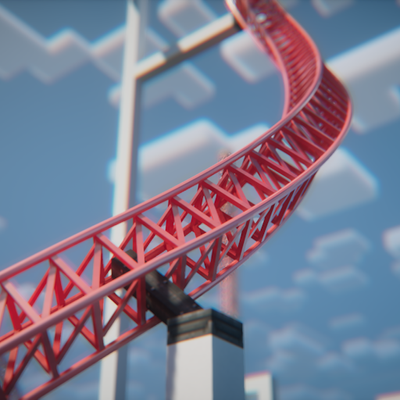
This is an unofficial NeoForge addon for Create: Coasters Simulated that adds custom, realistic track models based off real life manufacturer track, independent rail and spine color customization by HEX code, and an in-game tool to easily configure track styles.

It's currently pretty experimental, but functional if you want to build more realistic real-life roller coaster layouts or experiment with different track styles.

What It Adds

  • Custom Track Models: Adds 15+ track types covering B&M, Intamin, Vekoma, Arrow, RMC, and Wooden styles.
  • Mid-Spline Transitions: You can switch track types along the same curve (e.g., transitioning from single-spine to double-spine track).
  • In-Game Style Tool & GUI: A custom tool with a GUI for setting styles and entering hex colors.
  • Independent Rail & Spine Colors: Set rail colors and spine/tie colors separately using Hex codes (#RRGGBB).
  • Bulk Apply & Picker: Apply styles down the entire connected track circuit in one click, or sample styles off an existing anchor.
  • labPBR Support: Built-in PBR textures for realistic shine/reflections when running shaders with PBR enabled.
  • (Experimental) Anchor Style Tool: A custom tool with GUI for styling the coaster anchorpoint block along with the girder that connects it to the track.
    • Invisible style works, but the custom style can have some visual issues for the anchorpoint block when Forgified Fabric API is in your pack.

Included Track Styles

  • B&M Steel
  • Intamin Box Truss
  • Intamin Tri Truss
  • Intamin Heavy
  • Intamin Heavy Double Spine
  • Intamin BB
  • Intamin BB Double Spine
  • Steel Flat
  • Steel Flat Truss
  • Wooden (all wood types + white)
  • Vekoma New-Gen
  • Premier Rides (Steel, Tri, Tri Tall Spine, LSM)
  • Arrow Tubular
  • RMC I-Box
  • RMC I-Box (Mixed Rail Test)
    • (works, but sometimes the two rail colors get flipped, just make a second style with the two colors flipped)

For the future:

  • Arrow 4D

How to Use

Get the Coaster Style Tool from the new creative tab:

  • Right-Click in air: Opens the GUI to pick a style, enter base/rail hex codes, or toggle "Match Base Color".
  • Right-Click anchor: Applies the tool's settings to that specific anchor.
  • Shift + Right-Click anchor: Applies settings to all connected anchors along that track circuit.
  • Alt + Right-Click anchor: Copies the style and colors off the anchor into your tool.
  • Shift (Hover in inventory): Shows a quick control reference.

Rendering & Shaders Setup

This mod relies on Flywheel instance rendering to display custom track models:

  1. Flywheel must be ON: Set Flywheel to Indirect (Default) or Instancing. If Flywheel is disabled, custom track models will not render.
  2. If using shaders: You need one of these compatibility mods so Flywheel instances render properly through shaders:

(Tested with Complementary by EminGT in labPBR mode and Nostalgia by RRe36 with resource pack reflections turned on).

Resource Packs

All models can be overridden using a resource pack. Extract the mod .jar file to check the asset path structure (assets/coasterssimulatedextratypes/...) and model naming conventions.

Requirements & License

Disclaimer: This is an unofficial addon. It is not affiliated with Mojang, the Create Team, Sable / Aeronautics, or SilverGold (creator of Create: Coasters Simulated).

  • Trademarks: All manufacturer names (Intamin, Vekoma, Arrow Dynamics, B&M, RMC, etc.) are used purely for descriptive purposes to identify track geometry styles and belong to their respective trademark owners.

Project description from CurseForge.

Pick your setup

Coasters Simulated: Track Styles by Minecraft version and loader

Choose the version and loader you play, then open the matching release.

1 available setups

Check the dependencies, then try the file in a copied instance before changing a world you care about.

Recent files

Coasters Simulated: Track Styles versions and loaders

2 of 2 releases match

Looking for an older file? The official CurseForge project page is in Resources.