Minecraft version
Back to mods 
CurseForge · Minecraft mod
Custom Attack
Custom Attack is a custom combat event mod.
Choose a version Pick your version below, then grab the matching file.
Quick answer
Which Custom Attack release should I use?
Latest stable file CustomAttack-1.21.1-NeoForge-0.1.0.jar
Game version 1.21.1
Loader NeoForge
Custom Attack CustomAttack-1.21.1-NeoForge-0.1.0.jar targets 1.21.1 with NeoForge. The project page does not say whether this file belongs on the client, dedicated server, or both. No extra mods listed for this file.
Where it goes
Is Custom Attack required on the client, server, or both?
The project page does not say whether this file belongs on the client, dedicated server, or both.
Client Source doesn’t say
Dedicated server Source doesn’t say
Loader for this release NeoForge
Required install it here Optional supported, not mandatory Not supported do not install here Source doesn’t say do not assume
The source does not explicitly classify this release as client-only or server-only.
What else does Custom Attack CustomAttack-1.21.1-NeoForge-0.1.0.jar need?
CustomAttack-1.21.1-NeoForge-0.1.0.jar. Change the file and its required mods may change too.
This file does not list any required mods. Do not add a library just because a different file uses it.
This file does not list any required or optional mods.
Before you install it
Add Custom Attack without breaking your instance.
Built for Custom Attack CustomAttack-1.21.1-NeoForge-0.1.0.jar. Pick another file and the loader, install side or required mods may change.
- 01
Stick to this file
Use CustomAttack-1.21.1-NeoForge-0.1.0.jar. It targets 1.21.1 with NeoForge; another release may have different loader, side or dependency requirements.
- 02
Bring the mods it needs
This file does not list any required mods. Do not add a library just because a different file uses it.
- 03
Put it on the correct side
The project page does not say whether this file belongs on the client, dedicated server, or both.
- 04
Pick the file you checked
Use the “Get this file” button beside CustomAttack-1.21.1-NeoForge-0.1.0.jar. It opens that exact file at the source.
About this project
What does Custom Attack add?
About the Mod Name
The name "Custom Attack" may give the impression that it modifies vanilla village raids.
In fact, this mod does not alter the mobs or waves of vanilla raids; instead, it provides an independent custom raid system. It is closer to "custom combat events."
How to Use
The editor requires command permissions. Enable cheats in single‑player, or have administrator privileges on a server.
Enter the following command to open the manager:
/custom\_attack editor
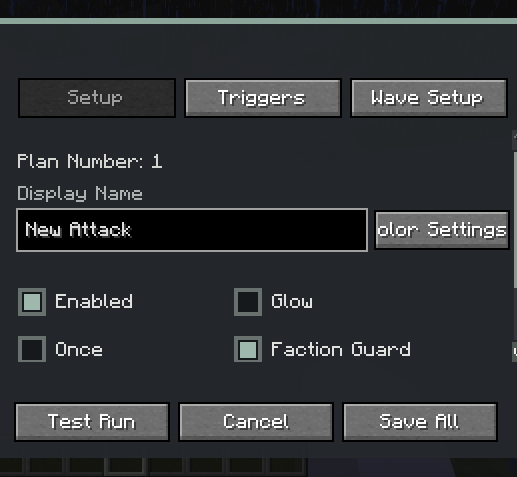
After opening:
- Click "New" in the lower‑left corner to create a raid plan.
- In "Basic Settings", fill in the display name, and set enabled, glowing, trigger once, same‑team protection, attack target, and color.
- In "Trigger Conditions", add trigger methods, and set the target, match mode, probability, and cooldown.
- In "Wave Arrangement", add waves, and set preparation time, timeout, spawn radius, mobs, NBT, and count.
- For friendly mobs or those without melee behaviour, enable "Melee" to make them actively chase and attack players.
- Click "Save All" to save the configuration to the current world.
- Click "Test Run" to immediately test the current raid.
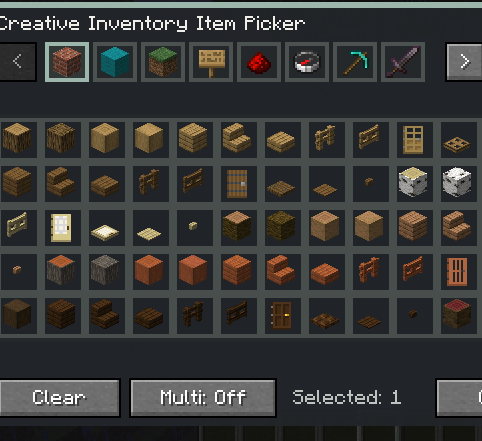
Mobs, items, blocks, effects, biomes, dimensions, and advancements can be selected via visual lists, or you may enter the registry name directly. Mobs and some trigger targets support NBT input.
Attack Target
Each raid can set the target selection method for its mobs:
- Triggering player
- Nearest player
- Keep the mob's original AI
"Force Melee" allows friendly mobs such as chickens to gain chasing and attacking capabilities, and can also supplement modded mobs that lack conventional melee behaviour.
When "Same‑Team Protection" is enabled, mobs spawned by the same raid will not target or damage each other. This protection also handles friendly fire from melee, projectiles, area effects, and certain summoned entities.
Trigger Conditions
Currently supported:
- Kill a specified mob
- A specified mob's health drops below a certain percentage
- Player's health drops below a certain percentage
- Gain a specified potion effect
- Right‑click with a specified item
- Obtain a specified item
- Break a specified block
- Place a specified block
- Interact with a specified block
- Interact with a specified mob
- Enter a specified biome
- Enter a specified dimension
- Complete a specified advancement
A raid can have multiple conditions, and can be set to "match any" or "match all".
Waves and Health Bar
Each raid can contain multiple waves. Each wave can be independently configured with:
- Preparation time
- Combat timeout
- Spawn radius
- Mob type(s)
- Mob count
- Entity NBT
- Force Melee
When a raid starts, a boss health bar similar to vanilla raids and a preparation progress bar are displayed. After a player kills a raid mob for the first time, the health bar shows the current wave and remaining count.
Text supports precise RGB/HEX colours, and the boss health bar supports seven vanilla preset colours.
Management Commands
/custom\_attack editor
Opens the visual manager.
/custom\_attack start <plan ID>
Immediately starts the specified raid. Plan IDs are automatically generated in list order, e.g. 1, 2, 3.
/custom\_attack stop
Stops the ongoing raid for the current player and clears all mobs spawned by that raid.
/custom\_attack reset\_once
Resets the current player's "trigger once" records, allowing related raids to be triggered again.
The above commands require permission level 2.
Main Features
- Custom waves, mobs, counts, and entity NBT
- Supports modded mobs and special bosses
- Multiple trigger conditions with any/all matching
- Gives friendly mobs forced melee capability
- Same‑team target and friendly fire protection
- Custom text colours with RGB/HEX
- Optional mob glowing, item consumption, and trigger‑once
- Supports visual lists for mobs, items, blocks, effects, biomes, dimensions, and advancements
Project description from CurseForge.
Pick your setup
Custom Attack by Minecraft version and loader
Choose the version and loader you play, then open the matching release.
Minecraft version
1.20.1
1 loader buildCheck the dependencies, then try the file in a copied instance before changing a world you care about.
Recent files
Custom Attack versions and loaders
CustomAttack-1.21.1-NeoForge-0.1.0.jar
10 Aug 2026
Client Source doesn’t say Server Source doesn’t say Dependencies No extras listed Listed on Release listing
Check the 1.21.1 · NeoForge setup 1.21.1NeoForge release
custom_attack-0.1.0.jar
9 Aug 2026
Client Source doesn’t say Server Source doesn’t say Dependencies No extras listed Listed on Release listing
Check the 1.20.1 · Forge setup 1.20.1Forge release
Looking for an older file? The official CurseForge project page is in Resources.
 mod
mod CurseForge · Minecraft
PixelTrance
A Minecraft mod that pays homage to the art of hypnosis, blending RPG progression with immersive trance mechanics for both singleplayer and multiplayer.
 mod
mod CurseForge · Minecraft
Modern Chickens
A port of setycz's Chickens mod, and timrwood's Roost mod to 1.21.1 combined into a single package for NeoForge.
 mod
mod CurseForge · Minecraft
Witheria
Adds a boss with many attack patterns and unique animations. Beatable in Vanilla.