Minecraft version
Back to mods 
CurseForge · Minecraft mod
Switch Hopper
A redstone-controlled hopper that switches its item output between two opposite directions.
Choose a version Pick your version below, then grab the matching file.
Quick answer
Which Switch Hopper release should I use?
Latest stable file switch_hopper-1.0.2+mc26.2
Game version 26.2
Loader Fabric
Switch Hopper switch_hopper-1.0.2+mc26.2 targets 26.2 with Fabric. The project page does not say whether this file belongs on the client, dedicated server, or both. No extra mods listed for this file.
Where it goes
Is Switch Hopper required on the client, server, or both?
The project page does not say whether this file belongs on the client, dedicated server, or both.
Client Source doesn’t say
Dedicated server Source doesn’t say
Loader for this release Fabric
Required install it here Optional supported, not mandatory Not supported do not install here Source doesn’t say do not assume
The source does not explicitly classify this release as client-only or server-only.
What else does Switch Hopper switch_hopper-1.0.2+mc26.2 need?
switch_hopper-1.0.2+mc26.2. Change the file and its required mods may change too.
This file does not list any required mods. Do not add a library just because a different file uses it.
This file does not list any required or optional mods.
Before you install it
Add Switch Hopper without breaking your instance.
Built for Switch Hopper switch_hopper-1.0.2+mc26.2. Pick another file and the loader, install side or required mods may change.
- 01
Stick to this file
Use switch_hopper-1.0.2+mc26.2. It targets 26.2 with Fabric; another release may have different loader, side or dependency requirements.
- 02
Bring the mods it needs
This file does not list any required mods. Do not add a library just because a different file uses it.
- 03
Put it on the correct side
The project page does not say whether this file belongs on the client, dedicated server, or both.
- 04
Pick the file you checked
Use the “Get this file” button beside switch_hopper-1.0.2+mc26.2. It opens that exact file at the source.
About this project
What does Switch Hopper add?
Switch Hopper adds a simple but useful redstone-controlled hopper for more flexible item transport.
The Switch Hopper works similarly to a normal hopper, but with one important difference: its output can be switched between two opposite horizontal directions using a redstone signal.
Without a redstone signal, items are transported in the direction selected when the hopper is placed. When the hopper receives a redstone signal, the output switches to the opposite side. When the signal is removed, it switches back to its original direction.
The Switch Hopper can receive items from above and from the sides, and it can also pick up dropped items like a normal hopper.
Unlike a normal hopper, it will never output items downward. In addition, other hoppers placed below or beside it cannot pull items out of the Switch Hopper. This makes it possible to build more controlled item-routing systems without the hopper being accidentally emptied from another direction.
Features
- Redstone-controlled switching between two opposite horizontal outputs
- Output direction is determined when the block is placed
- No downward item output
- Cannot be emptied by other hoppers
- Accepts items from above and from the sides
- Can pick up dropped items
- Uses a normal 5-slot hopper inventory
- Compatible with hopper chains and automated item transport systems
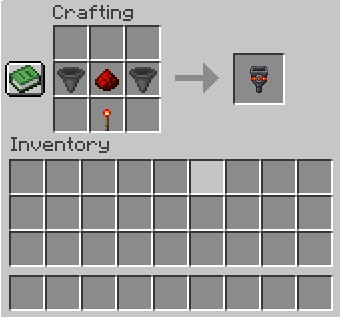
Crafting Recipe
The Switch Hopper is crafted with:
2 Hoppers – placed in the middle row on the left and right
1 Redstone Dust – placed in the center of the middle row, between the two Hoppers
1 Redstone Torch – placed in the center of the bottom row
The entire top row remains empty
License
Switch Hopper is released under the MIT License.
You are welcome to use this mod in modpacks, including public modpacks, as long as the terms of the MIT License are respected.
Project description from CurseForge.
Pick your setup
Switch Hopper by Minecraft version and loader
Choose the version and loader you play, then open the matching release.
Minecraft version
26.1
1 loader buildMinecraft version
1.21.11
1 loader buildMinecraft version
1.21.10
1 loader buildMinecraft version
1.21.8
1 loader buildMinecraft version
1.21.4
1 loader buildMinecraft version
1.21.1
1 loader buildMinecraft version
1.20.1
1 loader buildCheck the dependencies, then try the file in a copied instance before changing a world you care about.
Recent files
Switch Hopper versions and loaders
switch_hopper-1.0.2+mc26.2
switch_hopper-1.0.2+mc26.2.jar
17 Aug 2026
Client Source doesn’t say Server Source doesn’t say Dependencies No extras listed Listed on Release listing
Check the 26.2 · Fabric setup Fabric26.2 release
switch_hopper-1.0.2+mc26.1
switch_hopper-1.0.2+mc26.1.jar
17 Aug 2026
Client Source doesn’t say Server Source doesn’t say Dependencies No extras listed Listed on Release listing
Check the 26.1 · Fabric setup Fabric26.1 release
switch_hopper-1.0.2+mc1.21.11
switch_hopper-1.0.2+mc1.21.11.jar
17 Aug 2026
Client Source doesn’t say Server Source doesn’t say Dependencies No extras listed Listed on Release listing
Check the 1.21.11 · Fabric setup Fabric1.21.11 release
switch_hopper-1.0.2+mc1.21.10
switch_hopper-1.0.2+mc1.21.10.jar
17 Aug 2026
Client Source doesn’t say Server Source doesn’t say Dependencies No extras listed Listed on Release listing
Check the 1.21.10 · Fabric setup Fabric1.21.10 release
switch_hopper-1.0.2+mc1.21.8
switch_hopper-1.0.2+mc1.21.8.jar
17 Aug 2026
Client Source doesn’t say Server Source doesn’t say Dependencies No extras listed Listed on Release listing
Check the 1.21.8 · Fabric setup Fabric1.21.8 release
switch_hopper-1.0.2+mc1.21.4
switch_hopper-1.0.2+mc1.21.4.jar
17 Aug 2026
Client Source doesn’t say Server Source doesn’t say Dependencies No extras listed Listed on Release listing
Check the 1.21.4 · Fabric setup Fabric1.21.4 release
switch_hopper-1.0.2+mc1.21.1
switch_hopper-1.0.2+mc1.21.1.jar
17 Aug 2026
Client Source doesn’t say Server Source doesn’t say Dependencies No extras listed Listed on Release listing
Check the 1.21.1 · Fabric setup Fabric1.21.1 release
switch_hopper-1.0.2+mc1.20.1
switch_hopper-1.0.2+mc1.20.1.jar
17 Aug 2026
Client Source doesn’t say Server Source doesn’t say Dependencies No extras listed Listed on Release listing
Check the 1.20.1 · Fabric setup Fabric1.20.1 release
switch_hopper-1.0.1+mc1.20.1
switch_hopper-1.0.1+mc1.20.1.jar
11 Aug 2026
Client Source doesn’t say Server Source doesn’t say Dependencies No extras listed Listed on Release listing
Check the 1.20.1 · Fabric setup Fabric1.20.1 release
switch_hopper-1.0.1+mc1.21.1
switch_hopper-1.0.1+mc1.21.1.jar
11 Aug 2026
Client Source doesn’t say Server Source doesn’t say Dependencies No extras listed Listed on Release listing
Check the 1.21.1 · Fabric setup Fabric1.21.1 release
switch_hopper-1.0.1+mc1.21.4
switch_hopper-1.0.1+mc1.21.4.jar
11 Aug 2026
Client Source doesn’t say Server Source doesn’t say Dependencies No extras listed Listed on Release listing
Check the 1.21.4 · Fabric setup Fabric1.21.4 release
switch_hopper-1.0.1+mc1.21.8
switch_hopper-1.0.1+mc1.21.8.jar
11 Aug 2026
Client Source doesn’t say Server Source doesn’t say Dependencies No extras listed Listed on Release listing
Check the 1.21.8 · Fabric setup Fabric1.21.8 release
Looking for an older file? The official CurseForge project page is in Resources.
 mod
mod CurseForge · Minecraft
Ash Of Sin: Soul Like Boss Battle
When a player dies near a specific entity, the entity will regain health up to its maximum health value.
 mod
mod CurseForge · Minecraft
Asxpenix
A magical adventure project featuring a spellcasting book, generators, and various tools such as swords and pickaxes, with more equipment and features to come.
 mod
mod CurseForge · Minecraft
MoveYourHouse
Create a territory, and then use the shortcut key to move