Minecraft version
Back to mods 
CurseForge · Minecraft mod
MoveYourHouse
Create a territory, and then use the shortcut key to move
Choose a version Pick your version below, then grab the matching file.
Quick answer
Which MoveYourHouse release should I use?
Latest stable file moveyourhouse-fabric-26.2-1.0.8.jar
Game version 26.2
Loader Fabric
moveyourhouse-fabric-26.2-1.0.8.jar targets 26.2 with Fabric. The project page does not say whether this file belongs on the client, dedicated server, or both. No extra mods listed for this file.
Where it goes
Is MoveYourHouse required on the client, server, or both?
The project page does not say whether this file belongs on the client, dedicated server, or both.
Client Source doesn’t say
Dedicated server Source doesn’t say
Loader for this release Fabric
Required install it here Optional supported, not mandatory Not supported do not install here Source doesn’t say do not assume
The source does not explicitly classify this release as client-only or server-only.
What else does moveyourhouse-fabric-26.2-1.0.8.jar need?
moveyourhouse-fabric-26.2-1.0.8.jar. Change the file and its required mods may change too.
This file does not list any required mods. Do not add a library just because a different file uses it.
This file does not list any required or optional mods.
Before you install it
Add MoveYourHouse without breaking your instance.
Built for moveyourhouse-fabric-26.2-1.0.8.jar. Pick another file and the loader, install side or required mods may change.
- 01
Stick to this file
Use moveyourhouse-fabric-26.2-1.0.8.jar. It targets 26.2 with Fabric; another release may have different loader, side or dependency requirements.
- 02
Bring the mods it needs
This file does not list any required mods. Do not add a library just because a different file uses it.
- 03
Put it on the correct side
The project page does not say whether this file belongs on the client, dedicated server, or both.
- 04
Pick the file you checked
Use the “Get this file” button beside moveyourhouse-fabric-26.2-1.0.8.jar. It opens that exact file at the source.
About this project
What does MoveYourHouse add?
en_us:
This mod adds a house block, which can be placed to create a territory in the world.
Permission defaults to disabling break and placement.
You can use the default shortcut key 【Right Alt】 to move your house.
The cooling time for moving is 10 minutes.
Commands:
/house [teleport to your house ]
/house tp <Territory with Teleportation Permission Enabled> [Teleport to other territory]
/house add <online player> [add player to the Permission list of house]
/house remove <online player> [remove player to the Permission list of house]
First,use the command to add player, then click the house_block to change settings.
zh_cn:
该模组添加了一个领地方块,放置后可以在世界中建立一个领地。
权限默认关闭破坏和放置。
可以使用默认快捷键【右Alt】键进行搬家。
搬家冷却时间为10分钟。
添加的指令:
/house 传送回自己的领地
/house tp <已开启传送权限的领地> 传送到开启传送权限的领地
/house add <在线玩家> 添加玩家为该领地的权限者
/house remove <在线玩家> 移除玩家为该领地的权限者
使用指令添加玩家后,右键领地方块进行权限配置
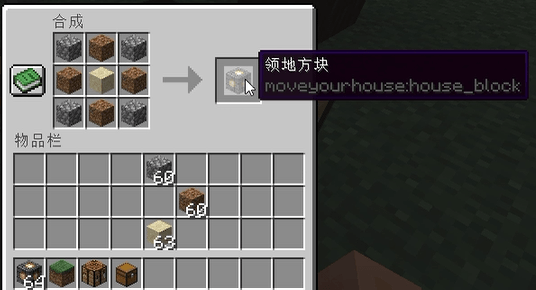
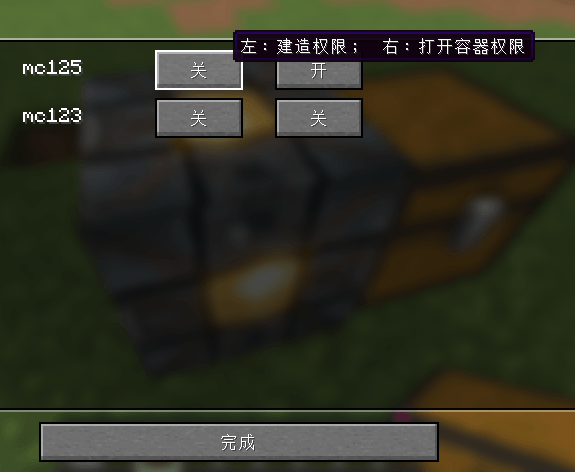
Project description from CurseForge.
Pick your setup
MoveYourHouse by Minecraft version and loader
Choose the version and loader you play, then open the matching release.
Check the dependencies, then try the file in a copied instance before changing a world you care about.
Recent files
MoveYourHouse versions and loaders
moveyourhouse-fabric-26.2-1.0.8.jar
21 Aug 2026
Client Source doesn’t say Server Source doesn’t say Dependencies No extras listed Listed on Release listing
Check the 26.2 · Fabric setup Fabric26.2 release
moveyourhouse-fabric-26.2-1.0.7.jar
17 Aug 2026
Client Source doesn’t say Server Source doesn’t say Dependencies No extras listed Listed on Release listing
Check the 26.2 · Fabric setup Fabric26.2 release
Looking for an older file? The official CurseForge project page is in Resources.
 mod
mod CurseForge · Minecraft
Genetic Ascension
A minecraft mod based on the novel Genetic Ascension.
 mod
mod CurseForge · Minecraft
Talk Balloons [Forge | Fabric | NeoForge]
Add bubbles above players heads when they send a message in the chat.
 mod
mod CurseForge · Minecraft
Tend and Bloom
Decorative gardening: planters, window boxes and beds you plant flowers into, water, and cross-breed for 128 colour varieties.