Ghost hopper Optional for Hopper flow control hopper-flow-control-1.0.0.jar
optionalMatching file found Matched file: hopper-ghost-filter-1.0.0.jar
CurseForge · Minecraft mod
Control the flow of hoppers
Quick answer
Hopper flow control hopper-flow-control-1.0.0.jar targets 26.2 with Fabric. The project page does not say whether this file belongs on the client, dedicated server, or both. No extra mods listed for this file.
Where it goes
The project page does not say whether this file belongs on the client, dedicated server, or both.
The source does not explicitly classify this release as client-only or server-only.
hopper-flow-control-1.0.0.jar. Change the file and its required mods may change too.
This file does not list any required mods. Do not add a library just because a different file uses it.
We only count dependency files that match this setup. A file for another loader does not fill the gap.
Before you install it
Built for Hopper flow control hopper-flow-control-1.0.0.jar. Pick another file and the loader, install side or required mods may change.
Use hopper-flow-control-1.0.0.jar. It targets 26.2 with Fabric; another release may have different loader, side or dependency requirements.
This file does not list any required mods. Do not add a library just because a different file uses it.
The project page does not say whether this file belongs on the client, dedicated server, or both.
Use the “Get this file” button beside hopper-flow-control-1.0.0.jar. It opens that exact file at the source.
About this project
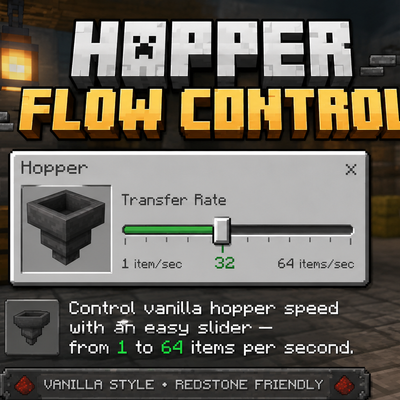
Hopper Flow Control is a small quality-of-life mod that lets you fully control how fast vanilla hoppers transfer items.
Instead of being stuck with the normal hopper transfer speed, this mod adds a simple slider right at the top of the hopper menu. Just move the slider to the speed you want, and the hopper will instantly update.
You can set the transfer speed anywhere from 3 items per second all the way up to 64 items per second, including any value in between.
There are no complicated upgrades, extra hopper blocks, or confusing menus. Just open a normal vanilla hopper, move the slider, and you're done.
Control the transfer speed of normal vanilla hoppers
Adjustable from 3–64 items per second
Change the speed instantly with a simple slider
Works directly inside the normal hopper menu
No new hopper blocks required
Designed to stay simple and vanilla-friendly
Currently available for Fabric 26.2.
Forge support is coming soon.
Want to see exactly how it works? Watch the demonstration video linked below to see Hopper Flow Control in action.
Project description from CurseForge.
Pick your setup
Choose the version and loader you play, then open the matching release.
Check the dependencies, then try the file in a copied instance before changing a world you care about.
Recent files
15 Aug 2026
Looking for an older file? The official CurseForge project page is in Resources.
 mod
modGuide your players through the ages. History Stages lets modpack creators lock items, recipes, dimensions, mobs, loot, and more behind custom research-based eras with full in-game tooling.
 mod
modA unified overlay for Hypixel SkyBlock storage — all your Ender Chests and Backpacks in one searchable view.
 mod
modI added over 100 recipes! 【Breaking the balance】