Quick answer
Which Advanced Pipez Utilities release should I use?
Latest stable file Advanced Pipez Utilities 1.0.0+1.21.1
Game version 1.21.1
Loader NeoForge
Advanced Pipez Utilities 1.0.0+1.21.1 targets 1.21.1 with NeoForge. The project page does not say whether this file belongs on the client, dedicated server, or both. All 1 required mods have matching files.
Where it goes
Is Advanced Pipez Utilities required on the client, server, or both?
The project page does not say whether this file belongs on the client, dedicated server, or both.
Client Source doesn’t say
Dedicated server Source doesn’t say
Loader for this release NeoForge
Required install it here Optional supported, not mandatory Not supported do not install here Source doesn’t say do not assume
The source does not explicitly classify this release as client-only or server-only.
What else does Advanced Pipez Utilities 1.0.0+1.21.1 need?
Advanced Pipez Utilities 1.0.0+1.21.1. Change the file and its required mods may change too.
Install Pipez first. We found matching files for this game-version and loader setup. 23 come through another mod in the chain.
1 listed on this file 23 pulled in by those mods
Pipez Needed by Advanced Pipez Utilities 1.0.0+1.21.1 requiredMatching file found Matched file: [NEOFORGE][1.21.1] Pipez 1.21.1-1.2.31
Matching file found Matched file: Mekanism-1.21.1-10.7.19.85.jar
Matching file found Matched file: [NeoForge 1.21.1] 15.10.6
Matching file found Matched file: 19.57.0.446 for NeoForge 1.21.1
Matching file found Matched file: TheOneProbe - 1.21_neo-12.0.8
No matching file
Matching file found Matched file: CTM - 1.21-1.2.1+3
Matching file found Matched file: [NeoForge 1.21.1] 12.10.2
Matching file found Matched file: Biomes O' Plenty NeoForge 1.21.1-21.1.0.14
Matching file found Matched file: oc2-MC1.21.1-0.7.0
Matching file found Matched file: Flux-Networks-1.21.1-8.0.0
No matching file
Matching file found Matched file: ProjectE-1.21.1-PE1.1.0.jar
Matching file found Matched file: curios-neoforge-9.0.15+1.21.1.jar
Matching file found Matched file: cc-tweaked-1.21.1-forge-1.113.1.jar
Matching file found Matched file: emi-1.1.24+1.21.1+neoforge
No matching file
No matching file
Matching file found Matched file: Oh-The-Biomes-Weve-Gone-NeoForge-2.6.0
Matching file found Matched file: AE2 19.2.17 [NEOFORGE]
Matching file found Matched file: FramedBlocks-10.6.2.jar
Matching file found Matched file: Female Gender Mod 3.2.2 - 1.21.1
Matching file found Matched file: JsonThings-1.21.1-0.13.7.jar
Matching file found Matched file: darkmodeeverywhere-1.21-1.3.5.jar
23
extra mods were pulled in by other dependencies.
Indented rows show who needs each one. We only count dependency files that match this setup. A file for another loader does not fill the gap.
Before you install it
Add Advanced Pipez Utilities without breaking your instance.
Built for Advanced Pipez Utilities 1.0.0+1.21.1. Pick another file and the loader, install side or required mods may change.
- 01
Stick to this file
Use Advanced Pipez Utilities 1.0.0+1.21.1. It targets 1.21.1 with NeoForge; another release may have different loader, side or dependency requirements.
- 02
Bring the mods it needs
Install Pipez first. We found matching files for this game-version and loader setup. 23 come through another mod in the chain.
- 03
Put it on the correct side
The project page does not say whether this file belongs on the client, dedicated server, or both.
- 04
Pick the file you checked
Use the “Get this file” button beside Advanced Pipez Utilities 1.0.0+1.21.1. It opens that exact file at the source.
About this project
What does Advanced Pipez Utilities add?
Advanced Pipez Utilities
Advanced Pipez Utilities is an add-on for Pipez that provides precise, GregTech-inspired control over pipe connections.
Pipes no longer connect automatically to every adjacent inventory or pipe. Instead, connections can be configured manually using the Advanced Pipe Wrench or created intentionally while placing pipes.
Features
- GregTech-style six-direction selection grid
- Manually connect or disconnect each side of a pipe
- Pipes use a full-block selection shape while holding the Advanced Pipe Wrench
- Right-click to toggle the selected connection
- Shift + right-click to toggle extraction
- Pipes connect automatically only when intentionally placed toward:
- Another compatible pipe
- A compatible inventory or machine
- Holding the same type of pipe displays the direction grid
- Newly placed pipes connect only to the intended target
Supported Versions
- Minecraft 1.21.1 — NeoForge
- Minecraft 1.20.1 — Forge
Requirements
Usage
Hold the Advanced Pipe Wrench and look at a pipe. The overlay divides the targeted block into six selectable directions.
- Right-click: Connect or disconnect the selected side
- Shift + right-click: Enable or disable extraction
- Hold the same pipe type: Display the grid and place the pipe in the selected direction
Project description from CurseForge.
Pick your setup
Advanced Pipez Utilities by Minecraft version and loader
Choose the version and loader you play, then open the matching release.
Minecraft version
1.21.1
1
loader build Minecraft version
1.20.1
1
loader build Check the dependencies, then try the file in a copied instance before changing a world you care about.
Recent files
Advanced Pipez Utilities versions and loaders
advanced_pipez_utilities-1.0.0.jar
16 Aug 2026
Client Source doesn’t say Server Source doesn’t say Dependencies 1 required · matched Listed on Release listing
Check the 1.21.1 · NeoForge setup → advanced_pipez_utilities-1.0.0.jar
16 Aug 2026
Client Source doesn’t say Server Source doesn’t say Dependencies 1 required · 1 unchecked Listed on Release listing
Check the 1.20.1 · Forge setup → 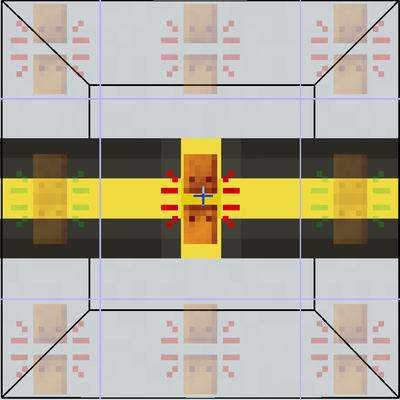
 mod
mod mod
mod mod
mod