Minecraft version
Back to mods 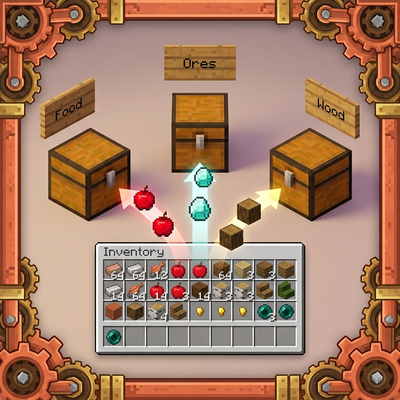
CurseForge · Minecraft mod
SmartSort - Chest & Inventory Sorter
Automatically sorts your inventory into nearby labeled chests with slot-locking support.
Choose a version Pick your version below, then grab the matching file.
Quick answer
Which SmartSort - Chest & Inventory Sorter release should I use?
Latest stable file smartsort-1.0.2-1.20.1
Game version 1.20.1
Loader Forge
SmartSort - Chest & Inventory Sorter smartsort-1.0.2-1.20.1 targets 1.20.1 with Forge. The project page does not say whether this file belongs on the client, dedicated server, or both. No extra mods listed for this file.
Where it goes
Is SmartSort - Chest & Inventory Sorter required on the client, server, or both?
The project page does not say whether this file belongs on the client, dedicated server, or both.
Client Source doesn’t say
Dedicated server Source doesn’t say
Loader for this release Forge
Required install it here Optional supported, not mandatory Not supported do not install here Source doesn’t say do not assume
The source does not explicitly classify this release as client-only or server-only.
What else does SmartSort - Chest & Inventory Sorter smartsort-1.0.2-1.20.1 need?
smartsort-1.0.2-1.20.1. Change the file and its required mods may change too.
This file does not list any required mods. Do not add a library just because a different file uses it.
This file does not list any required or optional mods.
Before you install it
Add SmartSort - Chest & Inventory Sorter without breaking your instance.
Built for SmartSort - Chest & Inventory Sorter smartsort-1.0.2-1.20.1. Pick another file and the loader, install side or required mods may change.
- 01
Stick to this file
Use smartsort-1.0.2-1.20.1. It targets 1.20.1 with Forge; another release may have different loader, side or dependency requirements.
- 02
Bring the mods it needs
This file does not list any required mods. Do not add a library just because a different file uses it.
- 03
Put it on the correct side
The project page does not say whether this file belongs on the client, dedicated server, or both.
- 04
Pick the file you checked
Use the “Get this file” button beside smartsort-1.0.2-1.20.1. It opens that exact file at the source.
About this project
What does SmartSort - Chest & Inventory Sorter add?
📦 SmartSort
SmartSort is a lightweight, high-performance inventory management mod for modern Minecraft. It allows players to instantly deposit items from their inventory into nearby categorized chests with a single keystroke or button click.
✨ Features
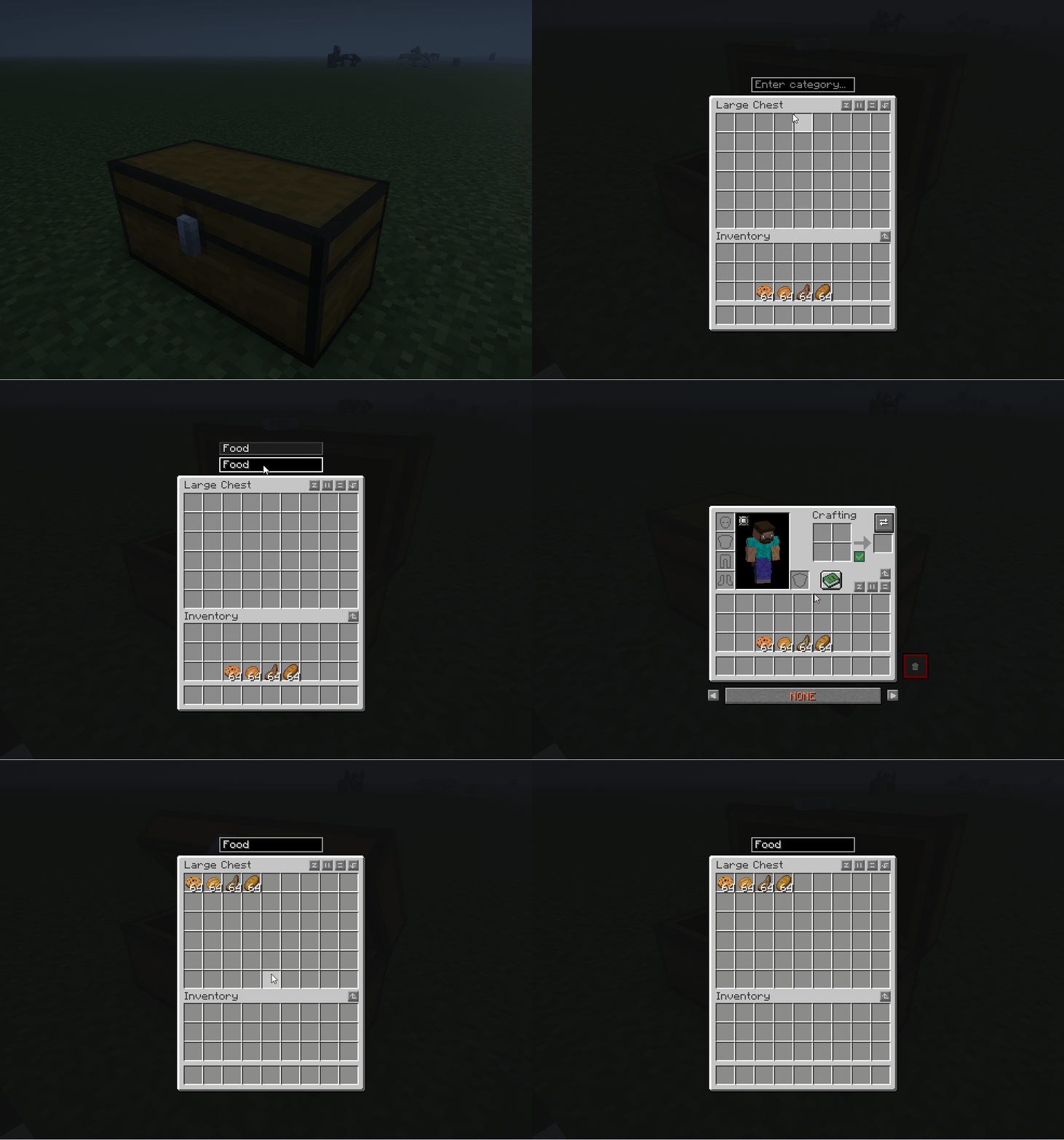
- ⚡ One-Click Sorting: Automatically scans chests within an 8-block radius and transfers items to matching categorized containers with real-time sound and action-bar feedback.
- 🛡️ Slot Protection & Safe Zones:
- In 26.3+ (Streamlined Safe Zone): The sorter only touches the upper 2 rows of your inventory. Your Hotbar and the Bottom Row are permanently protected and never dumped (indicated with a subtle slot tint).
- In 1.21.1 / 1.20.1 (Manual Slot Locking): Hold Left ALT + Left Click on any inventory slot to toggle locks on individual slots.
- 🏷️ In-Game Chest Tagging & GUI: Adds a clean, integrated text input box right above chest interfaces with an upward auto-complete dropdown. Press K to open the Category Management screen to search items, browse results, and configure custom categories effortlessly.
- 🎯 Dynamic & Flexible Matching: Beyond preset categories, it dynamically matches chest names, item display names, and registry IDs. Naming a chest "sword" or a custom keyword routes matching items instantly.
- 🌌 Cross-Dimensional Consistency: Chest data across the Overworld, Nether, and End never mix—even if containers share the exact same coordinates.
- 🔤 Special Character Normalization: Automatically handles language-specific characters (such as Turkish ş, ğ, ü, ç, ö, ı) and remains completely case-insensitive (
SWORD,Sword, orswordall behave identically). - 🧩 Mod Compatibility: Works out of the box with popular mods like Create, Farmer's Delight, and custom container storages.
- 🌍 Multi-Language Support: Full translations included for English (
en_us) and Turkish (tr_tr). - 🌐 100% Multiplayer & Server Ready: Built on NeoForge's modern payload network architecture with full dedicated server, LAN, and Co-op compatibility.
📂 Supported Categories & Item Matching
SmartSort automatically organizes your items into intuitive categories:
- Blocks (
blok/block): Dirt, Stone, Cobblestone, Deepslate, Sand, Gravel, Tuff, Obsidian, Sculk, Mud, etc. - Wood (
ahsap/wood): All logs, planks, and wooden variants. - Farming (
tarim/farming): Seeds, wheat, bamboo, sugar cane, saplings, flowers, and leaves. - Food (
yemek/food): All edible foods, crops, and eggs. - Tools & Weapons (
alet/tools): Swords, pickaxes, axes, shovels, hoes, bows, crossbows, tridents, maces, shears, fishing rods, buckets, and compasses. - Armor (
zirh/armor): Helmets, chestplates, leggings, boots, horse armor, and wolf armor. - Decoration (
dekor/decor): Glass, stairs, slabs, doors, trapdoors, signs, banners, torches, lanterns, fences, walls, decorated pots, and copper bulbs. - Alchemy (
simya/alchemy): Potions, splash potions, experience bottles, brewing stands, blaze powder, fermented spider eyes, and glass bottles. - Raw Materials (
hammadde/raw): Honeycomb, breeze rods, fire/wind charges, slimeballs, bones, strings, feathers, sticks, flint, leather, dyes, and bone meal. - Rare Relics (
nadir/rare): Trial keys, echo shards, music discs, ender pearls, eyes of ender, dragon eggs, totems of undying, templates, and conduits. - Nether (
nether): Netherrack, nether bricks, soul sand/soil, basalt, blackstone, glowstone, and quartz. - Redstone (
kiziltas/redstone): Redstone dust, repeaters, comparators, pistons, observers, dispensers, and droppers. - Utility (
islev/utility): Chests, furnaces, crafting tables, anvils, barrels, smokers, blast furnaces, and workbenches. - Books (
kitaplar/books): Enchanted books, regular books, and written books. - Ores & Minerals (
maden/ores): Ores, ingots, raw metals, nuggets, diamonds, emeralds, coal, and lapis lazuli. - Create Mod (
create): Native compatibility for Create mod items (create:*).
⌨️ Controls & Keybinds
- R Key (Rebindable): Instantly sorts inventory items into nearby tagged chests.
- K Key (Rebindable): Opens the Category Management screen.
- ⇄ Button: Convenient button located at the top right of the player inventory screen.
- Left ALT + Left Click (1.20.1 & 1.21.1): Locks or unlocks any slot in your main inventory.
- Protected Safe Row (26.3+): The bottom row and hotbar are permanently protected from being dumped.
🌐 Installation Guide
- Singleplayer / LAN: Drop the
.jarinto your.minecraft/modsfolder. - Dedicated Servers / Co-op: Must be installed on both the server and connecting clients.
🧩 Complete Your "Smart" Survival Suite!
Check out our other essential quality-of-life mods designed to work seamlessly together:
- 🔨 Smart Crafting Station — Craft items directly using materials from nearby chests (Terraria-style proximity crafting).
- 🗑️ SmartTrash — Safe, clutter-free inventory trash slot with undo support.
Project description from CurseForge.
Pick your setup
SmartSort - Chest & Inventory Sorter by Minecraft version and loader
Choose the version and loader you play, then open the matching release.
Minecraft version
1.21.1
2 loader buildsMinecraft version
1.20.1
1 loader buildCheck the dependencies, then try the file in a copied instance before changing a world you care about.
Recent files
SmartSort - Chest & Inventory Sorter versions and loaders
smartsort-1.0.2-1.20.1
smartsort-1.0.2-1.20.1.jar
21 Oct 2026
Client Source doesn’t say Server Source doesn’t say Dependencies No extras listed Listed on Release listing
Check the 1.20.1 · Forge setup 1.20.1Forge release
smartsort-1.0.1-1.20.1
smartsort-1.0.1-1.20.1.jar
17 Oct 2026
Client Source doesn’t say Server Source doesn’t say Dependencies No extras listed Listed on Release listing
Check the 1.20.1 · Forge setup 1.20.1Forge beta
smartsort-1.1.2.jar
16 Oct 2026
Client Source doesn’t say Server Source doesn’t say Dependencies No extras listed Listed on Release listing
Check the 1.21.1 · NeoForge setup 1.21.1NeoForge release
smartsort-fabric-1.21.1-1.0.0.jar
1 Oct 2026
Client Source doesn’t say Server Source doesn’t say Dependencies No extras listed Listed on Release listing
Check the 1.21.1 · Fabric setup Fabric1.21.1 release
smartsort-1.0.0.jar
1 Oct 2026
Client Source doesn’t say Server Source doesn’t say Dependencies No extras listed Listed on Release listing
Check the 26.3 · NeoForge setup NeoForge26.3 release
smartsort-1.0.0.jar (Forge)
smartsort-1.0.0.jar
18 Sept 2026
Client Source doesn’t say Server Source doesn’t say Dependencies No extras listed Listed on Release listing
Check the 1.20.1 · Forge setup 1.20.1Forge release
smartsort-1.1.1.
smartsort-1.1.1.jar
15 Sept 2026
Client Source doesn’t say Server Source doesn’t say Dependencies No extras listed Listed on Release listing
Check the 1.21.1 · NeoForge setup 1.21.1NeoForge release
smartsort-1.1.0.jar
8 Sept 2026
Client Source doesn’t say Server Source doesn’t say Dependencies No extras listed Listed on Release listing
Check the 1.21.1 · NeoForge setup 1.21.1NeoForge release
smartsort-1.0.3.
smartsort-1.0.3.jar
24 Aug 2026
Client Source doesn’t say Server Source doesn’t say Dependencies No extras listed Listed on Release listing
Check the 1.21.1 · NeoForge setup 1.21.1NeoForge release
smartsort-1.0.2
smartsort-1.0.2.jar
21 Aug 2026
Client Source doesn’t say Server Source doesn’t say Dependencies No extras listed Listed on Release listing
Check the 1.21.1 · NeoForge setup 1.21.1NeoForge release
smartsort v1.0.1
smartsort-1.0.1.jar
19 Aug 2026
Client Source doesn’t say Server Source doesn’t say Dependencies No extras listed Listed on Release listing
Check the 1.21.1 · NeoForge setup 1.21.1NeoForge release
smartsort-1.0
smartsort-1.0.0.jar
18 Aug 2026
Client Source doesn’t say Server Source doesn’t say Dependencies No extras listed Listed on Release listing
Check the 1.21.1 · NeoForge setup 1.21.1NeoForge release
Looking for an older file? The official CurseForge project page is in Resources.
 mod
mod CurseForge · Minecraft
Command Icons
Icons in command lines.
 mod
mod CurseForge · Minecraft
BSP INVENTORY SYNC
An inventory sync mod made to work with multiple networked servers behind proxies specifically running Forge.
 mod
mod CurseForge · Minecraft
Real Bicycles
Finally, Bikes have arrived in Minecraft!