Minecraft version
Back to mods 
CurseForge · Minecraft mod
TKVM Puffish Additions
Additions for Pufferfish Skills for FalchionMC!
Choose a version Pick your version below, then grab the matching file.
Quick answer
Which TKVM Puffish Additions release should I use?
Latest stable file tkvm_puffish_additions-1.2.jar
Game version 1.20.1
Loader Forge
TKVM Puffish Additions tkvm_puffish_additions-1.2.jar targets 1.20.1 with Forge. The project page does not say whether this file belongs on the client, dedicated server, or both. No extra mods listed for this file.
Where it goes
Is TKVM Puffish Additions required on the client, server, or both?
The project page does not say whether this file belongs on the client, dedicated server, or both.
Client Source doesn’t say
Dedicated server Source doesn’t say
Loader for this release Forge
Required install it here Optional supported, not mandatory Not supported do not install here Source doesn’t say do not assume
The source does not explicitly classify this release as client-only or server-only.
What else does TKVM Puffish Additions tkvm_puffish_additions-1.2.jar need?
tkvm_puffish_additions-1.2.jar. Change the file and its required mods may change too.
This file does not list any required mods. Do not add a library just because a different file uses it.
This file does not list any required or optional mods.
Before you install it
Add TKVM Puffish Additions without breaking your instance.
Built for TKVM Puffish Additions tkvm_puffish_additions-1.2.jar. Pick another file and the loader, install side or required mods may change.
- 01
Stick to this file
Use tkvm_puffish_additions-1.2.jar. It targets 1.20.1 with Forge; another release may have different loader, side or dependency requirements.
- 02
Bring the mods it needs
This file does not list any required mods. Do not add a library just because a different file uses it.
- 03
Put it on the correct side
The project page does not say whether this file belongs on the client, dedicated server, or both.
- 04
Pick the file you checked
Use the “Get this file” button beside tkvm_puffish_additions-1.2.jar. It opens that exact file at the source.
About this project
What does TKVM Puffish Additions add?
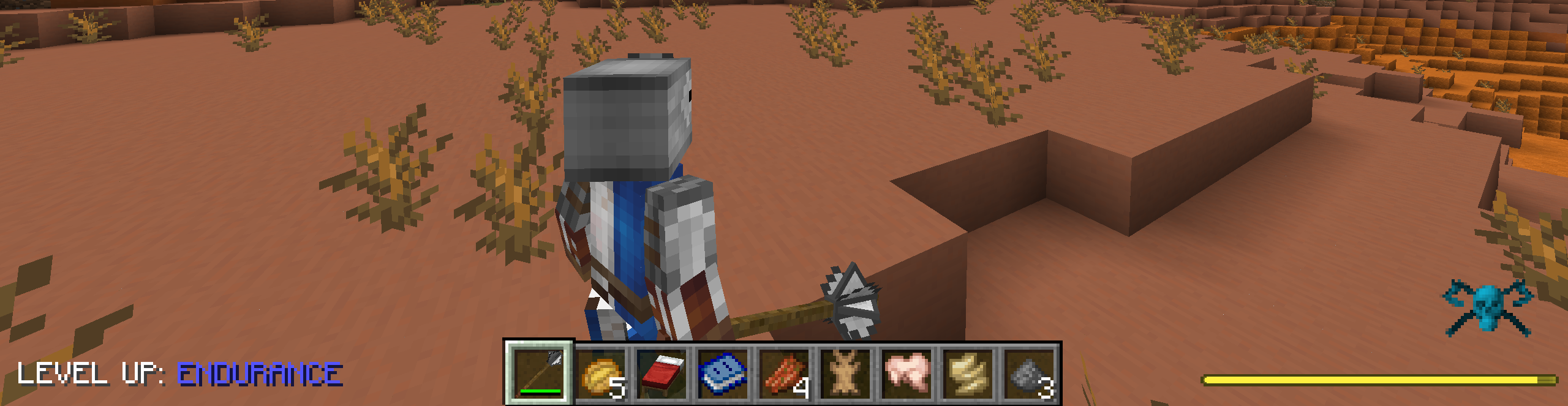
Leveling Up
Leveling up is now displayed on the overlay instead of in the chat. You can customize where the text appears. The text is customizable, and it will always show what category is being leveled up.
#The text that appears before the category name.
messagePrefix = "LEVEL UP: "
#Allowed Values: TOP_LEFT, TOP_RIGHT, BOTTOM_LEFT, BOTTOM_RIGHT
position = "BOTTOM_LEFT"
Effect Granting
Enables effects being able to be unlocked via the skill tree. Removes the effect when the skill is removed/reset.
Example :
{
  "type": "tkvm_puffish_additions:effect_grant",
  "data": {
    "effect": "tkvm_effects:riposte",
    "amplifier": 4
  }
}


Full Example :
"deflection": {
    "title": "Deflection",
    "description": "Projectiles completely bounce off you. Cost: 5 Points",
    "size": 1.5,
    "cost": 5,
    "icon": {
        "type": "effect",
        "data": {
            "effect": "tkvm_effects:deflection"
        }
    },
    "rewards": [
        {
            "type": "tkvm_puffish_additions:effect_grant",
            "data": {
                "effect": "tkvm_effects:deflection",
                "amplifier": 0
            }
        }
    ],
    "metadata": {}
}
Sounds
You can also add a custom sound to leveling up via the config.
#Sound event to play on level-up, as a resource location (e.g. "minecraft:entity.player.levelup" or "examplemod:levelupsound").
#Leave blank to disable the sound.
levelUpSound = "minecraft:entity.player.levelup"
#Volume for the level-up sound.
#Range: 0.0 ~ 10.0
soundVolume = 1.0
#Pitch for the level-up sound.
#Range: 0.5 ~ 2.0
soundPitch = 1.0
Project description from CurseForge.
Pick your setup
TKVM Puffish Additions by Minecraft version and loader
Choose the version and loader you play, then open the matching release.
Check the dependencies, then try the file in a copied instance before changing a world you care about.
Recent files
TKVM Puffish Additions versions and loaders
tkvm_puffish_additions-1.2.jar
18 Aug 2026
Client Source doesn’t say Server Source doesn’t say Dependencies No extras listed Listed on Release listing
Check the 1.20.1 · Forge setup 1.20.1Forge release
Looking for an older file? The official CurseForge project page is in Resources.
 mod
mod CurseForge · Minecraft
Item Frame Cache for Items & Maps
Keep huge Minecraft map walls and floors visible beyond server item-frame tracking distance, with persistent map caching, optimized RAM usage, and fully client-side Fabric support.
 mod
mod CurseForge + Modrinth · Minecraft
Guns Craft: Reforged
Deep weapon customization, realistic firearms, and immersive combat.
 mod
mod CurseForge · Minecraft
AppleStats : AppleSkin+ Jade (Target Info)+Coordinates+Horse Stat
HUD:A lightweight Jade alternative ,Saturation and Coordinates Monitor ,Waila,HWYLA,show Horse speed and jump stats,death location,Death Finder