Minecraft version
Back to mods 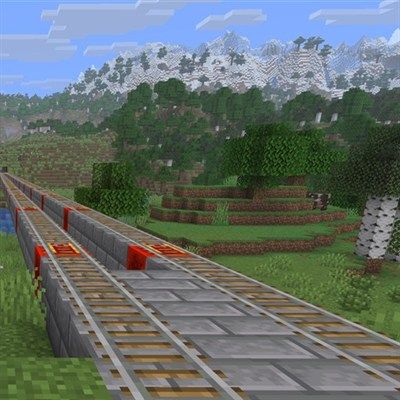
CurseForge · Minecraft mod
Rail TNT
One TNT. One detonation. A finished twin-track railway — tunnelled, bridged, lit and powered.
Choose a version Pick your version below, then grab the matching file.
Quick answer
Which Rail TNT release should I use?
Latest stable file railtnt-neoforge-26.2-2.0.1.jar
Game version 26.2
Loader NeoForge
Rail TNT railtnt-neoforge-26.2-2.0.1.jar targets 26.2 with NeoForge. The project page does not say whether this file belongs on the client, dedicated server, or both. No extra mods listed for this file.
Where it goes
Is Rail TNT required on the client, server, or both?
The project page does not say whether this file belongs on the client, dedicated server, or both.
Client Source doesn’t say
Dedicated server Source doesn’t say
Loader for this release NeoForge
Required install it here Optional supported, not mandatory Not supported do not install here Source doesn’t say do not assume
The source does not explicitly classify this release as client-only or server-only.
What else does Rail TNT railtnt-neoforge-26.2-2.0.1.jar need?
railtnt-neoforge-26.2-2.0.1.jar. Change the file and its required mods may change too.
This file does not list any required mods. Do not add a library just because a different file uses it.
This file does not list any required or optional mods.
Before you install it
Add Rail TNT without breaking your instance.
Built for Rail TNT railtnt-neoforge-26.2-2.0.1.jar. Pick another file and the loader, install side or required mods may change.
- 01
Stick to this file
Use railtnt-neoforge-26.2-2.0.1.jar. It targets 26.2 with NeoForge; another release may have different loader, side or dependency requirements.
- 02
Bring the mods it needs
This file does not list any required mods. Do not add a library just because a different file uses it.
- 03
Put it on the correct side
The project page does not say whether this file belongs on the client, dedicated server, or both.
- 04
Pick the file you checked
Use the “Get this file” button beside railtnt-neoforge-26.2-2.0.1.jar. It opens that exact file at the source.
About this project
What does Rail TNT add?
Rail TNT
Place it, face it, light it. One detonation cuts a finished twin-track railway through whatever is in the way — tunnelling through hills, bridging over gaps, lighting the tunnel and laying powered track as it goes.
Every corridor comes with twin track and riding headroom, glowstone in the walls every 32 blocks, and support pylons dropped to solid ground wherever the track leaves the hillside.
No redstone. No scaffolding. Just a railway.
The six charges
Corridor TNT — up to 256 blocks, booster every 8.
Cuts the line and decides when the run is done: out of a tunnel into open air, or at the first real hillside rather than boring through it. Always cuts at least 8 blocks first, so lighting one inside a cave or a base works the way you would expect.
Corridor TNT (Long) — 1024 blocks, booster every 8.
The same corridor with no stop rule of its own. It runs the whole way, so pick your spot.
Ramp TNT (Up) — up to 64 blocks at a 1:1 climb, every rail powered.
Stops once it has actually broken through — out the far side of the hill, or into a real cavern. Fired in the open it stops when it runs into something: a mountainside, or a bridge already standing in its path.
Ramp TNT (Down) — up to 64 blocks at a 1:1 dive, every rail powered.
Stops at sea level, or as soon as the way ahead changes: tunnel into open cave, or open air onto solid ground. It keeps a few blocks of clearance on the way down.
Corridor TNT (Cleanup) — up to 256 blocks. Light it between two rails.
Lifts the track back out and takes the bridge with it, deck and supports and all. It follows ramps on the same terms as flat track, and fills in the hole where it lifts a booster. Tunnels and cuttings are left as they are, and it stops at the first slice that is no longer corridor — so a junction halts it rather than being eaten.
Booster TNT (Existing Track) — up to 64 blocks. Light it between two rails.
Converts a railway you already have to powered rail on its own redstone block. It digs nothing and lays no new rail: where the track ends, it stops. It also stops at curves, junctions, and detector or activator rails, so it will not quietly break a mechanism you built.
Stopping one where you want it
Stand a torch in the track line and every charge stops there — on either rail, or on the walkway block between them. Walk out, plant your mark, come back and light the fuse.
Bedrock stops them too, and both work on the ramps, where the mark is looked for at the height the ramp is climbing or diving to. Each charge runs a few blocks before it starts looking.
Crafting
Everything comes from the Redstone Blocks tab, built from Corridor TNT — a ring of eight rails around a stick of TNT.
- Long — four Corridor TNT in a square
- Ramp Up / Down — three powered rails above the charge to climb, below it to dive
- Cleanup — a corridor charge on a sticky piston
- Booster — a corridor charge on a powered rail
Requires Forge. Client and server. No other dependencies. Pick the file matching your Minecraft version — it will refuse to load on the wrong one rather than half-work.
⚠️ Long Corridor TNT cuts 1024 blocks in one go. Try it somewhere you don't mind first.
Project description from CurseForge.
Pick your setup
Rail TNT by Minecraft version and loader
Choose the version and loader you play, then open the matching release.
Minecraft version
1.21.8
1 loader buildCheck the dependencies, then try the file in a copied instance before changing a world you care about.
Recent files
Rail TNT versions and loaders
railtnt-neoforge-26.2-2.0.1.jar
17 Sept 2026
Client Source doesn’t say Server Source doesn’t say Dependencies No extras listed Listed on Release listing
Check the 26.2 · NeoForge setup NeoForge26.2 release
railtnt-forge-26.2-2.0.1.jar
17 Sept 2026
Client Source doesn’t say Server Source doesn’t say Dependencies No extras listed Listed on Release listing
Check the 26.2 · Forge setup Forge26.2 release
railtnt-forge-2.0.1.jar
17 Sept 2026
Client Source doesn’t say Server Source doesn’t say Dependencies No extras listed Listed on Release listing
Check the 1.21.8 · Forge setup 1.21.8Forge release
railtnt-forge-26.2-2.0.0.jar
6 Sept 2026
Client Source doesn’t say Server Source doesn’t say Dependencies No extras listed Listed on Release listing
Check the 26.2 · Forge setup Forge26.2 release
railtnt-forge-2.0.0.jar
6 Sept 2026
Client Source doesn’t say Server Source doesn’t say Dependencies No extras listed Listed on Release listing
Check the 1.21.8 · Forge setup 1.21.8Forge release
railtnt-forge-26.2-1.1.0.jar
22 Aug 2026
Client Source doesn’t say Server Source doesn’t say Dependencies No extras listed Listed on Release listing
Check the 26.2 · Forge setup Forge26.2 release
railtnt-forge-1.1.0.jar
22 Aug 2026
Client Source doesn’t say Server Source doesn’t say Dependencies No extras listed Listed on Release listing
Check the 1.21.8 · Forge setup 1.21.8Forge release
railtnt-forge-26.2-1.0.0.jar
19 Aug 2026
Client Source doesn’t say Server Source doesn’t say Dependencies No extras listed Listed on Release listing
Check the 26.2 · Forge setup Forge26.2 release
railtnt-forge-1.0.0.jar
19 Aug 2026
Client Source doesn’t say Server Source doesn’t say Dependencies No extras listed Listed on Release listing
Check the 1.21.8 · Forge setup 1.21.8Forge release
Looking for an older file? The official CurseForge project page is in Resources.
 mod
CurseForge · Minecraft
Vertical Cut
A coal-powered Rock Tomograph shows a vertical cross-section of the terrain in front of you: caves, ores and living things.
 mod
CurseForge · Minecraft
月月科技mod
Technology progression with ores, rubber, oil refining, nuclear energy, vehicles, firearms, advanced furnaces and vertical building blocks for Fabric 26.3.
 mod
CurseForge · Minecraft
Enchantment Transference
Ever wanted a way of moving your enchants onto a book? Time to get overpowered!