Minecraft version
Back to mods 
CurseForge · Minecraft mod
Embellish
Animation, optimization and better item poses.
Choose a version Pick your version below, then grab the matching file.
Quick answer
Which Embellish release should I use?
Latest stable file embellish-fabric-1.20.1-1.0.0.jar
Game version 1.20.1
Loader Fabric
embellish-fabric-1.20.1-1.0.0.jar targets 1.20.1 with Fabric. The project page does not say whether this file belongs on the client, dedicated server, or both. No extra mods listed for this file.
Where it goes
Is Embellish required on the client, server, or both?
The project page does not say whether this file belongs on the client, dedicated server, or both.
Client Source doesn’t say
Dedicated server Source doesn’t say
Loader for this release Fabric
Required install it here Optional supported, not mandatory Not supported do not install here Source doesn’t say do not assume
The source does not explicitly classify this release as client-only or server-only.
What else does embellish-fabric-1.20.1-1.0.0.jar need?
embellish-fabric-1.20.1-1.0.0.jar. Change the file and its required mods may change too.
This file does not list any required mods. Do not add a library just because a different file uses it.
This file does not list any required or optional mods.
Before you install it
Add Embellish without breaking your instance.
Built for embellish-fabric-1.20.1-1.0.0.jar. Pick another file and the loader, install side or required mods may change.
- 01
Stick to this file
Use embellish-fabric-1.20.1-1.0.0.jar. It targets 1.20.1 with Fabric; another release may have different loader, side or dependency requirements.
- 02
Bring the mods it needs
This file does not list any required mods. Do not add a library just because a different file uses it.
- 03
Put it on the correct side
The project page does not say whether this file belongs on the client, dedicated server, or both.
- 04
Pick the file you checked
Use the “Get this file” button beside embellish-fabric-1.20.1-1.0.0.jar. It opens that exact file at the source.
About this project
What does Embellish add?

Client side animation and polish, better item poses.
Body movement that looks like it has a body in it, and footprints that are actual geometry. Minecraft's animations are fine. theyre also from 2011 and it shows.
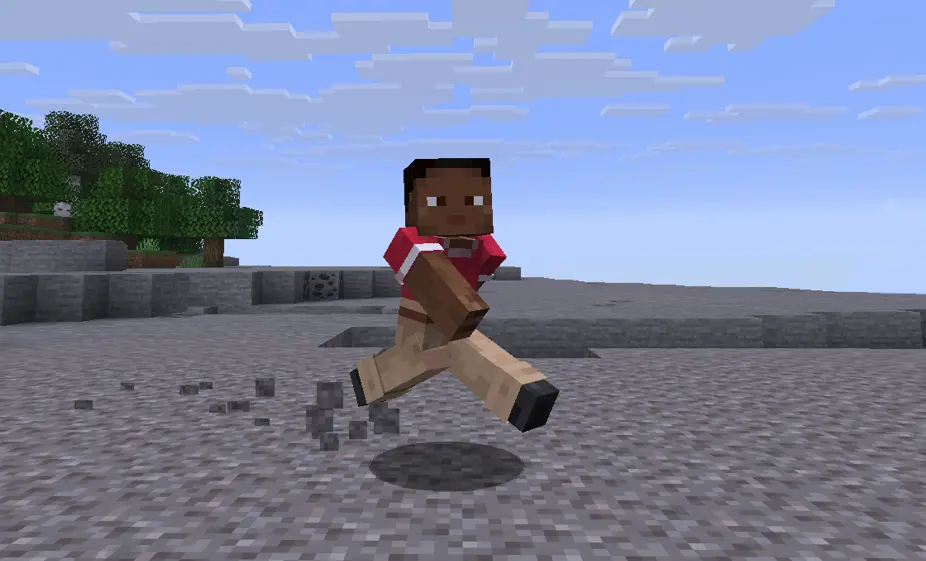
This reworks how things move without touching how anything plays. Every item gets a grip that suits it so a sword isnt held like a torch, swings carry weight, heavy tools drag a little when you turn.
In third person your character leans into a sprint, rides the stride instead of gliding along the floor, gathers on a jump and braces on a landing. swimming and elytra have real shapes. it sits on top of the vanilla walk cycle rather than replacing it, so nothing fights the game.
Footprints are geometry on the ground and they fade. landings, water and combat run through one impact system so the effect matches the force behind it.
then the small stuff: damage numbers, a durability bar you can read at a glance, break progress, death coords and a compass back to them, xp popups, an fps graph that only shows during an actual stutter. most of it is off until you turn it on.
Needs Embellish API. client side only, works on servers, sends nothing.
heads up: body animation doesnt work on forge 1.20.1. everything else does. fabric 1.20.1 is fine.
settings are in Mod Menu on fabric, the config button in the mod list on forge and neoforge. F8 opens it directly. F7 kills every effect at once, handy for checking if something is the mod or not.
Project description from CurseForge.
Pick your setup
Embellish by Minecraft version and loader
Choose the version and loader you play, then open the matching release.
Minecraft version
26.1.2
3 loader buildsMinecraft version
1.21.1
3 loader buildsMinecraft version
1.20.1
2 loader buildsCheck the dependencies, then try the file in a copied instance before changing a world you care about.
Recent files
Embellish versions and loaders
embellish-fabric-1.20.1-1.0.0.jar
22 Aug 2026
Client Source doesn’t say Server Source doesn’t say Dependencies No extras listed Listed on Release listing
Check the 1.20.1 · Fabric setup Fabric1.20.1 release
embellish-forge-1.20.1-1.0.0.jar
22 Aug 2026
Client Source doesn’t say Server Source doesn’t say Dependencies No extras listed Listed on Release listing
Check the 1.20.1 · Forge setup 1.20.1Forge release
embellish-fabric-1.21.1-1.0.0.jar
22 Aug 2026
Client Source doesn’t say Server Source doesn’t say Dependencies No extras listed Listed on Release listing
Check the 1.21.1 · Fabric setup Fabric1.21.1 release
embellish-forge-1.21.1-1.0.0.jar
22 Aug 2026
Client Source doesn’t say Server Source doesn’t say Dependencies No extras listed Listed on Release listing
Check the 1.21.1 · Forge setup Forge1.21.1 release
embellish-neoforge-1.21.1-1.0.0.jar
22 Aug 2026
Client Source doesn’t say Server Source doesn’t say Dependencies No extras listed Listed on Release listing
Check the 1.21.1 · NeoForge setup 1.21.1NeoForge release
embellish-fabric-26.1.2-1.0.0.jar
22 Aug 2026
Client Source doesn’t say Server Source doesn’t say Dependencies No extras listed Listed on Release listing
Check the 26.1.2 · Fabric setup Fabric26.1.2 release
embellish-forge-26.1.2-1.0.0.jar
22 Aug 2026
Client Source doesn’t say Server Source doesn’t say Dependencies No extras listed Listed on Release listing
Check the 26.1.2 · Forge setup Forge26.1.2 release
embellish-neoforge-26.1.2-1.0.0.jar
22 Aug 2026
Client Source doesn’t say Server Source doesn’t say Dependencies No extras listed Listed on Release listing
Check the 26.1.2 · NeoForge setup NeoForge26.1.2 release
embellish-fabric-26.2-1.0.0.jar
22 Aug 2026
Client Source doesn’t say Server Source doesn’t say Dependencies No extras listed Listed on Release listing
Check the 26.2 · Fabric setup Fabric26.2 release
embellish-forge-26.2-1.0.0.jar
22 Aug 2026
Client Source doesn’t say Server Source doesn’t say Dependencies No extras listed Listed on Release listing
Check the 26.2 · Forge setup Forge26.2 release
embellish-neoforge-26.2-1.0.0.jar
22 Aug 2026
Client Source doesn’t say Server Source doesn’t say Dependencies No extras listed Listed on Release listing
Check the 26.2 · NeoForge setup NeoForge26.2 release
Looking for an older file? The official CurseForge project page is in Resources.
 mod
mod CurseForge · Minecraft
Banner Tweaks
Vanilla-friendly tweaks to banners
 mod
mod CurseForge · Minecraft
Cobblemon: Parting Gifts
This addon mod to Cobblemon adds a highly configurable Reward system for releasing Pokemon. Inspired by the mechanic in Pokemon Legends: Arceus.
 mod
mod CurseForge · Minecraft
VillagerTweaks
Some minor adjustments to villager interactions to ease a few headaches.