SolLib Needed by The Spooky Birch spookybirch-1.1.jar
requiredMatching file found Matched file: sollib-neo-1.21.1-2.1.jar
CurseForge · Minecraft mod
Don't you sometimes feel like you're being watched? Maybe it's not Herobrine. Maybe it's something else… something more natural.
Quick answer
The Spooky Birch spookybirch-1.1.jar targets 1.21.1 with NeoForge. The project page does not say whether this file belongs on the client, dedicated server, or both. All 1 required mods have matching files.
Where it goes
The project page does not say whether this file belongs on the client, dedicated server, or both.
The source does not explicitly classify this release as client-only or server-only.
spookybirch-1.1.jar. Change the file and its required mods may change too.
Install SolLib first. We found matching files for this game-version and loader setup.
We only count dependency files that match this setup. A file for another loader does not fill the gap.
Before you install it
Built for The Spooky Birch spookybirch-1.1.jar. Pick another file and the loader, install side or required mods may change.
Use spookybirch-1.1.jar. It targets 1.21.1 with NeoForge; another release may have different loader, side or dependency requirements.
Install SolLib first. We found matching files for this game-version and loader setup.
The project page does not say whether this file belongs on the client, dedicated server, or both.
Use the “Get this file” button beside spookybirch-1.1.jar. It opens that exact file at the source.
About this project
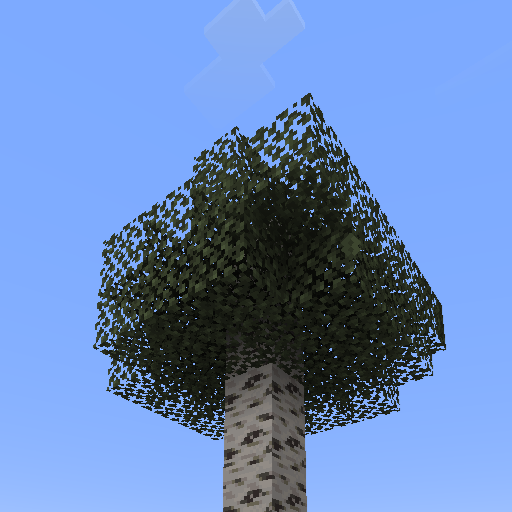
This addon adds a new type of tree that resembles a birch. It does not spawn naturally. You can only craft its sapling (recipe in the gallery). The raw log isn't animated, but the wood crafted from it is! Perfect for playing a prank on someone.
Credits: Habciak (me) – mod concept, crafting recipe, testing
SashaKYotoz – coding, bug fixing
Rappenem – block textures
Link to the textures used - https://www.curseforge.com/minecraft/texture-packs/spooky-birch
Project description from CurseForge.
Pick your setup
Choose the version and loader you play, then open the matching release.
Check the dependencies, then try the file in a copied instance before changing a world you care about.
Recent files
21 Nov 2026
23 Aug 2026
Looking for an older file? The official CurseForge project page is in Resources.
 mod
Adds fast and fun combat and utility magic that stays true to the vanilla Minecraft look & feel. Spells live on spell gems you craft, enchant, and can cast manually by wand or automated via spell dispenser.
 mod
Craft a toxic sword using poisonous potatoes to instantly kill animals!
 mod
Realistic natural disasters: tornadoes under real storm clouds, volcanoes, meteors that dig craters, tsunamis, earthquakes and 29 disasters in all. Watch the shockwave roll in, then rewind it all with /disaster undo.