Mod Menu Optional for Real-time CraftingTable-1.0.0+mc1.21.11.jar
optionalMatching file found Matched file: v17.0.0 for 1.21.11
CurseForge · Minecraft mod
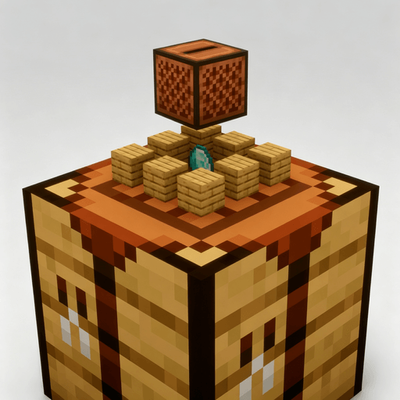
A real-time 3D preview of your crafting result above the workbench, with smooth animations and lots of customization.
Quick answer
Real-time CraftingTable-1.0.0+mc1.21.11.jar targets 1.21.11 with Fabric. The project page does not say whether this file belongs on the client, dedicated server, or both. All 1 required mods have matching files.
Where it goes
The project page does not say whether this file belongs on the client, dedicated server, or both.
The source does not explicitly classify this release as client-only or server-only.
Real-time CraftingTable-1.0.0+mc1.21.11.jar. Change the file and its required mods may change too.
Install Fabric API first. We found matching files for this game-version and loader setup. 1 comes through another mod in the chain.
1 extra mod was pulled in by another dependency. Indented rows show who needs each one. We only count dependency files that match this setup. A file for another loader does not fill the gap.
Before you install it
Built for Real-time CraftingTable-1.0.0+mc1.21.11.jar. Pick another file and the loader, install side or required mods may change.
Use Real-time CraftingTable-1.0.0+mc1.21.11.jar. It targets 1.21.11 with Fabric; another release may have different loader, side or dependency requirements.
Install Fabric API first. We found matching files for this game-version and loader setup. 1 comes through another mod in the chain.
The project page does not say whether this file belongs on the client, dedicated server, or both.
Use the “Get this file” button beside Real-time CraftingTable-1.0.0+mc1.21.11.jar. It opens that exact file at the source.
About this project
A real-time 3D preview of your crafting result — materials float above the workbench, and the result hovers and slowly rotates above them, And they all feature smooth animations.
A Fabric mod that adds a real-time 3D preview to the vanilla Crafting Table. Install on your client and it works — even on vanilla servers. Author: Xliecc | License: MIT
config/real-time-crafting-table.json directly (auto-generated on first run)keep-items-when-closed is OFF by default — enable it to keep materials in the table after closing the GUI. This is the most important setting to know aboutMIT © 2026 Xliecc
Project description from CurseForge.
Pick your setup
Choose the version and loader you play, then open the matching release.
Check the dependencies, then try the file in a copied instance before changing a world you care about.
Recent files
real-time-crafting-table-1.0.0+mc26.2.jar
31 Aug 2026
real-time-crafting-table-1.0.0+mc1.21.11.jar
31 Aug 2026
25 Aug 2026
Looking for an older file? The official CurseForge project page is in Resources.
 mod
modQuickly adjust spawn rate, ban mobs, change mob limit and more with in-game menu
 mod
modEnchantStats is the combat & magic sequel to AppleStats — enchanting your HUD with exact enchantment values, advanced tooltips, and monster combat stats.
 mod
modCatch the flying objects with a bundle