Minecraft version
Back to mods 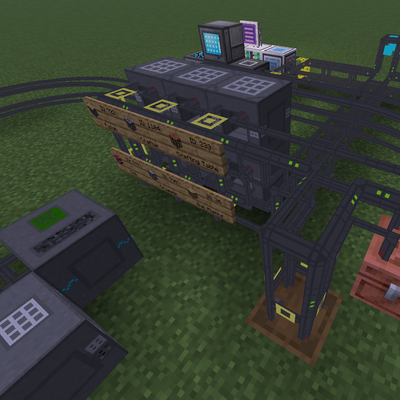
CurseForge · Minecraft mod
Logistics Pipes: Rerouted
Porting the Logistics Pipes mod to modern versions of Minecraft
Choose a version Pick your version below, then grab the matching file.
Quick answer
Which Logistics Pipes: Rerouted release should I use?
beta file logistics-pipes-rerouted-26.1.2-0.0.5
Game version 26.1.2
Loader NeoForge
Logistics Pipes: Rerouted logistics-pipes-rerouted-26.1.2-0.0.5 targets 26.1.2 with NeoForge. The project page does not say whether this file belongs on the client, dedicated server, or both. No extra mods listed for this file.
Where it goes
Is Logistics Pipes: Rerouted required on the client, server, or both?
The project page does not say whether this file belongs on the client, dedicated server, or both.
Client Source doesn’t say
Dedicated server Source doesn’t say
Loader for this release NeoForge
Required install it here Optional supported, not mandatory Not supported do not install here Source doesn’t say do not assume
The source does not explicitly classify this release as client-only or server-only.
What else does Logistics Pipes: Rerouted logistics-pipes-rerouted-26.1.2-0.0.5 need?
logistics-pipes-rerouted-26.1.2-0.0.5. Change the file and its required mods may change too.
This file does not list any required mods. Do not add a library just because a different file uses it.
This file does not list any required or optional mods.
Before you install it
Add Logistics Pipes: Rerouted without breaking your instance.
Built for Logistics Pipes: Rerouted logistics-pipes-rerouted-26.1.2-0.0.5. Pick another file and the loader, install side or required mods may change.
- 01
Stick to this file
Use logistics-pipes-rerouted-26.1.2-0.0.5. It targets 26.1.2 with NeoForge; another release may have different loader, side or dependency requirements.
- 02
Bring the mods it needs
This file does not list any required mods. Do not add a library just because a different file uses it.
- 03
Put it on the correct side
The project page does not say whether this file belongs on the client, dedicated server, or both.
- 04
Pick the file you checked
Use the “Get this file” button beside logistics-pipes-rerouted-26.1.2-0.0.5. It opens that exact file at the source.
About this project
What does Logistics Pipes: Rerouted add?
Logistics Pipes: Rerouted
A modern port of the classic Logistics Pipes mod, bringing its iconic logistics and item transportation system to a newer version of Minecraft.
The goal of this project is to preserve the original Logistics Pipes experience while adapting its systems and codebase to the modern Minecraft modding environment. Build powerful pipe networks, manage your items efficiently, and automate your storage and crafting systems just like in the original mod.
This project is not affiliated with the original Logistics Pipes team. It is a community-made port created to keep the Logistics Pipes experience alive on modern Minecraft versions.
Original project: Logistics Pipes on CurseForge
Project description from CurseForge.
Pick your setup
Logistics Pipes: Rerouted by Minecraft version and loader
Choose the version and loader you play, then open the matching release.
Check the dependencies, then try the file in a copied instance before changing a world you care about.
Recent files
Logistics Pipes: Rerouted versions and loaders
logistics-pipes-rerouted-26.1.2-0.0.5
logistics-pipes-rerouted-26.1.2-0.0.5.jar
8 Sept 2026
Client Source doesn’t say Server Source doesn’t say Dependencies No extras listed Listed on Release listing
Check the 26.1.2 · NeoForge setup NeoForge26.1.2 beta
logistics-pipes-rerouted-26.1.2-0.0.4
logistics-pipes-rerouted-26.1.2-0.0.4.jar
7 Sept 2026
Client Source doesn’t say Server Source doesn’t say Dependencies No extras listed Listed on Release listing
Check the 26.1.2 · NeoForge setup NeoForge26.1.2 beta
logistics-pipes-rerouted-26.1.2-0.0.3
logistics-pipes-rerouted-26.1.2-0.0.3.jar
5 Sept 2026
Client Source doesn’t say Server Source doesn’t say Dependencies No extras listed Listed on Release listing
Check the 26.1.2 · NeoForge setup NeoForge26.1.2 beta
logistics-pipes-rerouted-26.1.2-0.0.2
logistics-pipes-rerouted-26.1.2-0.0.2.jar
4 Sept 2026
Client Source doesn’t say Server Source doesn’t say Dependencies No extras listed Listed on Release listing
Check the 26.1.2 · NeoForge setup NeoForge26.1.2 beta
logistics-pipes-rerouted-26.1.2-0.0.1
logisticspipes-26.1.2-0.0.1.jar
28 Aug 2026
Client Source doesn’t say Server Source doesn’t say Dependencies No extras listed Listed on Release listing
Check the 26.1.2 · NeoForge setup NeoForge26.1.2 beta
Looking for an older file? The official CurseForge project page is in Resources.
 mod
mod CurseForge · Minecraft
Logistics Network
Logistics mod
 mod
mod CurseForge + Modrinth · Minecraft
Pixelshot
High-resolution screenshots, and an orthographic camera all in one. A continuation of Mineshot by BarracudaATA.
 mod
mod CurseForge + Modrinth · Minecraft
Pact Magic
An expansive open-ended magic mod inspired by the web serials Pact and Pale by wildbow.