Minecraft version
Back to mods 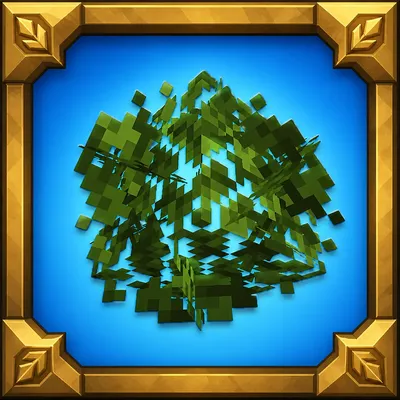
CurseForge · Minecraft mod
Way Better Leaves
Way Better Leaves is a client-side mod. It automatically gives vanilla and modded leaf blocks external X-shaped leaf panels using each block model's own leaf texture.
Choose a version Pick your version below, then grab the matching file.
Quick answer
Which Way Better Leaves release should I use?
Latest stable file waybetterleaves-2.0.0-neoforge-mc26.1.jar
Game version 26.1
Loader NeoForge
Way Better Leaves waybetterleaves-2.0.0-neoforge-mc26.1.jar targets 26.1 with NeoForge. The project page does not say whether this file belongs on the client, dedicated server, or both. No extra mods listed for this file.
Where it goes
Is Way Better Leaves required on the client, server, or both?
The project page does not say whether this file belongs on the client, dedicated server, or both.
Client Source doesn’t say
Dedicated server Source doesn’t say
Loader for this release NeoForge
Required install it here Optional supported, not mandatory Not supported do not install here Source doesn’t say do not assume
The source does not explicitly classify this release as client-only or server-only.
What else does Way Better Leaves waybetterleaves-2.0.0-neoforge-mc26.1.jar need?
waybetterleaves-2.0.0-neoforge-mc26.1.jar. Change the file and its required mods may change too.
This file does not list any required mods. Do not add a library just because a different file uses it.
This file does not list any required or optional mods.
Before you install it
Add Way Better Leaves without breaking your instance.
Built for Way Better Leaves waybetterleaves-2.0.0-neoforge-mc26.1.jar. Pick another file and the loader, install side or required mods may change.
- 01
Stick to this file
Use waybetterleaves-2.0.0-neoforge-mc26.1.jar. It targets 26.1 with NeoForge; another release may have different loader, side or dependency requirements.
- 02
Bring the mods it needs
This file does not list any required mods. Do not add a library just because a different file uses it.
- 03
Put it on the correct side
The project page does not say whether this file belongs on the client, dedicated server, or both.
- 04
Pick the file you checked
Use the “Get this file” button beside waybetterleaves-2.0.0-neoforge-mc26.1.jar. It opens that exact file at the source.
About this project
What does Way Better Leaves add?
About
Way Better Leaves makes Minecraft trees look fuller, softer, and more natural while keeping the familiar blocky Minecraft style.
The mod automatically detects vanilla and modded leaf blocks, uses their original textures and colors, and prepares the bushy models when resources are loaded. Resource-pack textures and biome coloring are preserved automatically.
Way Better Leaves is completely client-side. It does not change gameplay, block collisions, drops, world generation, or server behavior. Servers do not need to install it, and accidental server installation is handled safely.
Features
- 🌳 Automatic Modded Leaf Support: Detects vanilla and modded leaf blocks without requiring separate compatibility packs.
- 🎨 Original Leaf Textures: Uses the texture, transparency, and biome colors of each leaf block.
- 📦 Resource-Pack Support: Automatically adapts to leaf textures supplied by your active resource packs.
- 🍃 Natural Variation: Leaf shapes receive position, depth, and full rotational variation, making forests look less repetitive.
- ✂️ Custom Leaf Shapes: Uses a prepared transparency mask to create carefully trimmed, pixelated foliage instead of plain square panels.
- 👁️ Optional Culling: Removes hidden faces and foliage between connected leaves to improve performance in dense forests.
- 💡 Custom Lighting: Ambient Occlusion and Directional Shading can be controlled specifically for leaves.
- ✨ LabPBR Support: Includes normal and specular texture support for compatible shaders and resource packs.
- 🚫 Configurable Blacklist: Individual leaf blocks can be excluded if their shape does not work well with bushy geometry.
- 🖥️ Client-Side Only: Works on multiplayer servers without requiring server installation.
Leaf Styles
Way Better Leaves includes three selectable styles:
- Native: Keeps Minecraft's original leaf shape while still allowing the mod's lighting, culling, and blacklist options to be used.
- Classic: Keeps the original leaf block and adds smaller bushy panels around its visible sides.
- Plus: Replaces the cube-shaped leaf model with three large crossed panels. Each panel uses a repeating 32×32 version of the original leaf texture and remains at a 90-degree angle to the other panels.
Configuration
The configuration file is located at:
config/waybetterleaves-client.toml
enabled = true type = "PLUS" culling = true ambientOcclusion = false directionalShading = false blacklist = [ "mod_name:block_name", "another_mod:another_leaf_block" ]
enabled— Enables or disables the mod.type— Selects the leaf style: NATIVE, CLASSIC, or PLUS.culling— Removes hidden leaf geometry to improve performance.ambientOcclusion— Adds softer shadows around nearby blocks and corners.directionalShading— Makes leaf surfaces appear lighter or darker depending on their direction.blacklist— Lists leaf blocks that should keep their original appearance and culling behavior.
All options can also be changed through the in-game configuration screen.
Project description from CurseForge.
Pick your setup
Way Better Leaves by Minecraft version and loader
Choose the version and loader you play, then open the matching release.
Minecraft version
26.1.2
1 loader buildMinecraft version
26.1.1
1 loader buildMinecraft version
26.1
1 loader buildMinecraft version
1.21.11
1 loader buildMinecraft version
1.21.10
1 loader buildMinecraft version
1.21.9
1 loader buildMinecraft version
1.21.8
1 loader buildMinecraft version
1.21.7
1 loader buildMinecraft version
1.21.6
1 loader buildMinecraft version
1.21.5
1 loader buildMinecraft version
1.21.4
1 loader buildShowing the newest 12 of 22 game versions. Older files are in the list below.
Check the dependencies, then try the file in a copied instance before changing a world you care about.
Recent files
Way Better Leaves versions and loaders
waybetterleaves-2.0.0-neoforge-mc26.1.jar
30 Aug 2026
Client Source doesn’t say Server Source doesn’t say Dependencies No extras listed Listed on Release listing
Check the 26.1 · NeoForge setup NeoForge26.1 release
waybetterleaves-2.0.0-neoforge-mc26.1.2.jar
30 Aug 2026
Client Source doesn’t say Server Source doesn’t say Dependencies No extras listed Listed on Release listing
Check the 26.1.2 · NeoForge setup NeoForge26.1.2 release
waybetterleaves-2.0.0-neoforge-mc26.1.1.jar
30 Aug 2026
Client Source doesn’t say Server Source doesn’t say Dependencies No extras listed Listed on Release listing
Check the 26.1.1 · NeoForge setup NeoForge26.1.1 release
waybetterleaves-2.0.0-neoforge-mc1.21.jar
30 Aug 2026
Client Source doesn’t say Server Source doesn’t say Dependencies No extras listed Listed on Release listing
Check the 1.21 · NeoForge setup 1.21NeoForge release
waybetterleaves-2.0.0-neoforge-mc1.21.11.jar
30 Aug 2026
Client Source doesn’t say Server Source doesn’t say Dependencies No extras listed Listed on Release listing
Check the 1.21.11 · NeoForge setup NeoForge1.21.11 release
waybetterleaves-2.0.0-neoforge-mc1.21.10.jar
30 Aug 2026
Client Source doesn’t say Server Source doesn’t say Dependencies No extras listed Listed on Release listing
Check the 1.21.10 · NeoForge setup NeoForge1.21.10 release
waybetterleaves-2.0.0-neoforge-mc1.21.9.jar
30 Aug 2026
Client Source doesn’t say Server Source doesn’t say Dependencies No extras listed Listed on Release listing
Check the 1.21.9 · NeoForge setup NeoForge1.21.9 release
waybetterleaves-2.0.0-neoforge-mc1.21.8.jar
30 Aug 2026
Client Source doesn’t say Server Source doesn’t say Dependencies No extras listed Listed on Release listing
Check the 1.21.8 · NeoForge setup 1.21.8NeoForge release
waybetterleaves-2.0.0-neoforge-mc1.21.7.jar
30 Aug 2026
Client Source doesn’t say Server Source doesn’t say Dependencies No extras listed Listed on Release listing
Check the 1.21.7 · NeoForge setup 1.21.7NeoForge release
waybetterleaves-2.0.0-neoforge-mc1.21.6.jar
30 Aug 2026
Client Source doesn’t say Server Source doesn’t say Dependencies No extras listed Listed on Release listing
Check the 1.21.6 · NeoForge setup 1.21.6NeoForge release
waybetterleaves-2.0.0-neoforge-mc1.21.5.jar
30 Aug 2026
Client Source doesn’t say Server Source doesn’t say Dependencies No extras listed Listed on Release listing
Check the 1.21.5 · NeoForge setup 1.21.5NeoForge release
waybetterleaves-2.0.0-neoforge-mc1.21.4.jar
30 Aug 2026
Client Source doesn’t say Server Source doesn’t say Dependencies No extras listed Listed on Release listing
Check the 1.21.4 · NeoForge setup 1.21.4NeoForge release
Looking for an older file? The official CurseForge project page is in Resources.
 mod
mod CurseForge · Minecraft
Create: Assembly Animations
Client-side animations for the Create Aeronautics physics assembler
 mod
mod CurseForge · Minecraft
Grassrise - Better Lighting
This optional Grassrise mod gets rid of the shadows cast by the Grassrise resourcepack, and brings Complementary Shaders support! Grassrise resource pack required.
 mod
mod CurseForge + Modrinth · Minecraft
Health Indicator TXF
Health indicator on player screen