Minecraft version
Back to mods 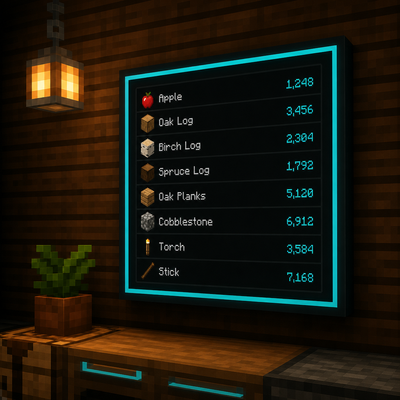
CurseForge · Minecraft mod
Smartstock
Wall monitors and storage terminals for NeoForge 1.21.1 — craft from nearby inventories, wireless links, crop farmer, AE2 bridge, and stylish Item Displays.
Choose a version Pick your version below, then grab the matching file.
Quick answer
Which Smartstock release should I use?
beta file smartstock-0.18.11.jar
Game version 1.21.1
Loader NeoForge
smartstock-0.18.11.jar targets 1.21.1 with NeoForge. The project page does not say whether this file belongs on the client, dedicated server, or both. No extra mods listed for this file.
Where it goes
Is Smartstock required on the client, server, or both?
The project page does not say whether this file belongs on the client, dedicated server, or both.
Client Source doesn’t say
Dedicated server Source doesn’t say
Loader for this release NeoForge
Required install it here Optional supported, not mandatory Not supported do not install here Source doesn’t say do not assume
The source does not explicitly classify this release as client-only or server-only.
What else does smartstock-0.18.11.jar need?
smartstock-0.18.11.jar. Change the file and its required mods may change too.
This file does not list any required mods. Do not add a library just because a different file uses it.
This file does not list any required or optional mods.
Before you install it
Add Smartstock without breaking your instance.
Built for smartstock-0.18.11.jar. Pick another file and the loader, install side or required mods may change.
- 01
Stick to this file
Use smartstock-0.18.11.jar. It targets 1.21.1 with NeoForge; another release may have different loader, side or dependency requirements.
- 02
Bring the mods it needs
This file does not list any required mods. Do not add a library just because a different file uses it.
- 03
Put it on the correct side
The project page does not say whether this file belongs on the client, dedicated server, or both.
- 04
Pick the file you checked
Use the “Get this file” button beside smartstock-0.18.11.jar. It opens that exact file at the source.
About this project
What does Smartstock add?
SMART STOCK
Storage terminals and wall displays | NeoForge 1.21.1
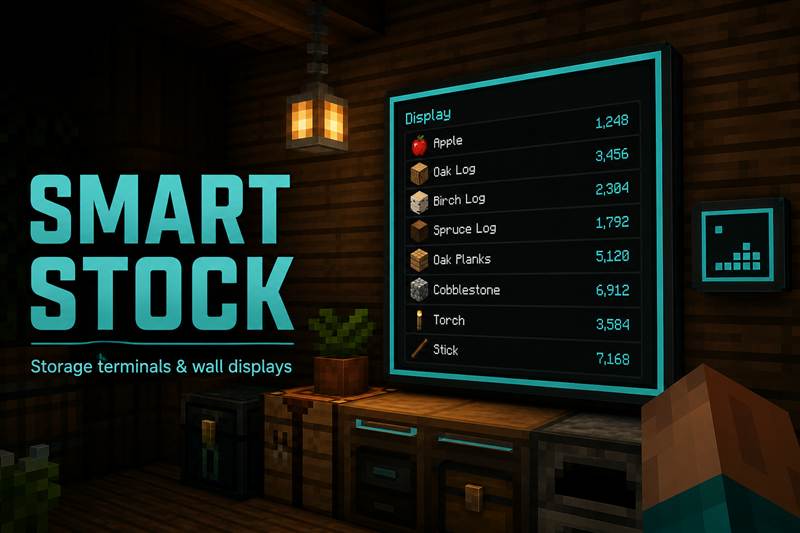
Smart Stock is a storage / terminal mod for Minecraft 1.21.1 (NeoForge). Craft and pull from nearby chests without opening every inventory - plus wall monitors, wireless terminals, farming, and optional bridges for bigger packs.
If you know Create vaults, AE2 terminals, or drawer controllers: put storage next to a terminal (or link it), then work from one screen.
What you get
Stock Terminal - craft / withdraw / deposit from attached chests or Create vaults.
Item Display - wall monitors (1x1 or multi-block), filters, colors, paging.
Wireless Terminal - remote links, range upgrades, optional ComputerCraft.
Linking Tool - wireless, farmer, and storage hub linking.
Storage Hub - pulls from the vault with less of an item into the vault with more.
Auto Farmer - harvest radius, redstone modes, deposit links.
ME Bridge - optional AE2 connection.
Quick start
- Place a Stock Terminal next to a chest or Create vault
- Use Craft / Storage / Deposit tabs
- Place an Item Display (sneak = 1x1)
- Wireless: Linking Tool + range upgrades
Requirements
- Minecraft 1.21.1
- NeoForge 21.1.x
- Optional: AE2, ComputerCraft / CC: Tweaked, Create
This mod is actively maintained and will keep receiving updates.
Feedback, criticism, and suggestions are very welcome - please leave a comment on this page.
Author: Beardflix | License: MIT | Build: 0.13.29
Project description from CurseForge.
Pick your setup
Smartstock by Minecraft version and loader
Choose the version and loader you play, then open the matching release.
Check the dependencies, then try the file in a copied instance before changing a world you care about.
Recent files
Smartstock versions and loaders
smartstock-0.18.11.jar
31 Aug 2026
Client Source doesn’t say Server Source doesn’t say Dependencies No extras listed Listed on Release listing
Check the 1.21.1 · NeoForge setup 1.21.1NeoForge beta
smartstock-0.17.6.jar
31 Aug 2026
Client Source doesn’t say Server Source doesn’t say Dependencies No extras listed Listed on Release listing
Check the 1.21.1 · NeoForge setup 1.21.1NeoForge beta
smartstock-0.17.5.jar
30 Aug 2026
Client Source doesn’t say Server Source doesn’t say Dependencies No extras listed Listed on Release listing
Check the 1.21.1 · NeoForge setup 1.21.1NeoForge beta
smartstock-0.13.29.jar
28 Aug 2026
Client Source doesn’t say Server Source doesn’t say Dependencies No extras listed Listed on Release listing
Check the 1.21.1 · NeoForge setup 1.21.1NeoForge beta
Looking for an older file? The official CurseForge project page is in Resources.
 mod
mod CurseForge + Modrinth · Minecraft
Create: Warnautics
Create Big Cannons add-on with redstone-launched aerial bombs, multi-bomb cassettes, sea bombs, land mines, cinematic blast effects, and optional Sable ship destruction.
 mod
mod CurseForge · Minecraft
Createch 2 Core
Core mod used in the Createch 2 Modpack
 mod
mod CurseForge + Modrinth · Minecraft
M*dder Name Lib
Yeah, another one of these. Shared code for quat's Season 2 mods.