Minecraft version
Back to mods 
CurseForge · Minecraft mod
Just Enough Storage
Stop wasting hours digging through endless chests! Just Enough Storage lets you locate any item instantly and pull it straight into your hands with a single click.
Choose a version Pick your version below, then grab the matching file.
Quick answer
Which Just Enough Storage release should I use?
Latest stable file jes-fabric-1.21.4-1.0.0
Game version 1.21.4
Loader Fabric
Just Enough Storage jes-fabric-1.21.4-1.0.0 targets 1.21.4 with Fabric. The project page does not say whether this file belongs on the client, dedicated server, or both. No extra mods listed for this file.
Where it goes
Is Just Enough Storage required on the client, server, or both?
The project page does not say whether this file belongs on the client, dedicated server, or both.
Client Source doesn’t say
Dedicated server Source doesn’t say
Loader for this release Fabric
Required install it here Optional supported, not mandatory Not supported do not install here Source doesn’t say do not assume
The source does not explicitly classify this release as client-only or server-only.
What else does Just Enough Storage jes-fabric-1.21.4-1.0.0 need?
jes-fabric-1.21.4-1.0.0. Change the file and its required mods may change too.
This file does not list any required mods. Do not add a library just because a different file uses it.
This file does not list any required or optional mods.
Before you install it
Add Just Enough Storage without breaking your instance.
Built for Just Enough Storage jes-fabric-1.21.4-1.0.0. Pick another file and the loader, install side or required mods may change.
- 01
Stick to this file
Use jes-fabric-1.21.4-1.0.0. It targets 1.21.4 with Fabric; another release may have different loader, side or dependency requirements.
- 02
Bring the mods it needs
This file does not list any required mods. Do not add a library just because a different file uses it.
- 03
Put it on the correct side
The project page does not say whether this file belongs on the client, dedicated server, or both.
- 04
Pick the file you checked
Use the “Get this file” button beside jes-fabric-1.21.4-1.0.0. It opens that exact file at the source.
About this project
What does Just Enough Storage add?
📦 Just Enough Storage (JES)
Tired of spending 30% of your playtime opening 50 different chests in your warehouse just to find a single missing diamond or stick?
Just Enough Storage (JES) is a lightweight Quality of Life (QoL) utility mod that revolutionizes storage management once and for all.

✨ Key Features
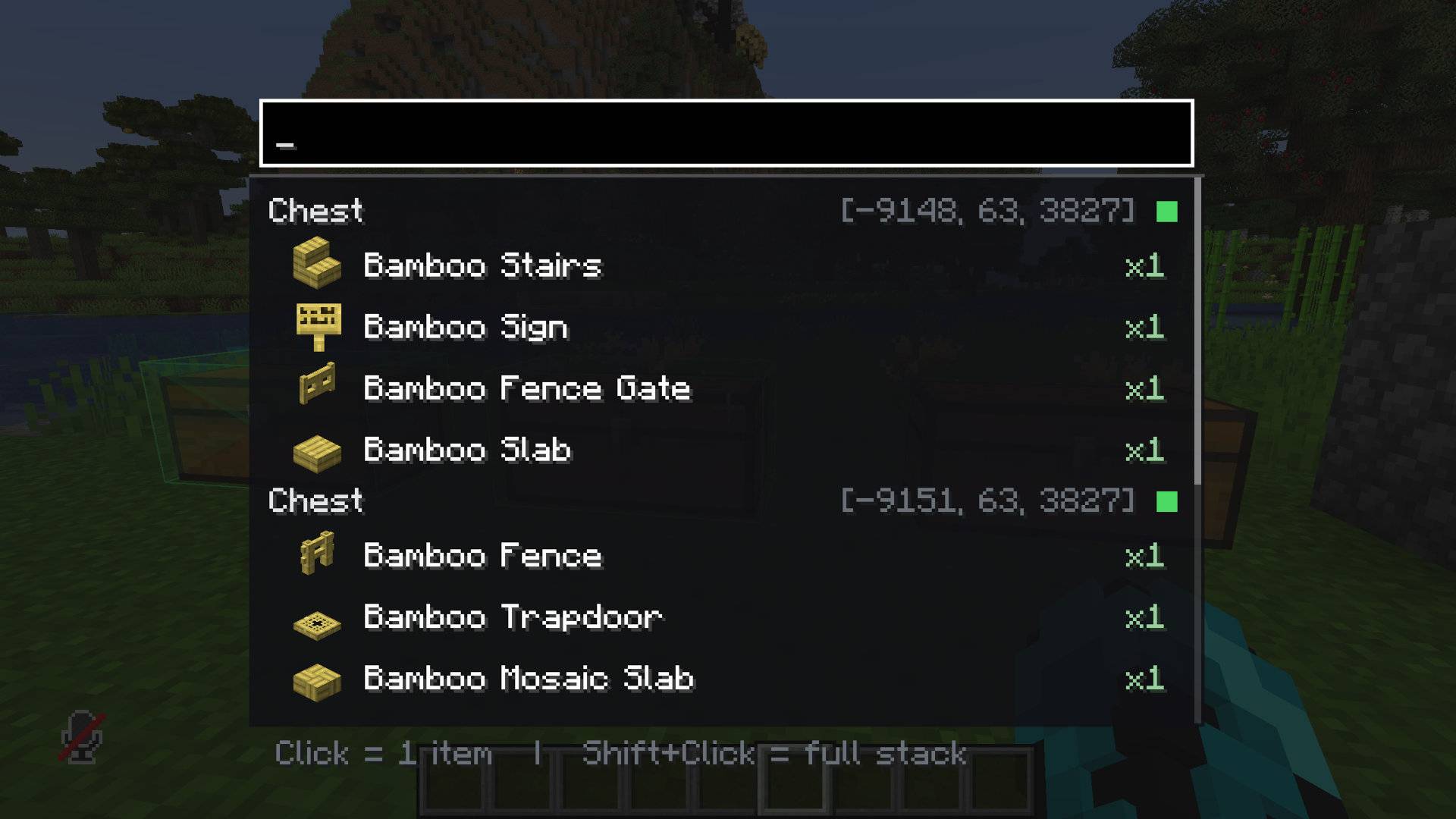
- 🔍 Instant Search Overlay (
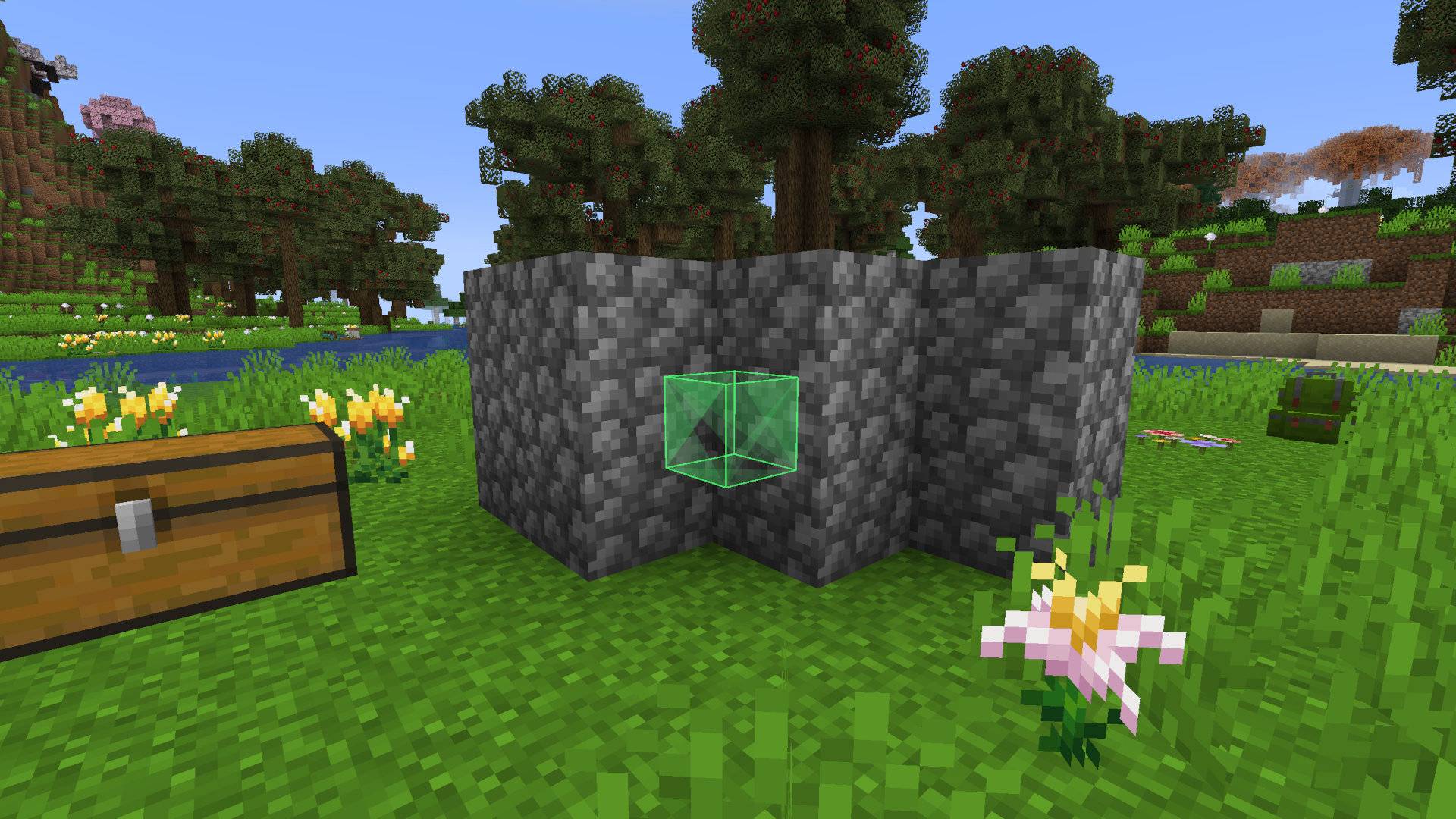
Ctrl + F) – Press a customizable hotkey to open a clean interface with a responsive search bar. - 🌟 Dynamic Container Highlight (X-Ray) – Typing an item name highlights all nearby containers holding that item through solid walls.
- 🟢 In-Range Visual Cue – Chests highlight in orange by default, but turn vibrant green as soon as you step into pulling range!
- ⚡ Remote Item Extraction – Standing within range of your storage wall? Click the item icon in the JES menu to instantly pull it straight into your inventory—no walking required.
- 💻 In-Game Toggle Commands – Easily turn features on or off on the fly with intuitive slash commands.
- 🚀 Lag-Free & Optimized – Container scanning is executed on-demand, ensuring zero performance hit to server TPS or client FPS.
- 🔄 Multi-Version Support – Built using the Stonecutter architecture, ensuring compatibility across a wide range of Minecraft versions (1.18.2 to 1.21+).
🎮 How It Works
- Press
Ctrl + F(rebindable in Controls settings). - Type the name of the item you are looking for (e.g., "Diamond Sword" or "Gold Ingot").
- Look around – matching chests glow through walls. Green chests are close enough to pull items from!
- Click the item icon in the overlay to fetch it directly into your inventory.
💻 Commands
Player-friendly commands to customize your experience on the fly:
| Command | Description |
|---|---|
/jes highlight on|off |
Toggle wall-highlighting (X-Ray effect) on or off |
/jes pull on|off |
Toggle remote item pickup functionality on or off |
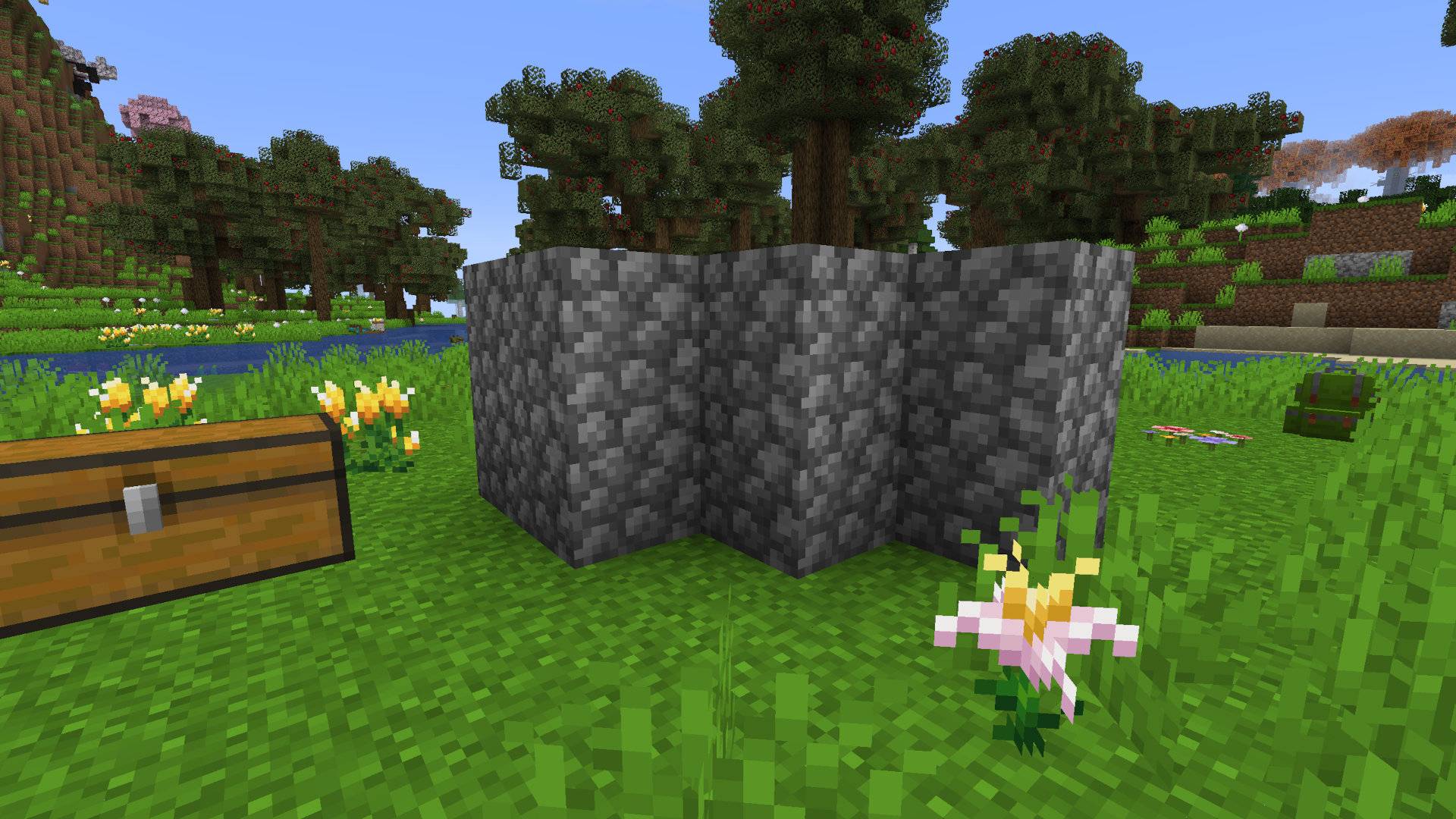
Chest X-Ray off
Chest X-Ray on
Remote pickup on
Remote pickup off
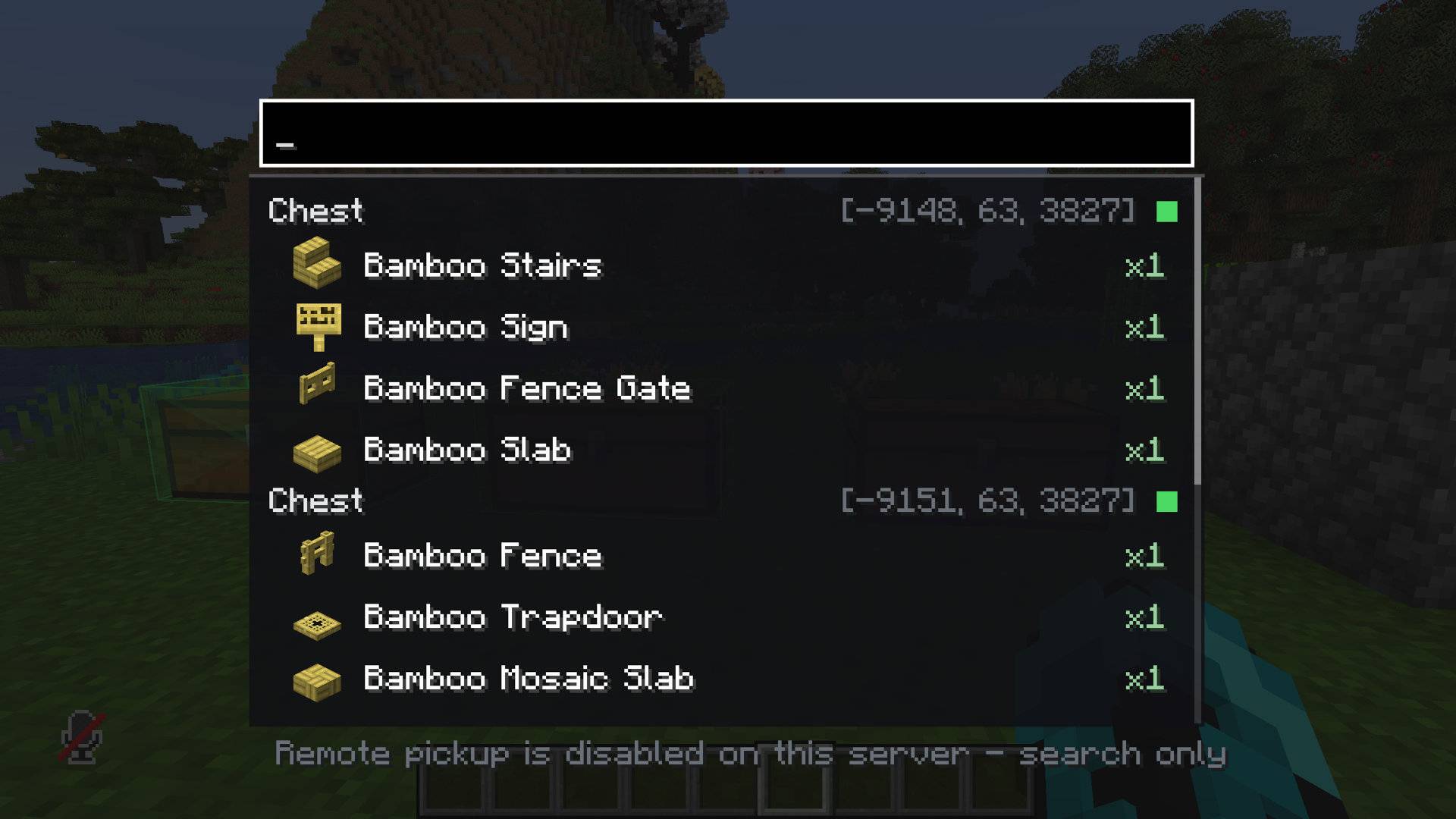
🔌 Compatibility
- Mod Loaders: Forge / NeoForge.
- Storage Mods: Supports vanilla chests, barrels, shulker boxes, and containers from popular mods like Iron Chests, Sophisticated Storage, and Expanded Storage.
- Multiplayer: Requires installation on both Client and Server to safely handle remote item transfers and sync command toggles.
💡 Can I use this in my modpack?
Yes! Feel free to include Just Enough Storage in any public or private modpack.
Project description from CurseForge.
Pick your setup
Just Enough Storage by Minecraft version and loader
Choose the version and loader you play, then open the matching release.
Minecraft version
1.21.10
1 loader buildMinecraft version
1.21.8
1 loader buildMinecraft version
1.21.5
1 loader buildMinecraft version
1.21.4
2 loader buildsMinecraft version
1.21.1
2 loader buildsMinecraft version
1.20.1
2 loader buildsMinecraft version
1.19.2
1 loader buildMinecraft version
1.18.2
1 loader buildCheck the dependencies, then try the file in a copied instance before changing a world you care about.
Recent files
Just Enough Storage versions and loaders
jes-fabric-1.21.4-1.0.0
jes-fabric-1.21.4-1.0.0.jar
29 Aug 2026
Client Source doesn’t say Server Source doesn’t say Dependencies No extras listed Listed on Release listing
Check the 1.21.4 · Fabric setup Fabric1.21.4 release
jes-fabric-1.20.1-1.0.0
jes-fabric-1.20.1-1.0.0.jar
29 Aug 2026
Client Source doesn’t say Server Source doesn’t say Dependencies No extras listed Listed on Release listing
Check the 1.20.1 · Fabric setup Fabric1.20.1 release
jes-fabric-1.21.1-1.0.0
jes-fabric-1.21.1-1.0.0.jar
29 Aug 2026
Client Source doesn’t say Server Source doesn’t say Dependencies No extras listed Listed on Release listing
Check the 1.21.1 · Fabric setup Fabric1.21.1 release
jes-forge-1.19.2-1.0.0
jes-forge-1.19.2-1.0.0.jar
29 Aug 2026
Client Source doesn’t say Server Source doesn’t say Dependencies No extras listed Listed on Release listing
Check the 1.19.2 · Forge setup Forge1.19.2 release
jes-forge-1.18.2-1.0.0
jes-forge-1.18.2-1.0.0.jar
29 Aug 2026
Client Source doesn’t say Server Source doesn’t say Dependencies No extras listed Listed on Release listing
Check the 1.18.2 · Forge setup Forge1.18.2 release
jes-neoforge-1.21.11-1.0.0
jes-neoforge-1.21.11-1.0.0.jar
29 Aug 2026
Client Source doesn’t say Server Source doesn’t say Dependencies No extras listed Listed on Release listing
Check the 1.21.11 · NeoForge setup NeoForge1.21.11 release
jes-neoforge-1.21.10-1.0.0
jes-neoforge-1.21.10-1.0.0.jar
29 Aug 2026
Client Source doesn’t say Server Source doesn’t say Dependencies No extras listed Listed on Release listing
Check the 1.21.10 · NeoForge setup NeoForge1.21.10 release
jes-neoforge-1.21.8-1.0.0
jes-neoforge-1.21.8-1.0.0.jar
29 Aug 2026
Client Source doesn’t say Server Source doesn’t say Dependencies No extras listed Listed on Release listing
Check the 1.21.8 · NeoForge setup 1.21.8NeoForge release
jes-neoforge-1.21.5-1.0.0
jes-neoforge-1.21.5-1.0.0.jar
29 Aug 2026
Client Source doesn’t say Server Source doesn’t say Dependencies No extras listed Listed on Release listing
Check the 1.21.5 · NeoForge setup 1.21.5NeoForge release
jes-neoforge-1.21.4-1.0.0
jes-neoforge-1.21.4-1.0.0.jar
29 Aug 2026
Client Source doesn’t say Server Source doesn’t say Dependencies No extras listed Listed on Release listing
Check the 1.21.4 · NeoForge setup 1.21.4NeoForge release
jes-neoforge-1.21.1-1.0.0
jes-neoforge-1.21.1-1.0.0+1.21.1-neoforge.jar
28 Aug 2026
Client Source doesn’t say Server Source doesn’t say Dependencies No extras listed Listed on Release listing
Check the 1.21.1 · NeoForge setup 1.21.1NeoForge release
jes-forge-1.20.1-1.0.0
jes-forge-1.20.1-1.0.0+1.20.1-forge.jar
28 Aug 2026
Client Source doesn’t say Server Source doesn’t say Dependencies No extras listed Listed on Release listing
Check the 1.20.1 · Forge setup 1.20.1Forge release
Looking for an older file? The official CurseForge project page is in Resources.
 mod
mod CurseForge · Minecraft
Give me FPS
Give Me FPS is a performance optimization mod made specifically for Create.
 mod
mod CurseForge · Minecraft
Gemstone Protection
Protect your lands using customizable gemstone wards with an intuitive GUI to manage players, flags, and visual borders.
 mod
mod CurseForge · Minecraft
MineCoin: Economy & Trade
Complete physical economy system with tiered coins, functional wallets, lottery scratch-offs, and player-to-player auctions.