Minecraft version
Back to mods 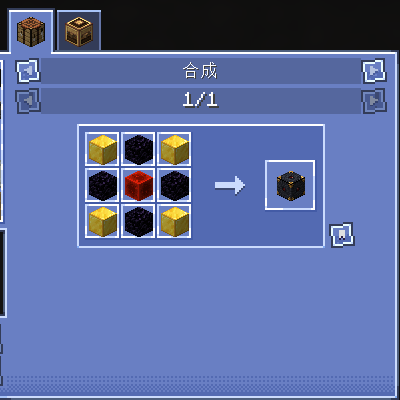
CurseForge · Minecraft mod
EasyCraftChest
A mod that provides infinite storage and allows one-click auto-crafting for most recipes.
Choose a version Pick your version below, then grab the matching file.
Quick answer
Which EasyCraftChest release should I use?
Latest stable file easycraftchest-neoforge-1.21.1-1.0.2.jar
Game version 1.21.1
Loader NeoForge
easycraftchest-neoforge-1.21.1-1.0.2.jar targets 1.21.1 with NeoForge. The project page does not say whether this file belongs on the client, dedicated server, or both. No extra mods listed for this file.
Where it goes
Is EasyCraftChest required on the client, server, or both?
The project page does not say whether this file belongs on the client, dedicated server, or both.
Client Source doesn’t say
Dedicated server Source doesn’t say
Loader for this release NeoForge
Required install it here Optional supported, not mandatory Not supported do not install here Source doesn’t say do not assume
The source does not explicitly classify this release as client-only or server-only.
What else does easycraftchest-neoforge-1.21.1-1.0.2.jar need?
easycraftchest-neoforge-1.21.1-1.0.2.jar. Change the file and its required mods may change too.
This file does not list any required mods. Do not add a library just because a different file uses it.
This file does not list any required or optional mods.
Before you install it
Add EasyCraftChest without breaking your instance.
Built for easycraftchest-neoforge-1.21.1-1.0.2.jar. Pick another file and the loader, install side or required mods may change.
- 01
Stick to this file
Use easycraftchest-neoforge-1.21.1-1.0.2.jar. It targets 1.21.1 with NeoForge; another release may have different loader, side or dependency requirements.
- 02
Bring the mods it needs
This file does not list any required mods. Do not add a library just because a different file uses it.
- 03
Put it on the correct side
The project page does not say whether this file belongs on the client, dedicated server, or both.
- 04
Pick the file you checked
Use the “Get this file” button beside easycraftchest-neoforge-1.21.1-1.0.2.jar. It opens that exact file at the source.
About this project
What does EasyCraftChest add?
A mod that provides infinite storage and allows one-click auto-crafting for most recipes.
Automatic Crafting(存储 · 一键合成)
English
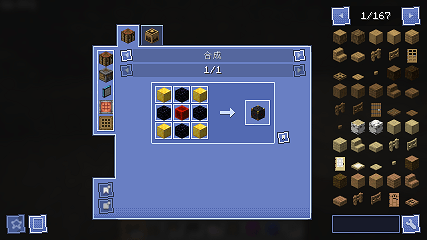
Automatic Crafting adds a one-stop storage block that makes managing large amounts of items simple and fast — and lets you craft directly from the materials already in storage.
What it gives players:
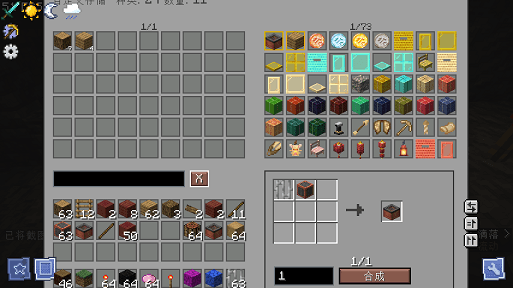
- Huge, tidy storage in one block: store practically unlimited quantities of any item in a single block — no more walls of chests.
- Instant search (with Pinyin): type a name, a keyword, or even Chinese Pinyin to find any item in a flash, no matter how many you've stored.
- Clean paginated browsing: a tidy 9×6 grid with wheel-scroll pagination; press A (rebindable) on any item to pin it to the top.
- Quick deposit & withdrawal: left-click to take, right-click for one, Shift-click to stack, or drag — fast and familiar.
- Recipes right in the storage UI: click any item, or any ingredient inside the recipe grid, to instantly see how it's crafted — no separate screens.
- Recipe history: the 6 most recently viewed recipes are remembered on the right; one click jumps you straight back.
- One-click auto-crafting (workbench only): craft the final item from stored materials, auto-crafting any intermediate sub-components first; right-click any item to synthesize quickly with your chosen count.
- Clear feedback: when materials are missing, the GUI shows exactly what — and how many; the message clears itself after 3 seconds.
- Visual shortcuts: pinned items get a blue border, synthesized items a gold border, so what you use often stands out.
- Remembers your workflow: search, page, synthesis count, last item, and recipe history are all kept between visits.
- Fast & stable: recipe resolution is indexed and protected by a node budget + timeout, so complex recipes (like dyeing) never freeze the server.
- Fully configurable & localized: a TOML config tunes performance; English and Chinese are built in.
- Balanced: furnace/blasting/smoking/campfire, stonecutting, and smithing recipes can be viewed, but are not executed by one-click crafting — no fuel-free processing.
In short: find, store, view recipes, and craft — all in one place, so you spend your time building and exploring instead of rummaging through chests.
中文
「自动合成」 提供一款“一站式存储方块”:把海量物品集中管理得更简单、更省时,而且能直接用存储里的材料一键合成。
它能带来的方便:
- 一个方块装下海量物资: 单方块近乎无限的虚拟容量,告别满屋子的箱子阵列,基地更整洁。
- 即时搜索(支持拼音): 输入中文、关键词、甚至中文拼音都能立刻定位物品,存再多种类也不怕找不到。
- 清爽的分页浏览: 9×6 网格 + 滚轮翻页;按 A 键(可改绑)即可把常用物品置顶到最前。
- 取放更快捷: 左键取出、右键取 1 个、Shift 一键堆叠、拖拽存取,顺手不卡手。
- 界面内直接看配方: 点目录任意物品、或配方九宫格里的任意原料,立刻显示它的配方,不用切界面。
- 配方历史记录: 最近查看过的 6 个配方记住在右侧,一键切回,反复查看不重复找。
- 一键自动合成(仅工作台): 材料都在存储里就能直接合成,需要中间产物时会先自动合成中间产物再出成品;右键任意物品可按你设定的次数快捷合成。
- 失败提示清晰: 缺什么、缺多少直接显示在界面里,并带目标名称;3 秒后自动复原,不用翻聊天栏。
- 视觉快捷键: 置顶物品亮蓝框、合成过物品金框,常用的东西一眼就能找到。
- 记住你的习惯: 搜索、页码、合成次数、上次目标、配方历史都会在你重开容器时自动恢复。
- 快速又稳定: 配方解析已做索引优化,并带节点预算 + 超时保护,复杂配方(如染色、地毯)也不会卡死服务器。
- 可配置、全本地化: TOML 配置可调性能参数(超时/节点预算等);中英文语言包内置。
- 更平衡: 熔炉/高炉/烟熏/篝火、切石机、锻造台等配方可以查看,但不会被一键合成直接执行,避免不耗燃料等破坏平衡的情况。
总结: 找物品、存物品、看配方、做合成,串成一条顺手的流程——让你把时间花在建造、探索和玩法本身,而不是反复翻箱子和整理物品。
Project description from CurseForge.
Pick your setup
EasyCraftChest by Minecraft version and loader
Choose the version and loader you play, then open the matching release.
Check the dependencies, then try the file in a copied instance before changing a world you care about.
Recent files
EasyCraftChest versions and loaders
easycraftchest-neoforge-1.21.1-1.0.2.jar
6 Sept 2026
Client Source doesn’t say Server Source doesn’t say Dependencies No extras listed Listed on Release listing
Check the 1.21.1 · NeoForge setup 1.21.1NeoForge release
easycraftchest-neoforge-1.21.1-1.0.1.jar
5 Sept 2026
Client Source doesn’t say Server Source doesn’t say Dependencies No extras listed Listed on Release listing
Check the 1.21.1 · NeoForge setup 1.21.1NeoForge release
Looking for an older file? The official CurseForge project page is in Resources.
 mod
mod CurseForge + Modrinth · Minecraft
Cobblemon: Charms
A progression-based charm system for Cobblemon. Catch Pokémon to unlock type-specific charms that influence spawns around you. Complete your Pokédex to earn the Shiny Charm, and combine charms into a single Multi-Charm. Fully configurable.
 mod
mod CurseForge + Modrinth · Minecraft
Knight Lib
A library that serves as a bridge between mods.
 mod
mod Modrinth · Minecraft
Simple AutoPickup
Instantly collect items from mined blocks directly into your inventory with the AutoPickup mod. Mob loot & more configurable!