Back to mods
TeamPins - FTB Teams Map Integration project artwork

CurseForge · Minecraft mod

TeamPins - FTB Teams Map Integration

Sync FTB Teams pins and claims instantly across JourneyMap and Xaero's maps, with owner and claim-age details.

Choose a version Pick your version below, then grab the matching file.

Quick answer

Which TeamPins - FTB Teams Map Integration release should I use?

Updated 2 months ago
Latest stable file TeamPins 2.0.0 — NeoForge 1.21.1
Game version 1.21.1
Loader NeoForge

TeamPins - FTB Teams Map Integration TeamPins 2.0.0 — NeoForge 1.21.1 targets 1.21.1 with NeoForge. The project page does not say whether this file belongs on the client, dedicated server, or both. All 3 required mods have matching files.

Where it goes

Is TeamPins - FTB Teams Map Integration required on the client, server, or both?

The project page does not say whether this file belongs on the client, dedicated server, or both.

Client Source doesn’t say
Dedicated server Source doesn’t say
Loader for this release NeoForge
Required install it here Optional supported, not mandatory Not supported do not install here Source doesn’t say do not assume

The source does not explicitly classify this release as client-only or server-only.

What else does TeamPins - FTB Teams Map Integration TeamPins 2.0.0 — NeoForge 1.21.1 need?

TeamPins 2.0.0 — NeoForge 1.21.1. Change the file and its required mods may change too.

All 3 required mods have matching files

Install FTB Teams (NeoForge), Architectury API, FTB Library (NeoForge) first. We found matching files for this game-version and loader setup. 8 come through another mod in the chain.

7 listed on this file 8 pulled in by those mods
FTB Chunks (NeoForge) Optional for TeamPins - FTB Teams Map Integration TeamPins 2.0.0 — NeoForge 1.21.1
optional
Matching file found Matched file: [NEOFORGE][1.21.1] FTB Chunks 2101.1.24
FTB Teams (NeoForge) Needed by TeamPins - FTB Teams Map Integration TeamPins 2.0.0 — NeoForge 1.21.1
required
Matching file found Matched file: [NEOFORGE][1.21.1] FTB Teams 2101.1.12
Architectury API Needed by TeamPins - FTB Teams Map Integration TeamPins 2.0.0 — NeoForge 1.21.1
required
Matching file found Matched file: [NeoForge 1.21] v13.0.12
Xaero's Minimap Optional for TeamPins - FTB Teams Map Integration TeamPins 2.0.0 — NeoForge 1.21.1
optional
Matching file found Matched file: xaerominimap-neoforge-1.21.1-26.6.0.jar
JourneyMap Optional for TeamPins - FTB Teams Map Integration TeamPins 2.0.0 — NeoForge 1.21.1
optional
Matching file found Matched file: journeymap-1.21.1-6.0.10+neoforge
FTB Library (NeoForge) Needed by TeamPins - FTB Teams Map Integration TeamPins 2.0.0 — NeoForge 1.21.1
required
Matching file found Matched file: [NEOFORGE][1.21.1] FTB Library 2101.1.40
Xaero's World Map Optional for TeamPins - FTB Teams Map Integration TeamPins 2.0.0 — NeoForge 1.21.1
optional
Matching file found Matched file: xaeroworldmap-neoforge-1.21.1-1.47.0.jar
FTB Ranks (NeoForge) Needed by FTB Chunks (NeoForge)
pulled in
Matching file found Matched file: [NEOFORGE][1.21.1] FTB Ranks 2101.1.5
Open Parties and Claims Needed by Xaero's Minimap
pulled in
Matching file found Matched file: open-parties-and-claims-neoforge-1.21.1-0.33.0.jar
Just Enough Items (JEI) Needed by FTB Library (NeoForge)
pulled in
Matching file found Matched file: 19.76.1.481 for NeoForge 1.21.1
MezzConfigGUI Needed by Just Enough Items (JEI)
pulled in
Matching file found Matched file: MezzConfig GUI mc1.21.1-0.7.1 for NeoForge
MezzConfig Needed by Just Enough Items (JEI)
pulled in
Matching file found Matched file: MezzConfig 0.7.1 for NeoForge 1.21.1

8 extra mods were pulled in by other dependencies. Indented rows show who needs each one. We only count dependency files that match this setup. A file for another loader does not fill the gap.

Before you install it

Add TeamPins - FTB Teams Map Integration without breaking your instance.

Built for TeamPins - FTB Teams Map Integration TeamPins 2.0.0 — NeoForge 1.21.1. Pick another file and the loader, install side or required mods may change.

  1. 01

    Stick to this file

    Use TeamPins 2.0.0 — NeoForge 1.21.1. It targets 1.21.1 with NeoForge; another release may have different loader, side or dependency requirements.

  2. 02

    Bring the mods it needs

    Install FTB Teams (NeoForge), Architectury API, FTB Library (NeoForge) first. We found matching files for this game-version and loader setup. 8 come through another mod in the chain.

  3. 03

    Put it on the correct side

    The project page does not say whether this file belongs on the client, dedicated server, or both.

  4. 04

    Pick the file you checked

    Use the “Get this file” button beside TeamPins 2.0.0 — NeoForge 1.21.1. It opens that exact file at the source.

About this project

What does TeamPins - FTB Teams Map Integration add?

TeamPins

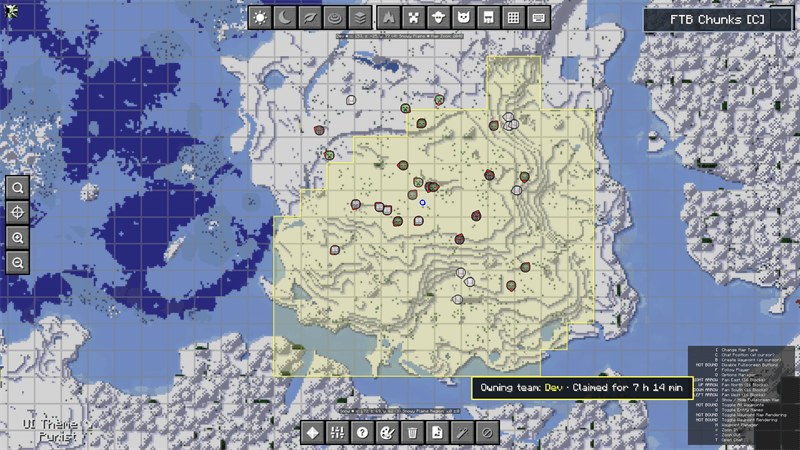
TeamPins connects FTB Teams and FTB Chunks with JourneyMap and Xaero's maps.

Share persistent pins with your entire FTB team, display claimed territories directly on your preferred map, and keep team colors and claim changes synchronized instantly.
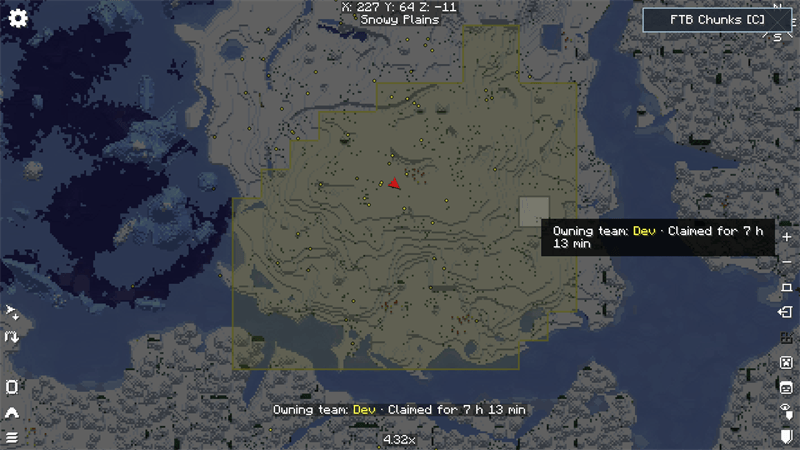
Screenshots

JourneyMap

image

Xaero's World Map

image

Features

  • Shared and persistent map pins for every member of an FTB team
  • Full support for both JourneyMap and Xaero's maps
  • FTB Chunks territories displayed as clean, continuous areas
  • Instant claim, unclaim, and team-color updates
  • Claim information showing the owning team and claim age
  • Force-loaded chunks displayed with a stronger overlay
  • Live teammates and mutual allies on JourneyMap
  • Direct FTB Chunks button on the JourneyMap and Xaero fullscreen maps
  • Press C from either supported map to open the FTB Chunks claim manager
  • Server-side team permissions for creating and removing pins
  • Lightweight integration with no custom blocks, items, models, or textures

Supported Maps

TeamPins supports:

  • JourneyMap 6.0.x
  • Xaero's Minimap
  • Xaero's World Map

Players only need to install the map integration they want to use.

Commands

  • /teampins add <name> — Create a team pin at your current position
  • /teampins list — List every pin owned by your team
  • /teampins remove <uuid> — Remove one pin
  • /teampins clear — Remove every pin owned by your team
  • /teampins sync — Request an immediate synchronization

Pin creation and removal permissions are validated by the server. Team owners and officers can manage their team's shared pins.

Requirements

  • Minecraft 1.21.1
  • NeoForge
  • FTB Teams
  • FTB Library
  • Architectury API

Optional Integrations

  • FTB Chunks — Required for claim and force-loaded chunk overlays
  • JourneyMap — JourneyMap integration
  • Xaero's Minimap — Shared pins and player tracking
  • Xaero's World Map — Fullscreen Xaero map integration

TeamPins can be installed on a server without JourneyMap or Xaero. Each player can use their preferred supported map.

Compatibility

TeamPins automatically prevents duplicate claim overlays or player markers when compatible integration mods are already installed.

Claim privacy is inherited from FTB Chunks. TeamPins only displays information that FTB Chunks has already synchronized with the player.

Installation

  1. Install NeoForge for Minecraft 1.21.1.
  2. Install TeamPins and its required dependencies.
  3. Install JourneyMap or Xaero's maps.
  4. Install FTB Chunks if you want claimed territories to appear on the maps.
  5. Install TeamPins on both the server and participating clients.

License

TeamPins is released under the MIT License.

TeamPins is an unofficial community addon and is not affiliated with Feed The Beast, TeamJM, or Xaero.

Project description from CurseForge.

Pick your setup

TeamPins - FTB Teams Map Integration by Minecraft version and loader

Choose the version and loader you play, then open the matching release.

1 available setups

Check the dependencies, then try the file in a copied instance before changing a world you care about.

Recent files

TeamPins - FTB Teams Map Integration versions and loaders

2 of 2 releases match

Looking for an older file? The official CurseForge project page is in Resources.