Minecraft version
Back to mods 
CurseForge · Minecraft mod
Voxel Phone
Take Pictures. Send Messages. Build Apps. Make it Yours!
Choose a version Pick your version below, then grab the matching file.
Quick answer
Which Voxel Phone release should I use?
Latest stable file voxelphone-0.2.0.jar
Game version 1.21.1
Loader NeoForge
Voxel Phone voxelphone-0.2.0.jar targets 1.21.1 with NeoForge. The project page does not say whether this file belongs on the client, dedicated server, or both. No extra mods listed for this file.
Where it goes
Is Voxel Phone required on the client, server, or both?
The project page does not say whether this file belongs on the client, dedicated server, or both.
Client Source doesn’t say
Dedicated server Source doesn’t say
Loader for this release NeoForge
Required install it here Optional supported, not mandatory Not supported do not install here Source doesn’t say do not assume
The source does not explicitly classify this release as client-only or server-only.
What else does Voxel Phone voxelphone-0.2.0.jar need?
voxelphone-0.2.0.jar. Change the file and its required mods may change too.
This file does not list any required mods. Do not add a library just because a different file uses it.
This file does not list any required or optional mods.
Before you install it
Add Voxel Phone without breaking your instance.
Built for Voxel Phone voxelphone-0.2.0.jar. Pick another file and the loader, install side or required mods may change.
- 01
Stick to this file
Use voxelphone-0.2.0.jar. It targets 1.21.1 with NeoForge; another release may have different loader, side or dependency requirements.
- 02
Bring the mods it needs
This file does not list any required mods. Do not add a library just because a different file uses it.
- 03
Put it on the correct side
The project page does not say whether this file belongs on the client, dedicated server, or both.
- 04
Pick the file you checked
Use the “Get this file” button beside voxelphone-0.2.0.jar. It opens that exact file at the source.
About this project
What does Voxel Phone add?
Take pictures. Send messages. Build apps. Make it yours.
MOD LICENCE:
You are all allowed to use these mods as well as put them in your packs. We are still sorting out a licence and getting things sorted.
PS. My programmer friend reminded me that "All Right Reserved" means "No one can put in packs".
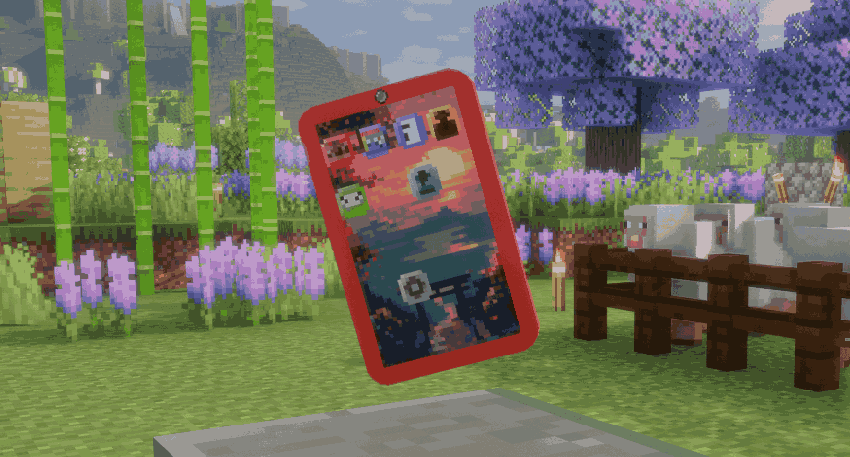
VoxelPhone adds a fully functional, customizable smartphone to Minecraft — built for players, multiplayer communities, server administrators, and modpack developers alike.
Take photographs and turn them into physical map art. Text your friends even when they're offline. Create group conversations. Keep notes and to-do lists. Customize your phone. Or build entirely new server-specific apps using KubeJS.
VoxelPhone isn't just another decorative tech item: It's a platform you can actually use.
Getting and Using your first Voxel Phone
When you log into a world either for the first time after installing Voxel Phone, you'll be given you very own voxel phone complete with a six digit phone number. Simply right click with it in your hand and the phone interface will open. If you'd like a second one or didn't get your first one for some reason (this has not been an issue in our play testing) and have sufficient admin rights to run the command, you can get one via "/voxelphone give {playername}".
Each Voxel Phone has it's own phone number, storage, and registered owner (the person to whom that Voxel Phone was given). This means it's completely possible for you to throw your phone to a friend so they can scroll through your gallery and see all the photos you've taken (though you could also just text them the photos!). Each Voxel Phone can be dyed one of over 5 million color combinations which will update both the physical phone item itself (as seen in player hand, item frames, inventories, or dropped into the world) as well as the in the bezel of the phone interface.
Additionally each phone item will be updated to show the screen as YOU customized it by rearranging the icons, changing backgrounds, etc. This might be a bit of brag, but I legimately don't know of a single other mod that allows this level of customization -- and there may be more on the way!
I've got this crazy idea for an in-game drag-and-drop image editor where pack developers and server owners can provide their players with unique "stickers" and the players can place them whereever they want on the back of their phones. Each phone back will then be sync'd as part of that phone data unique data.
Take Photos — and Put Them in Your World
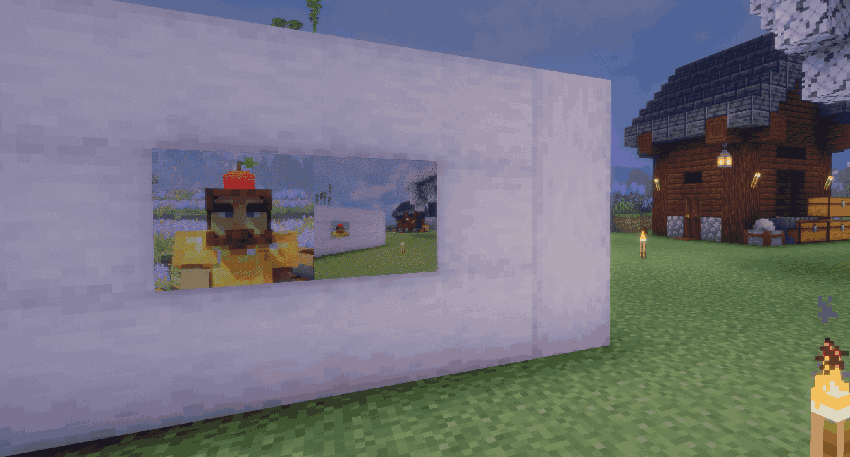
Point your VoxelPhone camera at something worth remembering and snap a picture. Apply filters to give your photos a unique touch. Then print photographs directly onto Minecraft maps, allowing you to place them into item frames and use your pictures as physical decorations throughout the world. (A note from Nerdi: Currently my filter preview is broken because I decided shader support was more important. The filters still work, but you don't get to see them until you go to the gallery app. Sorry about that.)
Document your builds. Make family photos for your SMP. Photograph events. Create galleries. Hang vacation pictures on your base walls.
If you can photograph it, you can display it.
Text Players — Even While They're Offline
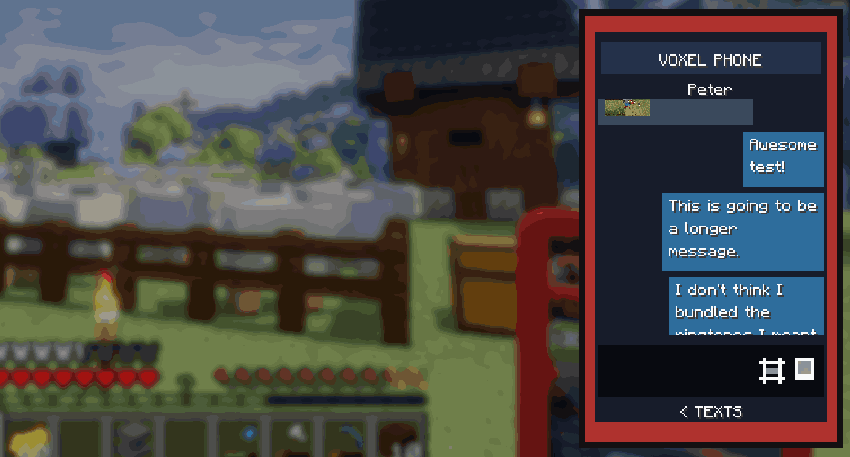
Minecraft chat disappears: VoxelPhone messages don't.
Send private text messages directly to another player and they'll remain available whether that player is currently online or not. When they return, their conversations are waiting for them.
VoxelPhone also supports group messaging, making it useful for factions, businesses, towns, build teams, roleplay groups, or simply keeping your friends in one conversation.
And when you don't want someone contacting you, VoxelPhone includes a robust player-blocking system.
Built with Safety and Community in Mind
Persistent private messaging introduces responsibilities that ordinary Minecraft chat doesn't.
VoxelPhone was designed accordingly. Ill-intentioned players are unable to edit or replace photos, notes, or data client-side and send it to another player as the server source will always remain authorative. The only reason clients get a copy is for caching.
Server administrators can maintain and review message logs when necessary, giving multiplayer communities tools to investigate harassment, abuse, or other rule violations rather than creating an invisible communication channel administrators cannot moderate.
Players get useful private communication – Server operators retain the tools needed to keep their communities safe.
Notes & To-Do Lists
Sometimes you don't need another chest, waypoint, or book: You just need to remember what you were doing.
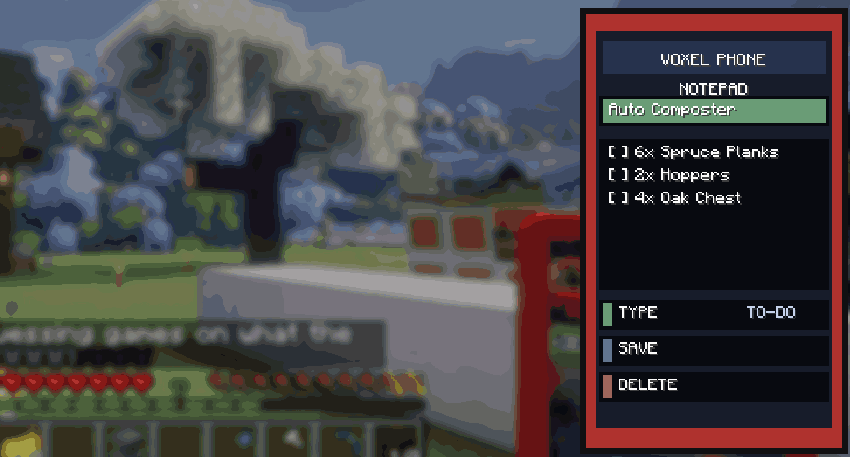
- VoxelPhone includes a detailed Notes app for keeping track of things like:
- Build materials
- Coordinates
- Shopping lists
- Project plans
- Things you promised another player
- Adventure notes
- Server information
- Your increasingly alarming number of unfinished projects
Your phone becomes a little piece of persistent organization that travels with you.
Endlessly customizable
No two VoxelPhones need to look alike. Mix and match dyes to create more than five million possible color combinations your VoxelPhone can have. Rearrange your apps, delete ones you don’t like, and install new ones! But that’s not the end of it: VoxelPhone currently includes 12 built-in wallpapers, plus the ability to turn your own camera photographs into custom backgrounds -- AND ALL OF THOSE CHOICES REFLECT ON THE ITEM YOU ACTUALLY HOLD IN YOUR HAND. Other people can see your choices and go "Woah! Cool Phone!" Or whatever people say these days.
Customization possibilities may expand even further with future updates if time, resources, and public interest all allow.
And Then There Are Apps.
This is where VoxelPhone becomes something different.
Server owners and modpack developers can create custom VoxelPhone applications using KubeJS.
An app doesn't have to be something built directly into VoxelPhone.
It can become a convenient front end for practically anything you want players to access.
For example, a modpack could create:
Rules: Open a custom GUI containing the server rules.
Banking: Launch the banking interface from another mod such as Create: Numismatics.
Transit: Show destinations, schedules, or transportation controls.
Market: Open your server's economy or trading interface.
Guide: Create an interactive modpack manual.
Rewards: Access voting, daily rewards, quests, or player perks.
Company Apps: Build interfaces specifically for factions, towns, roleplay organizations, or businesses.
Instead of forcing players to remember another command… give them an app!
VoxelPhone provides the phone: You decide what belongs on it. I personally intend to use VoxelPhone to clean up my modpack’s userinterface by moving things like FTB Claims and FTB Quests off of the player inventory screen and setting them up as apps. You can ship your modpack with fewer keybind overlaps by making things like JourneyMap launch with an icon from the VoxelPhone instead of the default “J” keybind.
Oh, and if there’s ever a discrepancy between the way a modpack is built for singleplayer, and the way a server is configured for multiplayer; the server configuration wins out – meaning you can ensure continuity across your community.
Included Apps
Camera: Take photographs from inside Minecraft and preserve what you see. The VoxelPhone has both rear and front facing cameras, as well as filters!
Gallery: Browse the photographs you've taken, print them to maps, or set them as your phone background.
Text: Persistent player-to-player and group conversations, including offline messaging.
Contacts: Keep your multiplayer social world organized and block players you don’t want to hear from.
Notes: Detailed notes and task lists that stay with your character.
Settings: Change your phone's background, ringtone, see ownership information, and see the mod credits (please ☺)
App Store: If custom apps are on your server (or you delete any of the default apps), you'll find them here!
Made for Modpacks
VoxelPhone can become the front door to your modpack.
Minecraft modpacks frequently accumulate commands, keybinds, guide books, menus, and interfaces belonging to completely unrelated mods.
VoxelPhone gives pack developers another option:
Put those experiences somewhere players intuitively know how to find them.
On their phone.
Through KubeJS integration, custom apps can perform server-specific actions or connect players with systems provided by other mods without requiring VoxelPhone itself to know anything about those mods. If you're a modpack developer who has built out themes and apps you want to ship with your pack, all you have to do is setup a single phone and run this command:
/voxelphone config save default
That's it. From that point on, every player in every world gets a phone who's starting configuration is exactly what you've setup. They'll still be able to dye it, change apps, backgrounds, etc (unless you lock down the config files) but that means each phone can look completely different depending on the server or modpack using it.
Built for Minecraft
VoxelPhone's interface and models are deliberately designed around Minecraft's visual language.
Pixel-art icons.
Block-friendly geometry.
In-world phone models.
Minecraft-native photography through maps.
It should feel like something that belongs in the player's hand—not like a web browser floating over Minecraft.
What VoxelPhone Is Not
VoxelPhone is not finished. It is under active development.
Server Admin Commands
Whether we like it or not, being a server admin means shouldering some responsibility. Did someone lose their phone? Run "/voxelphone list" and click theirs to clone it. This will disable whatever copy may or may not still be in the world and allow them to keep all their photos, message history, and phone number.
Likewise, if you suspect people are using voxelphone to violate your community guidelines (or potentialy the law) your server will maintain text message logs indefinitely and you can monitor live texts with the "/voxelphone text monitor" command. Listen, I don't like it anymore than you do, but whether or not this capability gets used is at the descretion of serer staff, and no one wants to see their server (or their mod) used to harm anyone else.
Project description from CurseForge.
Pick your setup
Voxel Phone by Minecraft version and loader
Choose the version and loader you play, then open the matching release.
Check the dependencies, then try the file in a copied instance before changing a world you care about.
Recent files
Voxel Phone versions and loaders
voxelphone-0.2.0.jar
26 Sept 2026
Client Source doesn’t say Server Source doesn’t say Dependencies No extras listed Listed on Release listing
Check the 1.21.1 · NeoForge setup 1.21.1NeoForge release
voxelphone-0.1.12.jar
12 Sept 2026
Client Source doesn’t say Server Source doesn’t say Dependencies No extras listed Listed on Release listing
Check the 1.21.1 · NeoForge setup 1.21.1NeoForge release
voxelphone-0.1.11.jar
1 Sept 2026
Client Source doesn’t say Server Source doesn’t say Dependencies No extras listed Listed on Release listing
Check the 1.21.1 · NeoForge setup 1.21.1NeoForge release
voxelphone-0.1.4.jar
31 Aug 2026
Client Source doesn’t say Server Source doesn’t say Dependencies No extras listed Listed on Release listing
Check the 1.21.1 · NeoForge setup 1.21.1NeoForge release
voxelphone-0.1.3.jar
31 Aug 2026
Client Source doesn’t say Server Source doesn’t say Dependencies No extras listed Listed on Release listing
Check the 1.21.1 · NeoForge setup 1.21.1NeoForge release
Looking for an older file? The official CurseForge project page is in Resources.
 mod
mod CurseForge + Modrinth · Minecraft
Trash Cans
Trash Cans adds trash cans which can be used to void items, liquids, and energy!
 mod
mod CurseForge + Modrinth · Minecraft
Packed Up (Backpacks)
Packed Up allows you to pack up all your things into new amazing Backpacks!
 mod
mod CurseForge + Modrinth · Minecraft
Quick Skin
Sick of wasting time with Minecraft’s slow launcher just to change your skin? Quick Skin lets you swap skins instantly even on “offline” servers and gives you access to every official Minecraft cape.