Minecraft version
Back to mods 
CurseForge · Minecraft mod
ItemsBanned
A server administration mod for Minecraft Forge that lets operators ban, manage, and restrict specific vanilla and modded items.
Choose a version Pick your version below, then grab the matching file.
Quick answer
Which ItemsBanned release should I use?
Latest stable file itemsbanned-1.1.1-forge-1.20.1.jar
Game version 1.20.1
Loader Forge
itemsbanned-1.1.1-forge-1.20.1.jar targets 1.20.1 with Forge. The project page does not say whether this file belongs on the client, dedicated server, or both. No extra mods listed for this file.
Where it goes
Is ItemsBanned required on the client, server, or both?
The project page does not say whether this file belongs on the client, dedicated server, or both.
Client Source doesn’t say
Dedicated server Source doesn’t say
Loader for this release Forge
Required install it here Optional supported, not mandatory Not supported do not install here Source doesn’t say do not assume
The source does not explicitly classify this release as client-only or server-only.
What else does itemsbanned-1.1.1-forge-1.20.1.jar need?
itemsbanned-1.1.1-forge-1.20.1.jar. Change the file and its required mods may change too.
This file does not list any required mods. Do not add a library just because a different file uses it.
This file does not list any required or optional mods.
Before you install it
Add ItemsBanned without breaking your instance.
Built for itemsbanned-1.1.1-forge-1.20.1.jar. Pick another file and the loader, install side or required mods may change.
- 01
Stick to this file
Use itemsbanned-1.1.1-forge-1.20.1.jar. It targets 1.20.1 with Forge; another release may have different loader, side or dependency requirements.
- 02
Bring the mods it needs
This file does not list any required mods. Do not add a library just because a different file uses it.
- 03
Put it on the correct side
The project page does not say whether this file belongs on the client, dedicated server, or both.
- 04
Pick the file you checked
Use the “Get this file” button beside itemsbanned-1.1.1-forge-1.20.1.jar. It opens that exact file at the source.
About this project
What does ItemsBanned add?
🚫 ItemsBanned
Control which vanilla and modded items players can obtain on your Minecraft Forge server.
ItemsBanned is an item-restriction and moderation mod for Minecraft Forge 1.20.1. Ban specific items by their registry IDs, manage the list in-game or with commands, and optionally allow server operators to bypass restrictions.
✨ Features
- Vanilla and modded item support: Restrict individual items using their exact registry IDs.
- In-game management: Ban and unban items from a graphical interface.
- Easy pagination: Browse up to 54 banned items per page with first, previous, next, and last navigation buttons.
- Safe GUI controls: Mouse scrolling, middle-clicking, Shift-clicking and dragging do not change the ban list.
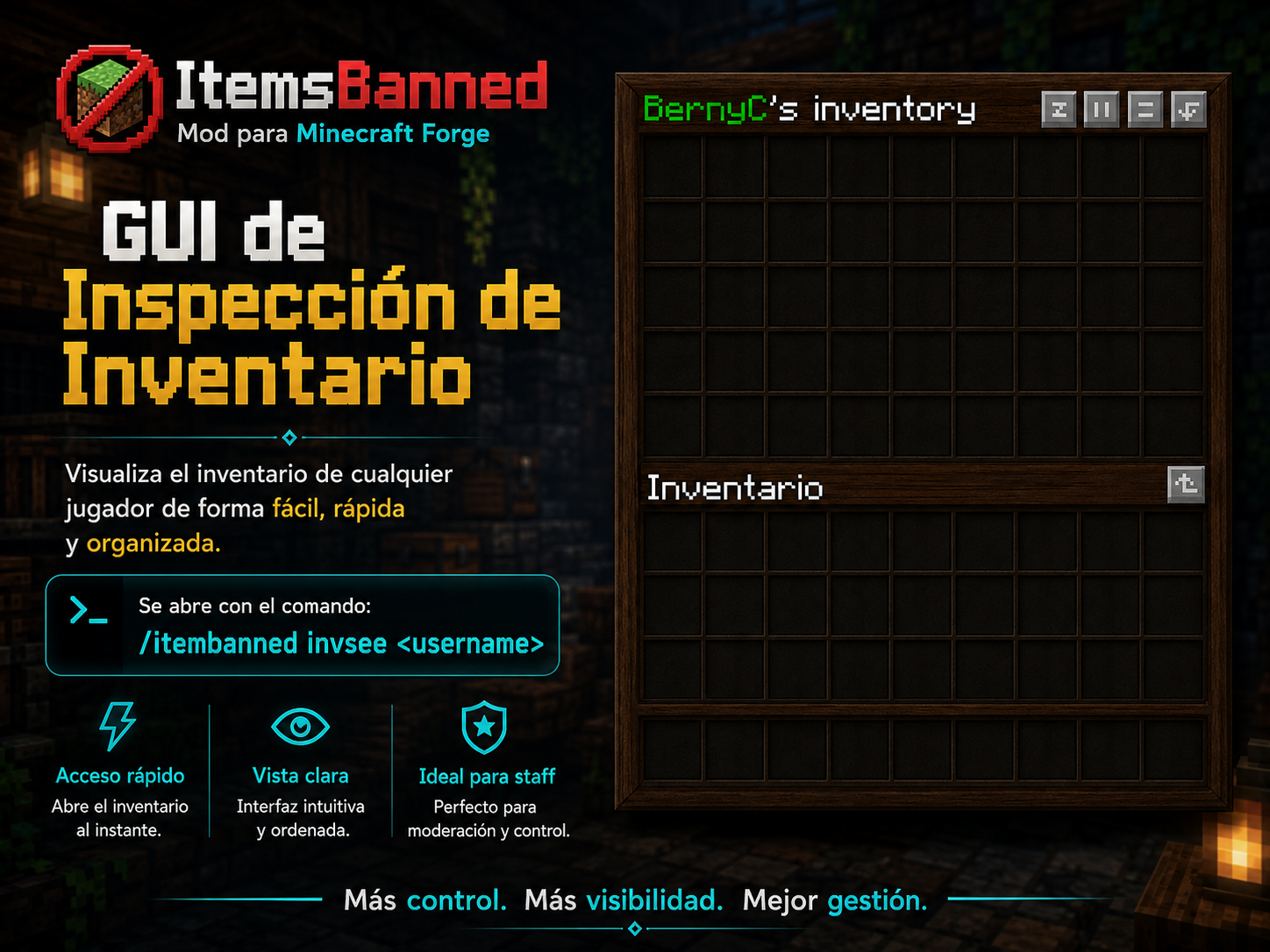
- Player inventory inspection: View an online player's inventory and remove banned stacks when needed.
- Server-side enforcement: Handle banned items during player pickup and standard inventory/container interactions, with additional checks for certain block drops.
- Persistent configuration: Changes are saved to a JSON file and can be reloaded without restarting the server.
- Optional OP bypass: Decide whether operators are exempt from item restrictions.
🖥️ Administration Interface
Open the administration menu with:
/itemsbanned

Controls
| Action | Result |
|---|---|
| Left-click an item in your inventory | Ban that item type |
| Right-click an item in the banned-items list | Unban that item type |
| First / Previous / Next / Last | Move between pages |
| Scroll / middle-click / Shift-click / drag | No ban or unban action |
The upper area displays currently banned items with their icons. The lower area shows your own inventory so you can select items to ban. Selecting an item does not consume or move it. Navigation buttons are disabled when there are no more pages in that direction.
🚫 Ban Specific Items
ItemsBanned uses exact registry IDs, including those added by other mods.
Examples:
minecraft:elytra
minecraft:diamond_ore
alexscaves:nuclear_bomb
Banning minecraft:diamond_ore does not also ban minecraft:diamond. Banning one item from a mod does not ban every item from that mod.
🛠️ Commands
All commands require a server operator.
| Command | Description |
|---|---|
/itemsbanned |
Open the administration interface |
/itemsbanned ban <item_id> |
Ban a specific item |
/itemsbanned unban <item_id> |
Unban a specific item |
/itemsbanned list |
List banned items in chat |
/itemsbanned reload |
Reload the configuration file |
/itemsbanned invsee <player> |
Open an online player's inventory |
/itemsbanned remove <player> |
Remove banned item stacks from an online player's inventory |
The remove command reports the number of item stacks removed, not the total number of individual items.
🛡️ How Restrictions Work
For players without bypass permission, ItemsBanned checks restricted items in these situations:
- Ground items: Picking up a banned dropped item is canceled and the dropped item is removed.
- Inventories and containers: Banned items encountered through standard Minecraft container-click interactions are removed, including relevant hotbar/offhand swaps.
- Block drops: Banned item entities spawned near a recently broken block can be prevented from appearing.
Note: This is not a full scan of every stored item in all chests, machines or modded inventories. Compatibility with modded containers depends on their use of standard Minecraft inventory interactions. The mod does not disable crafting recipes or automatically ban all items from a mod.
⚙️ Configuration
Configuration file:
config/itemsbanned/banned-items.json
{
  "allowOpsToUseBannedItems": true,
  "bannedItems": [
    "minecraft:elytra",
    "alexscaves:nuclear_bomb"
  ]
}
allowOpsToUseBannedItems: true— Operators can use banned items.allowOpsToUseBannedItems: false— Operators are restricted too, but keep access to administration commands.bannedItems— Exact item IDs to restrict.
GUI and command changes are saved automatically. After editing the JSON manually, run /itemsbanned reload.
📥 Installation & Requirements
- Use Minecraft 1.20.1, Forge 47.x, and Java 17.
- Place the compiled ItemsBanned
.jarinside the server'smods/folder. - Install the mod on clients that need to use its graphical administration interfaces.
- Start the game/server and configure your restrictions with
/itemsbanned.
👨💻 Author & License
Developed by Berxx
License: All Rights Reserved
Copyright © Berxx. Redistribution, resale, unauthorized modified releases, and removal of author attribution are not permitted without explicit permission from the author.
Minecraft is a trademark of Mojang Studios. ItemsBanned is an independent project and is not affiliated with or endorsed by Mojang Studios or Microsoft.
Project description from CurseForge.
Pick your setup
ItemsBanned by Minecraft version and loader
Choose the version and loader you play, then open the matching release.
Check the dependencies, then try the file in a copied instance before changing a world you care about.
Recent files
ItemsBanned versions and loaders
itemsbanned-1.1.1-forge-1.20.1.jar
21 Nov 2026
Client Source doesn’t say Server Source doesn’t say Dependencies No extras listed Listed on Release listing
Check the 1.20.1 · Forge setup 1.20.1Forge release
itemsbanned-1.1.0-forge-1.20.1.jar
2 Sept 2026
Client Source doesn’t say Server Source doesn’t say Dependencies No extras listed Listed on Release listing
Check the 1.20.1 · Forge setup 1.20.1Forge release
Looking for an older file? The official CurseForge project page is in Resources.
 mod
CurseForge + Modrinth · Minecraft
Betweenlands' Tinker
An addon that integrates The Betweenlands’ materials and mechanics into Tinkers’ Construct, adding new tool materials, traits, and smeltery support while respecting the dimension’s corrosion and weakness systems.
 mod
CurseForge · Minecraft
Companion Codex - Vault Hunters Addon
Run Vault's like Iskall😁- Create companion parties
 mod
CurseForge · Minecraft
ArbCraft: Leveling
Every Level Makes you Stronger!