Sodium Optional for Gleam-1.21.1-1.1.0.0-NeoForge
optionalMatching file found Matched file: mc1.21.1-0.8.13-neoforge

CurseForge · Minecraft mod
Gleam is a powerful and very customizable colored lights mod that can render many lights at very high distances with an incredible amount of optimization compared to others of its kind.
Quick answer
Gleam-1.21.1-1.1.0.0-NeoForge targets 1.21.1 with NeoForge. The project page does not say whether this file belongs on the client, dedicated server, or both. No extra mods listed for this file.
Where it goes
The project page does not say whether this file belongs on the client, dedicated server, or both.
The source does not explicitly classify this release as client-only or server-only.
Gleam-1.21.1-1.1.0.0-NeoForge. Change the file and its required mods may change too.
This file does not list any required mods. Do not add a library just because a different file uses it.
We only count dependency files that match this setup. A file for another loader does not fill the gap.
Before you install it
Built for Gleam-1.21.1-1.1.0.0-NeoForge. Pick another file and the loader, install side or required mods may change.
Use Gleam-1.21.1-1.1.0.0-NeoForge. It targets 1.21.1 with NeoForge; another release may have different loader, side or dependency requirements.
This file does not list any required mods. Do not add a library just because a different file uses it.
The project page does not say whether this file belongs on the client, dedicated server, or both.
Use the “Get this file” button beside Gleam-1.21.1-1.1.0.0-NeoForge. It opens that exact file at the source.
About this project




Gleam is an extremely powerful and very customizable colored lights mod that can render tens of thousands of colored lights at very high render distances with very little impact on FPS; it is by far the most capable colored lights mod to ever exist, intended for both casual players and mod developers looking to spice up the game's lighting engine.
Gleam is also fully compatible with Sodium!
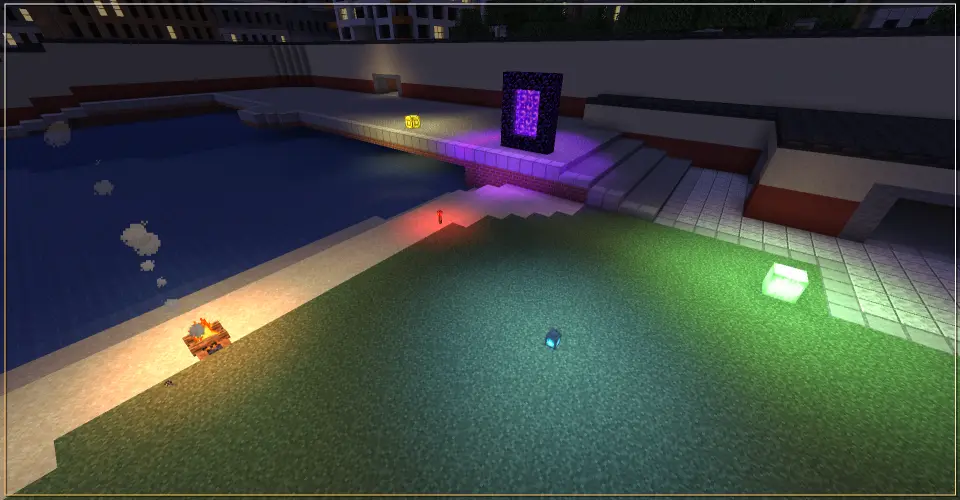


Gleam provides a variety of features such as:

As briefly mentioned earlier, Gleam is quite heavily optimized to ensure it can run as smoothly as possible and be able to handle tens of thousands of lights with very little impact on performance, it does this through a variety of tricks like Smart Light gathering, Chunk-Based GPU Buffering, Spatial Grids, Efficent usage of Resources and so on.
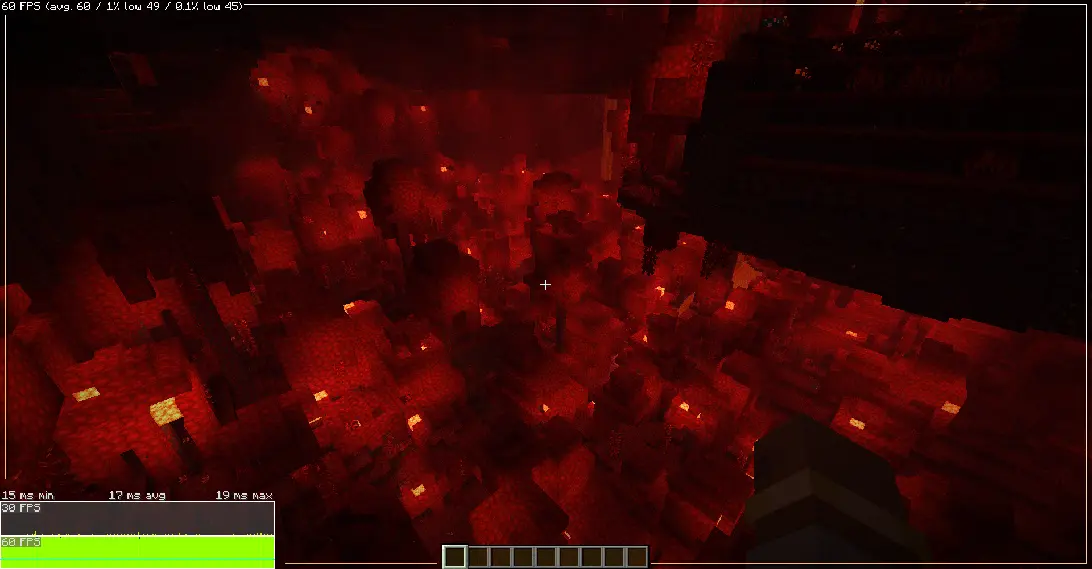
Above is a screenshot taken while loading THOUSANDS of colored lights in a 192 blocks tall Nether Crimson Forest with Sodium and the game still runs at around a stable 60 FPS! results may vary from PC-to-PC but you can expect Gleam to run fairly smoothly assuming you have a modern computer with a decently good GPU and CPU.

Gleam is made with mod compatibility in-mind with an ever expanding list of mods it supports! We have a contribution-driven basis for how we'll be adding compatibility; because of the easy to understand Resource Pack system. absolutely anyone can give any block a colored light and free to send over the JSONs to be added in future releases of Gleam.
If you are interested in contributing colored lights for modded blocks, you can Pull-Request to the Gleam Github Repository or manually send over the JSONs in our discord server.
Below are the current list of Mods supported by Gleam:
Currently Supported Mods:
| Mod | Status | Contributors |
|---|---|---|
| Jaden's Nether Expansion | Complete ✅ | ThatJadenXgamer (ThatMaidenJaden) |
| Twilight Forest | Complete ✅ | DANMATISK |
| Supplementaries | Complete ✅ | WOW |
| Galosphere | Complete ✅ | WOW |
| Architect's Palette | Complete ✅ | RedReaper |
| L_Ender's Cataclysm | Complete ✅ | RedReaper |
| Caverns & Chasms | Complete ✅ | RedReaper |
| Create | Complete ✅ | RedReaper |
| Iron's Spell Books | Complete ✅ | RedReaper |
| Regions Unexplored | Complete ✅ | RedReaper |
| Amendments | Complete ✅ | ACraZYHippIEZA |
| No Man's Land Books | Complete ✅ | ACraZYHippIEZA |
| Supplementaries Squared | Complete ✅ | ACraZYHippIEZA |
| Block Box | Complete ✅ | ACraZYHippIEZA |
| Farmer's Delight | Complete ✅ | ACraZYHippIEZA |
| Cold Sweat | Complete ✅ | ACraZYHippIEZA |
| Modest Magic | Complete ✅ | ACraZYHippIEZA |
| Modest Mining | Complete ✅ | ACraZYHippIEZA |
| Chipped | Complete ✅ | DANMATISK |
| Abundant Atmosphere | Complete ✅ | BATLYCHEE |
| Infernal Expansion | Complete ✅ | BATLYCHEE |
| Windswept | Complete ✅ | BATLYCHEE |
And a short Tutorial on how to add more colored lights with Resource Packs:
How to add Custom Colored Lights:
In order to add more colored lights you need to make a JSON file within the following directory: assets/<namespace>/gleam/light_providers/ the namespace can be anything of your choice; though I recommend using either minecraft or the namespace of whatever mod you intend on adding compat to.
Here is the is the skeleton of a Gleam Light Provider JSON.
{
  "emitters": [
    "modid:example_block", // You can provide a singleton or a list of blocks the light provider applies itself to.
    "modid:example_lamp[lit=true,facing=north]" // Supports blockstates using minecraft command syntax; it also allows multiple conditions.
  ],
  "light_properties": {
    "encoding": "hex", // you can specify the light for a block as either an "rgb" 0-1, "hsl" 0-255 or "hex" #RRGGBB.
    "hex": "#FF0000", // the light color.
    "radius": 8.0, // defines the radius that our colored light spreads out to.
    "intensity": 1.0 // multiplier that defines the strength of the light, letting you brighten or dim its intensity.
  }
}
        // The following only get parsed if encoding is set to "rgb"
        "encoding": "rgb",
        "red": 0.2,
        "green": 0.6,
        "blue": 1.0,
        // the following only gets parsed if encoding is set to "hsl"
           "encoding": "hsl",
        "hue": 149,
        "saturation": 255,
        "lightness": 153,
        // the following only gets parsed if encoding is set to "hex"
           "encoding": "hex",
        "hex": "#FF0000",
In order to make a light source emit a UV Blacklight, you must use the blacklight encoding
        // "blacklight" encoding does not need any additional parsing
           "encoding": "blacklight",
Blacklights only appear when the block is not exposed to any skylight and it is sufficently dark.

Gleam currently only supports Colored Lights but we do plan on implementing more features as time goes on, such as:

Shimmer - A small chunk of Gleam's colored lights code was derived from Shimmer's as a starting-off point, which I've since iterated on and changed quite drastically to fit my own needs for the project; though it is still important to remember that without Shimmer there would likely be no Gleam. And that is why I'd like to thank Shimmer and its Developers for their hard work!

Q: Is Gleam a client-side mod?
A: Yes! don't need it on the server for it to work.
Q: When will you update to [X] minecraft version?
A: Gleam will be staying on 1.20.1 and 1.21.1 for the foreseeable future; there are no plans to move to 26.1+ and no explicit permission will be granted to port Gleam to any newer versions on my behalf.
Q: Backports?
A: I may backport Gleam to 1.20.1 sometime in the future, but for now I just intend on supporting 1.21.1; as for any other versions, I don't intend on backporting any further.
Q: Fabric Port?
A: Maybe.
Q: Is this mod AI-generated?
A: As stated earlier, NO. Everything in Gleam is FULLY HUMAN-MADE. Absolutely no generative AI content was used to make Gleam.
Q: Does Gleam use Veil to add colored lights?
A: No, gleam does its own thing to implement colored lights, but is also fully compatible and works with Veil assuming it's present!

Gleam © 2026 by ThatJadenXgamer (ThatMaidenJaden) is licensed under CC BY-NC-ND 4.0


Project description from CurseForge.
Pick your setup
Choose the version and loader you play, then open the matching release.
Check the dependencies, then try the file in a copied instance before changing a world you care about.
Recent files
Gleam-1.21.1-1.1.0.0-NeoForge.jar
12 Sept 2026
Gleam-1.21.1-1.0.0.jar
8 Sept 2026
Gleam-1.0.0-BETA.2.jar
2 Sept 2026
Looking for an older file? The official CurseForge project page is in Resources.
 mod
modProvides the core functionallity for the Easy NPC mod.
 mod
modCreate easily NPCs with dialogs for your world or for your mods.
 mod
modManas Cosmetic is our own take on a cosmetics engine, built for 1.21.1. It brings 14 cosmetic slots, 16 weapon slots, auras, pets and much more. Through Architectury, the mod supports Neoforge and Fabric.