Minecraft version
Back to mods 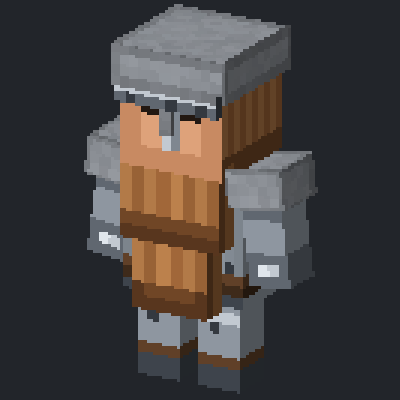
CurseForge · Minecraft mod
JRH Dwarven Outpost
Commission a dwarven outpost and watch it build itself into a working settlement.
Choose a version Pick your version below, then grab the matching file.
Quick answer
Which JRH Dwarven Outpost release should I use?
Latest stable file jrhdwarves-2.1.8+26.3.jar
Game version 26.3
Loader Fabric
JRH Dwarven Outpost jrhdwarves-2.1.8+26.3.jar targets 26.3 with Fabric. The project page does not say whether this file belongs on the client, dedicated server, or both. No extra mods listed for this file.
Where it goes
Is JRH Dwarven Outpost required on the client, server, or both?
The project page does not say whether this file belongs on the client, dedicated server, or both.
Client Source doesn’t say
Dedicated server Source doesn’t say
Loader for this release Fabric
Required install it here Optional supported, not mandatory Not supported do not install here Source doesn’t say do not assume
The source does not explicitly classify this release as client-only or server-only.
What else does JRH Dwarven Outpost jrhdwarves-2.1.8+26.3.jar need?
jrhdwarves-2.1.8+26.3.jar. Change the file and its required mods may change too.
This file does not list any required mods. Do not add a library just because a different file uses it.
This file does not list any required or optional mods.
Before you install it
Add JRH Dwarven Outpost without breaking your instance.
Built for JRH Dwarven Outpost jrhdwarves-2.1.8+26.3.jar. Pick another file and the loader, install side or required mods may change.
- 01
Stick to this file
Use jrhdwarves-2.1.8+26.3.jar. It targets 26.3 with Fabric; another release may have different loader, side or dependency requirements.
- 02
Bring the mods it needs
This file does not list any required mods. Do not add a library just because a different file uses it.
- 03
Put it on the correct side
The project page does not say whether this file belongs on the client, dedicated server, or both.
- 04
Pick the file you checked
Use the “Get this file” button beside jrhdwarves-2.1.8+26.3.jar. It opens that exact file at the source.
About this project
What does JRH Dwarven Outpost add?
JRH Dwarven Outpost lets you commission dwarves and watch them get to work. You pay for what you want built, they build it, and what starts as a single structure grows into a working settlement with its own trades and its own defenders.
Requires Fabric API.
You commission, they build
Nothing here spawns at random and nothing appears instantly. You buy a commission, place it, and the dwarves construct what you paid for. That makes an outpost something you have deliberately founded and built rather than something you stumbled into, and it means the settlement sits where you want it.
A settlement that works
Dwarves take professions and do the jobs that come with them. A full outpost is a place with trades running in it, not a set of buildings with idle mobs inside. The more you commission, the more the place starts behaving like somewhere people actually live.
Everything has a price
The outpost runs on a broad currency basket, and every structure and every dwarf is priced against what it genuinely costs to place. There is no free growth. Expanding an outpost is a project you fund, which makes a large settlement worth something.
Features
• Commission-driven construction - you pay for it, the dwarves build it
• Multiple dwarven professions, each on its own custom model
• A full settlement economy with costed structures and residents
• A settlement that grows on your terms, in the place you chose
• Server friendly and multiplayer safe
Getting started
• Gather trade goods and currency
• Buy your first commission and place it on clear, level ground.
• Let the dwarves build it out.
• Keep commissioning. Each addition brings another trade into the outpost.
For Minecraft 26.2 and 26.3. Requires Fabric API. More from the JRH mod family at https://zelphuria.com
Project description from CurseForge.
Pick your setup
JRH Dwarven Outpost by Minecraft version and loader
Choose the version and loader you play, then open the matching release.
Minecraft version
26.2
1 loader buildCheck the dependencies, then try the file in a copied instance before changing a world you care about.
Recent files
JRH Dwarven Outpost versions and loaders
jrhdwarves-2.1.8+26.3.jar
jrhdwarves-2.1.8-26.3.jar
16 Nov 2026
Client Source doesn’t say Server Source doesn’t say Dependencies No extras listed Listed on Release listing
Check the 26.3 · Fabric setup Fabric26.3 release
jrhdwarves-2.1.8+26.2.jar
jrhdwarves-2.1.8-26.2.jar
16 Nov 2026
Client Source doesn’t say Server Source doesn’t say Dependencies No extras listed Listed on Release listing
Check the 26.2 · Fabric setup Fabric26.2 release
Looking for an older file? The official CurseForge project page is in Resources.
 mod
CurseForge · Minecraft
Elite Mobs 2
Elite Mobs is a Minecraft mod that introduces powerful “elite” variants of hostile mobs. These enemies spawn during the night or can be summoned with a command for testing. Elite mobs have increased health and strength
 mod
CurseForge · Minecraft
Alicization Survival
Survival sword skills, sacred arts, artifact expeditions, and progression inspired by Sword Art Online.
 mod
CurseForge · Minecraft
SAO Aincrad Addon
An Alicization Survival expansion with explorable Aincrad floors, towns, bosses, and persistent shared progression.