Minecraft version
Back to mods 
CurseForge · Minecraft mod
Ferrity
Basically Verity JE but he is always nice :).
Choose a version Pick your version below, then grab the matching file.
Quick answer
Which Ferrity release should I use?
beta file Ferrity Beta v0.1.1
Game version 26.1, 26.1.1, 26.1.2
Loader NeoForge
Ferrity Beta v0.1.1 targets 26.1, 26.1.1, 26.1.2 with NeoForge. The project page does not say whether this file belongs on the client, dedicated server, or both. No extra mods listed for this file.
Where it goes
Is Ferrity required on the client, server, or both?
The project page does not say whether this file belongs on the client, dedicated server, or both.
Client Source doesn’t say
Dedicated server Source doesn’t say
Loader for this release NeoForge
Required install it here Optional supported, not mandatory Not supported do not install here Source doesn’t say do not assume
The source does not explicitly classify this release as client-only or server-only.
What else does Ferrity Beta v0.1.1 need?
Ferrity Beta v0.1.1. Change the file and its required mods may change too.
This file does not list any required mods. Do not add a library just because a different file uses it.
This file does not list any required or optional mods.
Before you install it
Add Ferrity without breaking your instance.
Built for Ferrity Beta v0.1.1. Pick another file and the loader, install side or required mods may change.
- 01
Stick to this file
Use Ferrity Beta v0.1.1. It targets 26.1, 26.1.1, 26.1.2 with NeoForge; another release may have different loader, side or dependency requirements.
- 02
Bring the mods it needs
This file does not list any required mods. Do not add a library just because a different file uses it.
- 03
Put it on the correct side
The project page does not say whether this file belongs on the client, dedicated server, or both.
- 04
Pick the file you checked
Use the “Get this file” button beside Ferrity Beta v0.1.1. It opens that exact file at the source.
About this project
What does Ferrity add?
Ferrity 🟠
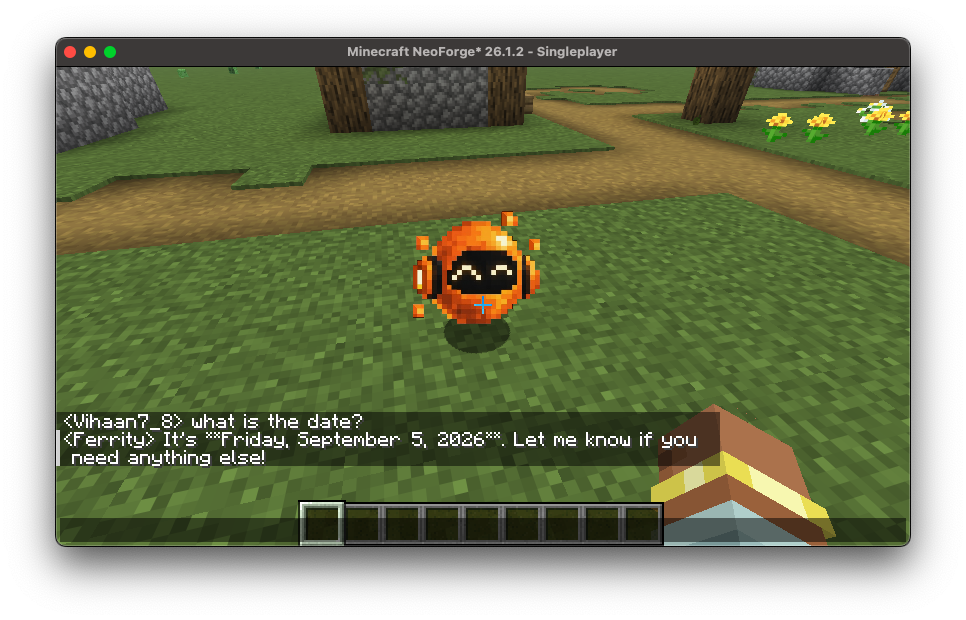
A tiny orange companion that can actually understand your Minecraft world.
Ferrity is an AI-powered Minecraft companion that lives alongside you in your world. Instead of opening a separate chatbot, running commands, or constantly leaving Minecraft to look something up, you can simply talk in chat and Ferrity will respond as part of the game.
Ferrity appears as a small orange orb with a very important job: FOLLOW DA HOOMAN.
But following you around is only the beginning.
🟠 Meet Ferrity
Ferrity is designed to feel like an actual companion rather than a chatbot awkwardly glued onto Minecraft.
In singleplayer, just type normally in chat. Ferrity can respond to your messages, remember previous conversations, understand information about the world around him, and even perform a few in-game actions.
You don't need to type /ferrity, open a separate menu every time you want to talk, or repeatedly explain what you've been doing.
Ferrity just… exists in your world.
🧠 Persistent Memory
Ferrity remembers your conversations.
His conversation history is stored with the world and survives quitting and reopening Minecraft. This means a conversation doesn't have to start from zero every time you play.
Tell Ferrity something, leave the world, come back later, and the conversation can continue.
Memory is kept per world, so different Minecraft worlds can have their own separate history with Ferrity.
👀 World Awareness
Ferrity isn't limited to seeing whatever you type into chat.
He can receive temporary information about the Minecraft world around him, including things such as your location, his location, nearby entities, blocks, the environment and other useful information.
That allows conversations to actually involve what's happening in Minecraft.
Instead of:
You: There's a creeper near me. Ferrity: I have no way to see your game.
Ferrity can use his world awareness to understand the situation he's currently in.
This live world information is separate from his permanent conversation memory, so Ferrity doesn't fill his saved memory with enormous snapshots of every block around him.
🎮 Ferrity Can Actually Do Things
Ferrity isn't completely trapped inside the chat box.
The Beta includes a small, deliberately limited set of actions that allow Ferrity to interact with the game when appropriate. For example, Ferrity can give the player an item or change whether he's following them.
So you can naturally say things like:
You: Ferrity, stop following me for a minute. Ferrity: Okay, I'll stay here.
And later:
You: Come with me.
And the ORB™ can continue following you.
Ferrity's action system is intentionally restricted rather than giving the AI unrestricted access to Minecraft commands.
🚶 FOLLOW THE HUMAN
By default, Ferrity follows the player around the world.
He'll navigate toward you when you move away while trying to stay close instead of occupying the exact same block as you.
Need him to stay somewhere? Tell him to stop following.
Need your orange sphere back?
Tell him to come with you again.
You can also pick Ferrity up and carry him as an item before placing him back into the world.
💬 Normal Minecraft Chat
Ferrity is built around normal conversation.
In singleplayer, you don't need to prefix every message with Ferrity's name. Regular chat messages can become part of your conversation with him.
The goal is for talking to Ferrity to feel like talking to another character that's already there with you—not operating a command-line interface disguised as a Minecraft mod.
🤖 Choose How Ferrity Thinks
Ferrity isn't permanently tied to one AI service.
The Beta includes configurable support for:
- Google Gemini
- Groq
- Ollama
- OpenAI-compatible APIs
You choose the provider, model and connection settings in Ferrity's configuration.
Want to use a cloud model? You can.
Want to run Ferrity using a model on your own computer through Ollama? You can do that too.
Want to connect another service that provides an OpenAI-compatible chat endpoint? Ferrity includes an option for that as well.
Ferrity does not include an API key. If your selected provider requires one, you'll need to provide your own key in the mod's configuration. Never share your API key with other people.
🔒 Designed With Limited AI Actions
Giving an AI unrestricted command execution would be… an interesting way to discover new kinds of Minecraft disasters.
Ferrity doesn't do that.
The current action system recognizes only specific actions implemented by the mod. AI responses are parsed by Ferrity, validated, and then the corresponding supported action is performed by Minecraft.
Unknown action types aren't simply executed as commands.
The ORB does not get /op. 🟠
🧪 THIS IS A BETA
Ferrity is currently under active development.
That means you should expect bugs, rough edges, features that aren't finished yet, provider-specific problems, and behaviour that may change between releases.
In particular, support for different AI providers may behave differently depending on the model, API implementation, configuration and provider.
If something explodes, the Beta label was not decorative.
✨ Current Beta Features
🟠 Ferrity companion — A tiny orange 2D companion that exists inside your Minecraft world.
💬 Natural chat interaction — Talk through Minecraft chat rather than constantly using special commands.
🧠 Persistent per-world memory — Conversations can survive leaving and reopening your world.
👀 Live world awareness — Ferrity can receive information about what's happening around him.
🚶 Player following — Ferrity follows you and can be told to stay or start following again.
🎮 In-game actions — Ferrity can perform a limited selection of supported actions when appropriate.
📦 Pickup and placement — Carry Ferrity with you as an item and put him back into the world.
⚙️ Configurable models — Choose the model Ferrity uses instead of being locked to one.
🌐 Multiple providers — Gemini, Groq, Ollama and OpenAI-compatible services are supported by the Beta.
🔑 Bring your own API key — No developer API key is embedded into Ferrity.
Ferrity is still small, still orange, and still very much a work in progress.
But the idea is simple:
Minecraft has plenty of pets, mobs and assistants. Ferrity is a companion you can actually talk to.
🟠 FERRITY
Talk to him. Explore with him. Ask him for help. And most importantly:
FOLLOW THE HUMAN.
To setup this mod please play the video below!
Project description from CurseForge.
Pick your setup
Ferrity by Minecraft version and loader
Choose the version and loader you play, then open the matching release.
Minecraft version
26.1.1
1 loader buildMinecraft version
26.1
1 loader buildCheck the dependencies, then try the file in a copied instance before changing a world you care about.
Recent files
Ferrity versions and loaders
Ferrity Beta v0.1.1
ferritymod-0.1.1-neoforge-26.1.2.jar
6 Sept 2026
Client Source doesn’t say Server Source doesn’t say Dependencies No extras listed Listed on Release listing
Check the 26.1.2 · NeoForge setup NeoForge26.126.1.126.1.2 beta
ferritymod-0.1.0-neoforge-26.1.2.jar
5 Sept 2026
Client Source doesn’t say Server Source doesn’t say Dependencies No extras listed Listed on Release listing
Check the 26.1.2 · NeoForge setup NeoForge26.126.1.126.1.2 beta
Looking for an older file? The official CurseForge project page is in Resources.
 mod
CurseForge + Modrinth · Minecraft
Chronofall
The year 3001 crashed into your world: rifts drop pods of future tech guarded by laser Sentinels. Salvage them and build jetpacks, drones, mechs, hover skiffs, rift gates and a holographic Fabricator, all on cable-free Flux.
 mod
CurseForge + Modrinth · Minecraft
Mob Flow Utilities
A mob farming automation mod. Yup
 mod
CurseForge · Minecraft
Caerula Arbor
Adapted from Mitsuki and Caerula Arbor from Arknights, which adds varieties of water mobs invading the Land.