Minecraft version
Back to mods 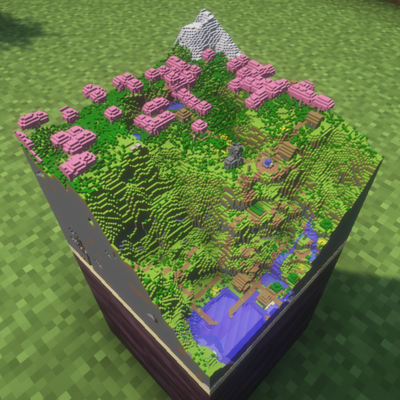
CurseForge · Minecraft mod
Maps3D
Makes Minecrafts maps three-dimensional and customizable inside item frames.
Choose a version Pick your version below, then grab the matching file.
Quick answer
Which Maps3D release should I use?
Latest stable file maps3d_1.0.2-1.21.1-neoforge.jar
Game version 1.21.1
Loader NeoForge
maps3d_1.0.2-1.21.1-neoforge.jar targets 1.21.1 with NeoForge. The project page does not say whether this file belongs on the client, dedicated server, or both. No extra mods listed for this file.
Where it goes
Is Maps3D required on the client, server, or both?
The project page does not say whether this file belongs on the client, dedicated server, or both.
Client Source doesn’t say
Dedicated server Source doesn’t say
Loader for this release NeoForge
Required install it here Optional supported, not mandatory Not supported do not install here Source doesn’t say do not assume
The source does not explicitly classify this release as client-only or server-only.
What else does maps3d_1.0.2-1.21.1-neoforge.jar need?
maps3d_1.0.2-1.21.1-neoforge.jar. Change the file and its required mods may change too.
This file does not list any required mods. Do not add a library just because a different file uses it.
This file does not list any required or optional mods.
Before you install it
Add Maps3D without breaking your instance.
Built for maps3d_1.0.2-1.21.1-neoforge.jar. Pick another file and the loader, install side or required mods may change.
- 01
Stick to this file
Use maps3d_1.0.2-1.21.1-neoforge.jar. It targets 1.21.1 with NeoForge; another release may have different loader, side or dependency requirements.
- 02
Bring the mods it needs
This file does not list any required mods. Do not add a library just because a different file uses it.
- 03
Put it on the correct side
The project page does not say whether this file belongs on the client, dedicated server, or both.
- 04
Pick the file you checked
Use the “Get this file” button beside maps3d_1.0.2-1.21.1-neoforge.jar. It opens that exact file at the source.
About this project
What does Maps3D add?
A whole world, framed.
Maps3D transforms ordinary maps placed in item frames into miniature 3D volumetric slices of your Minecraft world. Forests grow above the surface, mountains rise from the page, coastlines gain real depth, and the underground becomes part of the display.
From flat picture to miniature world
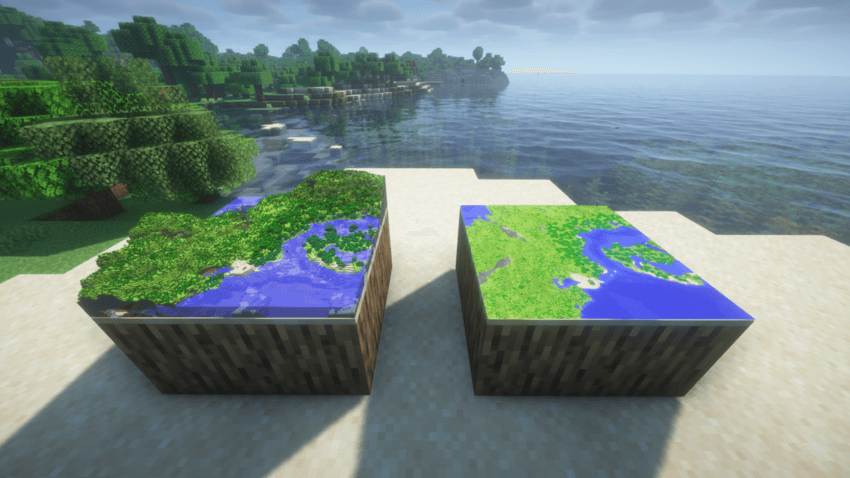
Same map, different settings
Sneak + Right-click a framed map to open its settings. Switch between 2D and 3D or adjust the starting Y-level.
Every item frame remembers its own choices, so the same map can be displayed in different ways.
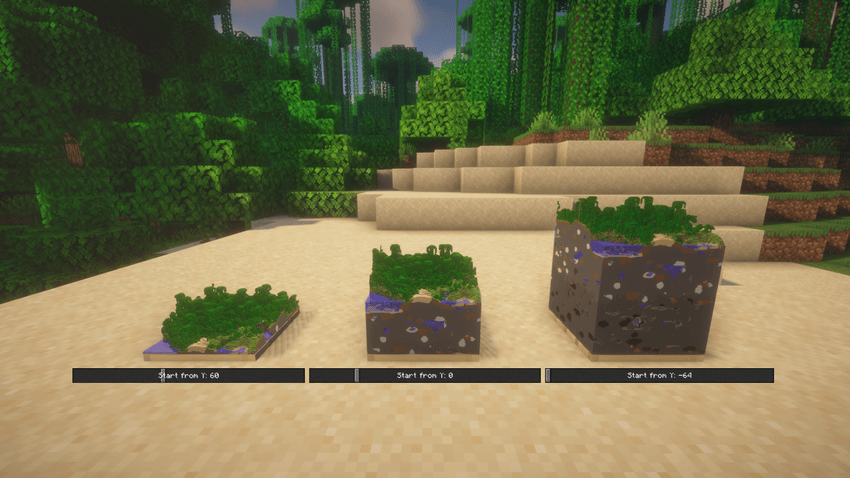
Make it look—and run—the way you want
Choose from clear quality and performance presets depending on whether you want every nearby detail or smoother rendering around large map displays. You can also turn 3D map rendering off globally at any time while keeping each frame's setup ready for later.
Shader Support
Supports most Iris shaders.
Existing World Support
This mod adds no new items or blocks—it purely enhances vanilla maps inside item frames. It is completely safe to install or remove from existing worlds without corrupting anything.
Multiplayer
Must be installed on both the server and the clients so everyone sees the same 3D displays.
Project description from CurseForge.
Pick your setup
Maps3D by Minecraft version and loader
Choose the version and loader you play, then open the matching release.
Minecraft version
1.20.1
2 loader buildsMinecraft version
1.19.2
2 loader buildsMinecraft version
1.18.2
2 loader buildsCheck the dependencies, then try the file in a copied instance before changing a world you care about.
Recent files
Maps3D versions and loaders
maps3d_1.0.2-1.21.1-neoforge.jar
6 Sept 2026
Client Source doesn’t say Server Source doesn’t say Dependencies No extras listed Listed on Release listing
Check the 1.21.1 · NeoForge setup 1.21.1NeoForge release
maps3d_1.0.3-1.21.1-forge.jar
6 Sept 2026
Client Source doesn’t say Server Source doesn’t say Dependencies No extras listed Listed on Release listing
Check the 1.21.1 · Forge setup Forge1.21.1 release
maps3d_1.0.2-1.21.1-fabric.jar
6 Sept 2026
Client Source doesn’t say Server Source doesn’t say Dependencies No extras listed Listed on Release listing
Check the 1.21.1 · Fabric setup Fabric1.21.1 release
maps3d_1.0.1-1.18.2-forge.jar
6 Sept 2026
Client Source doesn’t say Server Source doesn’t say Dependencies No extras listed Listed on Release listing
Check the 1.18.2 · Forge setup Forge1.18.2 release
maps3d_1.0.1-1.19.2-forge.jar
6 Sept 2026
Client Source doesn’t say Server Source doesn’t say Dependencies No extras listed Listed on Release listing
Check the 1.19.2 · Forge setup Forge1.19.2 release
maps3d_1.0.0-1.19.2-fabric.jar
5 Sept 2026
Client Source doesn’t say Server Source doesn’t say Dependencies No extras listed Listed on Release listing
Check the 1.19.2 · Fabric setup Fabric1.19.2 release
maps3d_1.0.0-1.18.2-fabric.jar
5 Sept 2026
Client Source doesn’t say Server Source doesn’t say Dependencies No extras listed Listed on Release listing
Check the 1.18.2 · Fabric setup Fabric1.18.2 release
maps3d_1.0.0-1.20.1-fabric.jar
5 Sept 2026
Client Source doesn’t say Server Source doesn’t say Dependencies No extras listed Listed on Release listing
Check the 1.20.1 · Fabric setup Fabric1.20.1 release
maps3d_1.0.0-1.20.1-forge.jar
5 Sept 2026
Client Source doesn’t say Server Source doesn’t say Dependencies No extras listed Listed on Release listing
Check the 1.20.1 · Forge setup 1.20.1Forge release
Looking for an older file? The official CurseForge project page is in Resources.
 mod
mod CurseForge · Minecraft
Improved Inventory Tabs
Adds tabs to access nearby chests and blocks. Fabric, NeoForge & Forge. Updated for 1.20.1, 1.21.1, 26.2
 mod
mod CurseForge · Minecraft
Tag Localizations
Adds tag localizations for item and block tags missing them.
 mod
mod CurseForge · Minecraft
Apocalypse Structures: Radio Towers and Airdrops
adds radio towers and airdrops