Fabric API Needed by BlockEcho-Fabric-1.20.1-0.4.0.jar
requiredMatching file found Matched file: [1.20.1] Fabric API 0.92.12+1.20.1

CurseForge · Minecraft mod
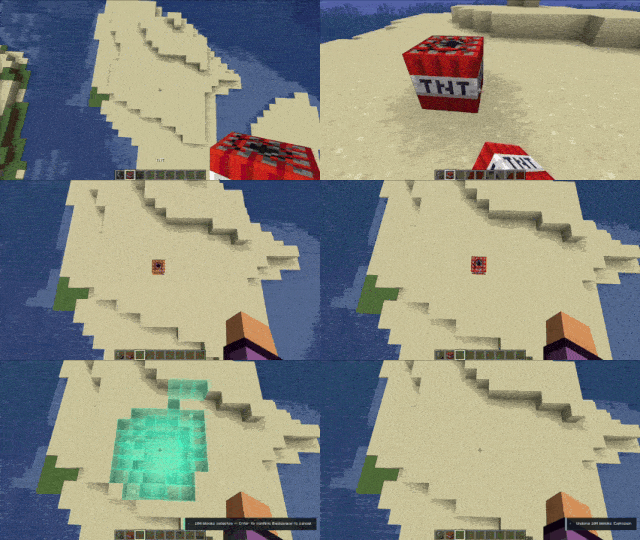
Preview and safely undo building mistakes, mined blocks, TNT chains, and creeper explosions with holographic confirmation.
Quick answer
BlockEcho-Fabric-1.20.1-0.4.0.jar targets 1.20.1 with Fabric. The project page does not say whether this file belongs on the client, dedicated server, or both. All 1 required mods have matching files.
Where it goes
The project page does not say whether this file belongs on the client, dedicated server, or both.
The source does not explicitly classify this release as client-only or server-only.
BlockEcho-Fabric-1.20.1-0.4.0.jar. Change the file and its required mods may change too.
Install Fabric API first. We found matching files for this game-version and loader setup.
We only count dependency files that match this setup. A file for another loader does not fill the gap.
Before you install it
Built for BlockEcho-Fabric-1.20.1-0.4.0.jar. Pick another file and the loader, install side or required mods may change.
Use BlockEcho-Fabric-1.20.1-0.4.0.jar. It targets 1.20.1 with Fabric; another release may have different loader, side or dependency requirements.
Install Fabric API first. We found matching files for this game-version and loader setup.
The project page does not say whether this file belongs on the client, dedicated server, or both.
Use the “Get this file” button beside BlockEcho-Fabric-1.20.1-0.4.0.jar. It opens that exact file at the source.
About this project
 # BlockEcho
BlockEcho is a preview-first undo mod for Minecraft, available for Forge, NeoForge, and Fabric.
Buy me a coffee on Patreon: https://patreon.com/c/ModsmithStudios0
It records your recent building actions and explosions, then displays a holographic preview of the affected blocks before anything is changed. Press Enter to confirm the rewind or Backspace to cancel it safely.
In Survival mode, BlockEcho displays the blocks required for restoration above the hologram. Required items are consumed only after the rewind is confirmed.
If an item is missing, the world remains unchanged.
Creative players can rewind without providing materials. When cheats are enabled, the material requirement can also be configured in the settings menu.
Press F7 to start recording a build. Every block placed until F7 is pressed again becomes one complete Ctrl+Z action, even if there are long pauses between placements.
Press F6 to enter BlockEcho's temporary spectator camera. You can move around, inspect the schematic and use Ctrl+Z from the camera position.
Your original game mode and position are restored when you exit.
All special keys can be changed from the BlockEcho settings menu.
No additional library mods are required.
BlockEcho restores recorded block states and available block-entity data. It does not revive entities, restore player health or recover events that happened before the mod was installed.
Project description from CurseForge.
Pick your setup
Choose the version and loader you play, then open the matching release.
Check the dependencies, then try the file in a copied instance before changing a world you care about.
Recent files
6 Sept 2026
5 Sept 2026
5 Sept 2026
Looking for an older file? The official CurseForge project page is in Resources.
 mod
modA Terraria-inspired and simple storage network solution mod for Minecraft 1.12.2. Centralize items in a Storage Heart with tiered units, crafting stations (anvil, enchanting, furnace, brewing), portable remotes, and JEI integration.
 mod
modPixelated Twemoji emojis in chat, with a picker, shortcodes, animated emojis, and datapack support.
 mod
modOfficial Olimpohosting partner mod with built-in server hosting integration and promotional features for partnered modpacks.