Minecraft version
Back to mods 
CurseForge · Minecraft mod
WikiEvery
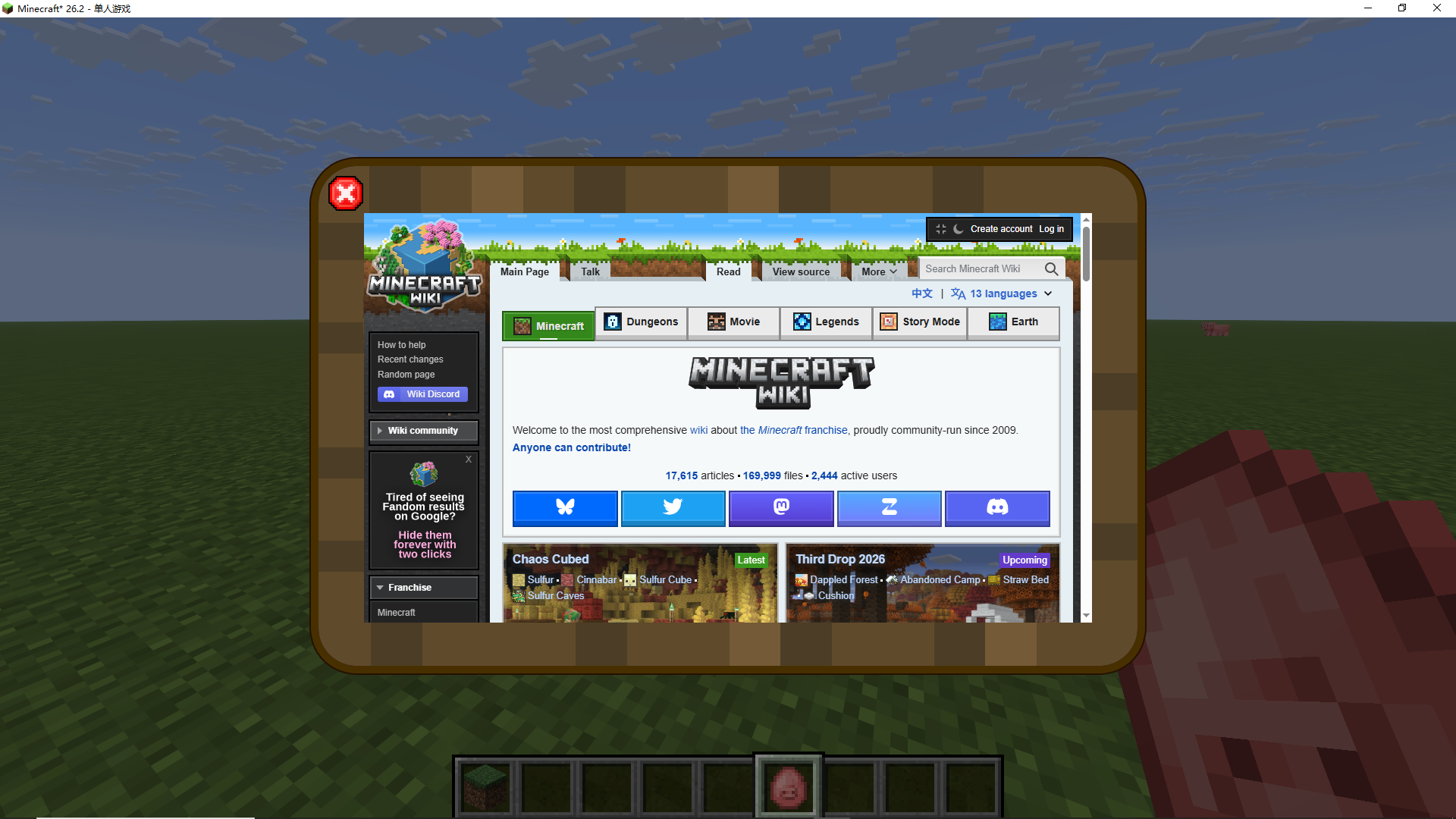
A mod for convenient access to in-game wiki page anytime and anywhere.
Choose a version Pick your version below, then grab the matching file.
Quick answer
Which WikiEvery release should I use?
Latest stable file 1.1.4-26.2
Game version 26.2
Loader Fabric
WikiEvery 1.1.4-26.2 targets 26.2 with Fabric. The project page does not say whether this file belongs on the client, dedicated server, or both. No extra mods listed for this file.
Where it goes
Is WikiEvery required on the client, server, or both?
The project page does not say whether this file belongs on the client, dedicated server, or both.
Client Source doesn’t say
Dedicated server Source doesn’t say
Loader for this release Fabric
Required install it here Optional supported, not mandatory Not supported do not install here Source doesn’t say do not assume
The source does not explicitly classify this release as client-only or server-only.
What else does WikiEvery 1.1.4-26.2 need?
1.1.4-26.2. Change the file and its required mods may change too.
This file does not list any required mods. Do not add a library just because a different file uses it.
This file does not list any required or optional mods.
Before you install it
Add WikiEvery without breaking your instance.
Built for WikiEvery 1.1.4-26.2. Pick another file and the loader, install side or required mods may change.
- 01
Stick to this file
Use 1.1.4-26.2. It targets 26.2 with Fabric; another release may have different loader, side or dependency requirements.
- 02
Bring the mods it needs
This file does not list any required mods. Do not add a library just because a different file uses it.
- 03
Put it on the correct side
The project page does not say whether this file belongs on the client, dedicated server, or both.
- 04
Pick the file you checked
Use the “Get this file” button beside 1.1.4-26.2. It opens that exact file at the source.
About this project
What does WikiEvery add?
***这个mod在代码部分使用了生成式人工智能。
This mod uses generative artificial intelligence in the code section。
重要提示:由于本模组的实现高度依赖webview2组件,所以它在除了windows系统以外的任何系统上的兼容性都无法保证,并且windows10部分版本及更老的版本由于没有内置webview2组件很可能会导致重大问题。***
***Important note: As the implementation of this mod heavily relies on the webview2 component, its compatibility with any system other than Windows cannot be guaranteed. Additionally, some versions of Windows 10 and older without built-in webview2 components may cause significant issues.
 ***
***
万象通揽 | WikiEvery
万象通揽 wikievery 是一个基于 WebView 的便携式 Wiki 查阅模组,让你无需再切出游戏、打开浏览器去查资料。只需按下快捷键,即可随时呼出 Wiki 页面,支持搜索、查询、复制和粘贴等操作。默认快捷键为 K,你可以在设置中自由更改。
This is a portable WebView-based Wiki viewer mod that eliminates the need to alt-tab out of the game and open a browser just to look up information. With a single keystroke, you can instantly bring up the Wiki page, and it supports searching, querying, copying, and pasting. The default hotkey is K, and you can change it in the settings.
我做这个模组,是因为在高版本的 Fabric 环境下,似乎找不到这样轻便的 Wiki 查看工具。我不想仅仅为了查 Wiki 就去装一个动辄几百 MB 的内置浏览器模组。而得益于 WebView 出色的轻量化特性,本模组体积仅有惊人的 310 KB,却几乎能实现 Edge 浏览器的全部功能——包括播放音视频媒体,它本质上就是一个内嵌的 Edge。而wikievery这个名字意思就是随时随地都可以wiki。
I created this mod because I couldn't find a lightweight Wiki viewer for modern Fabric versions—and I didn't want to install a bulky built‑in browser mod (often hundreds of MB) solely for Wiki access. Thanks to WebView's excellent lightweight design, this mod takes up only 310 KB, yet it delivers nearly all the functionality of Edge, including media playback. In essence, it's Edge embedded in your game.The name "wikievery" means "let everybody "wiki" everything everyday and everywhere!"
更多技术相关请查看Github | For more technical related information, please refer to GitHub
Project description from CurseForge.
Pick your setup
WikiEvery by Minecraft version and loader
Choose the version and loader you play, then open the matching release.
Check the dependencies, then try the file in a copied instance before changing a world you care about.
Recent files
WikiEvery versions and loaders
1.1.4-26.2
wikievery-1.1.4.jar
5 Sept 2026
Client Source doesn’t say Server Source doesn’t say Dependencies No extras listed Listed on Release listing
Check the 26.2 · Fabric setup Fabric26.2 release
Looking for an older file? The official CurseForge project page is in Resources.
 mod
mod CurseForge · Minecraft
NeroEconomy
Buy, sell, haul and bid — a player-driven economy that turns a Neroland server from sixteen solo grinds into one living market.
 mod
mod CurseForge · Minecraft
Air Tactical Arsenal - WarZone
Unofficial milsim fork of Air Tactical Arsenal by Synarsis: Shahed, Orlan, Iskander, radar and sirens, with SuperbWarfare / AshVehicles support. Non-commercial.
 mod
mod CurseForge · Minecraft
NEVER! (save your items)
Right-click a bed to save your inventory. Die and you only lose the loot you gathered since your last checkpoint.