Minecraft version
Back to mods 
CurseForge · Minecraft mod
Memento: Build History
Safe Undo, Redo, Preview and player history for Minecraft. MEMENTO remembers what you build and lets you restore mistakes without blindly overwriting the world.
Choose a version Pick your version below, then grab the matching file.
Quick answer
Which Memento: Build History release should I use?
Latest stable file Memento: Build History-1.0.0
Game version 26.2
Loader Fabric
Memento: Build History-1.0.0 targets 26.2 with Fabric. The project page does not say whether this file belongs on the client, dedicated server, or both. No extra mods listed for this file.
Where it goes
Is Memento: Build History required on the client, server, or both?
The project page does not say whether this file belongs on the client, dedicated server, or both.
Client Source doesn’t say
Dedicated server Source doesn’t say
Loader for this release Fabric
Required install it here Optional supported, not mandatory Not supported do not install here Source doesn’t say do not assume
The source does not explicitly classify this release as client-only or server-only.
What else does Memento: Build History-1.0.0 need?
Memento: Build History-1.0.0. Change the file and its required mods may change too.
This file does not list any required mods. Do not add a library just because a different file uses it.
This file does not list any required or optional mods.
Before you install it
Add Memento: Build History without breaking your instance.
Built for Memento: Build History-1.0.0. Pick another file and the loader, install side or required mods may change.
- 01
Stick to this file
Use Memento: Build History-1.0.0. It targets 26.2 with Fabric; another release may have different loader, side or dependency requirements.
- 02
Bring the mods it needs
This file does not list any required mods. Do not add a library just because a different file uses it.
- 03
Put it on the correct side
The project page does not say whether this file belongs on the client, dedicated server, or both.
- 04
Pick the file you checked
Use the “Get this file” button beside Memento: Build History-1.0.0. It opens that exact file at the source.
About this project
What does Memento: Build History add?
MEMENTO
Minecraft remembers what you did.
Build without fear.
MEMENTO adds a player-focused history system to Minecraft.
Placed the wrong blocks?
Destroyed part of your build by accident?
Want to return to an earlier point in your project?
MEMENTO remembers your actions and lets you safely Preview, Undo, and Redo them without turning Minecraft into a world editor.
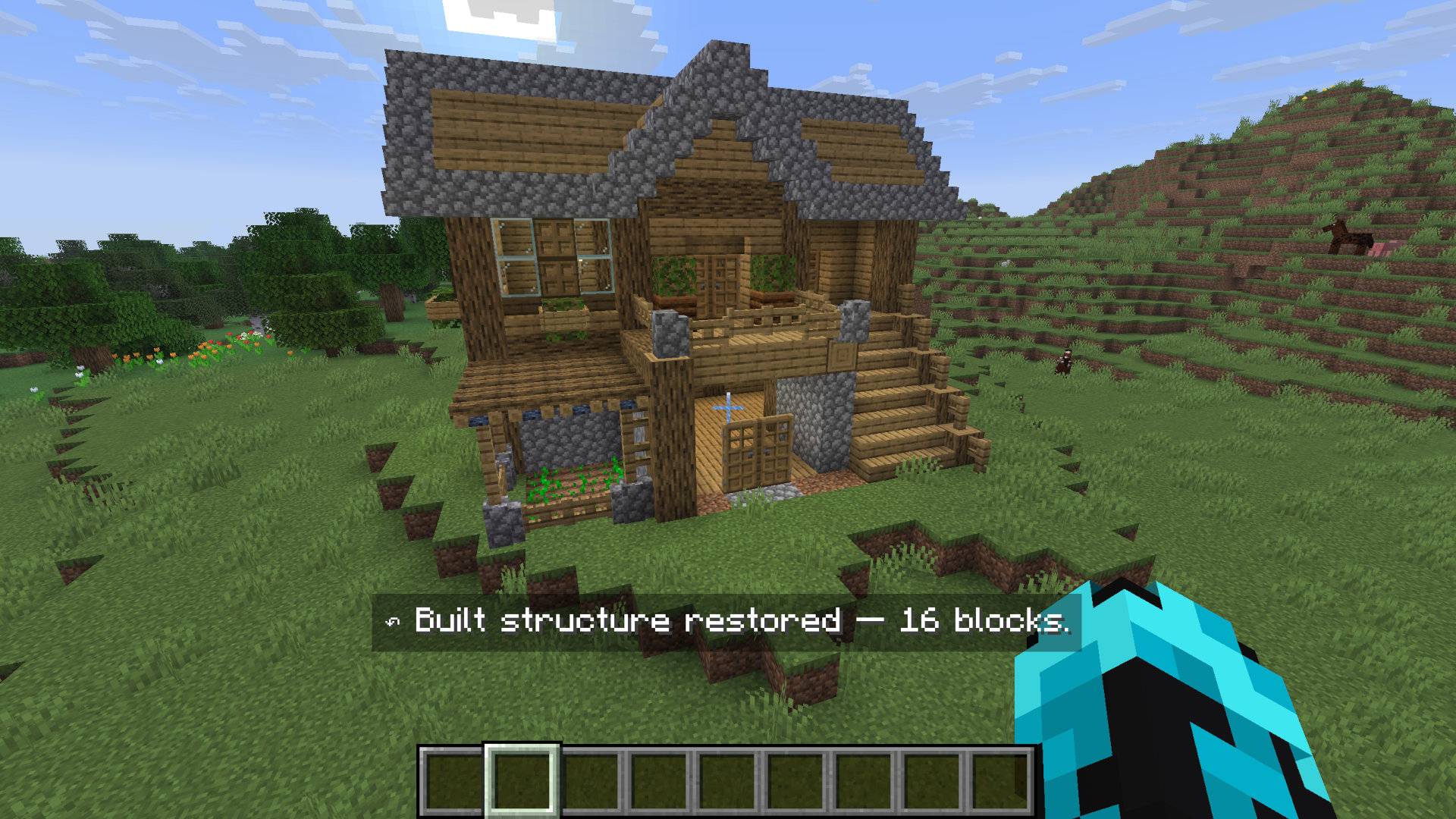
See what will change before you restore anything.
✦ Undo your mistakes
Press Z to undo your latest action.
MEMENTO groups individual block changes into meaningful actions, so building a wall or digging an area can become one history entry instead of dozens of unrelated blocks.
Press Y to redo an action you previously undid.
Undo an entire building action in seconds.
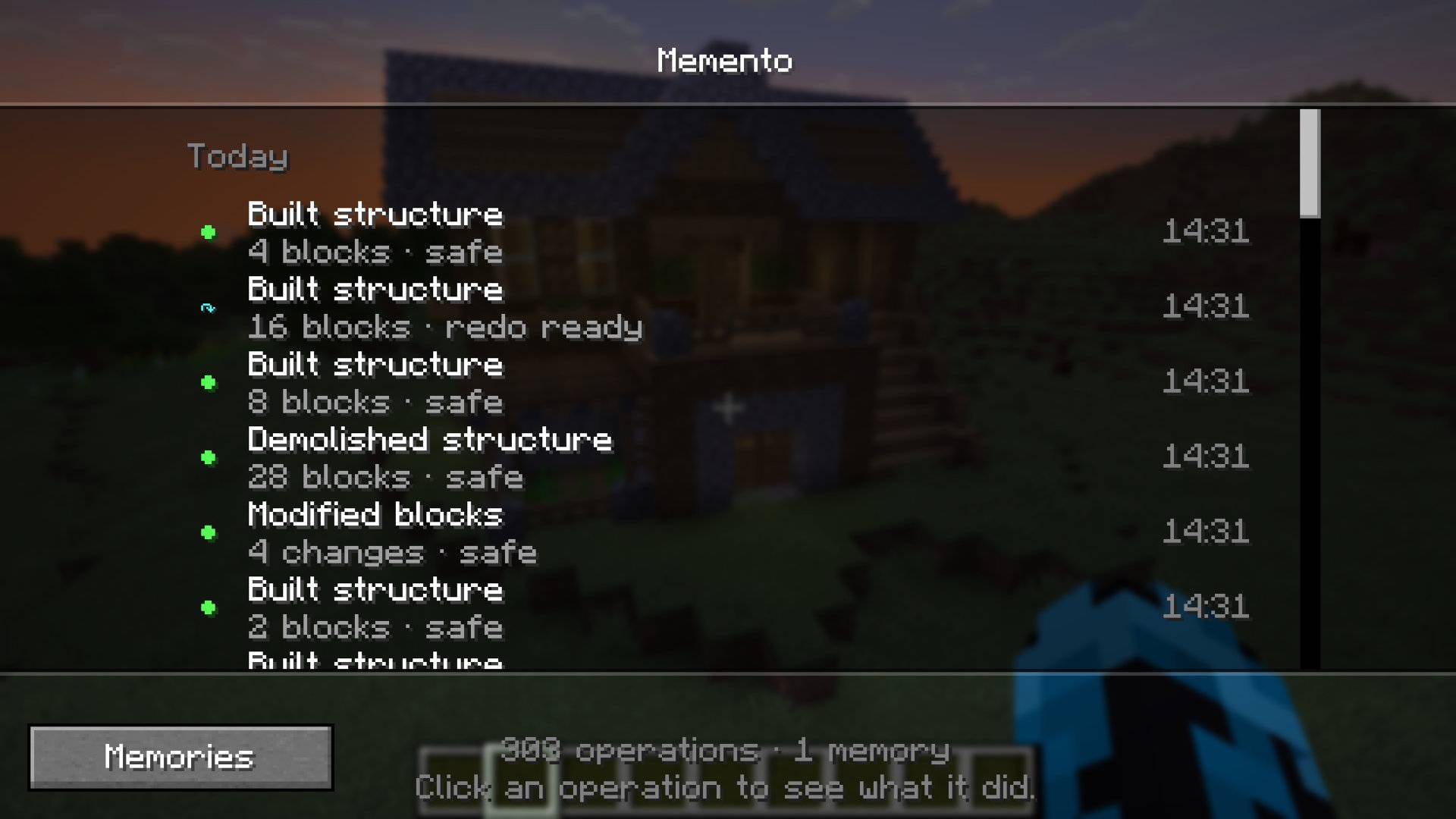
✦ See your history
Press H to open the MEMENTO History.
Instead of showing raw block updates, MEMENTO presents your actions as a readable timeline.
From there you can:
- inspect previous actions
- preview them
- undo them
- redo compatible changes
- see conflicts
- create Memories
Every action becomes part of your personal build history.
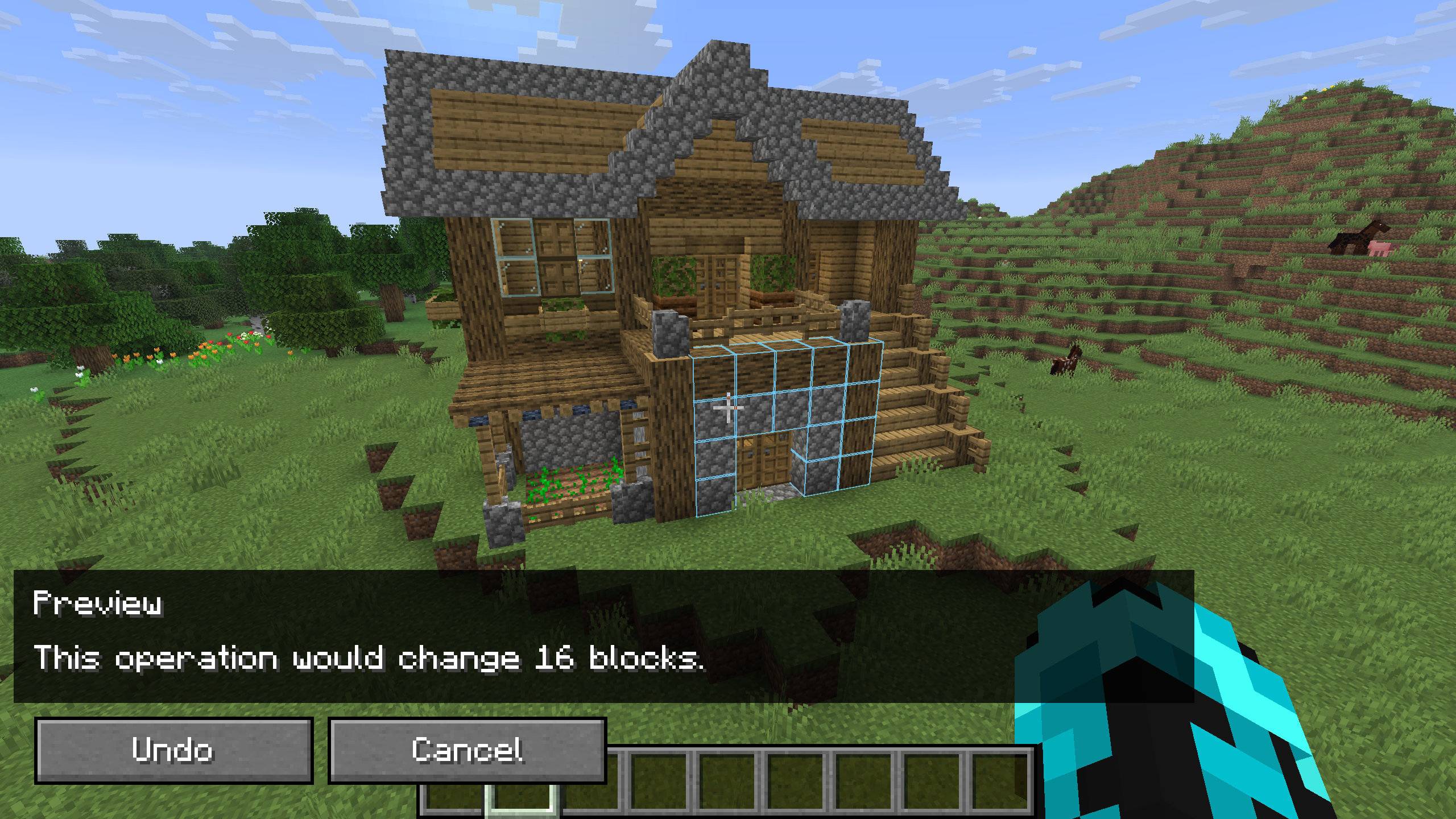
✦ Preview before restoring
Not sure what an Undo will change?
Open Preview first.
MEMENTO displays ghost blocks in the world so you can see what would be restored before anything is actually changed.
Preview is client-side and does not modify the world.
Preview first. Restore only when you're sure.
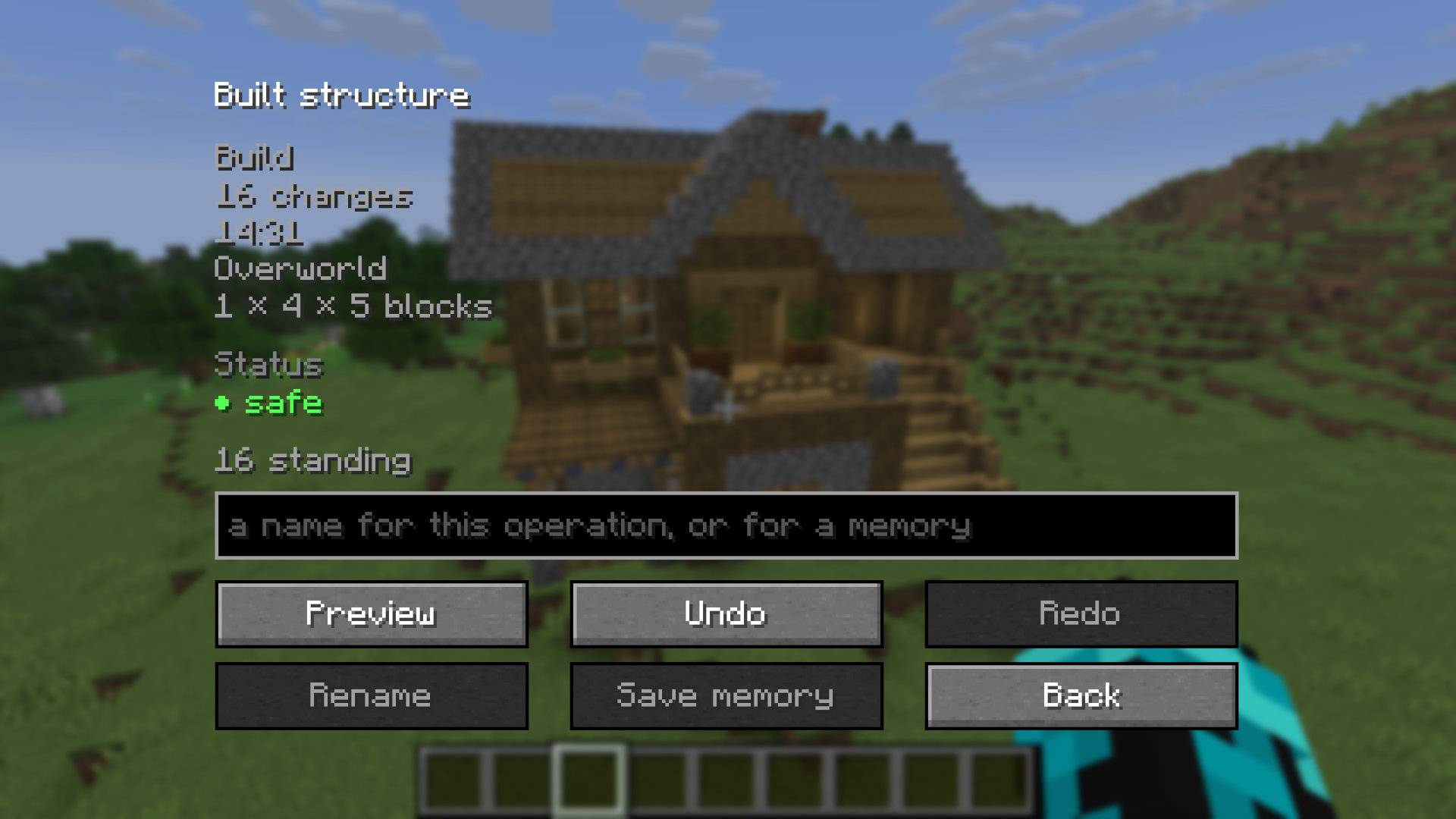
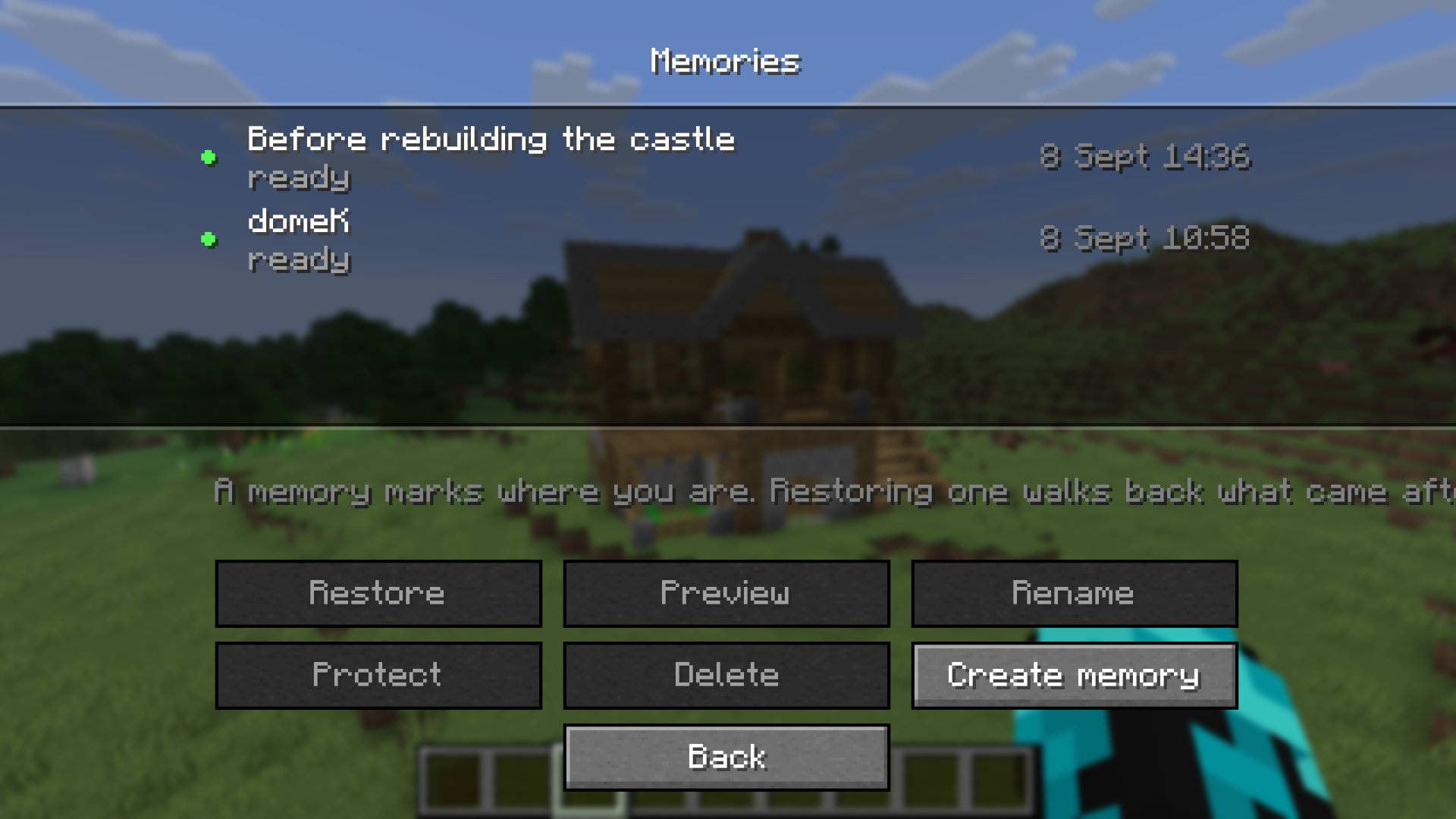
✦ Memories
A Memory marks a point in your history.
Create one before starting a large build, renovation, or experiment.
Later, MEMENTO can determine which operations happened after that Memory and safely restore what is still recoverable.
Memories are logical history checkpoints — they are not full world backups.
Mark important moments in your build and return to them later.
✦ Safe partial restoration
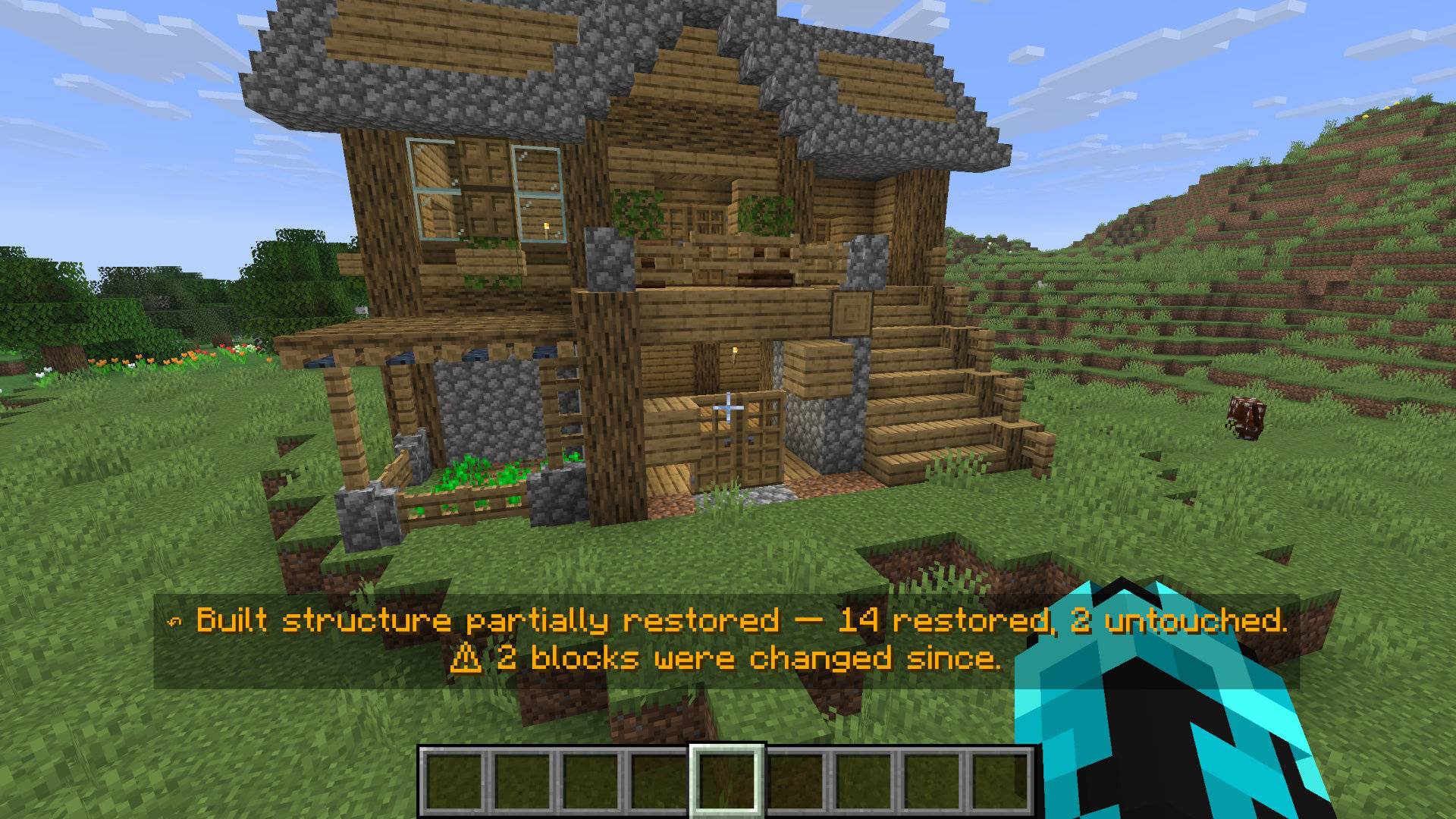
Minecraft worlds keep changing.
If part of an old operation has been modified later, MEMENTO does not blindly overwrite the current world.
For example:
48 blocks in the original operation
43 safely restored
5 left untouched because they changed later
MEMENTO tells you what happened instead of pretending the restore was perfect.
MEMENTO restores what is safe and leaves conflicts untouched.
✦ Multiplayer-aware
MEMENTO is designed with multiplayer safety in mind.
If Player A builds something and Player B later changes one of those blocks, Player A's Undo will not simply overwrite Player B's later work.
The server validates restores against the current world before applying them.
The client never decides what the world should become.
✦ Resource conservation
MEMENTO is not Creative-mode materialization disguised as Undo.
Where MEMENTO can safely account for items, restoring changes respects item conservation.
If the mod cannot prove that an operation can be restored safely, it fails closed instead of guessing.
Controls
| Key | Action |
|---|---|
| Z | Undo |
| Y | Redo |
| H | Open MEMENTO History |
All keybindings can be changed in Minecraft's Controls menu.
Current supported version
Minecraft 26.2
- Fabric Loader 0.19.5
- Fabric API 0.159.0+26.2
- Java 25
- Fabric API is required
For the full MEMENTO interface, install the mod on both the server and client.
Current limits
MEMENTO 1.0 uses conservative fixed limits that were tested as part of its release:
- up to 4,096 changes per reversible operation
- up to 500 operations per player
- 7-day history retention
- up to 20 Memories per player
- up to 20,000 Preview ghost blocks
Configuration is planned for a later version.
What MEMENTO is not
MEMENTO is intentionally not a complete world rewind system.
It focuses on restoring player-authored actions safely.
Autonomous world consequences such as:
- piston movement
- falling blocks
- redstone consequences
- explosions
may occur outside the recorded player operation and are not guaranteed to be restored.
Fluid propagation is currently outside the verified v1 guarantee.
Crash safety
MEMENTO uses persistent history and recovery information so an interrupted restore does not automatically continue based on assumptions.
If Minecraft or the server crashes during a restore, MEMENTO verifies the world again before allowing further restoration.
If item accounting becomes uncertain after a crash, that operation may remain permanently blocked rather than risking item duplication.
Philosophy
MEMENTO follows one important rule:
If the mod cannot prove that restoring something is safe, it does not guess.
That means a restore may occasionally leave something untouched.
That is intentional.
Keeping your world safe is more important than forcing every Undo to succeed.
Version
MEMENTO 1.0.0 — Minecraft 26.2 / Fabric
Project description from CurseForge.
Pick your setup
Memento: Build History by Minecraft version and loader
Choose the version and loader you play, then open the matching release.
Check the dependencies, then try the file in a copied instance before changing a world you care about.
Recent files
Memento: Build History versions and loaders
Memento: Build History-1.0.0
memento-1.0.0.jar
8 Sept 2026
Client Source doesn’t say Server Source doesn’t say Dependencies No extras listed Listed on Release listing
Check the 26.2 · Fabric setup Fabric26.2 release
Looking for an older file? The official CurseForge project page is in Resources.
 mod
mod CurseForge + Modrinth · Minecraft
Crow Bar
Adds skins and nametags to the player locator bar
 mod
mod CurseForge · Minecraft
Universal Recycler
Recycle items back into the ingredients used to craft them.
 mod
mod CurseForge · Minecraft
VoltRide 2.0 – Advanced E-Scooters
VoltRide adds realistic, customizable electric scooters to Minecraft. Craft parts, upgrade motors and batteries, use lights and indicators, perform wheelies and drifts, and experience advanced physics, damage, and repairs.