Minecraft version
Back to mods 
CurseForge · Minecraft mod
Clean Debug Screen (Better F3 Overlay)
A modern, readable better F3 debug screen and F3 overlay with customizable themes, structured cards, zero mod data loss, and a one-click shortcut to copy debug report to your clipboard.
Choose a version Pick your version below, then grab the matching file.
Quick answer
Which Clean Debug Screen (Better F3 Overlay) release should I use?
Latest stable file cleandebugscreen-1.0.1
Game version 26.3
Loader NeoForge
Clean Debug Screen (Better F3 Overlay) cleandebugscreen-1.0.1 targets 26.3 with NeoForge. The project page does not say whether this file belongs on the client, dedicated server, or both. No extra mods listed for this file.
Where it goes
Is Clean Debug Screen (Better F3 Overlay) required on the client, server, or both?
The project page does not say whether this file belongs on the client, dedicated server, or both.
Client Source doesn’t say
Dedicated server Source doesn’t say
Loader for this release NeoForge
Required install it here Optional supported, not mandatory Not supported do not install here Source doesn’t say do not assume
The source does not explicitly classify this release as client-only or server-only.
What else does Clean Debug Screen (Better F3 Overlay) cleandebugscreen-1.0.1 need?
cleandebugscreen-1.0.1. Change the file and its required mods may change too.
This file does not list any required mods. Do not add a library just because a different file uses it.
This file does not list any required or optional mods.
Before you install it
Add Clean Debug Screen (Better F3 Overlay) without breaking your instance.
Built for Clean Debug Screen (Better F3 Overlay) cleandebugscreen-1.0.1. Pick another file and the loader, install side or required mods may change.
- 01
Stick to this file
Use cleandebugscreen-1.0.1. It targets 26.3 with NeoForge; another release may have different loader, side or dependency requirements.
- 02
Bring the mods it needs
This file does not list any required mods. Do not add a library just because a different file uses it.
- 03
Put it on the correct side
The project page does not say whether this file belongs on the client, dedicated server, or both.
- 04
Pick the file you checked
Use the “Get this file” button beside cleandebugscreen-1.0.1. It opens that exact file at the source.
About this project
What does Clean Debug Screen (Better F3 Overlay) add?
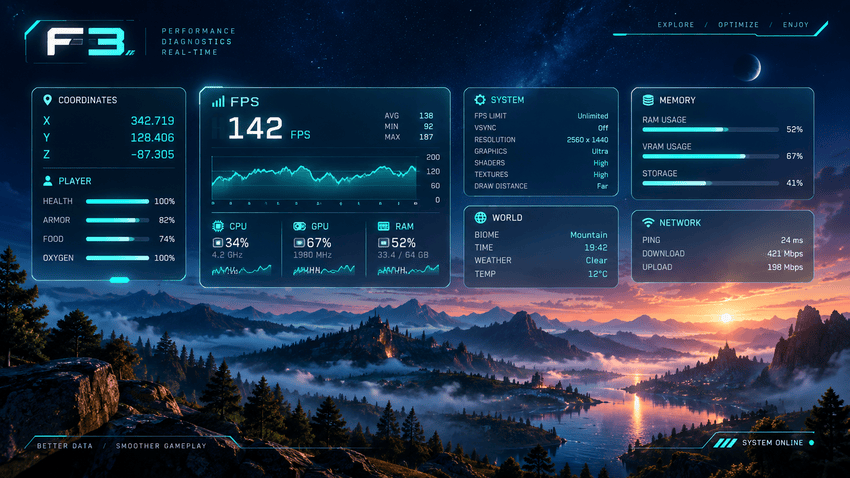
The vanilla Minecraft debug screen is an unreadable, overflowing wall of text that clutters your view and makes locating crucial coordinates or performance metrics frustrating.
Clean Debug Screen completely overhauls this interface into an elegant better F3 and F3 overlay featuring clean, collapsible cards for Position, World, Performance, Target blocks, and System specs.
Unlike alternatives that silently discard third-party lines, this mod captures and organizes every piece of information so you get clear, readable debug info without losing lines from other mods.
Choose between 4 distinct visual themes (Dark, Light, High Contrast, Minimal) with customizable scaling, margins, column layouts, and line-by-line visibility toggles.
Take advantage of the game-changing shortcut to copy debug report directly to your clipboard: an instant, markdown-formatted report containing your mod list, seed, FPS, and hardware specs ready for bug tickets.
Every single vanilla key combination—including F3+B, F3+G, F3+H, F3+T, and F3+A—remains 100% functional with zero keybinding conflicts.
Developed with the assistance of advanced AI pair-programming.
Project description from CurseForge.
Pick your setup
Clean Debug Screen (Better F3 Overlay) by Minecraft version and loader
Choose the version and loader you play, then open the matching release.
Minecraft version
26.2
1 loader buildCheck the dependencies, then try the file in a copied instance before changing a world you care about.
Recent files
Clean Debug Screen (Better F3 Overlay) versions and loaders
cleandebugscreen-1.0.1
cleandebugscreen-1.0.1.jar
29 Sept 2026
Client Source doesn’t say Server Source doesn’t say Dependencies No extras listed Listed on Release listing
Check the 26.3 · NeoForge setup NeoForge26.3 release
cleandebugscreen 1.0.0
cleandebugscreen-1.0.0.jar
8 Sept 2026
Client Source doesn’t say Server Source doesn’t say Dependencies No extras listed Listed on Release listing
Check the 26.2 · NeoForge setup NeoForge26.2 release
Looking for an older file? The official CurseForge project page is in Resources.
 mod
mod CurseForge · Minecraft
Absolute Afk Cinema
Go AFK and the camera takes over: slow cinematic shots of you, nearby animals, villagers, other players and interesting places – like the idle camera in racing games. Client-side, no dependencies.
 mod
mod CurseForge + Modrinth · Minecraft
TLM: True POWER
A SlashBlade: Resharped and Touhou Little Maid crossover addon, designed to empower maids in wielding SlashBlades.
 mod
mod CurseForge · Minecraft
Cleanventory
Adds an inventory trash button that opens a 9-slot disposal container, instantly deletes inserted or shift-clicked items, and automatically removes selected unwanted items from your inventory.