Minecraft version
Back to mods 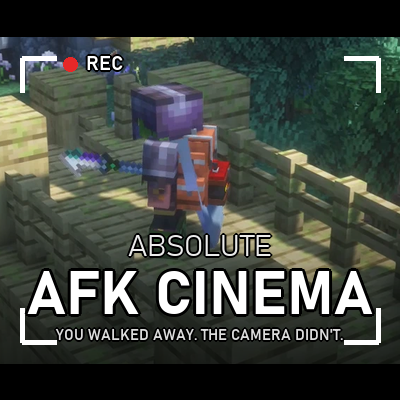
CurseForge · Minecraft mod
Absolute Afk Cinema
Go AFK and the camera takes over: slow cinematic shots of you, nearby animals, villagers, other players and interesting places – like the idle camera in racing games. Client-side, no dependencies.
Choose a version Pick your version below, then grab the matching file.
Quick answer
Which Absolute Afk Cinema release should I use?
Latest stable file absolute-afk-cinema-1.2.0-1.20.1-forge.jar
Game version 1.20.1
Loader Forge
Absolute Afk Cinema absolute-afk-cinema-1.2.0-1.20.1-forge.jar targets 1.20.1 with Forge. The project page does not say whether this file belongs on the client, dedicated server, or both. No extra mods listed for this file.
Where it goes
Is Absolute Afk Cinema required on the client, server, or both?
The project page does not say whether this file belongs on the client, dedicated server, or both.
Client Source doesn’t say
Dedicated server Source doesn’t say
Loader for this release Forge
Required install it here Optional supported, not mandatory Not supported do not install here Source doesn’t say do not assume
The source does not explicitly classify this release as client-only or server-only.
What else does Absolute Afk Cinema absolute-afk-cinema-1.2.0-1.20.1-forge.jar need?
absolute-afk-cinema-1.2.0-1.20.1-forge.jar. Change the file and its required mods may change too.
This file does not list any required mods. Do not add a library just because a different file uses it.
This file does not list any required or optional mods.
Before you install it
Add Absolute Afk Cinema without breaking your instance.
Built for Absolute Afk Cinema absolute-afk-cinema-1.2.0-1.20.1-forge.jar. Pick another file and the loader, install side or required mods may change.
- 01
Stick to this file
Use absolute-afk-cinema-1.2.0-1.20.1-forge.jar. It targets 1.20.1 with Forge; another release may have different loader, side or dependency requirements.
- 02
Bring the mods it needs
This file does not list any required mods. Do not add a library just because a different file uses it.
- 03
Put it on the correct side
The project page does not say whether this file belongs on the client, dedicated server, or both.
- 04
Pick the file you checked
Use the “Get this file” button beside absolute-afk-cinema-1.2.0-1.20.1-forge.jar. It opens that exact file at the source.
About this project
What does Absolute Afk Cinema add?
26.3 Update out now
Out Now Fade in and Fade out options / INGAME Settings Menu online and Inventory afk settings (also wiki on the end of the Descrition )
You walked away. The camera didn't.
You know that moment in a racing game when you put the controller down and the game starts admiring the car for you? Slow orbits, glossy pans, the lens creeping in on a headlight while the sun goes down?
That – but for your Minecraft world.
Step away for a few seconds and AFK Cinema takes the director's chair. The camera lifts off your shoulder, drifts around your character, finds the herd of cows on the hill, follows a villager across the square, lingers on the campfire glow, and pulls back until your base is a speck in the landscape. Letterbox bars slide in, the HUD fades away, a calm soundtrack rises.
Touch the mouse. You're back. Instantly.
Eighteen ways to look at your world
Not one spinning camera on a timer – a small film crew with taste.
The slow lens work
Static zoom – the camera rests, the lens breathes in Dolly zoom – the Vertigo shot; the world stretches behind you Pull-away – further and further, until you're part of the scenery Close-up – a portrait, held just a little too long Breathing frame – hand-held stillness, a few centimetres of sway Rise zoom, slide zoom, arc zoom – climbing, gliding, circling while the lens closes in Golden hour – your silhouette against the low sun or moon Tracking – a roadside camera that turns to follow whatever walks past Vista reveal & horizon pan – when the view is worth it, the camera shows you
The classic moves:
Orbit · Push-in / pull-out · Low-angle pan with a touch of dutch angle · Fly-by · Crane up / down · Bird's eye · Over the shoulder
Every move is eased like a real dolly, cut like a real edit – hard cuts, the occasional fade to black, never the same pattern twice in a row.
It knows what's worth filming
Other players building next to you. Villagers on their rounds. Herds, foals, named pets. The zombie creeping up behind you (yes, really). Campfires, lava, beacons, portals, bells, lanterns in the dark – and any machine humming away in your base. The camera scores everything around you, checks the sightlines, and never ends up inside a wall or behind a tree.
With its own soundtrack
Three original ambient pieces – Evening Meadow, Slow Fields, Lantern Light – warm pads, soft kalimba, a slow bass, a long reverb tail. They fade in when the cinema starts and fade out the moment you're back. Vanilla music waits politely. Uses your Music slider, switch it off if you'd rather listen to your own.
Where you set it, and what the options do
Press F9. Or Esc and the AFK Cinema button between Options and Mods, or the Config button next to the mod in the mod list. Tabs, a search box, an explanation under every setting, a Preview now button that starts the camera so you can watch what you just changed, and Reset tab for when you have tuned yourself into a corner. Saved the moment you close it. The file is still there if you prefer it: config/absoluteafkcinema-client.json
Transition – how one shot becomes the next:
| CUT | A hard cut. One frame the cows, the next the village, like a film edit. |
| FADE | Every change goes through black. Calmer, more documentary. |
| MIXED | Mostly cuts, a fade every third shot. The default: all fades gets sleepy, all cuts gets restless. |
Coming back – what happens the moment you touch a key:
| INSTANT | The old behaviour: your view is back on the very next frame. Nothing fancy, nothing in your way. |
| FADE | The picture goes to black, everything is handed back inside that black, and the picture comes back up in your own view. |
| FLY | The camera swings around you on an arc, pulling in as it goes, ends up behind your head and glides slowly forward into your eyes. On the way it turns from whatever it was filming to you, and at the end it is already looking where you are looking. The default. |
| DIVE | The character switch from GTA V: the camera shoots up into the sky, the lens pulls wide, it hangs over the world for a moment – and then drops back down into your head. |
Either flight follows you: start running again and the camera catches up with you instead of landing where you used to be. How long it takes is a slider of its own, from instant to eight seconds. FLY and DIVE arrive with 1.2.
Everything else lives in the same screen: shot length, letterbox bars and their height, hide HUD, hide chat, dutch angle, zooms, camera distance, how much it prefers zooms over moves, the soundtrack, and a weight per subject category – players, villagers, animals, monsters, blocks, vistas, yourself. Set a weight to 0 and that category is gone.
Every single setting, explained: delinkedde.de/wiki
Project description from CurseForge.
Pick your setup
Absolute Afk Cinema by Minecraft version and loader
Choose the version and loader you play, then open the matching release.
Minecraft version
26.2
2 loader buildsMinecraft version
26.1.2
2 loader buildsMinecraft version
26.1.1
2 loader buildsMinecraft version
26.1
2 loader buildsMinecraft version
1.21.1
3 loader buildsMinecraft version
1.20.1
2 loader buildsCheck the dependencies, then try the file in a copied instance before changing a world you care about.
Recent files
Absolute Afk Cinema versions and loaders
absolute-afk-cinema-1.2.0-1.20.1-forge.jar
9 Oct 2026
Client Source doesn’t say Server Source doesn’t say Dependencies No extras listed Listed on Release listing
Check the 1.20.1 · Forge setup 1.20.1Forge release
absolute-afk-cinema-1.2.0-1.20.1-fabric.jar
9 Oct 2026
Client Source doesn’t say Server Source doesn’t say Dependencies No extras listed Listed on Release listing
Check the 1.20.1 · Fabric setup Fabric1.20.1 release
absolute-afk-cinema-1.2.0-1.21.1-neoforge.jar
9 Oct 2026
Client Source doesn’t say Server Source doesn’t say Dependencies No extras listed Listed on Release listing
Check the 1.21.1 · NeoForge setup 1.21.1NeoForge release
absolute-afk-cinema-1.2.0-1.21.1-forge.jar
9 Oct 2026
Client Source doesn’t say Server Source doesn’t say Dependencies No extras listed Listed on Release listing
Check the 1.21.1 · Forge setup Forge1.21.1 release
absolute-afk-cinema-1.2.0-1.21.1-fabric.jar
9 Oct 2026
Client Source doesn’t say Server Source doesn’t say Dependencies No extras listed Listed on Release listing
Check the 1.21.1 · Fabric setup Fabric1.21.1 release
absolute-afk-cinema-1.2.0-26.1-neoforge.jar
9 Oct 2026
Client Source doesn’t say Server Source doesn’t say Dependencies No extras listed Listed on Release listing
Check the 26.1.2 · NeoForge setup NeoForge26.126.1.126.1.2 release
absolute-afk-cinema-1.2.0-26.1-fabric.jar
9 Oct 2026
Client Source doesn’t say Server Source doesn’t say Dependencies No extras listed Listed on Release listing
Check the 26.1.2 · Fabric setup Fabric26.126.1.126.1.2 release
absolute-afk-cinema-1.2.0-26.2-neoforge.jar
9 Oct 2026
Client Source doesn’t say Server Source doesn’t say Dependencies No extras listed Listed on Release listing
Check the 26.2 · NeoForge setup NeoForge26.2 release
absolute-afk-cinema-1.2.0-26.2-fabric.jar
9 Oct 2026
Client Source doesn’t say Server Source doesn’t say Dependencies No extras listed Listed on Release listing
Check the 26.2 · Fabric setup Fabric26.2 release
absolute-afk-cinema-1.2.0-26.3-neoforge.jar
9 Oct 2026
Client Source doesn’t say Server Source doesn’t say Dependencies No extras listed Listed on Release listing
Check the 26.3 · NeoForge setup NeoForge26.3 release
absolute-afk-cinema-1.2.0-26.3-fabric.jar
9 Oct 2026
Client Source doesn’t say Server Source doesn’t say Dependencies No extras listed Listed on Release listing
Check the 26.3 · Fabric setup Fabric26.3 release
absolute-afk-cinema-1.1.0-1.20.1-forge.jar
8 Oct 2026
Client Source doesn’t say Server Source doesn’t say Dependencies No extras listed Listed on Release listing
Check the 1.20.1 · Forge setup 1.20.1Forge release
Looking for an older file? The official CurseForge project page is in Resources.
 mod
mod CurseForge · Minecraft
Check Engine
Tells you what's wrong with your modpack in plain English: broken, missing and duplicate mods, plus recipes, loot and quests from mods you don't have.
 mod
mod CurseForge · Minecraft
WorldEdit Selection Overlay
Make your WorldEdit selections visible, readable, and predictable.
 mod
mod CurseForge · Minecraft
Voidhome
Hardcore co-op skyblock for 1-3 players. The block under your generator decides the ore, dead friends become ghosts, plus skills, void fishing and visiting traders.