Minecraft version
Back to mods 
CurseForge · Minecraft mod
WorldMates
Add friends by a unique code, see who's online, and jump straight into their world with one click
Choose a version Pick your version below, then grab the matching file.
Quick answer
Which WorldMates release should I use?
Latest stable file WorldMates-2.0.0.jar
Game version 1.21.1
Loader NeoForge
WorldMates-2.0.0.jar targets 1.21.1 with NeoForge. The project page does not say whether this file belongs on the client, dedicated server, or both. No extra mods listed for this file.
Where it goes
Is WorldMates required on the client, server, or both?
The project page does not say whether this file belongs on the client, dedicated server, or both.
Client Source doesn’t say
Dedicated server Source doesn’t say
Loader for this release NeoForge
Required install it here Optional supported, not mandatory Not supported do not install here Source doesn’t say do not assume
The source does not explicitly classify this release as client-only or server-only.
What else does WorldMates-2.0.0.jar need?
WorldMates-2.0.0.jar. Change the file and its required mods may change too.
This file does not list any required mods. Do not add a library just because a different file uses it.
This file does not list any required or optional mods.
Before you install it
Add WorldMates without breaking your instance.
Built for WorldMates-2.0.0.jar. Pick another file and the loader, install side or required mods may change.
- 01
Stick to this file
Use WorldMates-2.0.0.jar. It targets 1.21.1 with NeoForge; another release may have different loader, side or dependency requirements.
- 02
Bring the mods it needs
This file does not list any required mods. Do not add a library just because a different file uses it.
- 03
Put it on the correct side
The project page does not say whether this file belongs on the client, dedicated server, or both.
- 04
Pick the file you checked
Use the “Get this file” button beside WorldMates-2.0.0.jar. It opens that exact file at the source.
About this project
What does WorldMates add?
Add friends by a unique code, see who's online, and jump straight into their world — no more sharing IPs by hand every time you want to play together.
Features
- Add friends with a unique Name#Code, no need to exchange Discord tags or remember IPs.
- See who's online at a glance, right from an in-game friends panel.
- Get notified instantly when a friend invites you to their world or sends you a friend request, with a toast popup in the corner of your screen.
- Join with one click straight from the notification — no manual IP typing.
- Share your world easily, whether over your local network or over the internet using a Playit tunnel, without needing to configure port forwarding on your router.
- Copy your IP or port with one click when sharing your world, so you can send it to a friend in seconds.
Requirements
- Have a Playit .gg account
- have the playit.gg application installed
How to play over the internet with Playit
- Create a free account at playit.gg and download the Playit app for your computer.
- Open the Playit app so it's running, then on the playit.gg website go to Tunnels and click New Tunnel.
- Give it any name you like and click Next.

- Select Minecraft Java, then click Next twice.
- Under Assign to Agent, select your agent (something like
from-key-1c9c) — this only shows up if the Playit app from step 1 is installed and running.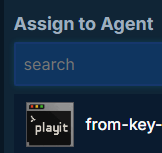
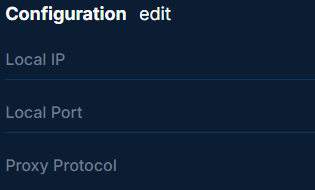
- Click Next. On the following screen (Local IP, Local Port, Proxy Protocol) don't change anything — just click Next, then Create Tunnel. Your tunnel is now ready.
- Copy the address shown under Your Tunnel and paste it into WorldMates' "Playit tunnel" box, then in Minecraft click Open to LAN.
- Minecraft will give you a port number.
- Go back to your tunnel on playit.gg, scroll down to Configuration, click Edit, clear the Local Port field, and enter the exact port Minecraft just gave you. Click Save.
- All set: invite your friend and enjoy!
¡Remember to keep the PlayIt.gg program open; if you close it, you won't be able to play with your friends!.
You only need to set up the tunnel once. For the same world, WorldMates remembers the address and you won't have to repeat anything. If you start a new world, you'll just need to repeat steps 8-9 (get the new port from Minecraft and update it in your existing tunnel) — no need to create a whole new tunnel.
Notes
- The internet-sharing option needs a Playit account with the Playit app running on your computer. WorldMates does not create the tunnel for you — you create it in Playit, then paste the address Playit gives you into WorldMates' "Playit tunnel" box when sharing your world. If you only want to play over your local network (LAN), you don't need Playit at all.
- This project is all rights reserved — please don't redistribute or modify it without permission.
Please mention any errors or questions
Project description from CurseForge.
Pick your setup
WorldMates by Minecraft version and loader
Choose the version and loader you play, then open the matching release.
Minecraft version
1.20.1
1 loader buildCheck the dependencies, then try the file in a copied instance before changing a world you care about.
Recent files
WorldMates versions and loaders
WorldMates-2.0.0.jar
9 Nov 2026
Client Source doesn’t say Server Source doesn’t say Dependencies No extras listed Listed on Release listing
Check the 1.21.1 · NeoForge setup 1.21.1NeoForge release
WorldMates-Neo-1.0.1.jar
20 Sept 2026
Client Source doesn’t say Server Source doesn’t say Dependencies No extras listed Listed on Release listing
Check the 1.21.1 · NeoForge setup 1.21.1NeoForge release
WorldMates-Neo-1.0.0.jar
16 Sept 2026
Client Source doesn’t say Server Source doesn’t say Dependencies No extras listed Listed on Release listing
Check the 1.21.1 · NeoForge setup 1.21.1NeoForge release
WorldMates-1.0.1.jar
16 Sept 2026
Client Source doesn’t say Server Source doesn’t say Dependencies No extras listed Listed on Release listing
Check the 1.20.1 · Forge setup 1.20.1Forge release
WorldMates(1.20.1)-1.0.0.jar
9 Sept 2026
Client Source doesn’t say Server Source doesn’t say Dependencies No extras listed Listed on Release listing
Check the 1.20.1 · Forge setup 1.20.1Forge release
Looking for an older file? The official CurseForge project page is in Resources.
 mod
CurseForge · Minecraft
Actually Additions: More Additions
Added upgrades for machines in "Actually Additions" and some new working blocks compatible with other mods
 mod
CurseForge · Minecraft
MCA x Minecolonies Integration
A seamless NeoForge bridge unifying MineColonies worker AI with MCA Reborn's humanoid rendering, genetics, age progression, and immersive social interactions.
 mod
CurseForge · Minecraft
Mace Enchants & Effects!!
Mace Enchants and Effects Mod primarily adds enchantments and combat status effects to the game for the mace. Also adds mobs, foods, weapons, and tools!