Fabric API Needed by MC Storage Area Network Crafting Network
requiredMatching file found Matched file: [1.21.1] Fabric API 0.116.17+1.21.1

CurseForge · Minecraft mod
Centralized Storage access
Quick answer
MC Storage Area Network Crafting Network targets 1.21.1 with Fabric, NeoForge. The project page does not say whether this file belongs on the client, dedicated server, or both. All 1 required mods have matching files.
Where it goes
The project page does not say whether this file belongs on the client, dedicated server, or both.
The source does not explicitly classify this release as client-only or server-only.
Crafting Network. Change the file and its required mods may change too.
Install Fabric API first. We found matching files for this game-version and loader setup.
We only count dependency files that match this setup. A file for another loader does not fill the gap.
Before you install it
Built for MC Storage Area Network Crafting Network. Pick another file and the loader, install side or required mods may change.
Use Crafting Network. It targets 1.21.1 with Fabric, NeoForge; another release may have different loader, side or dependency requirements.
Install Fabric API first. We found matching files for this game-version and loader setup.
The project page does not say whether this file belongs on the client, dedicated server, or both.
Use the “Get this file” button beside Crafting Network. It opens that exact file at the source.
About this project
Turn every chest, barrel and container around you into one shared, searchable item network — then craft with it.
Have you ever filled a chunk with chests? Now you can — and access, search, sort, and craft with everything inside them from a single block. MC Storage Area Network is a suite of three mods for Minecraft 1.21.1 on Fabric and NeoForge — install them all from one all-in-one jar, or pick only the mods you want:
| Mod | What it adds |
|---|---|
| Storage Network | Storage Terminal — browse, search, take and deposit from every nearby container from one interface. Plus the Network Share Terminal for collecting crafted output. |
| Crafting Network | Crafting / Smelting / Blasting / Smoking / Brewing Terminals — upgradable machines that craft, cook and brew using items pulled from the network. |
| MC Storage Area Network | The shared library/API that scans storage and powers the two mods above. Required by both; other mods can hook into it. |
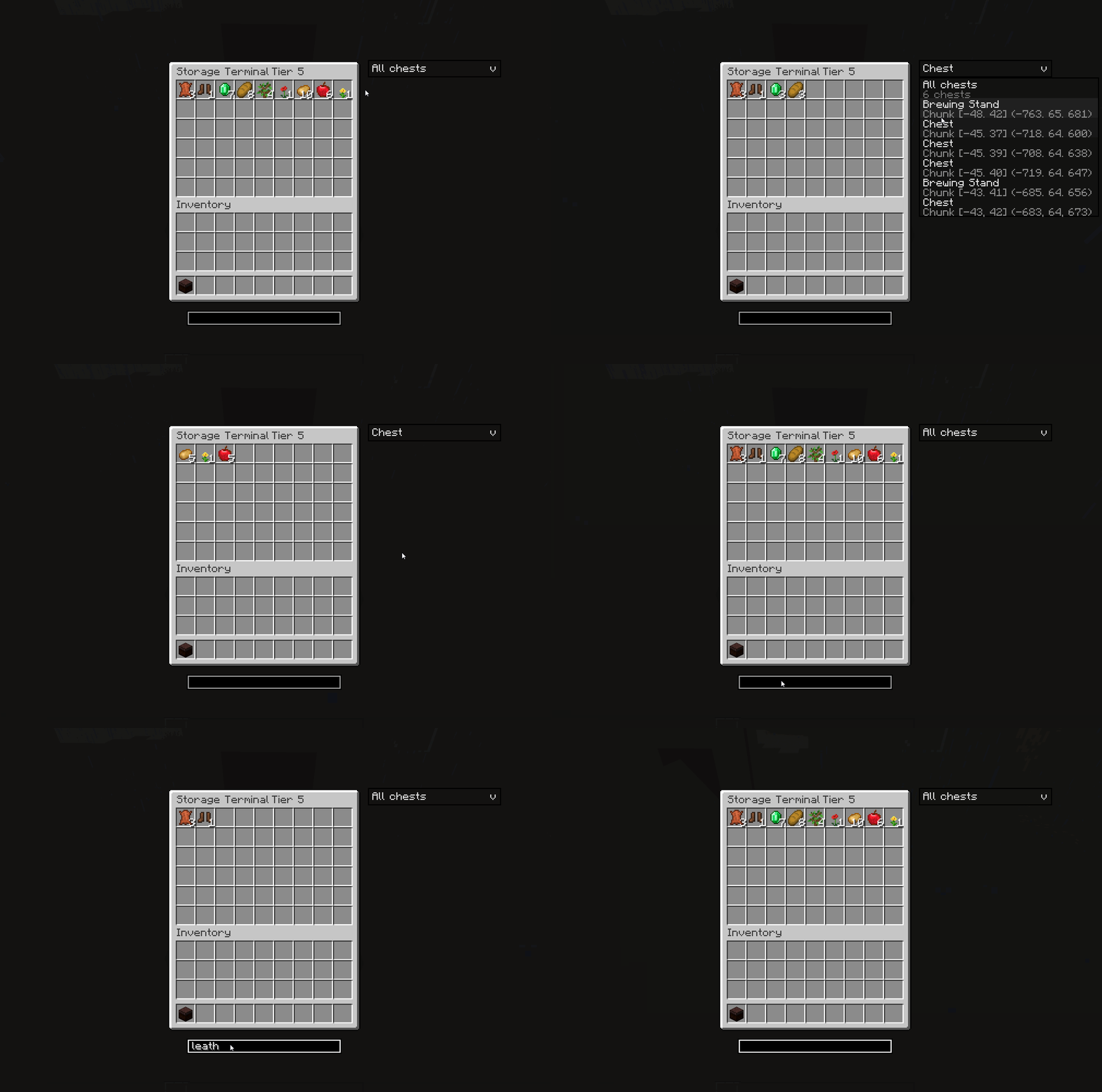
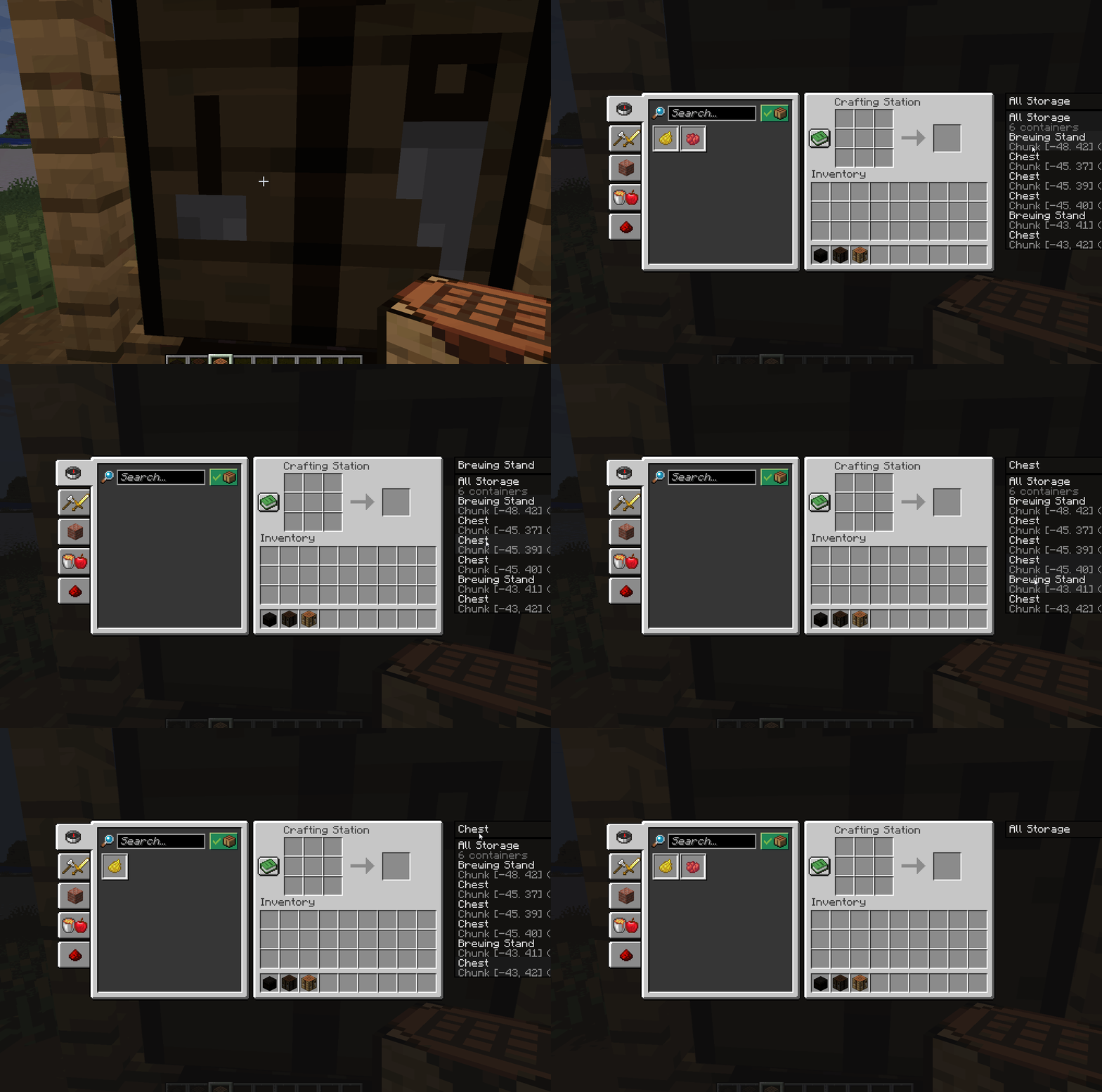
Place it near your storage and it scans the surrounding chunks, gathering every inventory block into one searchable index.
A collection-only sink that receives crafted output and holds it for you.
Requires Storage Network (it's part of that mod).
Storage Network records who places each container:
All of this is configurable on the server.
| Result | Recipe |
|---|---|
| Storage Terminal | 3×3: 8× Copper Ingot around a Chest |
| Network Share Terminal | 3×3: 4× Chest around a Storage Terminal |
| Crafting Terminal | 3×3: 8× Copper Ingot around a Crafting Table |
| Smelting Terminal | 3×3: 8× Copper Ingot around a Furnace |
| Blasting Terminal | 3×3: 8× Copper Ingot around a Blast Furnace |
| Smoking Terminal | 3×3: 8× Copper Ingot around a Smoker |
| Brewing Terminal | 3×3: 8× Copper Ingot around a Brewing Stand |
Tier upgrades — place the previous terminal in the center of a 3×3 crafting grid and surround it with four of the tier material:
| Tier | Name | Material | Scan radius |
|---|---|---|---|
| 0 | Copper | — (base terminal) | 1×1 chunks |
| 1 | Iron | 4× Iron Ingot | 3×3 chunks |
| 2 | Gold | 4× Gold Ingot | 5×5 chunks |
| 3 | Emerald | 4× Emerald | 7×7 chunks |
| 4 | Diamond | 4× Diamond | 9×9 chunks |
| 5 | Netherite | 4× Netherite Ingot | 11×11 chunks |
Higher tiers also make processor terminals work faster.
| Minecraft | 1.21.1 |
| Loaders | Fabric (Loaders + Fabric API) or NeoForge 21.1.235+ |
| Java | 21 |
| Side | Client & Server |
MC Storage Area Network (
mc_storage_area_network) is required by both gameplay mods. It is bundled in the all-in-one jar; when installing the mods individually, install the API jar too.
The same jar works on both Fabric and NeoForge.
All-in-one (recommended): drop mc-storage-area-network-<version>-all.jar into your mods/ folder — it bundles the API, Storage Network and Crafting Network in a single file.
Or install the mods individually:
mods/.Never use the all-in-one jar together with the individual jars — the same mods would load twice.
config/<mod>.json — NeoForge: config/<mod>-server.toml| Mod | Key | Default | Description |
|---|---|---|---|
mc_storage_area_network |
flattenDepth |
1 |
How many shulker-box levels to flatten (1 = boxes in containers, 2 = boxes in boxes). |
mc_storage_area_network |
boxRowHidden |
false |
Hide raw shulker-box stacks so only their contents show. |
mc_storage_area_network |
sameTypeFirst |
true |
Prefer inserting into boxes that already hold the same item. |
mc_storage_area_network |
ownershipEnabled |
true |
Terminals show only global + owner-placed storage. |
mc_storage_area_network |
teamSharing |
true |
Scoreboard-team members share their placed storage. |
storage_network |
maxTier |
5 |
Highest upgrade tier allowed (0–5). |
crafting_network |
maxTier |
5 |
Highest upgrade tier allowed (0–5). |
This project's own source code is licensed under Apache-2.0.
Retired Roca
Project description from CurseForge.
Pick your setup
Choose the version and loader you play, then open the matching release.
Check the dependencies, then try the file in a copied instance before changing a world you care about.
Recent files
crafting-network-1.0.0.26091313-universal.jar
13 Sept 2026
storage-network-1.0.0.26091313-universal.jar
13 Sept 2026
mc-storage-area-network-1.0.2-universal.jar
13 Sept 2026
Looking for an older file? The official CurseForge project page is in Resources.
 mod
modThis is a re-creation of old but gold NuclearCraft on a modern MC version
 mod
modA client side Minecraft mod to find blocks in singleplayer or multiplayer
 mod
mod15× faster JEI ingredient filter build — drastically reduces "Joining world..." wait time on big modded servers.