Vellumli Needed by Motorcade (0.0.0-beta.3)
requiredMatching file found Matched file: Vellumli (1.0.3)
CurseForge · Minecraft mod
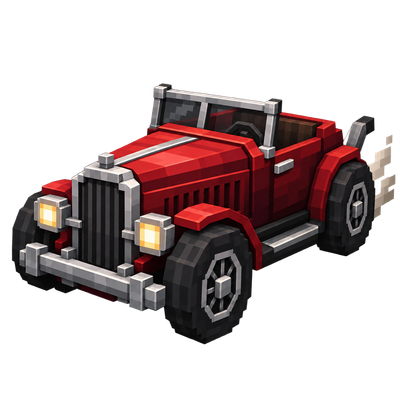
Build and drive customizable automobiles: assemble frames, engines, wheels and attachments on an Auto Mechanic Table, then race across roads, slopes and off-road terrain.
Quick answer
Motorcade (0.0.0-beta.3) targets 1.21.1 with NeoForge. The project page does not say whether this file belongs on the client, dedicated server, or both. All 1 required mods have matching files.
Where it goes
The project page does not say whether this file belongs on the client, dedicated server, or both.
The source does not explicitly classify this release as client-only or server-only.
Motorcade (0.0.0-beta.3). Change the file and its required mods may change too.
Install Vellumli first. We found matching files for this game-version and loader setup.
We only count dependency files that match this setup. A file for another loader does not fill the gap.
Before you install it
Built for Motorcade (0.0.0-beta.3). Pick another file and the loader, install side or required mods may change.
Use Motorcade (0.0.0-beta.3). It targets 1.21.1 with NeoForge; another release may have different loader, side or dependency requirements.
Install Vellumli first. We found matching files for this game-version and loader setup.
The project page does not say whether this file belongs on the client, dedicated server, or both.
Use the “Get this file” button beside Motorcade (0.0.0-beta.3). It opens that exact file at the source.
About this project
Build your own automobiles from scratch, then drive them across roads, slopes and off-road terrain.



| Motorcade adds fully customizable, buildable vehicles to Minecraft. Craft an Auto Mechanic Table to design frames, engines, wheels and attachments, then place those parts on an Automobile Assembler to build a real, drivable vehicle piece by piece. Every combination of parts changes how the finished automobile handles — its speed, weight, handling and what it can carry. A NeoForge 1.21.1 port of Automobility by FoundationGames (originally Fabric/Forge for 1.20.1), based on the author's own unreleased NeoForge 1.21.1 rewrite, brought up to NeoForge 21.1.259 by Stalking Dragons. Distributed under the same license (MIT). Not affiliated with or endorsed by the original author. |
 |
|---|
Use the Auto Mechanic Table to craft a frame, engine and set of wheels, then place them on the Automobile Assembler. Add an optional attachment for extra functionality or utility. Break a finished vehicle apart again with a Crowbar whenever you want to rebuild it differently.
Build proper roads and racetracks with Slopes, Dash Panels and Off-Road tiles, and design obstacle courses that actually reward good driving.
Accelerate, brake, reverse, steer and drift with dedicated controls (W/A/S/D + Space). Controller support is available through Controlify where the platform provides it.
Add entirely new vehicle types with data packs and resource packs — no coding required for simple additions.
| Minecraft | 1.21.1 |
|---|---|
| NeoForge | 21.1.259+ |
| Dependencies | None required |
| Side | Client and Server (required on both) |
mods folder — on the server and on every client in multiplayer.Motorcade is a NeoForge 1.21.1 port of Automobility by FoundationGames, updated to NeoForge 21.1.259 by Stalking Dragons. Not affiliated with or endorsed by the original author.
License: MIT, the same license under which Automobility is published. The full licence text ships in the jar (META-INF/LICENSE) and in the repository LICENSE file, and full corresponding source is published at gitlab.com/stalking-dragons/minecraft/motorcade.
https://codex.skdragons.com/
Codex Stalking Dragons — Minecraft Modding
Project description from CurseForge.
Pick your setup
Choose the version and loader you play, then open the matching release.
Check the dependencies, then try the file in a copied instance before changing a world you care about.
Recent files
motorcade-1.21.1-neoforge-21.1.259-0.0.0-beta.3.jar
19 Oct 2026
motorcade-1.21.1-neoforge-21.1.249-0.0.0-beta.2.jar
14 Oct 2026
motorcade-1.21.1-neoforge-21.1.249-0.0.0-beta.1.jar
12 Sept 2026
Looking for an older file? The official CurseForge project page is in Resources.
 mod
A semi-magical mod focused around power, called Force
 mod
Event Prevention for Blocks
 mod
Pick your race and build your legend with elves, dwarves, werewolves, goblins, mighty bosses, and a world full of fantasy loot.
