Minecraft version
Back to mods 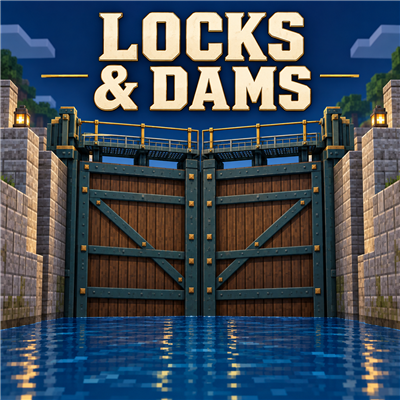
CurseForge · Minecraft mod
Locks and Dams
Build working navigation locks with smooth water levels, Create-powered gates, flanged piping, and an industrial control desk.
Choose a version Pick your version below, then grab the matching file.
Quick answer
Which Locks and Dams release should I use?
Latest stable file LocksAndDams-Forge-1.20.1-1.1.0-beta.6.jar
Game version 1.20.1
Loader Forge
Locks and Dams LocksAndDams-Forge-1.20.1-1.1.0-beta.6.jar targets 1.20.1 with Forge. The project page does not say whether this file belongs on the client, dedicated server, or both. No extra mods listed for this file.
Where it goes
Is Locks and Dams required on the client, server, or both?
The project page does not say whether this file belongs on the client, dedicated server, or both.
Client Source doesn’t say
Dedicated server Source doesn’t say
Loader for this release Forge
Required install it here Optional supported, not mandatory Not supported do not install here Source doesn’t say do not assume
The source does not explicitly classify this release as client-only or server-only.
What else does Locks and Dams LocksAndDams-Forge-1.20.1-1.1.0-beta.6.jar need?
LocksAndDams-Forge-1.20.1-1.1.0-beta.6.jar. Change the file and its required mods may change too.
This file does not list any required mods. Do not add a library just because a different file uses it.
This file does not list any required or optional mods.
Before you install it
Add Locks and Dams without breaking your instance.
Built for Locks and Dams LocksAndDams-Forge-1.20.1-1.1.0-beta.6.jar. Pick another file and the loader, install side or required mods may change.
- 01
Stick to this file
Use LocksAndDams-Forge-1.20.1-1.1.0-beta.6.jar. It targets 1.20.1 with Forge; another release may have different loader, side or dependency requirements.
- 02
Bring the mods it needs
This file does not list any required mods. Do not add a library just because a different file uses it.
- 03
Put it on the correct side
The project page does not say whether this file belongs on the client, dedicated server, or both.
- 04
Pick the file you checked
Use the “Get this file” button beside LocksAndDams-Forge-1.20.1-1.1.0-beta.6.jar. It opens that exact file at the source.
About this project
What does Locks and Dams add?
Locks & Dams
Build a working canal lock and move boats between different water levels. Locks & Dams combines smooth chamber water with Create-powered swing gates, physical pipe circuits, and an industrial control desk.
Build your own lock
Four corner hinges define a rectangular chamber. The upper and lower hinge pairs can sit at different heights, and canal ports establish the upper and lower water levels. Build the walls, gates, and plumbing to suit your canal.
- Individual gate panels assemble into continuous timber-and-steel miter gates with grated catwalks and handrails. The closed V points toward high water: into the chamber at the lower end and into the upper canal at the upper end.
- Create-powered hinges: positive rotation opens, negative rotation closes, and zero holds position.
- Rounded flanged pipes, chamber and canal ports, and an inline valve anywhere along each separate fill/drain circuit.
- Smooth managed chamber water that carries boats as the water level changes.
- Gate and water-level interlocks, obstruction handling, and emergency stopping.
Take control
Link a three-block industrial control desk to the lock controller. It includes upper/lower gate selectors, a FILL/DRAIN selector, labeled indicators, and a latched emergency-stop button.
- **Gate lamps:** green for closed, red for open, flashing yellow while moving.
- **Water lamps:** WARN during the pre-start countdown, FLOW during water movement, and CLOSED when idle.
- **Pre-start alarm:** selecting FILL or DRAIN starts a 10-second warning with a redstone output for your own alarm or siren.
- **Departure horn:** a 2-second redstone pulse starts 4 seconds after a commanded gate fully opens.
- **Emergency stop:** stops gate and water movement; deliberate reset does not restart previous commands.
Gate Control Nodes provide clutch and reversing-gearshift outputs for Create machinery. Use your configured Sneak + Use keys to open node settings. Alarm and horn sounds come from devices you connect; this mod supplies the redstone signals.
Requirements
- Minecraft Java **1.20.1**
- **Forge 47.4.10** (the supported setup used during development)
- **Create 6.0.8**
- Install Locks & Dams and Create on both client and server.
Commercial Systems is not required. Forge is the supported loader for this release.
Getting started
In a creative test world with commands enabled, run /locks demo_desk in a large clear area to build a wired example. Explore its gate controls and pipe circuits before building your own lock.
Each water circuit connects two Culvert Ports through pipes and one Inline Culvert Valve:
- **Fill:** upper canal intake → inline valve → chamber outlet.
- **Drain:** chamber intake → inline valve → lower canal outlet.
Use the Control Link Tool on the lock controller and then the desk. Keep the controller, desk, gate nodes, and machinery loaded together.
Construction and wiring guide · Plumbing guide
Release scope
Version 1.1.0-beta.1 introduces timber miter gates. New gate behavior has been checked offline but has not yet been tested in Minecraft. Existing assemblies keep their old geometry until edited and reassembled with suitable recesses. The mod provides working navigation locks with fixed canal water supplies. Finite reservoirs and dam simulation are not included. Gallery screenshots show earlier gate and plumbing designs during development; the control-desk gallery image is a Blender design render, not an in-game screenshot.
Project description from CurseForge.
Pick your setup
Locks and Dams by Minecraft version and loader
Choose the version and loader you play, then open the matching release.
Check the dependencies, then try the file in a copied instance before changing a world you care about.
Recent files
Locks and Dams versions and loaders
LocksAndDams-Forge-1.20.1-1.1.0-beta.6.jar
13 Sept 2026
Client Source doesn’t say Server Source doesn’t say Dependencies No extras listed Listed on Release listing
Check the 1.20.1 · Forge setup 1.20.1Forge release
Looking for an older file? The official CurseForge project page is in Resources.
 mod
mod CurseForge + Modrinth · Minecraft
Changed Extras
The Changed: Minecraft Mod Addon that adds creatures, features and structures that just won't be implemented by the other addons or the main mod.
 mod
mod CurseForge + Modrinth · Minecraft
Shutter Up!
A mod that adds classy decorative shutters to your world!
 mod
mod CurseForge + Modrinth · Minecraft
Particle Rain
replaces the default weather with particle effects