DayZ Inventory Optional for DayZ Hotbar 1.2.0 for MC 26.3
optionalMatching file found Matched file: DayZ Inventory 1.8.2 for MC 26.3
CurseForge · Minecraft mod
a DayZ-style hotbar and status readout, styled to match the DayZ Inventory mod.
Quick answer
DayZ Hotbar 1.2.0 for MC 26.3 targets 26.3 with NeoForge. The project page does not say whether this file belongs on the client, dedicated server, or both. No extra mods listed for this file.
Where it goes
The project page does not say whether this file belongs on the client, dedicated server, or both.
The source does not explicitly classify this release as client-only or server-only.
DayZ Hotbar 1.2.0 for MC 26.3. Change the file and its required mods may change too.
This file does not list any required mods. Do not add a library just because a different file uses it.
2 extra mods were pulled in by other dependencies. Indented rows show who needs each one. We only count dependency files that match this setup. A file for another loader does not fill the gap.
Before you install it
Built for DayZ Hotbar 1.2.0 for MC 26.3. Pick another file and the loader, install side or required mods may change.
Use DayZ Hotbar 1.2.0 for MC 26.3. It targets 26.3 with NeoForge; another release may have different loader, side or dependency requirements.
This file does not list any required mods. Do not add a library just because a different file uses it.
The project page does not say whether this file belongs on the client, dedicated server, or both.
Use the “Get this file” button beside DayZ Hotbar 1.2.0 for MC 26.3. It opens that exact file at the source.
About this project
Replaces the Minecraft HUD with a DayZ-style hotbar and a DayZ-style status readout.
Built as a visual sibling of DayZ Inventory — same palette, same flat translucent panels, same near-black washes — so the two mods read as one interface.
Available for Minecraft 1.20.1+. No loader needs an API mod.
Tip — GUI Scale. The HUD is laid out at a fixed pixel size and is tuned for Minecraft's default Auto GUI scale. At a large GUI scale the hotbar, the player panel and the status readout are pushed together and can meet in the middle of the screen; at a very small one the icons become hard to read. If either happens, adjust Options → Video Settings → GUI Scale.
| Minecraft | Loaders | Java | Release |
|---|---|---|---|
| 1.21.1 | Fabric, Forge 52.1.2+, NeoForge 21.1+ | 21 | 1.1.0 |
| 1.20.1 | Fabric, Forge 47.x | 17 | 1.0.1 |
Both versions draw the same HUD. Download the file for your game version and loader - they are not interchangeable.
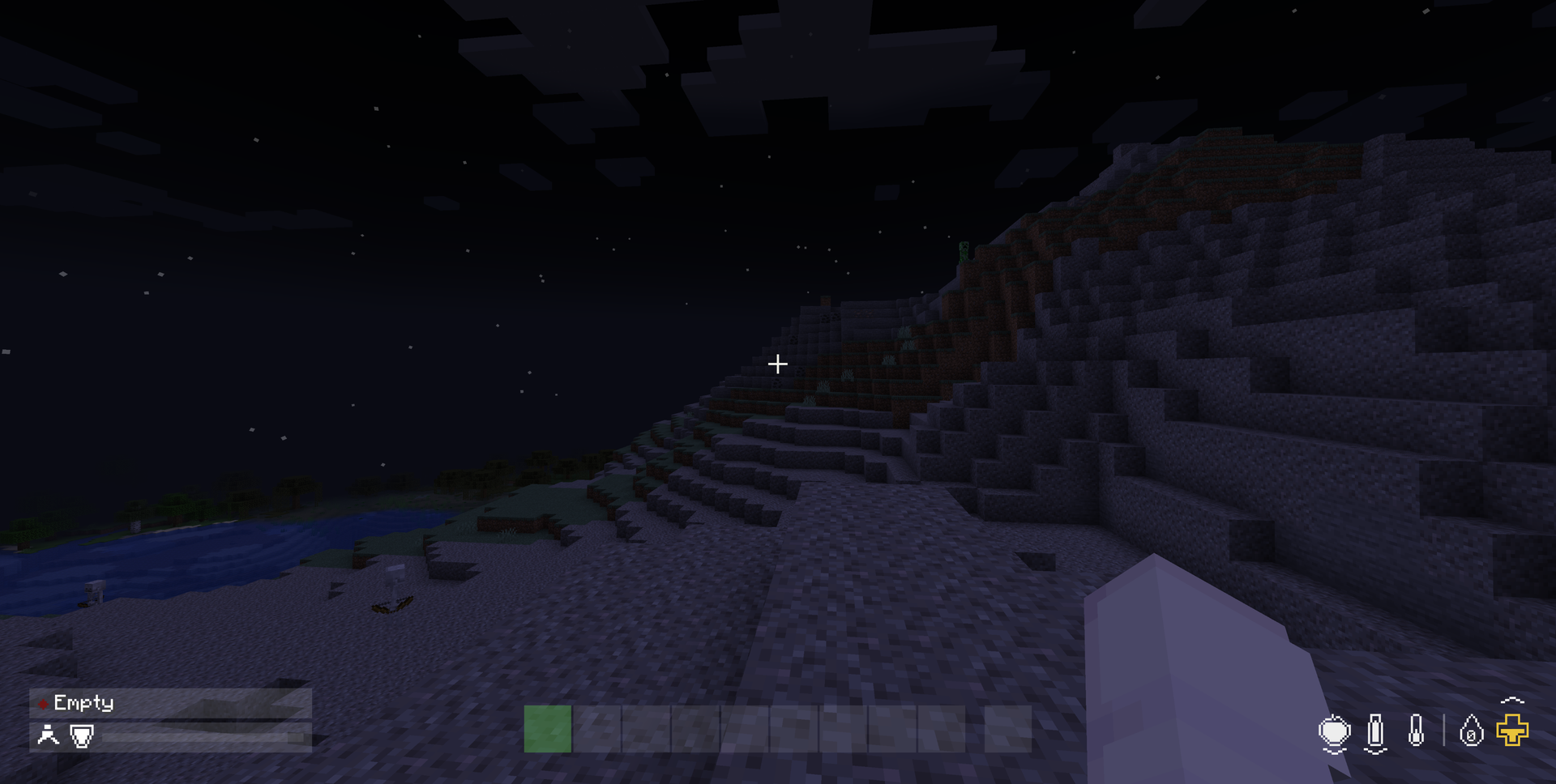
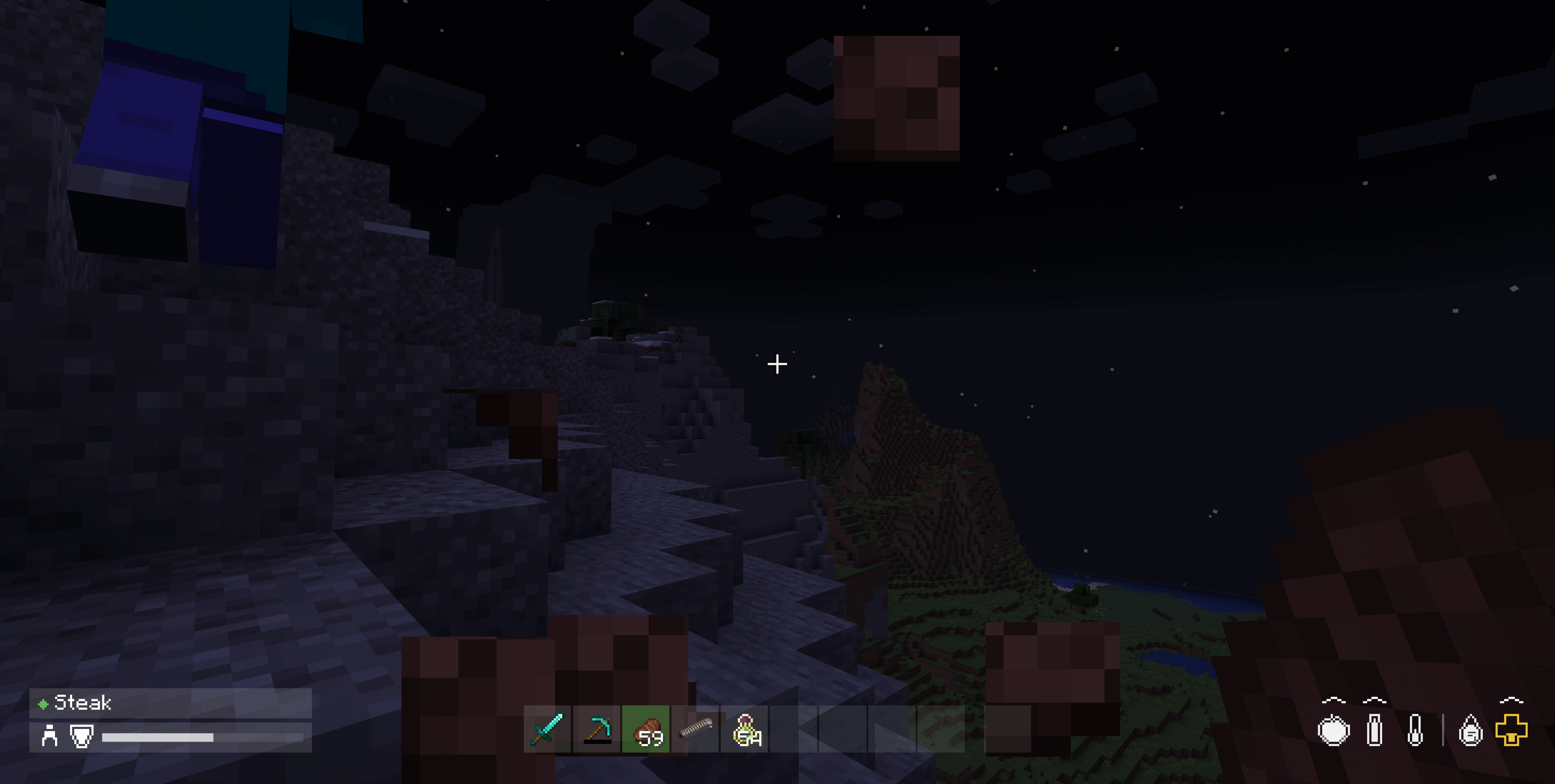
| Section | Icons |
|---|---|
| Effects | One mark per family of active potion effect |
| Sustenance | Apple for food, with saturation drawn over it as a brighter wash; bottle for water; thermometer for temperature; bubble for air, only while you are underwater |
| Vitals | Drop for experience with the level number inside it; gold cross for absorption; cross for health, or your mount's health while riding |
Health and food use DayZ's own bands, which differ from each other. Health is quoted against 100 HP; food against a 5,000-point reserve.
| White | Yellow | Red | Flashing | |
|---|---|---|---|---|
| Health | 61–100% | 31–60% | 15–30% | 0–14% |
| Food | 16–100% | 6–15% | 2–5% | 0–1.9% |
Minecraft's bars are 20 points for both, so health turns yellow at 12 or less, red at 6 or less, and flashes under 3 — while food turns yellow at 3 or less, red at 1, and flashes only when empty. Food is deliberately the more forgiving of the two: in DayZ you are warned about hunger far later than about blood loss.

The critical band in motion — food, water and health all flashing red at empty. The beneficial-effect heart on the left and the experience drop stay white through it, because an effect is either on or off and how far through a level you are is not a warning.
Air has no bands of its own and borrows health's, since drowning and bleeding out are the same kind of emergency. Absorption and experience are deliberately not colour-tiered — having less absorption is not a warning, and neither is how far through a level you are.
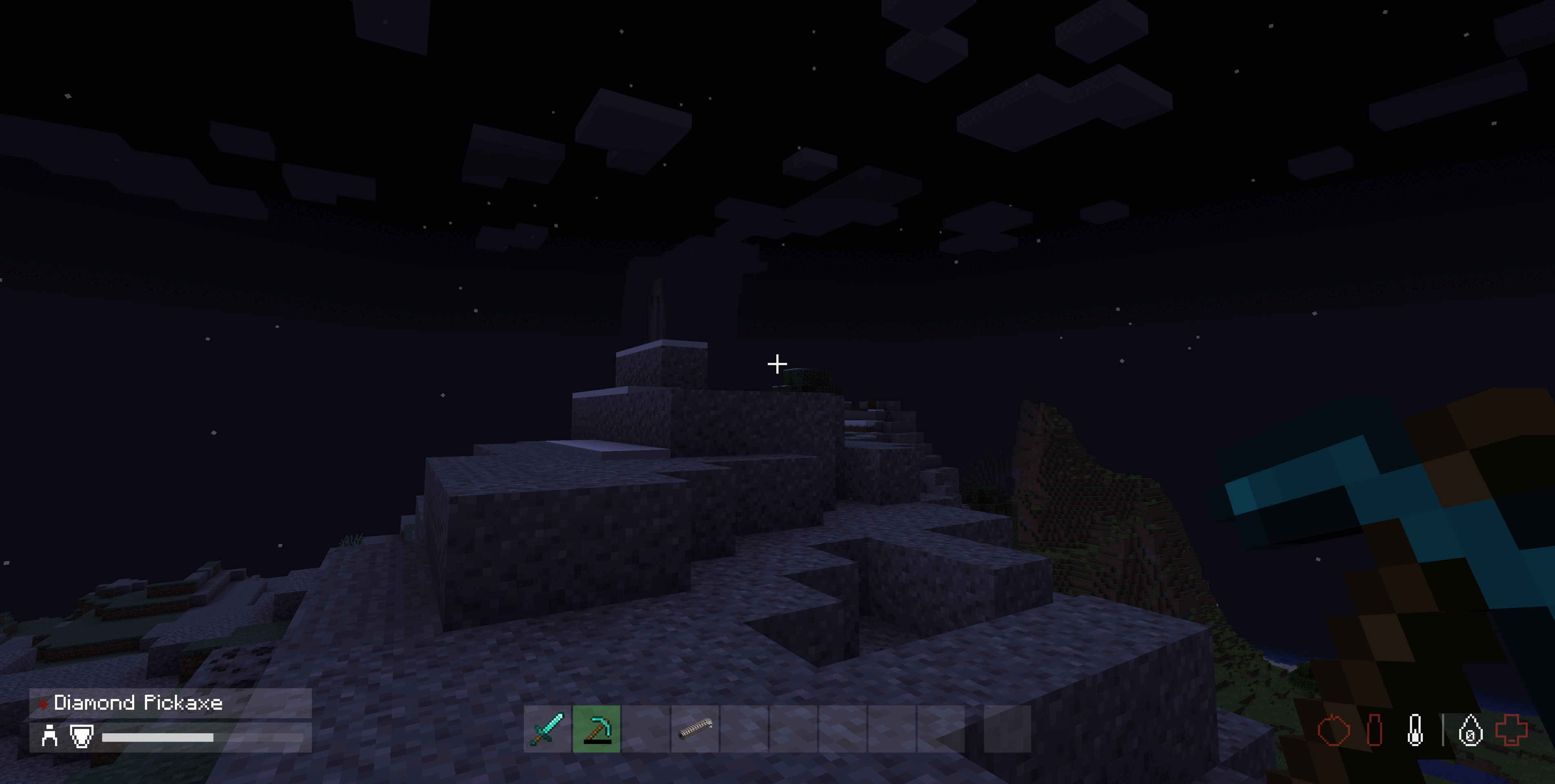
Active potion effects are collapsed to one mark per family rather than one per effect, because Minecraft has thirty-odd effects and a row that grew per effect would eat the screen edge. What matters at a glance is which kinds of thing are on you.
| Mark | Family |
|---|---|
| Heart | Beneficial — speed, strength, night vision |
| Pill | Restorative — regeneration, absorption, saturation |
| Broken heart | Harmful — poison, hunger, mining fatigue, everything else bad |
They are drawn white with no fill level and no colour banding, because an effect is either on or off. When one ends its mark fades out over a second rather than vanishing.
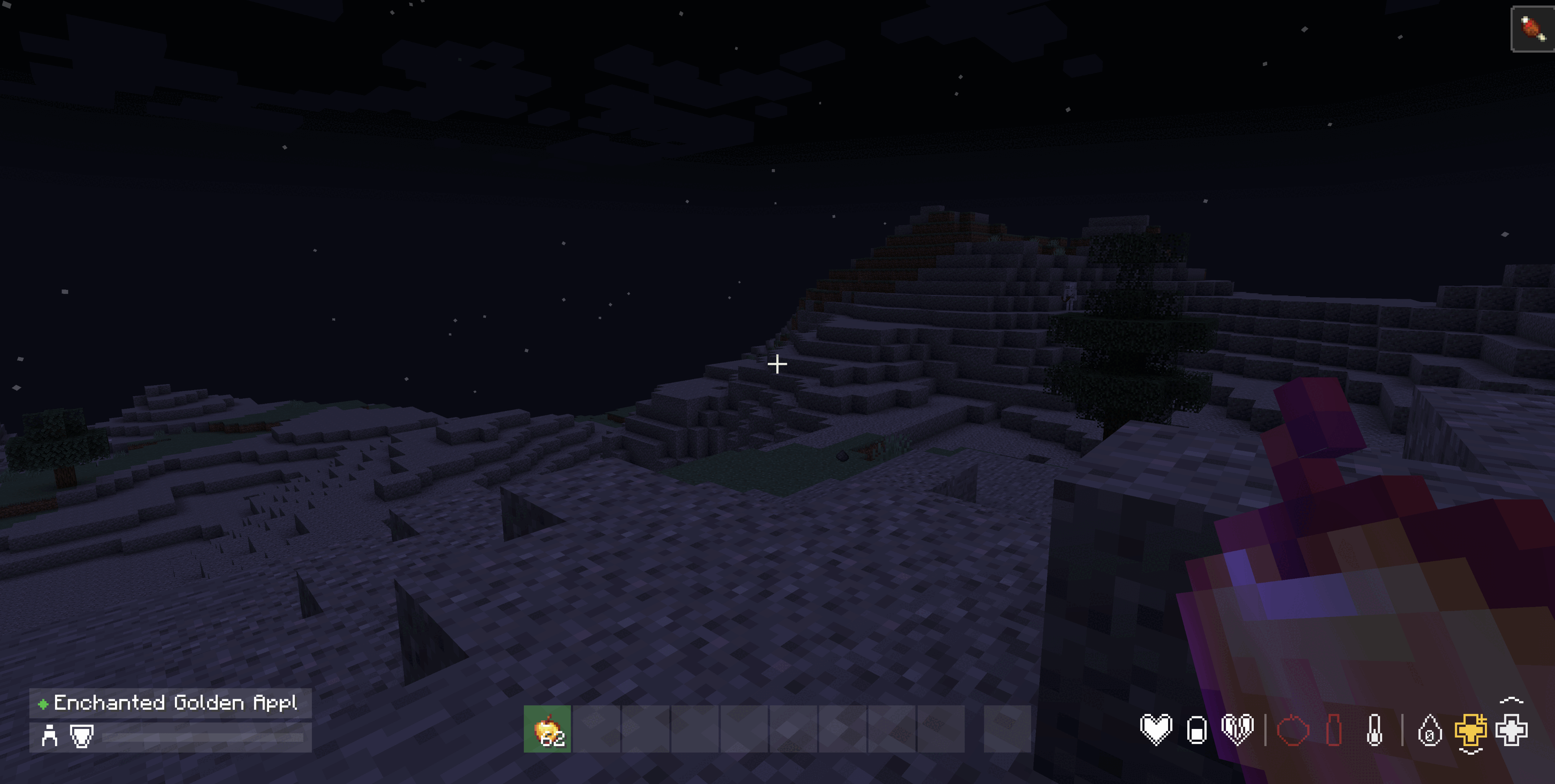
Every icon is pixel art defined in the mod's own source on a 15x15 grid rather than loaded from a texture. The mod ships no icon art of its own, so it cannot clash with a resource pack.
Nothing else needs installing on any loader — no Fabric API, and no companion mod on Forge or NeoForge either. Each build talks to its own loader's HUD plumbing and to nothing else.
Pick the file for your Minecraft version and loader. They draw the same HUD, but they are built for different versions and loaders and are not interchangeable.
Fabric
dayz-hotbar-fabric-1.21.1-<version>.jar into your mods folder.Forge
dayz-hotbar-forge-1.21.1-<version>.jar into your mods folder.NeoForge
dayz-hotbar-neoforge-1.21.1-<version>.jar into your mods folder.Fabric
dayz-hotbar-fabric-1.20.1-<version>.jar into your mods folder.Forge
dayz-hotbar-forge-1.20.1-<version>.jar into your mods folder.There is no NeoForge build for 1.20.1. That line uses the older overlay-based HUD API, which this mod is not written against, so 1.20.1 ships for Fabric and Forge only.
The builds are not interchangeable. Forge and NeoForge are separate downloads even though they look similar; they are different loaders with different HUD APIs.
Apache License 2.0 — free to use, modify and redistribute, including in modpacks, on servers, and commercially.
Copyright 2026 suoim.
Project description from CurseForge.
Pick your setup
Choose the version and loader you play, then open the matching release.
Showing the newest 12 of 23 game versions. Older files are in the list below.
Check the dependencies, then try the file in a copied instance before changing a world you care about.
Recent files
dayz-hotbar-neoforge-26.3-1.2.0+mc26.3.jar
17 Sept 2026
dayz-hotbar-neoforge-26.2-1.2.0+mc26.2.jar
17 Sept 2026
dayz-hotbar-neoforge-26.1.2-1.2.0+mc26.1.2.jar
17 Sept 2026
dayz-hotbar-neoforge-26.1.1-1.2.0+mc26.1.1.jar
17 Sept 2026
dayz-hotbar-neoforge-26.1-1.2.0+mc26.1.jar
17 Sept 2026
dayz-hotbar-neoforge-1.21.9-1.2.0+mc1.21.9.jar
17 Sept 2026
dayz-hotbar-neoforge-1.21.6-1.2.0+mc1.21.6.jar
17 Sept 2026
dayz-hotbar-neoforge-1.21.5-1.2.0+mc1.21.5.jar
17 Sept 2026
dayz-hotbar-neoforge-1.21.8-1.2.0+mc1.21.8.jar
17 Sept 2026
dayz-hotbar-neoforge-1.21.7-1.2.0+mc1.21.7.jar
17 Sept 2026
dayz-hotbar-neoforge-1.21.11-1.2.0+mc1.21.11.jar
17 Sept 2026
dayz-hotbar-neoforge-1.21.3-1.2.0+mc1.21.3.jar
17 Sept 2026
Looking for an older file? The official CurseForge project page is in Resources.
 mod
modTurn Minecraft’s empty oceans into living floating settlements.
 mod
mod3D digging/block particles for Minecraft 26.2 - a community port of Hantonik & TominoCZ's FBP Renewed, originally created by MorphoxL.
 mod
modThree daily puzzles in one mod: Craftle (Wordle for crafting recipes), Connectle (Connections with Minecraft items) and CrossCraft (a Minecraft mini crossword). One hub, one hotkey, the same puzzles for everyone each day.