Minecraft version
Back to mods 
CurseForge · Minecraft mod
MineTP
Build your own fast-travel network. Find ancient pillars. Carry a scroll for emergencies.
Choose a version Pick your version below, then grab the matching file.
Quick answer
Which MineTP release should I use?
Latest stable file MineTP 1.0.0.jar
Game version 1.12.1
Loader NeoForge
MineTP 1.0.0.jar targets 1.12.1 with NeoForge. The project page does not say whether this file belongs on the client, dedicated server, or both. No extra mods listed for this file.
Where it goes
Is MineTP required on the client, server, or both?
The project page does not say whether this file belongs on the client, dedicated server, or both.
Client Source doesn’t say
Dedicated server Source doesn’t say
Loader for this release NeoForge
Required install it here Optional supported, not mandatory Not supported do not install here Source doesn’t say do not assume
The source does not explicitly classify this release as client-only or server-only.
What else does MineTP 1.0.0.jar need?
MineTP 1.0.0.jar. Change the file and its required mods may change too.
This file does not list any required mods. Do not add a library just because a different file uses it.
This file does not list any required or optional mods.
Before you install it
Add MineTP without breaking your instance.
Built for MineTP 1.0.0.jar. Pick another file and the loader, install side or required mods may change.
- 01
Stick to this file
Use MineTP 1.0.0.jar. It targets 1.12.1 with NeoForge; another release may have different loader, side or dependency requirements.
- 02
Bring the mods it needs
This file does not list any required mods. Do not add a library just because a different file uses it.
- 03
Put it on the correct side
The project page does not say whether this file belongs on the client, dedicated server, or both.
- 04
Pick the file you checked
Use the “Get this file” button beside MineTP 1.0.0.jar. It opens that exact file at the source.
About this project
What does MineTP add?
# MineTP — Waystones & Teleport Pillars
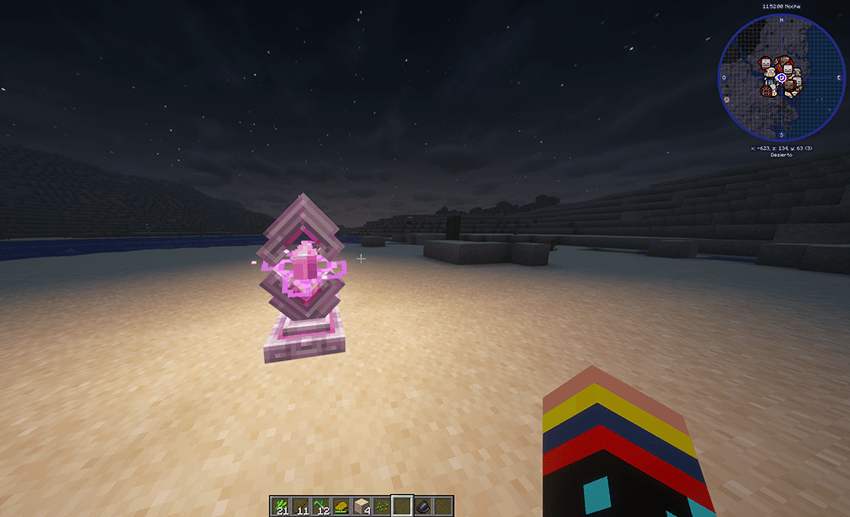
**Build your own fast-travel network. Find ancient pillars. Carry a scroll for emergencies.**
MineTP adds a complete, server-friendly fast-travel system to Minecraft: craftable
Waystones you place and name yourself, towering Elysian Teleport Pillars that generate
naturally across every dimension, and single-use Warp Scrolls that let you jump home
from anywhere. Everything is validated on the server, configurable by admins, and built
to keep a multiplayer world stable.
Features
Waystone
A tall, glowing obelisk you craft and place wherever you want a travel point.
- Right-click to activate. The waystone joins your personal network and gets an automatic
village-style name — Riverwood, Ebonreach, Stonehollow, Frosthaven, and hundreds more. - Right-click again to open the teleport menu.
- Share it or keep it private. As the owner you can flip a waystone to global so every
player who discovered it can travel there. Flip it back and visitors lose access instantly. - Rename it from the menu with the [R] button, or by right-clicking with a named name tag
(the tag is consumed). - Protected: only the owner or an admin can break it.
- Two blocks tall, emits full light, puffs purple End particles when placed and when used.
Elysian Teleport Pillar
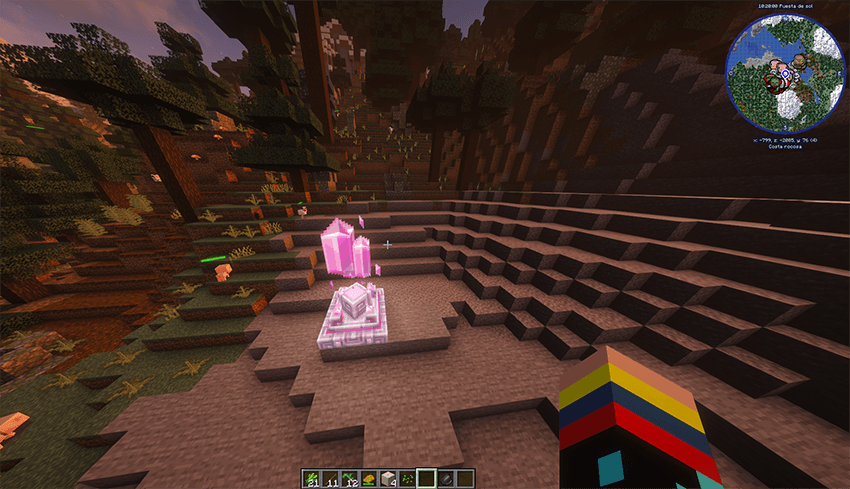
A 3x3, five-block-tall crystal tower that generates naturally — free public travel points scattered across the world.
- Always public, never owned. Anyone can discover and use one. Nobody can claim, rename or convert it.
- Doesn't eat your personal waystone quota. If an admin caps how many waystones a player can own, pillars are exempt.
- Generates in the Overworld, the Nether and the End.
- Truly spread out: one pillar per 40x40 chunk cell — about 640 blocks apart on average — with a guaranteed minimum of 515 blocks between any two. The anchor inside each cell is picked from the world seed, so the layout looks random but never clusters, and it's identical for the same seed.
- One guaranteed pillar at every Overworld village, placed next to the village and never inside it. The mod clears grass, flowers, ferns, saplings, logs and leaves out of the way, levels the 3x3 base and fills holes up to two blocks deep with the surrounding natural block. It will never build over houses, roads, farmland, wells, chests, beds, workstations or water — if the spot isn't clean it simply tries somewhere else.
- Locator lightning: every now and then a bolt strikes a pillar — real flash, real thunder, zero damage and zero fire. It's there so you can spot a pillar from a distance at night. It only fires when a player is nearby, and admins can tune it or switch it off.
- Creative-only removal. A pillar cannot be mined in Survival, not even by an operator, so public travel points don't disappear on a shared server.
- Terrain per dimension: the Overworld needs open sky on dirt, grass, stone, snow or sand; the Nether needs netherrack, basalt or blackstone; the End needs end stone under open sky.
Warp Scroll One-use parchment for the moment you're deep in a cave with a full inventory. - Right-click anywhere — no waystone needed — to open your destination list. - Pick a destination, travel, and the scroll crumbles to dust.
- It is only spent if you actually travel. Close the menu, hit a cooldown, pick a destination that no longer exists, or fail the safe-landing check, and the scroll stays in your hand. - Never consumed in Creative.
- The scroll is the payment: a scroll trip costs no experience (admins can change this). - Stacks to 16.
Recipes
Waystone — 3 Ender Pearls + 3 Obsidian -> 1 Waystone
[ ] [ Pearl ] [ ]
[ Pearl ] [ ] [ Pearl ]
[ Obsid ] [ Obsid ] [ Obsid ]
Warp Scroll — 8 Paper + 1 Ender Pearl -> 2 Warp Scrolls
[ Paper ] [ Paper ] [ Paper ]
[ Paper ] [ Pearl ] [ Paper ]
[ Paper ] [ Paper ] [ Paper ]
The Elysian Teleport Pillar has no recipe — it only appears through world generation.
Admins can place one from the creative tab or with a command.
The teleport menu
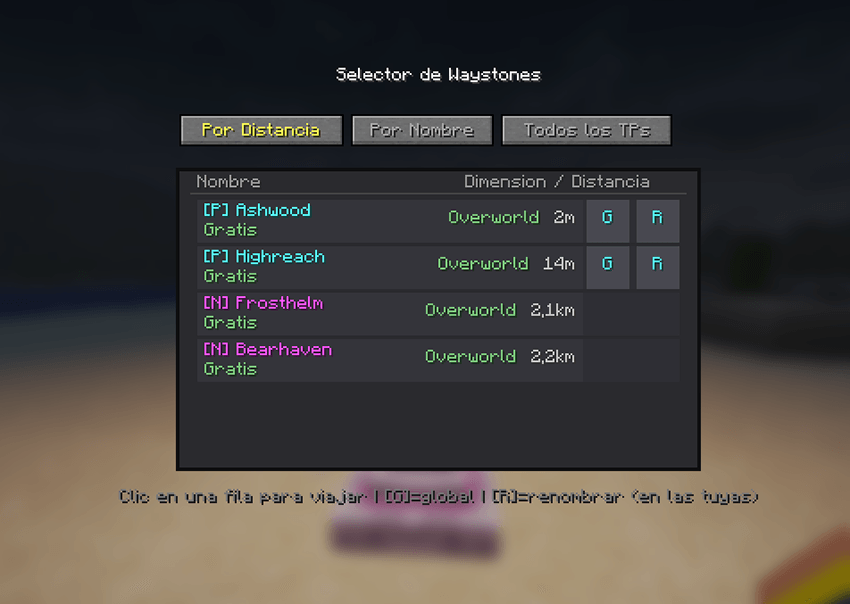
Scrollable list with mouse wheel support.
Three views: All TPs / My TPs / Global TPs.
Sort by distance or by name.
Colour-coded marks: cyan [P] your own, yellow [G] public, magenta [N] natural pillar,
orange [?] an older discovery not yet indexed.Dimension and distance on every row, colour-coded: green Overworld, red Nether, purple
End. Distances switch to kilometres past 1000 blocks.The experience cost is shown per destination before you commit — "Free" or
"Cost: N level(s)".Left-click a row to travel. Right-click one of your own to toggle global. The [G] and [R]
buttons appear only on waystones you own.Live updates: while the menu is open it refreshes every two seconds, so if another player
renames a waystone or makes one private you see it immediately — without loading a single
remote chunk.Fully localised: English plus 13 Spanish locales (es_es, es_419, es_mx, es_co, es_ar,
es_cl, es_pe, es_ve, es_ec, es_bo, es_uy, es_py, es_do).
Travel rules
Cross-dimension travel works out of the box.
Experience cost scales with distance (default mode): up to 128 blocks is free, up to 1000
costs 1 level, up to 2000 costs 2, up to 3000 costs 3, anything further or across
dimensions costs 5. Creative and Spectator always travel free. Admins can switch the whole
thing to free.Cooldown between trips, 5 seconds by default.
You land beside the waystone, never on top of it. In Survival the mod looks for a safe spot
— solid ground, no fluid, no magma block, campfire or cactus underneath — and refuses the
trip if there isn't one. Creative and Spectator can land anywhere.Coordinates, world border and collision are all validated before you move.
Built for servers
- The server is the source of truth. Discovery, permissions, the global toggle, renaming,
protection and the teleport itself are all decided server-side. A modified client cannot
travel to a destination it never discovered, claim a pillar, or fake a warp scroll. - Teleport queue: at most 2 trips processed per tick with up to 8 pending, so a group of
players jumping at once doesn't spike chunk loading. A player can't queue the same trip
twice, and disconnecting cancels it. - Anti-spam limits per player: 4 list openings, 8 edits and 4 travel requests per 2 seconds.
- The destination list never loads remote chunks. Metadata lives in a per-world index, so
opening the menu costs nothing even when your network spans thousands of blocks. The real
block is still validated at the moment you travel. - Cheap idle cost: a pillar with nobody near it costs a single integer comparison per tick,
and produces no network traffic. - Per-world data. Discoveries, the destination index and village state are stored as world
SavedData, so separate worlds never mix. - Player names are cached alongside UUIDs, so offline players are never shown as a raw UUID.
## Configuration
config/minetp.json, all editable in-game with /minetp config set <field> <value>.
teleportCostMode xp 'xp' for the distance-based cost, 'free' for no cost
teleportCooldownSeconds 5 Cooldown between trips
maxWaystonesPerPlayer 0 Cap on personal waystones; 0 means unlimited
pillarSpacingOverworld 40 Cell size in chunks for natural pillars (0 disables)
pillarSpacingNether 40 Same, for the Nether
pillarSpacingEnd 40 Same, for the End
pillarMinDistance 500 Guaranteed minimum distance in blocks between pillars
villagePillars true One guaranteed pillar per Overworld village
scrollFreeTravel true A warp scroll pays for its own trip (no XP cost)
pillarLightning true Cosmetic locator lightning on pillars
pillarLightningSeconds 120 Average seconds between bolts on one pillar
pillarLightningRadius 48 Only strike when a player is within this many blocks
Pillar spacing is read at world-generation time, so changing it only affects newly
generated chunks.
Commands
All commands require permission level 2 (operator).
/minetp give [player] Give a waystone item
/minetp config get Show the current configuration
/minetp config set <field> <value> Change one setting and save it
/minetp config reload Reload the config from disk
/minetp pillar spawn Place a natural pillar where you stand
/minetp pillar remove Remove the nearby pillar completely
/minetp pillar count Count pillars in loaded chunks near players
/minetp pillar strike Fire one locator bolt now, to preview the effect
/minetp village status How many villages already have their pillar
/minetp village here Force the village-pillar attempt in this chunk
/minetp index rebuild Index waystones in already-loaded chunks
/minetp data import-legacy Import discoveries from an older JSON file
/minetp data import-legacy migrates a pre-existing config/minetp_players.json into the
current world. The original file is kept untouched and a backup is written to the world
folder.
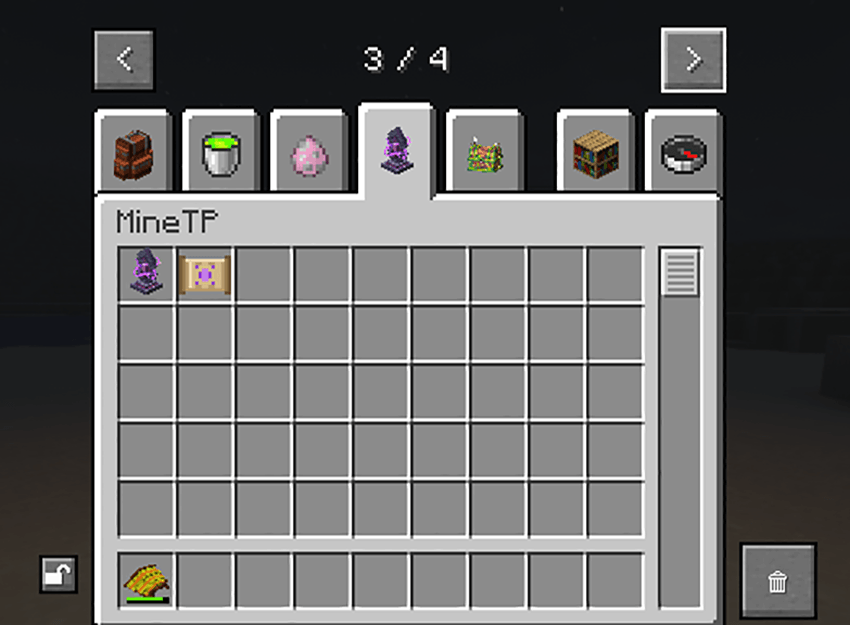
Creative tab
MineTP registers its own creative tab.
- Waystone and Warp Scroll — available to any player.
- Elysian Teleport Pillar — admin only. It shows up for operators (permission level 2) in
Creative with the "Operator Items Tab" option enabled, the same gate vanilla uses for
command blocks and barriers. Placing the master block is enough: the structure completes
itself on the next tick.
Compatibility
- Minecraft 1.21.1 on NeoForge 21.1.233 or newer.
- Java 21.
- Works in singleplayer and on dedicated servers.
- No dependencies.
- Client and server must run the same version of the mod (network protocol 5).
- No mixins, no core mods, no vanilla behaviour replaced. Village generation, structures and
terrain are left untouched — the village pillar is placed beside a village without
modifying the village itself.
Notes
- This is an early release. Feedback and bug reports are welcome.
- Natural pillars only appear in newly generated chunks. Existing worlds will get them as you
explore into fresh terrain, and villages get theirs when their chunks load. - Do not redistribute the mod or include it in a modpack without permission.
Project description from CurseForge.
Pick your setup
MineTP by Minecraft version and loader
Choose the version and loader you play, then open the matching release.
Check the dependencies, then try the file in a copied instance before changing a world you care about.
Recent files
MineTP versions and loaders
MineTP 1.0.0.jar
14 Sept 2026
Client Source doesn’t say Server Source doesn’t say Dependencies No extras listed Listed on Release listing
Check the 1.12.1 · NeoForge setup 1.12.1NeoForge release
Looking for an older file? The official CurseForge project page is in Resources.
 mod
mod CurseForge + Modrinth · Minecraft
Horse Powered
Hand-cranked and animal-powered machinery focusing on early game grinding, chopping, pressing, drying, and crushing. Leash horses, donkeys, or llamas to automate the line or generate Forge Energy. Data-driven recipes with full JEI, EMI, and Jade support.
 mod
mod CurseForge · Minecraft
Lucky Block Invasion(Neoforge 1.21.1)
Lucky Block Invasion brings unpredictable events, unique items, and chaotic fun to your Minecraft world.
 mod
mod CurseForge · Minecraft
Multiversal
Harness other realities, generate resources, manipulate energy, harness spirits, and unlock duplicated enchantment effects in this experimental technology mod for Minecraft 1.20.1.