Minecraft version
Back to mods 
CurseForge · Minecraft mod
Elytra Swordflight
Transform your Elytra into a flying sword with animated wings, aerial abilities, customizable colors, and multiplayer support.
Choose a version Pick your version below, then grab the matching file.
Quick answer
Which Elytra Swordflight release matches 26.2 Forge?
Best match for your filters Elytra-Swordflight-1.0.0-Forge-26.2.jar
Game version 26.2
Loader Forge
Elytra Swordflight Elytra-Swordflight-1.0.0-Forge-26.2.jar targets 26.2 with Forge. The project page does not say whether this file belongs on the client, dedicated server, or both. No extra mods listed for this file.
Where it goes
Is Elytra Swordflight required on the client, server, or both?
The project page does not say whether this file belongs on the client, dedicated server, or both.
Client Source doesn’t say
Dedicated server Source doesn’t say
Loader for this release Forge
Required install it here Optional supported, not mandatory Not supported do not install here Source doesn’t say do not assume
The source does not explicitly classify this release as client-only or server-only.
What else does Elytra Swordflight Elytra-Swordflight-1.0.0-Forge-26.2.jar need?
Elytra-Swordflight-1.0.0-Forge-26.2.jar on 26.2 Forge. Every mod below is checked against that same setup.
This file does not list any required mods. Do not add a library just because a different file uses it.
This file does not list any required or optional mods.
Before you install it
Add Elytra Swordflight without breaking your instance.
Built for Elytra Swordflight Elytra-Swordflight-1.0.0-Forge-26.2.jar on 26.2 Forge. Pick another file and the loader, install side or required mods may change.
- 01
Stick to this file
Use Elytra-Swordflight-1.0.0-Forge-26.2.jar. It targets 26.2 with Forge; another release may have different loader, side or dependency requirements.
- 02
Bring the mods it needs
This file does not list any required mods. Do not add a library just because a different file uses it.
- 03
Put it on the correct side
The project page does not say whether this file belongs on the client, dedicated server, or both.
- 04
Pick the file you checked
Use the “Get this file” button beside Elytra-Swordflight-1.0.0-Forge-26.2.jar. It opens that exact file at the source.
About this project
What does Elytra Swordflight add?
ELYTRA SWORDFLIGHT
Ride the skies. Command the sword. Unleash the wings.
Elytra Swordflight transforms ordinary Elytra flight into a cinematic flying-sword experience inspired by fantasy and cultivation-style sword flight.
Instead of simply gliding with Elytra wings, your Elytra becomes a fully animated flying sword with enormous wings, dynamic wind trails, aerial abilities, custom colors, special effects, and synchronized multiplayer visuals — while preserving the core Vanilla Elytra flight mechanics.
✨ OFFICIAL KEY ART
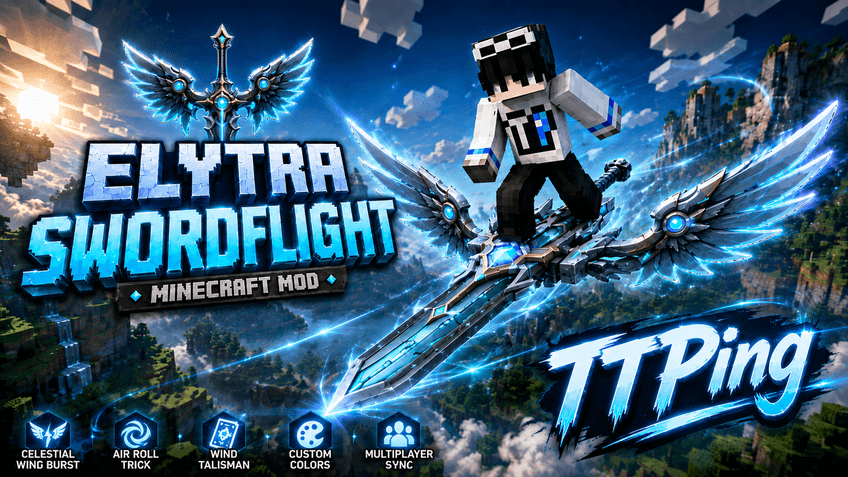
✦ FLYING SWORD
Equip an Elytra and take to the skies.
Your normal Elytra flight is visually transformed into riding an animated flying sword.
Features:
• Fully animated 3D flying sword
• Large animated wings attached to the sword
• Smooth wing deployment when taking flight
• Dynamic wing flapping while cruising
• Faster wing movement at higher speeds
• Smooth braking, landing, and wing-fold animations
• Custom player riding poses
• Flying sword companion while on the ground
• Smooth transitions between flight states
The Vanilla Elytra movement system remains intact. Elytra Swordflight changes the experience and visuals without replacing the fundamental flight physics.
✦ DYNAMIC WIND TRAILS
Two flowing energy trails extend from the tips of the sword's wings while flying.
They dynamically react to your movement:
• Trails follow both wing tips
• Length changes with flight speed
• Faster flight creates longer trails
• Braking affects their movement
• Firework boosting enhances the effect
• Celestial Wing Burst dramatically intensifies them
• Trail colors can be customized
The trails are rendered in world space and remain synchronized with the sword's movement.
✦ CELESTIAL WING BURST
Press Left Ctrl while flying to unleash Celestial Wing Burst.
The sword begins charging energy before releasing a powerful burst of speed.
Celestial Wing Burst includes:
• Approximately 3 seconds of energy charging
• Powerful wing strike animation
• Around 3× normal flight speed
• Approximately 5 seconds of boosted flight
• 15-second cooldown
• Expanded third-person camera
• Dynamic FOV changes
• Large energy thrust effects
• Shockwaves and speed streaks
• Intensified wind trails
• Customizable Burst energy color
• Collision handling designed to prevent passing through solid blocks
Celestial Wing Burst is a movement ability only and does not deal damage.
✦ AIR ROLL
Double-tap Space while flying to perform an aerial barrel roll.
During an Air Roll:
• The player and sword rotate together
• The player's body follows the animation
• Wind trails twist with the roll
• Flight speed remains unchanged
• Flight direction remains unchanged
• Air Roll can also be performed during Celestial Wing Burst
• The animation is synchronized in multiplayer
Air Roll is a visual maneuver and does not modify Elytra physics.
✦ WIND TALISMAN
Firework boosting receives a new visual identity while riding the flying sword.
Instead of simply displaying a Firework Rocket, the player uses a glowing Wind Talisman.
When activated:
• A glowing talisman appears in the player's hand
• The talisman dissolves into spiritual energy
• Cyan and golden energy appears behind the sword
• A magical formation briefly appears
• The sword enters its Firework Boosting animation
The actual Vanilla Firework boost mechanics remain unchanged.
Outside the flying-sword context, Firework Rockets continue to appear and behave normally.
✦ CUSTOMIZE YOUR FLYING SWORD
Hold an Elytra and press R to open the Sword Color Customization menu.
The menu includes:
• Interactive 3D sword preview
• Click and drag to rotate the model
• Mouse wheel zoom
• Quick color presets
• RGB controls
• HSV controls
• HEX color input
You can customize multiple visual groups independently:
• Sword Body
• Glow, Wings, and Wind Trails
• Celestial Wing Burst Energy
Each player can have their own colors.
In multiplayer, other players can also see your selected colors.
✦ MULTIPLAYER SUPPORT
Elytra Swordflight is designed for both singleplayer and multiplayer.
Other players can see:
• Your flying sword
• Wing animations
• Player flight poses
• Wind trails
• Celestial Wing Burst
• Air Roll
• Wind Talisman effects
• Your customized colors
Each player maintains their own independent flight state and customization.
🎮 CONTROLS
Left Ctrl
Celestial Wing Burst
Double-tap Space
Air Roll
R while holding an Elytra
Open Sword Color Customization
Shift while flying
Brake
Firework Rocket
Vanilla Elytra boost with Wind Talisman visuals
Supported key bindings can be changed through Minecraft's Controls menu.
⚙ SUPPORTED VERSIONS & LOADERS
Minecraft 1.12.2
• Forge
Minecraft 1.16.5
• Forge
• Fabric
Minecraft 1.18.2
• Forge
• Fabric
Minecraft 1.19.2
• Forge
• Fabric
Minecraft 1.20.1
• Forge
• Fabric
Minecraft 1.21.1
• Forge
• Fabric
• NeoForge
Minecraft 1.21.5
• Forge
• Fabric
• NeoForge
Minecraft 1.21.11
• Forge
• Fabric
• NeoForge
Minecraft 26.2
• Forge
• Fabric
• NeoForge
Please download the file that matches both your Minecraft version and your mod loader.
IMPORTANT NOTES
• Elytra Swordflight preserves Vanilla Elytra flight physics.
• The special abilities and visual effects do not deal damage.
• Celestial Wing Burst includes collision handling.
• Sword colors are stored independently for each player.
• Multiplayer players can see each other's animations and customization.
• Firework Rocket mechanics remain Vanilla.
• Some loader/version combinations may require their normal loader dependencies.
════════════════════════════════════
TIẾNG VIỆT
NGỰ KIẾM PHI HÀNH — XÉ GIÓ GIỮA BẦU TRỜI
Elytra Swordflight biến cách bay bằng Elytra quen thuộc thành trải nghiệm ngự kiếm phi hành theo phong cách fantasy và tu tiên.
Thay vì chỉ dang Elytra và lướt trên không, người chơi sẽ đứng trên một thanh phi kiếm có đôi cánh khổng lồ, animation riêng, luồng xé gió, kỹ năng tăng tốc, nhào lộn trên không, hiệu ứng năng lượng và hệ thống tùy chỉnh màu sắc.
Tất cả được xây dựng trên cơ chế bay Elytra Vanilla, vì vậy cảm giác điều khiển quen thuộc vẫn được giữ lại.
✦ NGỰ KIẾM PHI HÀNH
Khi trang bị Elytra và bắt đầu bay, hình ảnh Elytra thông thường được thay thế bằng phi kiếm.
Bao gồm:
• Model phi kiếm 3D có animation
• Đôi cánh lớn trên phi kiếm
• Animation bung cánh khi bắt đầu bay
• Cánh vỗ khi đang phi hành
• Animation cánh nhanh hơn khi tốc độ tăng
• Animation phanh, đáp xuống và gập cánh
• Pose nhân vật thay đổi theo trạng thái bay
• Phi kiếm bay cạnh người chơi khi ở mặt đất
• Chuyển đổi mượt giữa nhiều trạng thái animation
Physics bay của Elytra Vanilla vẫn được giữ nguyên.
✦ LUỒNG XÉ GIÓ
Hai luồng năng lượng xuất hiện phía sau hai đầu cánh của phi kiếm.
Hiệu ứng sẽ phản ứng theo chuyển động:
• Bám theo hai đầu cánh
• Thay đổi chiều dài theo tốc độ
• Bay càng nhanh, luồng gió càng dài
• Phản ứng với trạng thái phanh
• Mạnh hơn khi tăng tốc bằng pháo hoa
• Tăng cường mạnh khi dùng Thiên Dực Xung Kích
• Có thể tùy chỉnh màu sắc
✦ THIÊN DỰC XUNG KÍCH
Nhấn Left Ctrl trong lúc đang bay để kích hoạt Thiên Dực Xung Kích.
Phi kiếm sẽ tụ năng lượng trước khi bùng nổ tốc độ.
Bao gồm:
• Khoảng 3 giây tụ lực
• Animation đôi cánh phát lực
• Tốc độ khoảng gấp 3 lần bình thường
• Khoảng 5 giây tăng tốc
• 15 giây hồi chiêu
• Camera góc nhìn thứ ba kéo ra xa
• Hiệu ứng FOV khi tăng tốc
• Luồng năng lượng lớn phía sau
• Vòng xung kích và hiệu ứng tốc độ
• Luồng xé gió được tăng cường
• Có thể tùy chỉnh màu năng lượng
• Có xử lý va chạm nhằm tránh xuyên block đặc
Thiên Dực Xung Kích chỉ là kỹ năng di chuyển và không gây sát thương.
✦ NHÀO LỘN TRÊN KHÔNG
Nhấn đúp Space khi đang bay để thực hiện Air Roll.
• Người chơi và phi kiếm xoay cùng nhau
• Cơ thể nhân vật có animation riêng
• Luồng xé gió xoắn theo chuyển động
• Không làm thay đổi tốc độ bay
• Không làm thay đổi hướng bay
• Có thể sử dụng trong Thiên Dực Xung Kích
• Đồng bộ trong Multiplayer
Air Roll là động tác biểu diễn và không thay đổi physics Elytra.
✦ NGỰ PHONG PHÙ
Khi đang ngự kiếm, Firework Rocket sẽ có hiệu ứng hình ảnh mới.
Thay vì chỉ cầm pháo hoa, người chơi sẽ sử dụng Ngự Phong Phù.
Khi kích hoạt:
• Lá phù phát sáng xuất hiện trên tay
• Lá phù hóa thành linh khí
• Năng lượng cyan và vàng xuất hiện phía sau phi kiếm
• Một pháp trận nhỏ xuất hiện khi kích hoạt
• Phi kiếm chuyển sang animation tăng tốc
Cơ chế tăng tốc của Firework Rocket vẫn hoàn toàn sử dụng hệ thống Vanilla.
Khi không ở trạng thái ngự kiếm, Firework Rocket vẫn hiển thị và hoạt động bình thường.
✦ TÙY CHỈNH MÀU PHI KIẾM
Cầm Elytra trên tay và nhấn R để mở menu tùy chỉnh.
Menu bao gồm:
• Preview phi kiếm 3D
• Kéo chuột để xoay model
• Cuộn chuột để zoom
• Các màu chọn nhanh
• RGB
• HSV
• HEX
Có thể tùy chỉnh riêng:
• Thân kiếm
• Glow, Cánh và Luồng xé gió
• Năng lượng Thiên Dực Xung Kích
Mỗi người chơi có thể sử dụng màu riêng.
Trong Multiplayer, người chơi khác cũng nhìn thấy màu bạn đã chọn.
✦ MULTIPLAYER
Elytra Swordflight hỗ trợ đồng bộ Multiplayer.
Người chơi khác có thể nhìn thấy:
• Phi kiếm của bạn
• Animation cánh
• Pose khi bay
• Luồng xé gió
• Thiên Dực Xung Kích
• Air Roll
• Hiệu ứng Ngự Phong Phù
• Màu phi kiếm đã tùy chỉnh
Mỗi người chơi có trạng thái bay và tùy chỉnh riêng.
🎮 ĐIỀU KHIỂN
Left Ctrl
Thiên Dực Xung Kích
Nhấn đúp Space
Nhào lộn trên không / Air Roll
R khi đang cầm Elytra
Mở menu tùy chỉnh màu phi kiếm
Shift khi đang bay
Phanh
Firework Rocket
Tăng tốc Elytra Vanilla với hiệu ứng Ngự Phong Phù
Những phím hỗ trợ Key Bind có thể thay đổi trong phần Controls của Minecraft.
LƯU Ý
• Elytra Swordflight vẫn giữ physics bay của Elytra Vanilla.
• Các kỹ năng và hiệu ứng đặc biệt không gây sát thương.
• Thiên Dực Xung Kích có xử lý va chạm với block.
• Mỗi người chơi có thể sử dụng màu phi kiếm riêng.
• Multiplayer đồng bộ animation, trạng thái và màu sắc giữa người chơi.
• Cơ chế Firework Rocket Vanilla không bị thay đổi.
❤ SUPPORT / HỖ TRỢ
If you encounter a bug or have problems installing or using Elytra Swordflight, feel free to contact me.
Nếu bạn gặp lỗi hoặc có vấn đề khi cài đặt và sử dụng Elytra Swordflight, hãy liên hệ với mình.
Email:
hotrottpingdev@gmail.com
Thank you for supporting Elytra Swordflight. ❤️
Project description from CurseForge.
Pick your setup
Elytra Swordflight by Minecraft version and loader
Choose the version and loader you play, then open the matching release.
Minecraft version
1.21.11
3 loader buildsMinecraft version
1.21.5
3 loader buildsMinecraft version
1.21.1
3 loader buildsMinecraft version
1.20.1
2 loader buildsMinecraft version
1.19.2
2 loader buildsMinecraft version
1.18.2
2 loader buildsMinecraft version
1.16.5
2 loader buildsMinecraft version
1.12.2
1 loader buildCheck the dependencies, then try the file in a copied instance before changing a world you care about.
Recent files
Elytra Swordflight versions and loaders
Elytra-Swordflight-1.0.0-Forge-26.2.jar
15 Sept 2026
Client Source doesn’t say Server Source doesn’t say Dependencies No extras listed Listed on Release listing
Check the 26.2 · Forge setup Forge26.2 release
Looking for an older file? The official CurseForge project page is in Resources.