Minecraft version
Back to mods 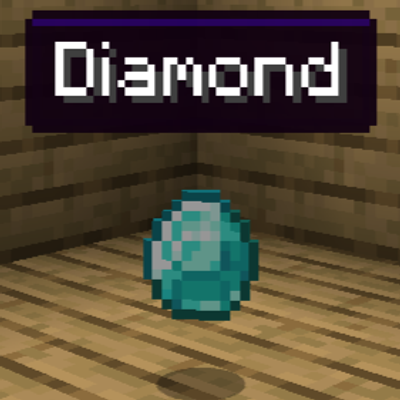
CurseForge · Minecraft mod
Wan's Hologram Items
Every dropped item tells you what it is! Its name floats above it, and if you want, the full tooltip, what's inside a shulker box and how it's crafted. Client-side only: works on any server.
Choose a version Pick your version below, then grab the matching file.
Quick answer
Which Wan's Hologram Items release should I use?
Latest stable file wans_hologram_items-neoforge_1.21.1-1.0.0.jar
Game version 1.21.1
Loader NeoForge
Wan's Hologram Items wans_hologram_items-neoforge_1.21.1-1.0.0.jar targets 1.21.1 with NeoForge. The project page does not say whether this file belongs on the client, dedicated server, or both. No extra mods listed for this file.
Where it goes
Is Wan's Hologram Items required on the client, server, or both?
The project page does not say whether this file belongs on the client, dedicated server, or both.
Client Source doesn’t say
Dedicated server Source doesn’t say
Loader for this release NeoForge
Required install it here Optional supported, not mandatory Not supported do not install here Source doesn’t say do not assume
The source does not explicitly classify this release as client-only or server-only.
What else does Wan's Hologram Items wans_hologram_items-neoforge_1.21.1-1.0.0.jar need?
wans_hologram_items-neoforge_1.21.1-1.0.0.jar. Change the file and its required mods may change too.
This file does not list any required mods. Do not add a library just because a different file uses it.
This file does not list any required or optional mods.
Before you install it
Add Wan's Hologram Items without breaking your instance.
Built for Wan's Hologram Items wans_hologram_items-neoforge_1.21.1-1.0.0.jar. Pick another file and the loader, install side or required mods may change.
- 01
Stick to this file
Use wans_hologram_items-neoforge_1.21.1-1.0.0.jar. It targets 1.21.1 with NeoForge; another release may have different loader, side or dependency requirements.
- 02
Bring the mods it needs
This file does not list any required mods. Do not add a library just because a different file uses it.
- 03
Put it on the correct side
The project page does not say whether this file belongs on the client, dedicated server, or both.
- 04
Pick the file you checked
Use the “Get this file” button beside wans_hologram_items-neoforge_1.21.1-1.0.0.jar. It opens that exact file at the source.
About this project
What does Wan's Hologram Items add?
Wan's Hologram Items
Every dropped item tells you what it is! Its name floats above it, and if you want, the full tooltip, what's inside a shulker box and how it's crafted. Client-side only: works on any server.
What Is This Mod?
A floating label above every item on the ground, and as much information as you want to put on it.
After a fight, a mined-out cave or an exploded chest, you no longer walk over everything to find out what dropped. You read it.
It runs only on your client. Nothing to install on the server, and it works on any server you join.
Version 1.0.0 (17/09/2026)
🏷️ The Hologram
Every dropped item gets its name and stack size floating above it, always facing you.
Then you choose what else to add:
- Full details: the whole vanilla tooltip, rarity colours included. Tools and armour add their remaining durability.
- Despawn timer: how long the item has left. It turns red in the last 30 seconds.
- Light ray: a short animated ray above every drop, to find it from a distance or in tall grass.
Everything except the name is off by default. Turn on only what you need.
📦 What's Inside
Shulker boxes, bundles and compatible modded containers show a miniature of their inventory right above them, with the game's own texture and every item in its slot.
No more breaking a box open to find out whose it was.
🛠️ How It's Made
A miniature workstation above the item shows its recipe: crafting table, furnace, blast furnace, smoker, campfire, stonecutter, smithing table, and modded recipes that follow the same rules.
More than one recipe? A page counter appears, and ← / → flip through them.
👁️ When It Shows Up
Names, tooltips, inventories and recipes each have their own mode:
- Always
- While looking at the item
- While holding a key (Tab by default)
Keep names always on, and open the full tooltip only for the item you are looking at.
🧱 It Doesn't See Through Walls
A hologram appears only if you can actually see the item. Behind a wall, it stays hidden. And it doesn't flicker when you turn a corner.
Want to find items through blocks anyway? There's an option for that.
🎯 Filters And Distance
- Maximum distance in chunks. On 0 it follows your render distance.
- Whitelist: only the listed items get a hologram.
- Blacklist: the listed items never get one.
Both accept a single item (minecraft:cobblestone) or a whole mod (minecraft:*). Cobblestone spam, begone.
✨ Legendary Tooltips
With Legendary Tooltips installed, holograms use its frames, textures and rarity colours: an epic item on the ground looks just like it does in your inventory.
It's optional. Without it you get the vanilla tooltip.
⌨️ Keys
- H: turn all holograms on or off
- Tab: show holograms set to "while holding a key"
- ← / →: previous and next recipe page
All of them can be changed in Controls.
⚙️ Settings
Open them from the Mods menu, or from the Wan's Hologram Items button the mod adds to the Options screen. Hover over any option to see what it does.
ℹ️ Good To Know
- Client-side only. Players install it; the server doesn't need it.
- Fabric needs Fabric API. Forge and NeoForge need nothing else.
- 1.21.11 and 26.2: these versions don't allow tooltip frames to be drawn in the world. Holograms keep the vanilla look even with Legendary Tooltips, and item previews inside tooltips (bundles, maps) aren't shown.
- Recipes on servers, 1.21.2 and up: Minecraft no longer sends every recipe to players. In singleplayer you see them all; on a server, the ones unlocked in your recipe book.
📋 Available Versions
- NeoForge: 1.21.1
- Forge: 1.20.1 · 1.19.2 · 1.18.2 · 1.16.5
- Fabric: 26.2 · 1.21.11 · 1.21.1 · 1.20.1 · 1.19.2
Read the full Changelog: https://drive.google.com/file/d/1y3F6WHo8jdRBcHnU418N0VctkmBfrqYW/view?usp=sharing
Project description from CurseForge.
Pick your setup
Wan's Hologram Items by Minecraft version and loader
Choose the version and loader you play, then open the matching release.
Minecraft version
1.21.11
1 loader buildMinecraft version
1.21.1
2 loader buildsMinecraft version
1.20.1
2 loader buildsMinecraft version
1.19.2
2 loader buildsMinecraft version
1.18.2
1 loader buildMinecraft version
1.16.5
1 loader buildCheck the dependencies, then try the file in a copied instance before changing a world you care about.
Recent files
Wan's Hologram Items versions and loaders
wans_hologram_items-neoforge_1.21.1-1.0.0.jar
17 Sept 2026
Client Source doesn’t say Server Source doesn’t say Dependencies No extras listed Listed on Release listing
Check the 1.21.1 · NeoForge setup 1.21.1NeoForge release
wans_hologram_items-forge_1.20.1-1.0.0.jar
17 Sept 2026
Client Source doesn’t say Server Source doesn’t say Dependencies No extras listed Listed on Release listing
Check the 1.20.1 · Forge setup 1.20.1Forge release
wans_hologram_items-forge_1.19.2-1.0.0.jar
17 Sept 2026
Client Source doesn’t say Server Source doesn’t say Dependencies No extras listed Listed on Release listing
Check the 1.19.2 · Forge setup Forge1.19.2 release
wans_hologram_items-forge_1.18.2-1.0.0.jar
17 Sept 2026
Client Source doesn’t say Server Source doesn’t say Dependencies No extras listed Listed on Release listing
Check the 1.18.2 · Forge setup Forge1.18.2 release
wans_hologram_items-forge_1.16.5-1.0.0.jar
17 Sept 2026
Client Source doesn’t say Server Source doesn’t say Dependencies No extras listed Listed on Release listing
Check the 1.16.5 · Forge setup 1.16.5Forge release
wans_hologram_items-fabric_26.2-1.0.0.jar
17 Sept 2026
Client Source doesn’t say Server Source doesn’t say Dependencies No extras listed Listed on Release listing
Check the 26.2 · Fabric setup Fabric26.2 release
wans_hologram_items-fabric_1.21.11-1.0.0.jar
17 Sept 2026
Client Source doesn’t say Server Source doesn’t say Dependencies No extras listed Listed on Release listing
Check the 1.21.11 · Fabric setup Fabric1.21.11 release
wans_hologram_items-fabric_1.21.1-1.0.0.jar
17 Sept 2026
Client Source doesn’t say Server Source doesn’t say Dependencies No extras listed Listed on Release listing
Check the 1.21.1 · Fabric setup Fabric1.21.1 release
wans_hologram_items-fabric_1.20.1-1.0.0.jar
17 Sept 2026
Client Source doesn’t say Server Source doesn’t say Dependencies No extras listed Listed on Release listing
Check the 1.20.1 · Fabric setup Fabric1.20.1 release
wans_hologram_items-fabric_1.19.2-1.0.0.jar
17 Sept 2026
Client Source doesn’t say Server Source doesn’t say Dependencies No extras listed Listed on Release listing
Check the 1.19.2 · Fabric setup Fabric1.19.2 release
Looking for an older file? The official CurseForge project page is in Resources.
 mod
CurseForge · Minecraft
BLOODSEEKER
A Brand-new Weapon with Cthulhu Mythos' power,based on Monster Hunter:Wild
 mod
CurseForge · Minecraft
TaCZ Bullet Whiz
Adds directional bullet flyby sounds to TaCZ. Near misses sound louder up close, while more powerful bullets produce higher-pitched sounds audible from farther away.
 mod
CurseForge · Minecraft
Raw's Iron's Spellbooks Tweaks
A couple things to balance the mod and some gameplay improvements to the awesome Iron's Spells and Spellbooks mod.