Minecraft version
Back to mods 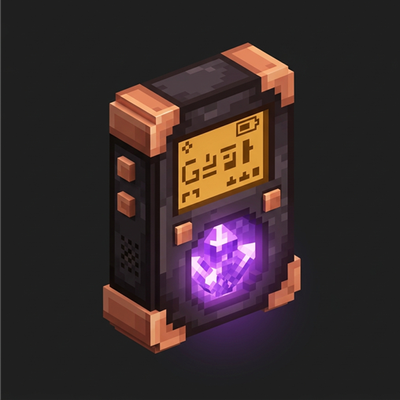
CurseForge · Minecraft mod
BuildCalc
A smart steampunk resource calculator and mining guide for structures, multi-block builds, and batch crafting.
Choose a version Pick your version below, then grab the matching file.
Quick answer
Which BuildCalc release should I use?
Latest stable file buildcalc-1.0.0.jar
Game version 1.20.1, 1.20
Loader Fabric
buildcalc-1.0.0.jar targets 1.20.1, 1.20 with Fabric. The project page does not say whether this file belongs on the client, dedicated server, or both. No extra mods listed for this file.
Where it goes
Is BuildCalc required on the client, server, or both?
The project page does not say whether this file belongs on the client, dedicated server, or both.
Client Source doesn’t say
Dedicated server Source doesn’t say
Loader for this release Fabric
Required install it here Optional supported, not mandatory Not supported do not install here Source doesn’t say do not assume
The source does not explicitly classify this release as client-only or server-only.
What else does buildcalc-1.0.0.jar need?
buildcalc-1.0.0.jar. Change the file and its required mods may change too.
This file does not list any required mods. Do not add a library just because a different file uses it.
This file does not list any required or optional mods.
Before you install it
Add BuildCalc without breaking your instance.
Built for buildcalc-1.0.0.jar. Pick another file and the loader, install side or required mods may change.
- 01
Stick to this file
Use buildcalc-1.0.0.jar. It targets 1.20.1, 1.20 with Fabric; another release may have different loader, side or dependency requirements.
- 02
Bring the mods it needs
This file does not list any required mods. Do not add a library just because a different file uses it.
- 03
Put it on the correct side
The project page does not say whether this file belongs on the client, dedicated server, or both.
- 04
Pick the file you checked
Use the “Get this file” button beside buildcalc-1.0.0.jar. It opens that exact file at the source.
About this project
What does BuildCalc add?
BuildCalc - Resource Calculator & Sourcing Guide
BuildCalc is an intuitive utility and building assistant mod designed for Minecraft 1.20.1 Fabric. It allows players and builders to plan complex structures, redstone machinery, and bulk crafting projects by breaking down recipes into their fundamental raw resources, calculating stack requirements, and providing mining layer guidance.
Features
Recursive Recipe Tree Resolver
- Deconstructs complex crafted items (such as Pistons, Observers, Hoppers, Repeaters, and Dispensers) down to their base materials (Wood Logs, Cobblestone, Iron Ingots, Redstone Dust, etc.).
- Automatically converts wooden planks and sticks back to raw log counts (1 Log = 4 Planks, 1 Log = 8 Sticks).
Smelting & Fuel Calculator
- Accurately factors in smelting recipes: Bricks decompose to Clay Balls, Glass decomposes to Sand, and Stone Bricks decompose to Cobblestone.
- Automatically calculates total smelting operations and estimated fuel consumption (e.g., total coal or lava buckets needed).
Multi-Item Project List (Shopping Cart)
- Add multiple different items and quantities to a single project cart (for example: 64 Pistons, 32 Repeaters, 20 Chests, and 16 Observers).
- The mod computes a single cumulative raw material requirement list for your entire build.
Mining Layer & Sourcing Guide
- Hover over any calculated resource to view optimal Minecraft 1.20.1 mining coordinates (Y-levels) and biome sourcing tips (e.g., Iron at Y:16, Redstone/Diamonds at Y:-58, Quartz at Nether levels).
Clipboard & Chat Sharing
- Copy to Clipboard: Exports formatted material requirements directly to your system clipboard for easy pasting into notes or external planners.
- Share to Chat: Broadcasts a concise shopping list to in-game chat to coordinate with teammates on multiplayer servers.
On-Screen HUD Pinning
- Pin any calculation to your HUD overlay so you can track required materials directly on screen while gathering resources.
Curios & Trinkets Compatibility
- Supports the Trinkets accessory framework. The BuildCalc Remote can be equipped in Belt, Charm, or Ring slots, taking 0 main inventory space.
- Press the default keybind (B) to access the calculator at any time.
Mod Compatibility
- Dynamically reads the Minecraft Recipe Manager and registry, making it compatible with modded recipes, modded items, and multi-block components from tech and magic mods (such as Applied Energistics 2, Mekanism, Create, and Tech Reborn).
Controls and Usage
- Open Interface: Right-click with the BuildCalc Remote in hand, or press the configurable keybind (Default: B).
- Crafting Recipe: Combine 4 Copper Ingots, 1 Amethyst Shard, 1 Iron Ingot, and 3 Redstone Dust in a crafting table.
Installation
- Install Fabric Loader for Minecraft 1.20.1.
- Install Fabric API.
- Place
buildcalc-1.0.0.jarinto your.minecraft/modsdirectory.
Project description from CurseForge.
Pick your setup
BuildCalc by Minecraft version and loader
Choose the version and loader you play, then open the matching release.
Minecraft version
1.20
1 loader buildCheck the dependencies, then try the file in a copied instance before changing a world you care about.
Recent files
BuildCalc versions and loaders
buildcalc-1.0.0.jar
16 Sept 2026
Client Source doesn’t say Server Source doesn’t say Dependencies No extras listed Listed on Release listing
Check the 1.20.1 · Fabric setup Fabric1.20.11.20 release
Looking for an older file? The official CurseForge project page is in Resources.
 mod
CurseForge · Minecraft
Pipster
Readable item, fluid, gas and energy pipes for Minecraft, with filters right at the port and channel-based tesseracts. For Fabric and NeoForge.
 mod
CurseForge · Minecraft
Profet's Timber
Chop one log and the whole tree comes down, cartoon style: it creaks, tips over, bursts into leaves and pops apart into its drops. Only needed on the server.
 mod
CurseForge · Minecraft
Simple Location Marking
Simple Location Marking is a lightweight, client-side location marking mod for Minecraft Fabric, directly inspired by the Waypoints feature of Xaero's Minimap.