Minecraft version
Back to mods 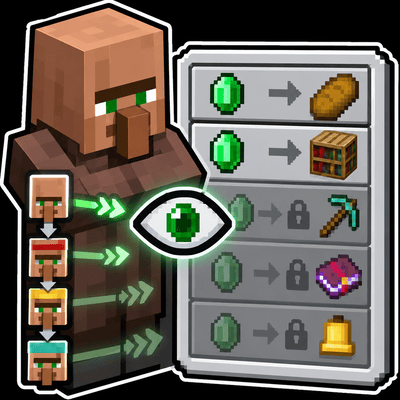
CurseForge · Minecraft mod
Villager Trade Preview
Preview the trades a villager will unlock at each future profession level directly from the trading screen.
Choose a version Pick your version below, then grab the matching file.
Quick answer
Which Villager Trade Preview release should I use?
Latest stable file [Forge 26.3] TradeView 1.2.0
Game version 26.3
Loader Forge
Villager Trade Preview [Forge 26.3] TradeView 1.2.0 targets 26.3 with Forge. The project page does not say whether this file belongs on the client, dedicated server, or both. No extra mods listed for this file.
Where it goes
Is Villager Trade Preview required on the client, server, or both?
The project page does not say whether this file belongs on the client, dedicated server, or both.
Client Source doesn’t say
Dedicated server Source doesn’t say
Loader for this release Forge
Required install it here Optional supported, not mandatory Not supported do not install here Source doesn’t say do not assume
The source does not explicitly classify this release as client-only or server-only.
What else does Villager Trade Preview [Forge 26.3] TradeView 1.2.0 need?
[Forge 26.3] TradeView 1.2.0. Change the file and its required mods may change too.
This file does not list any required mods. Do not add a library just because a different file uses it.
This file does not list any required or optional mods.
Before you install it
Add Villager Trade Preview without breaking your instance.
Built for Villager Trade Preview [Forge 26.3] TradeView 1.2.0. Pick another file and the loader, install side or required mods may change.
- 01
Stick to this file
Use [Forge 26.3] TradeView 1.2.0. It targets 26.3 with Forge; another release may have different loader, side or dependency requirements.
- 02
Bring the mods it needs
This file does not list any required mods. Do not add a library just because a different file uses it.
- 03
Put it on the correct side
The project page does not say whether this file belongs on the client, dedicated server, or both.
- 04
Pick the file you checked
Use the “Get this file” button beside [Forge 26.3] TradeView 1.2.0. It opens that exact file at the source.
About this project
What does Villager Trade Preview add?

Ever leveled up a villager just to discover that their higher-level trades are completely useless? Villager Trade Preview takes the guesswork out of villager trading by letting you see exactly which trades a villager will unlock at higher profession levels.
Future trades are displayed directly in the vanilla trading interface, making it easy to spot valuable offers at a glance. Whether you're building the perfect trading hall, searching for specific enchantments, or simply avoiding disappointing villagers, Villager Trade Preview makes the entire process faster, easier, and more convenient.
But that's not all! The mod also includes several optional quality-of-life features to make villager trading even better:
- Unlimited Trading: Optionally disable vanilla trade locking and trade as often as you like without waiting for villagers to restock. Disabled by default for a balanced vanilla experience.
- Automatic Trading: Use a configurable hotkey to automatically perform bulk trades, making it effortless to exchange large quantities of items.
- Enchanted Book Finder: Use the
/tradepreview findcommand to quickly locate villagers offering the enchanted books you're looking for.
How to use:
Trade preview: When opening a trading GUI with a villager, a "Preview" button will be shown on top. Click it, to enable or disable the trade preview. You can choose between the preview rendering below the trades or next to the trade GUI by using /tradepreview side left or /tradepreview side right. You may need to scroll down to see the future trades.
Automatic trading: The default hotkey is Left-Shift + T. Select a trade from the selection and press Left-Shift and T together. The mod will then process that trade very fast as long as you have sufficient items in your inventory. To stop, simply exit the trading GUI.
Trade rerolling: You can press the button ontop of the trades or use the hotkey (Default: R) to reroll the trades that a villager is offering. This only works if the villager hasn't been traded with.
/tradepreview find: Use the command /tradepreview find [name of enchantment] [enchantment level] to start the process. After you've entered the command, you have 60 seconds to open a villager trading gui. The mod will then reroll the trades until it finds a trade for the requested enchanted book.
Config:
You can either configure the mod by using Mod Menu or by typing /tradepreview config. This will bring up the config menu, where you can select various options.
| Option | Possible selection | Explanation |
|---|---|---|
| TradeView enabled | ON / OFF | Enable or disable the trade preview and the "Preview" button completely |
| Preview position | In trade list / besides trades | Show the locked trades directly under the unlocked trades or besides the trading GUI |
| Auto trade | Hotkey | Set the Hotkey for auto trading |
| Unlimited trades | ON / OFF | Enable or disable unlimited trades |
| Update check | ON / OFF | Enable or disable automatic update checking once per session |
| Trade reroll button | ON / OFF | Turn on or off the trade reroll button |
The Fabric version requires Fabric API
Needs to be installed on the server and the client to work in multiplayer
Project description from CurseForge.
Pick your setup
Villager Trade Preview by Minecraft version and loader
Choose the version and loader you play, then open the matching release.
Minecraft version
26.2
4 loader buildsMinecraft version
1.21.11
2 loader buildsMinecraft version
1.21.1
3 loader buildsMinecraft version
1.20.1
2 loader buildsCheck the dependencies, then try the file in a copied instance before changing a world you care about.
Recent files
Villager Trade Preview versions and loaders
[Forge 26.3] TradeView 1.2.0
tradeview-1.2.0-26.3-forge.jar
20 Oct 2026
Client Source doesn’t say Server Source doesn’t say Dependencies No extras listed Listed on Release listing
Check the 26.3 · Forge setup Forge26.3 release
[Forge 26.2] TradeView 1.2.0
tradeview-1.2.0-26.2-forge.jar
20 Oct 2026
Client Source doesn’t say Server Source doesn’t say Dependencies No extras listed Listed on Release listing
Check the 26.2 · Forge setup Forge26.2 release
[Fabric 1.21.11] TradeView 1.2.0
tradeview-1.2.0-1.21.11-fabric.jar
17 Oct 2026
Client Source doesn’t say Server Source doesn’t say Dependencies No extras listed Listed on Release listing
Check the 1.21.11 · Fabric setup Fabric1.21.11 release
[Fabric 1.21.1] TradeView 1.2.0
tradeview-1.2.0-1.21.1-fabric.jar
17 Oct 2026
Client Source doesn’t say Server Source doesn’t say Dependencies No extras listed Listed on Release listing
Check the 1.21.1 · Fabric setup Fabric1.21.1 release
[Fabric 1.20.1] TradeView 1.2.0
tradeview-1.2.0-1.20.1-fabric.jar
17 Oct 2026
Client Source doesn’t say Server Source doesn’t say Dependencies No extras listed Listed on Release listing
Check the 1.20.1 · Fabric setup Fabric1.20.1 release
[Forge 1.21.1] TradeView 1.2.0
tradeview-1.2.0-1.21.1-forge.jar
17 Oct 2026
Client Source doesn’t say Server Source doesn’t say Dependencies No extras listed Listed on Release listing
Check the 1.21.1 · Forge setup Forge1.21.1 release
[Forge 1.20.1] TradeView 1.2.0
tradeview-1.2.0-1.20.1-forge.jar
17 Oct 2026
Client Source doesn’t say Server Source doesn’t say Dependencies No extras listed Listed on Release listing
Check the 1.20.1 · Forge setup 1.20.1Forge release
[Neoforge 1.21.11] TradeView 1.2.0
tradeview-1.2.0-1.21.11-neoforge.jar
17 Oct 2026
Client Source doesn’t say Server Source doesn’t say Dependencies No extras listed Listed on Release listing
Check the 1.21.11 · NeoForge setup NeoForge1.21.11 release
[Neoforge 1.21.1] TradeView 1.2.0
tradeview-1.2.0-1.21.1-neoforge.jar
17 Oct 2026
Client Source doesn’t say Server Source doesn’t say Dependencies No extras listed Listed on Release listing
Check the 1.21.1 · NeoForge setup 1.21.1NeoForge release
[Neoforge 26.3] TradeView 1.2.0
tradeview-1.2.0-26.3-neoforge.jar
17 Oct 2026
Client Source doesn’t say Server Source doesn’t say Dependencies No extras listed Listed on Release listing
Check the 26.3 · NeoForge setup NeoForge26.3 release
[Neoforge 26.2] TradeView 1.2.0
tradeview-1.2.0-26.2-neoforge.jar
17 Oct 2026
Client Source doesn’t say Server Source doesn’t say Dependencies No extras listed Listed on Release listing
Check the 26.2 · NeoForge setup NeoForge26.2 release
[Fabric 26.3] TradeView 1.2.0
tradeview-1.2.0-26.3-fabric.jar
13 Oct 2026
Client Source doesn’t say Server Source doesn’t say Dependencies No extras listed Listed on Release listing
Check the 26.3 · Fabric setup FabricQuilt26.3 release
Looking for an older file? The official CurseForge project page is in Resources.
 mod
CurseForge + Modrinth · Minecraft
Fantastic Fishery
A Minecraft mod that adds various imaginary fish to your world
 mod
CurseForge · Minecraft
Interactive Safe
An interactive safe for Fabric 1.21.1. Turn the handle in first person, then drag, place, and stack items freely on two visible shelves.
 mod
CurseForge · Minecraft
Structures Arbiter
This mod prevents structure mods from overlapping or conflicting.