Minecraft version
Back to mods 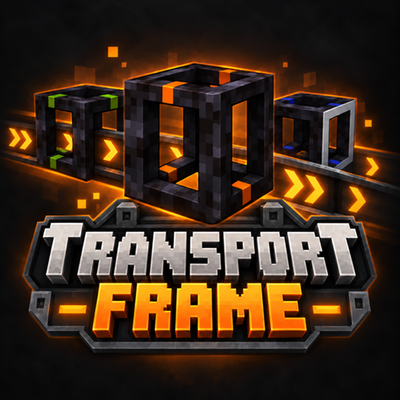
CurseForge · Minecraft mod
TransportFrame
Build directional conveyor networks with easy-to-use frames to transport items horizontally and vertically, split item flows, and merge multiple lines
Choose a version Pick your version below, then grab the matching file.
Quick answer
Which TransportFrame release should I use?
Latest stable file TransportFrame-v1.0.0-NeoForge-1.20.1
Game version 1.20.1
Loader NeoForge
TransportFrame-v1.0.0-NeoForge-1.20.1 targets 1.20.1 with NeoForge. The project page does not say whether this file belongs on the client, dedicated server, or both. No extra mods listed for this file.
Where it goes
Is TransportFrame required on the client, server, or both?
The project page does not say whether this file belongs on the client, dedicated server, or both.
Client Source doesn’t say
Dedicated server Source doesn’t say
Loader for this release NeoForge
Required install it here Optional supported, not mandatory Not supported do not install here Source doesn’t say do not assume
The source does not explicitly classify this release as client-only or server-only.
What else does TransportFrame-v1.0.0-NeoForge-1.20.1 need?
TransportFrame-v1.0.0-NeoForge-1.20.1. Change the file and its required mods may change too.
This file does not list any required mods. Do not add a library just because a different file uses it.
This file does not list any required or optional mods.
Before you install it
Add TransportFrame without breaking your instance.
Built for TransportFrame-v1.0.0-NeoForge-1.20.1. Pick another file and the loader, install side or required mods may change.
- 01
Stick to this file
Use TransportFrame-v1.0.0-NeoForge-1.20.1. It targets 1.20.1 with NeoForge; another release may have different loader, side or dependency requirements.
- 02
Bring the mods it needs
This file does not list any required mods. Do not add a library just because a different file uses it.
- 03
Put it on the correct side
The project page does not say whether this file belongs on the client, dedicated server, or both.
- 04
Pick the file you checked
Use the “Get this file” button beside TransportFrame-v1.0.0-NeoForge-1.20.1. It opens that exact file at the source.
About this project
What does TransportFrame add?
Transport Frame
Transport Frame adds a simple, directional item transportation system to Minecraft. Connect hollow frames to move items between inventories, build horizontal and vertical transport lines, split items between multiple destinations, and merge several lines into one.
Build your own transport network without complicated machinery!
Four Frame Types
- Horizontal Transport Frame: Moves items horizontally. A new line starts from left to right relative to the player’s view.
- Vertical Transport Frame: Moves items vertically. The default direction is upward.
- Splitter Frame: Blue accents identify this frame. It distributes incoming items one at a time across connected, available outputs.
- Merger Frame: Green accents identify this frame. It combines multiple input lines into one selected output.
How to Use
Build Your First Transport Line
- Place a source chest and a destination chest.
- Connect them with a straight line of horizontal or vertical frames.
- Make sure the transport direction points toward the destination.
- Put items in the source chest to begin transportation.
Frames also work with other compatible inventories.
Change the Direction
Right-click the first or last frame of a straight transport line with an empty hand to reverse the entire line.
Hold V to display direction arrows. Frames added to an existing line endpoint automatically inherit its direction.
Split Items Between Destinations
Place a Splitter Frame where you want your line to branch.
- Right-click the desired input face with an empty hand.
- The white marking identifies the selected input.
- Connect outgoing lines to the other faces, pointing away from the splitter.
- Items are distributed in turn across available outputs.
- Full or disconnected outputs are skipped.
An input from below allows a splitter to serve four horizontal output lines.
Merge Multiple Lines
Place a Merger Frame where several input lines should meet.
- Right-click the desired output face with an empty hand.
- The white marking identifies the selected output.
- Point incoming transport lines toward the merger.
- Connect the output to your destination.
Splitter and Merger Frames support both horizontal and vertical connections.
Easier Building and Clearer Connections
- Placement preview: A translucent frame and direction arrows help you check placement before placing a block.
- Automatic direction: Extensions follow the direction of an existing line.
- Connection indicators: Green rings indicate compatible connections; red rings indicate direction conflicts.
- Independent parallel lines: Side-by-side and stacked straight lines can run independently.
- Animated items: Items visibly travel through frames and turn toward the selected branch at junctions.
- Blocked-output handling: Transfers wait when the destination cannot accept items.
Simple Crafting
All four frame types can be crafted in your inventory’s 2×2 crafting grid. No crafting table or iron is required.
- Horizontal Frame: Two planks across the top row and one plank beneath either one.
- Vertical Frame: Two planks placed diagonally.
- Splitter Frame: Two planks on one diagonal and two sticks on the other.
- Merger Frame: Two planks across the top row and two sticks across the bottom.
Any plank type works. Collect planks to unlock the recipes.
Built-In Illustrated Guide
Press G to open the six-page in-game guide, covering:
- Basic transport setups
- Placement and connection indicators
- Splitter and merger configuration
- Crafting recipes
- Illustrated example layouts
The G and V key bindings can be changed in Minecraft’s Controls menu.
Compatibility
- Languages: English and Turkish
- Dependencies: No additional mods required
- Multiplayer: Install Transport Frame on both the client and server
Transport Frame is a standalone mod.
Project description from CurseForge.
Pick your setup
TransportFrame by Minecraft version and loader
Choose the version and loader you play, then open the matching release.
Check the dependencies, then try the file in a copied instance before changing a world you care about.
Recent files
TransportFrame versions and loaders
TransportFrame-v1.0.0-NeoForge-1.20.1
TransportFrame-v1.0.0-NeoForge-1.20.1.jar
20 Sept 2026
Client Source doesn’t say Server Source doesn’t say Dependencies No extras listed Listed on Release listing
Check the 1.20.1 · NeoForge setup 1.20.1NeoForge release
TransportFrame-v1.0.0-Fabric-1.20.1
TransportFrame-v1.0.0-Fabric-1.20.1.jar
20 Sept 2026
Client Source doesn’t say Server Source doesn’t say Dependencies No extras listed Listed on Release listing
Check the 1.20.1 · Fabric setup Fabric1.20.1 release
TransportFrame-v1.0.0-Forge-1.20.1
TransportFrame-1.20.1-Forge-1.0.0.jar
20 Sept 2026
Client Source doesn’t say Server Source doesn’t say Dependencies No extras listed Listed on Release listing
Check the 1.20.1 · Forge setup 1.20.1Forge release
Looking for an older file? The official CurseForge project page is in Resources.