FabricEssentials Optional for squaremarkers-1.0.7.jar
optionalMatching file found Matched file: Fabric Essentials 1.4.11+26.3

CurseForge · Minecraft mod
A Fabric mod to easily show markers, areas and claims on squaremap.
Quick answer
squaremarkers-1.0.7.jar targets 26.3 with Fabric. The project page does not say whether this file belongs on the client, dedicated server, or both. All 1 required mods have matching files.
Where it goes
The project page does not say whether this file belongs on the client, dedicated server, or both.
The source does not explicitly classify this release as client-only or server-only.
squaremarkers-1.0.7.jar. Change the file and its required mods may change too.
Install Fabric API first. We found matching files for this game-version and loader setup. 8 come through another mod in the chain.
8 extra mods were pulled in by other dependencies. Indented rows show who needs each one. We only count dependency files that match this setup. A file for another loader does not fill the gap.
Before you install it
Built for squaremarkers-1.0.7.jar. Pick another file and the loader, install side or required mods may change.
Use squaremarkers-1.0.7.jar. It targets 26.3 with Fabric; another release may have different loader, side or dependency requirements.
Install Fabric API first. We found matching files for this game-version and loader setup. 8 come through another mod in the chain.
The project page does not say whether this file belongs on the client, dedicated server, or both.
Use the “Get this file” button beside squaremarkers-1.0.7.jar. It opens that exact file at the source.
About this project
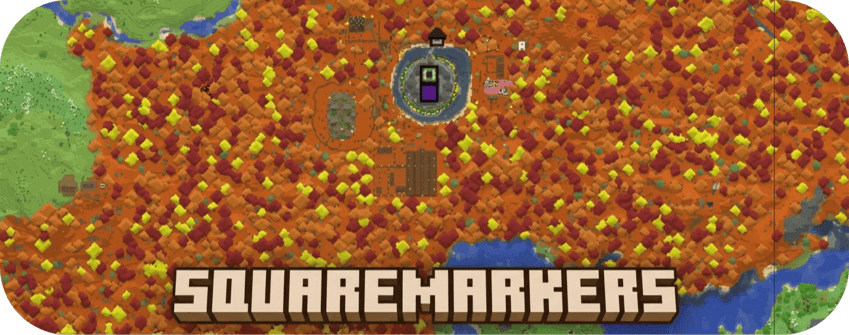
Automatically display useful points of interest on your server's squaremap without requiring players to
run commands.
Players do not need to install SquareMarkers on their clients.
You can check out the mod on this website: http://play.swordfishbe.eu:8080
SquareMarkers can display:
Markers are automatically added, updated, and removed when the corresponding
object changes in the Minecraft world.
All marker types can be enabled, disabled, and configured individually.
Open Parties and Claims, Waystones, Fabric Essentials, HuskHomes and Essential Commands are completely optional.
SquareMarkers works normally when it is not installed.
Players can create named areas without using commands.
Area behavior:
The banner name and base color identify which points belong to the same area.
Travel through a Nether portal to register it automatically.
When portal renaming is enabled, a renamed name tag can be used on a portal to
give its marker a custom name.
Portal popups include a button for navigating to the corresponding Overworld or
Nether coordinates on squaremap.
Beacon markers are created automatically after a placed beacon becomes active.
The marker is removed when the beacon is destroyed.
Editing the sign updates its marker. Removing the sign or lodestone removes the
marker.
End portals and End gateways are detected automatically and displayed on the
map.
No commands or manual configuration are required.
Lightning strikes are temporarily displayed on squaremap.
The marker lifetime can be configured in seconds.
SquareMarkers can show:
Coordinates are automatically converted using the standard 8:1
Overworld-to-Nether scale.
Spectators, invisible players, and players hidden through squaremap are not
displayed.
When Open Parties and Claims is installed, claimed chunks are automatically
combined into colored claim areas.
Claim markers update when chunks are claimed, unclaimed, or changed. Claim
names and colors are taken from Open Parties and Claims.
This integration can be disabled independently in the SquareMarkers
configuration.
Warp markers are displayed automatically after they are created.
The marker is removed when the warp location is deleted
Currently warps of Fabric Essentials, HuskHomes and Essential Commands are supported.
Important for HuskHomes: squaremap layers are visible to all map viewers.
If you use permission-restricted warps whose locations must stay private, set marker-settings.huskhomes-warps.enabled to false; squaremap cannot apply per-player warp permissions here.
Waystones markers are displayed automatically after they are created.
The marker is removed when the waystone location is deleted, you can enable sharestones and undiscovered stones in the config file.
Waystones by BlayTheNinth is supported.
Enable this to show the last death of each player on mapped worlds. The lifetime is in seconds (1–604800), defaulting to 30 minutes and can be set in the config file.
Important: death markers are public, including for players hidden from squaremap's live-player layer. Disable this feature or hide their death marker if required.
/squaremarkers status
/squaremarkers status details
/squaremarkers marker list
/squaremarkers marker list "minecraft:overworld" nether_portals
/squaremarkers marker hide "minecraft:overworld" nether_portals "100:64:200"
/squaremarkers marker show "minecraft:overworld" nether_portals "100:64:200"
Status is a compact, color-coded summary: green for enabled/visible, yellow for disabled/hidden, and dark gray for not installed. status details shows individual integrations and layer counts per world.
These are console/gamemaster commands. Hiding only removes the marker from the public map, not its source object, and takes effect on squaremap's next update.
All 18 player-feedback templates are configurable under the root messages section.
Customize marker creation/removal/rename/color messages, area-point messages, area entry/exit text and sign-marker feedback.
Defaults are English, and missing templates are added without replacing existing settings.
messages:
marker:
add: "Added {type} marker"
rename: "Renamed {type} marker to '{name}'"
interact: "{name}"
rename-failed: "Could not rename {type} marker"
color: "Colored {type} marker"
color-failed: "Could not color {type} marker"
remove: "Removed {type} marker"
area:
create: "Created area: {label}"
point-add: "Added point to area: {label}"
point-add-failed: "Could not add point to area: {label}"
remove: "Removed area: {label}"
point-remove: "Removed point from area: {label}"
enter: "[+] {name}"
leave: "[-] {name}"
sign:
invalid-text: "Text should be a String array with a size of 4"
add: "Added sign marker"
edit: "Edited sign marker"
remove: "Removed sign marker"
{type} represents a marker type, {name} its name or an entered/left area's name, and {label} an area label for point operations.
Text is plain text with the existing feedback colors.
Set a template to "" to suppress that message; sound settings remain separate.
Quote values containing : or # and reload with /squaremarkers reload.
Death-marker text and portal button labels can also be translated in the web map:
messages:
death:
title: "{name}'s last death"
position: "Position: {x}, {y}, {z}"
time: "Time of death ({timezone}): {time}"
portal:
go-to-end: "Go to The End"
go-to-nether: "Go to Nether"
go-to-overworld: "Go to Overworld"
{name} is the player name; {x}, {y}, {z} are death coordinates.{timezone} and {time} follow the configured death timezone.
Empty death templates hide their line. These map texts apply independently of in-game feedback settings.
Area names support a limited and sanitized selection of HTML:
<b>Bold</b>
<i>Italic</i>
<u>Underlined</u>
<br>
<span style="color: #RRGGBB;">Colored text</span>
Unsafe HTML and scripts are escaped before being sent to the web map.
The configuration file is generated at: config/squaremarkers/config.yml
Available settings include:
Reload the configuration and all marker layers with: /squaremarkers reload
The command can be used from the server console or by a player with gamemaster
command permissions.
Marker data is stored per world in JSON files below: config/squaremarkers/
Data is written using UTF-8 and atomic file replacement where supported.
If a marker file contains invalid JSON, SquareMarkers preserves it as a.broken-<timestamp> backup instead of preventing the server from starting.
SquareMarkers is based on Pl3xMarkers by Gjorgdy.
SquareMarkers is a server-side, Fabric-only port of Pl3xMarkers, adapted for the squaremap API. In addition to the functionality provided by Pl3xMarkers, it can display additional marker types.
squaremap is developed by jpenilla and its contributors.
Project description from CurseForge.
Pick your setup
Choose the version and loader you play, then open the matching release.
Check the dependencies, then try the file in a copied instance before changing a world you care about.
Recent files
4 Oct 2026
2 Oct 2026
25 Sept 2026
24 Sept 2026
20 Sept 2026
Looking for an older file? The official CurseForge project page is in Resources.
 mod
modConfig library with GUI based on the YAML format.
 mod
modLet you see the current connected workstation from the villigar.
 mod
modFarmhouse Decorations is all about old furniture perfect for house on the farm.