Minecraft version
Back to mods 
CurseForge · Minecraft mod
Loot Box plus plus
Animated case-opening loot boxes for survival: find or craft crates, spin the roulette, see the odds, get gacha-style guaranteed jackpots and change rewards with a datapack.
Choose a version Pick your version below, then grab the matching file.
Quick answer
Which Loot Box plus plus release should I use?
Latest stable file lootboxplusplus-1.1.0.jar
Game version 1.20.1
Loader Forge
Loot Box plus plus lootboxplusplus-1.1.0.jar targets 1.20.1 with Forge. The project page does not say whether this file belongs on the client, dedicated server, or both. No extra mods listed for this file.
Where it goes
Is Loot Box plus plus required on the client, server, or both?
The project page does not say whether this file belongs on the client, dedicated server, or both.
Client Source doesn’t say
Dedicated server Source doesn’t say
Loader for this release Forge
Required install it here Optional supported, not mandatory Not supported do not install here Source doesn’t say do not assume
The source does not explicitly classify this release as client-only or server-only.
What else does Loot Box plus plus lootboxplusplus-1.1.0.jar need?
lootboxplusplus-1.1.0.jar. Change the file and its required mods may change too.
This file does not list any required mods. Do not add a library just because a different file uses it.
This file does not list any required or optional mods.
Before you install it
Add Loot Box plus plus without breaking your instance.
Built for Loot Box plus plus lootboxplusplus-1.1.0.jar. Pick another file and the loader, install side or required mods may change.
- 01
Stick to this file
Use lootboxplusplus-1.1.0.jar. It targets 1.20.1 with Forge; another release may have different loader, side or dependency requirements.
- 02
Bring the mods it needs
This file does not list any required mods. Do not add a library just because a different file uses it.
- 03
Put it on the correct side
The project page does not say whether this file belongs on the client, dedicated server, or both.
- 04
Pick the file you checked
Use the “Get this file” button beside lootboxplusplus-1.1.0.jar. It opens that exact file at the source.
About this project
What does Loot Box plus plus add?
Open loot boxes in survival with a full case-opening roulette. Check the odds first, and see how close your next guaranteed jackpot is.
Loot Box++ works as soon as it is installed. Boxes appear in vanilla structure chests and drop from mobs and bosses, so you can use it as a case opening, crate or gacha system in a survival world or on a server, with no setup.
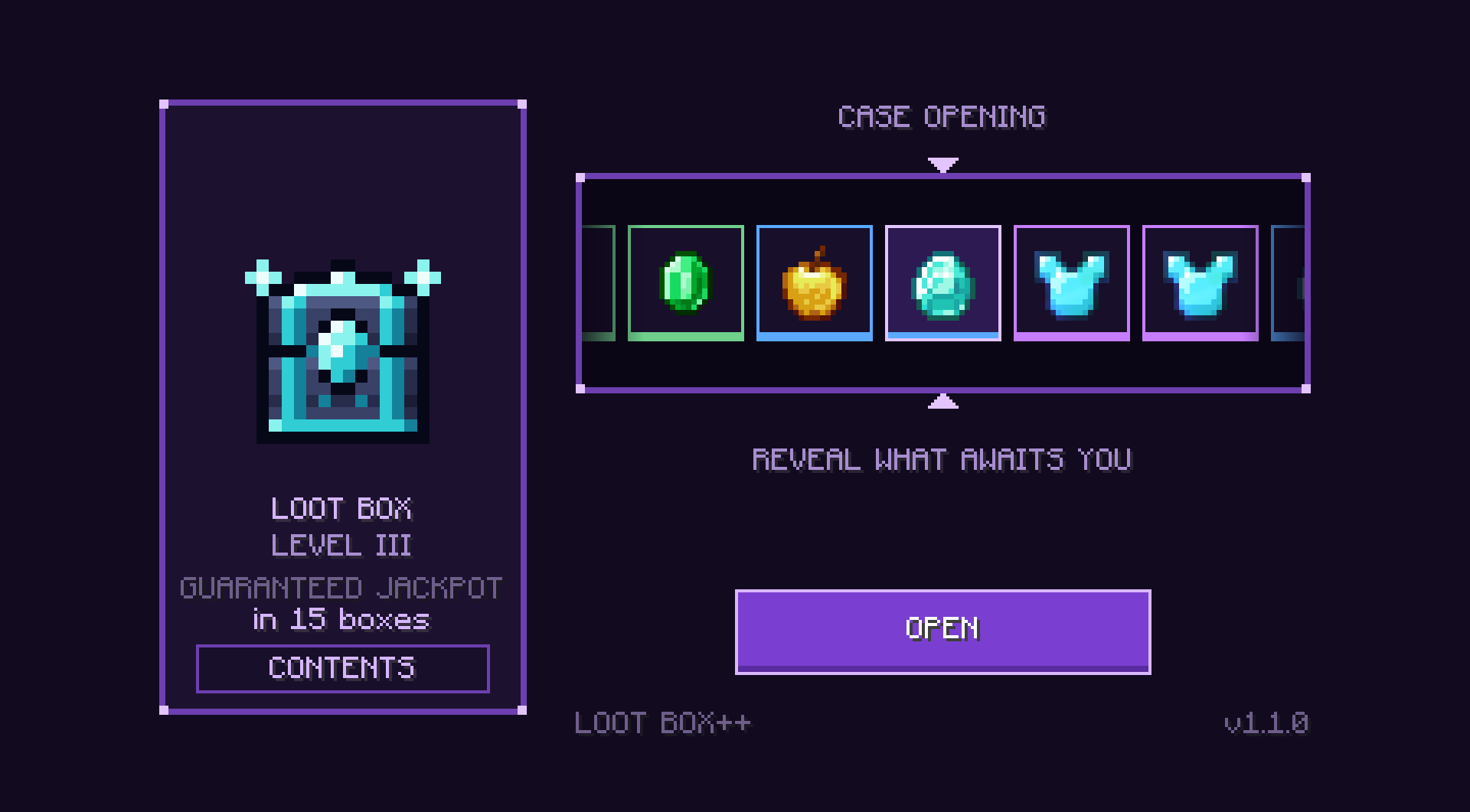
Hold a box, right-click, press OPEN, and claim your reward when the roulette stops.
Requires Minecraft 1.20.1 and Forge 47.4.10 or newer. On a server, install the same version on the server and on every client. Available in English and French.
New in 1.1.0
- More rewards at every level, up to elytra at Level III
- Five rarities, from common to legendary, each with its own color
- Jackpots with a golden effect, their own sound and a chat announcement
- CONTENTS button showing what a box can give and the chance of each reward
- Guaranteed luck, with a countdown on the opening screen
- Merging: three boxes make one box of the next level
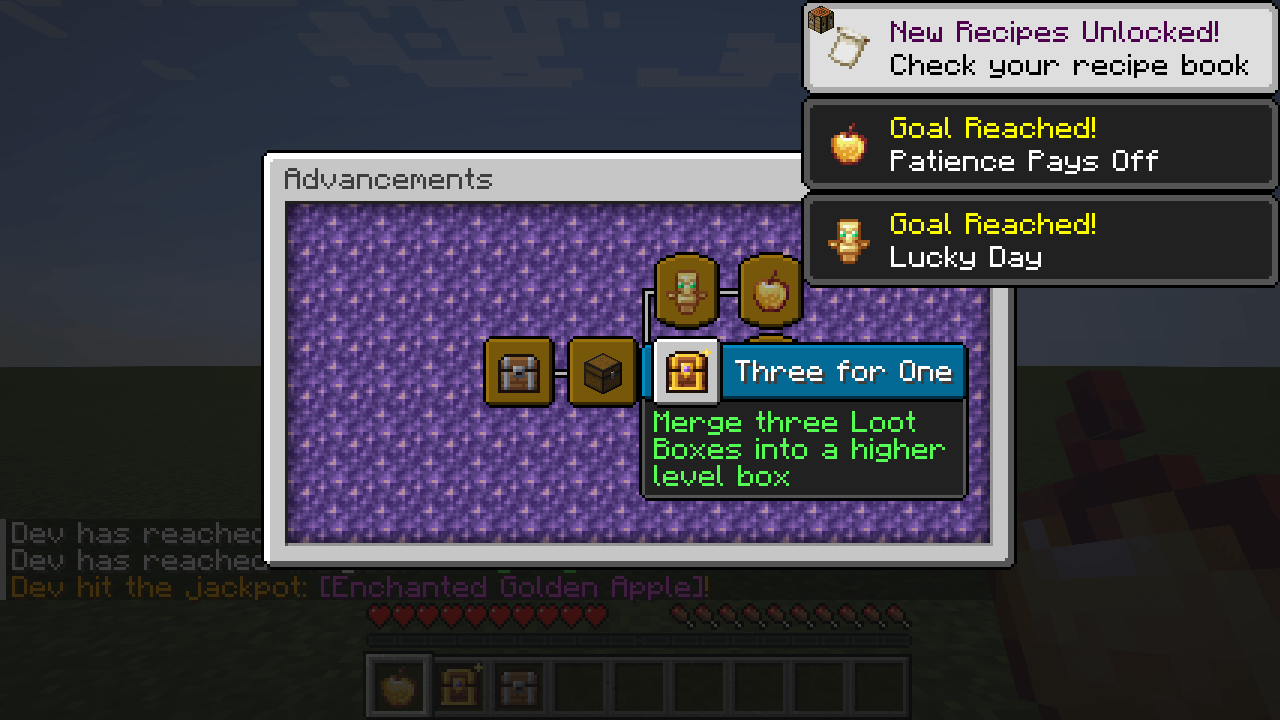
- 7 advancements in their own tab
- Datapack guide for adding items from other mods, further down this page
Getting boxes
| Level I | Level II | Level III | |
|---|---|---|---|
| Crafting | Recipe below | 3 Level I boxes | 3 Level II boxes |
| Chests | 20%: dungeon, abandoned mineshaft, desert pyramid, jungle temple, pillager outpost, ruined portal, shipwreck treasure, buried treasure | 15%: stronghold, Nether fortress, bastion (except treasure), woodland mansion | 10%: End city, bastion treasure, ancient city |
| Killed by a player | 0.5% + 0.2% per Looting level: zombie, husk, drowned, skeleton, stray, spider, creeper | 5% + 1% per Looting level: evoker, ravager, piglin brute | Always: Wither, Warden, Elder Guardian |
The Level I recipe unlocks when you get a diamond:
Gold ingot | Emerald | Gold ingot
Iron block | Chest   | Iron block
Gold ingot | Diamond | Gold ingot
A merging recipe unlocks when you get a box of the level to merge.
What's inside
Each box gives one reward. These are the default odds:
| Level I | Level II | Level III | |
|---|---|---|---|
| Common | Iron ingot x8-32 (44%), gold ingot x4-16 (22%) | Gold ingot x4-16 (30%) | None |
| Uncommon | Emerald x2-8 (14%) | Emerald x2-8 (22%) | Emerald x2-8 (14%) |
| Rare | Diamond x1-3 (8%), enchanted book (6%), enchanted iron sword (3%), golden apple (1%) | Diamond x1-3 (16%), enchanted book (8%), golden apple x1-2 (4%) | Diamond x1-3 (24%), enchanted book (10%), golden apple x1-2 (8%) |
| Epic | None | Netherite scrap x1-2 (7%), enchanted diamond sword (4%), enchanted diamond pickaxe (4%) | Netherite scrap x1-2 (14%), netherite ingot (8%), enchanted diamond sword (6%), enchanted diamond chestplate (6%) |
| Legendary | Totem of undying (2%) | Totem of undying (3%), enchanted golden apple (2%) | Totem of undying (5%), enchanted golden apple (3%), elytra (2%) |
| Jackpot chance per box | 2% | 5% | 10% |
| Guaranteed jackpot | Within 50 boxes | Within 30 boxes | Within 15 boxes |
Enchantments are random and get stronger with the box level.
Opening a box
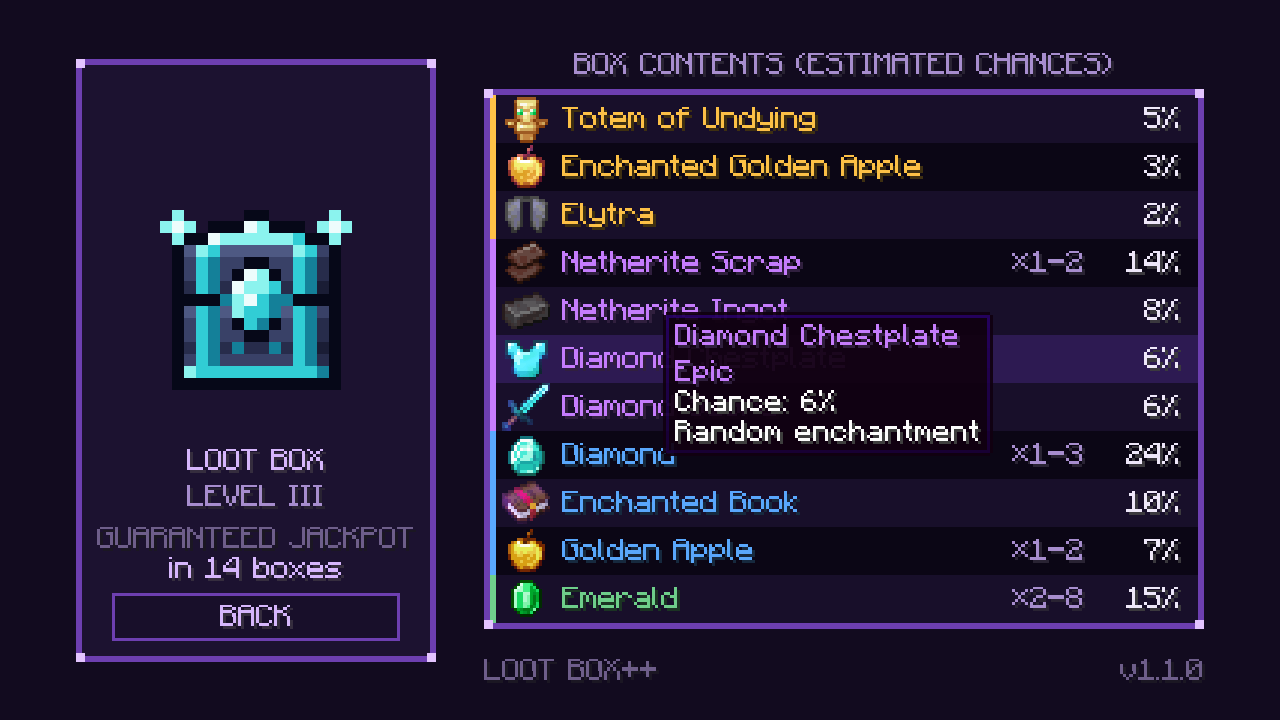
See the odds first. The CONTENTS button lists every possible reward with its rarity, amount and estimated chance. The list is measured from 10,000 real rolls of the loot table, so it follows datapacks and can differ slightly from the table above.
Bad luck has a limit. Every legendary item is a jackpot, and the screen shows how many boxes are left before one is guaranteed. The counter is kept per player and per level, is saved with the world, and starts over after any jackpot.
Jackpots get noticed. A jackpot gets a golden effect and its own sound, and it is announced to every player in chat. The announcement comes when the reward is handed over, so the chat never spoils the roulette.
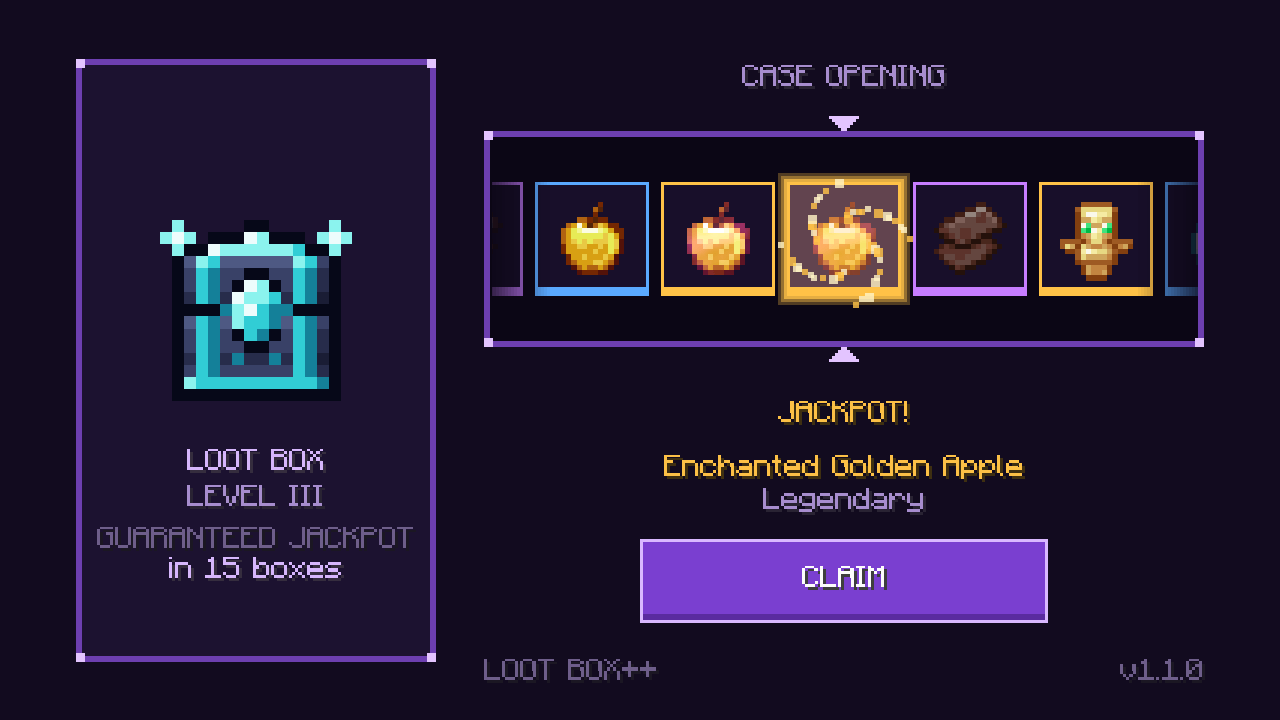
The roulette shows the real result. The server rolls the reward first and the roulette lands on it, including with tables changed by a datapack.
Your reward is safe. The box is only used once the roll succeeds. If you close the screen early, you still get the reward. If you disconnect or die during the opening, you get it when you reconnect or respawn. If your inventory is full, the excess drops on the ground.
Advancements. A Loot Box++ tab has 7 advancements, from getting your first box to opening 50 boxes and getting a jackpot through guaranteed luck.
Settings
Each player's options are in config/lootboxplusplus-client.toml:
| Option | Default | Effect |
|---|---|---|
animationSpeed |
1.0 | Roulette speed, from 0.25 to 4 |
skipAnimation |
false | Shows the reward directly, without the roulette |
rouletteSounds |
true | Plays a click for each slot that passes |
Server options are in serverconfig/lootboxplusplus-server.toml, inside the world folder:
| Option | Default | Effect |
|---|---|---|
announceJackpots |
true | Announces jackpots in chat |
jackpotGuaranteeLevel1 |
50 | Boxes for a guaranteed jackpot at Level I, from 0 to 1000. 0 turns it off |
jackpotGuaranteeLevel2 |
30 | Same for Level II |
jackpotGuaranteeLevel3 |
15 | Same for Level III |
Customizing the rewards
Yes, boxes can give items from other mods and roll in another mod's loot table. Box contents are ordinary loot tables and tags, so a datapack is enough and no code is needed.
| File | Purpose |
|---|---|
data/lootboxplusplus/loot_tables/loot_box_level_1.json (or _2, _3) |
Contents of each level |
data/lootboxplusplus/tags/items/rarity/uncommon.json (or rare, epic, legendary) |
Item rarity |
The one rule to remember
A minecraft:item entry naming an unknown item makes the game reject the whole table, valid items included. The box then shows "UNABLE TO OPEN" and is not consumed.
So for an item whose mod may be missing, use a tag with "required": false, and a minecraft:tag entry with "expand": true.
Adding items from another mod
1. Create the datapack. Make a my_pack folder in <world>/datapacks/ (world/datapacks/ on a server) and add this pack.mcmeta:
{
  "pack": {
    "pack_format": 15,
    "description": "My Loot Box++ rewards"
  }
}
The next steps add these files to it:
my_pack/
  pack.mcmeta
  data/
    my_pack/tags/items/modded_rewards.json
    lootboxplusplus/loot_tables/loot_box_level_1.json
    lootboxplusplus/tags/items/rarity/rare.json
2. Create a tag in data/my_pack/tags/items/modded_rewards.json. To find an item's ID, turn on advanced tooltips with F3 + H.
{
  "replace": false,
  "values": [
    { "id": "create:brass_ingot", "required": false },
    { "id": "mekanism:ingot_osmium", "required": false }
  ]
}
3. Copy the table you want to change from the mod's jar (it opens like a zip) to data/lootboxplusplus/loot_tables/loot_box_level_1.json, then add this entry to its entries list. The datapack replaces the whole table, so your copy must keep everything you want to retain.
{
  "type": "minecraft:tag",
  "name": "my_pack:modded_rewards",
  "expand": true,
  "weight": 5
}
4. Pick the rarity in data/lootboxplusplus/tags/items/rarity/rare.json, with "replace": false to keep the mod's own items.
{
  "replace": false,
  "values": [
    { "id": "create:brass_ingot", "required": false },
    { "id": "mekanism:ingot_osmium", "required": false }
  ]
}
5. Run /reload, then /datapack list. file/my_pack should be listed. The CONTENTS button updates by itself, and items from missing mods are left out.
Pulling from another mod's loot table
A minecraft:loot_table entry rolls in an existing table. Add it to the entries list of your copy, as in step 3. The file data/other_mod/loot_tables/chests/treasure.json in a mod's jar is named other_mod:chests/treasure.
{
  "type": "minecraft:loot_table",
  "name": "other_mod:chests/treasure",
  "weight": 5
}
- If the target table gives several items, the player gets them all and the roulette stops on the rarest one.
- If it does not exist, your table stays valid but that roll gives nothing: the box shows "UNABLE TO OPEN", is not consumed, and the player can try again. So keep this method for a modpack with a fixed mod list.
Good to know
expand: always keep ittrue. Withfalse, an empty tag produces rolls that give nothing.- Weight: each item in the tag gets the entry's weight. With
"weight": 5, three installed items add up to 15. - Amounts: with
expand, aset_counton the entry is ignored and the item is given one at a time. On the pool it does apply, but to every entry in that pool. - Giving a modded item an amount: use a
minecraft:itementry withset_count. The mod then becomes mandatory for this datapack, so keep this for a modpack with a fixed mod list. - Rarity: without a tag, an item keeps the rarity from the game or its mod, and an enchanted item becomes rare. A tag cannot lower that rarity.
- Jackpot: any item in the
legendarytag counts as a jackpot (golden effect, announcement, guaranteed luck, advancements). If a table has none, guaranteed luck does not apply to that level and its counter disappears. - Mod updates: your copy of the table does not follow the mod's changes. Compare it with the new version when you update.
Troubleshooting
If a box shows "UNABLE TO OPEN" after your /reload, look for this line in logs/latest.log: it names the rejected table, and the error after it gives the cause.
Couldn't parse element loot_tables:lootboxplusplus:loot_box_level_1
The most common cause is a mistyped ID, or an item from a missing mod named directly in a minecraft:item entry.
If only some openings are refused, look for Unknown loot table called instead: a minecraft:loot_table entry points to a table that does not exist.
What has been tested
The tag method was tested in game with Forge 47.4.10 and no other mod: missing items are ignored and a vanilla item added the same way comes up in rolls. It has not been tried yet with Create or Mekanism installed. The minecraft:loot_table entry was tested with one of the mod's test tables, not with another mod's table.
What the mod doesn't do
- A datapack can change what the three boxes contain, but it can't add new boxes or levels.
- Boxes only come from vanilla chests, mobs and bosses. Structures and mobs from other mods don't give them by default.
- There is no KubeJS integration, dedicated JEI, EMI or REI view of box contents, bulk opening or key system.
- The mod has no commands of its own. Vanilla
/give @s lootboxplusplus:loot_box_level_1works (or_2,_3). - It runs on Forge 1.20.1 only.
Bugs and ideas
Leave a comment. For a bug, please include your Minecraft and Forge versions and the relevant part of logs/latest.log.
Project description from CurseForge.
Pick your setup
Loot Box plus plus by Minecraft version and loader
Choose the version and loader you play, then open the matching release.
Check the dependencies, then try the file in a copied instance before changing a world you care about.
Recent files
Loot Box plus plus versions and loaders
lootboxplusplus-1.1.0.jar
4 Nov 2026
Client Source doesn’t say Server Source doesn’t say Dependencies No extras listed Listed on Release listing
Check the 1.20.1 · Forge setup 1.20.1Forge release
lootboxplusplus-1.0.0.jar
2 Nov 2026
Client Source doesn’t say Server Source doesn’t say Dependencies No extras listed Listed on Release listing
Check the 1.20.1 · Forge setup 1.20.1Forge release
lootboxplusplus-1.0.0-beta.jar
lootboxplusplus-1.0.0-beta.1.jar
22 Sept 2026
Client Source doesn’t say Server Source doesn’t say Dependencies No extras listed Listed on Release listing
Check the 1.20.1 · Forge setup 1.20.1Forge beta
lootboxplusplus-1.0.0-alpha.jar
lootboxplusplus-1.0.0-alpha.1.jar
20 Sept 2026
Client Source doesn’t say Server Source doesn’t say Dependencies No extras listed Listed on Release listing
Check the 1.20.1 · Forge setup 1.20.1Forge alpha
Looking for an older file? The official CurseForge project page is in Resources.
 mod
CurseForge · Minecraft
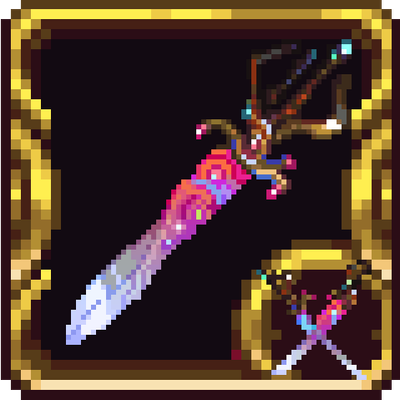
ProjectC ~ Ark of the Cosmos
A mod added Ark of the Cosmos from Calamity mod in Terraria
 mod
CurseForge + Modrinth · Minecraft
Biome Blends
Biome Blends allow you to change the biome anywhere you want. Fully configurable!
 mod
CurseForge · Minecraft
Hundred Years Warfare
NPC-based combat and production gameplay, multiple control methods including RTS mode, special compatibility and integration with various mods, with future plans to expand into structures, management, RPG mechanics, and more.