Minecraft version
Back to mods 
CurseForge · Minecraft mod
Entity Director
Entity Director is a lightweight, rule-driven entity and spawn management engine designed for modpack developers and server administrators on NeoForge.
Choose a version Pick your version below, then grab the matching file.
Quick answer
Which Entity Director release should I use?
Latest stable file entitydirector-1.1.0-neoforge-1.21.1.jar
Game version 1.21.1
Loader NeoForge
Entity Director entitydirector-1.1.0-neoforge-1.21.1.jar targets 1.21.1 with NeoForge. The project page does not say whether this file belongs on the client, dedicated server, or both. No extra mods listed for this file.
Where it goes
Is Entity Director required on the client, server, or both?
The project page does not say whether this file belongs on the client, dedicated server, or both.
Client Source doesn’t say
Dedicated server Source doesn’t say
Loader for this release NeoForge
Required install it here Optional supported, not mandatory Not supported do not install here Source doesn’t say do not assume
The source does not explicitly classify this release as client-only or server-only.
What else does Entity Director entitydirector-1.1.0-neoforge-1.21.1.jar need?
entitydirector-1.1.0-neoforge-1.21.1.jar. Change the file and its required mods may change too.
This file does not list any required mods. Do not add a library just because a different file uses it.
This file does not list any required or optional mods.
Before you install it
Add Entity Director without breaking your instance.
Built for Entity Director entitydirector-1.1.0-neoforge-1.21.1.jar. Pick another file and the loader, install side or required mods may change.
- 01
Stick to this file
Use entitydirector-1.1.0-neoforge-1.21.1.jar. It targets 1.21.1 with NeoForge; another release may have different loader, side or dependency requirements.
- 02
Bring the mods it needs
This file does not list any required mods. Do not add a library just because a different file uses it.
- 03
Put it on the correct side
The project page does not say whether this file belongs on the client, dedicated server, or both.
- 04
Pick the file you checked
Use the “Get this file” button beside entitydirector-1.1.0-neoforge-1.21.1.jar. It opens that exact file at the source.
About this project
What does Entity Director add?
Entity Director
Entity Director is an in-game spawn control, density management, and custom loot engine for NeoForge 1.21.1.
Unlike traditional spawn control mods that force you to edit external JSON files and restart the server repeatedly, Entity Director allows modpack creators and server administrators to configure, toggle, and test spawn policies directly inside the running game.
Why Entity Director?
| Feature | Traditional Tools (JSON Only) | Entity Director |
|---|---|---|
| Configuration | Hand-edit JSON in text editor | Visual In-Game GUI (Press ' / /edgui) |
| Server Restarts | Required on every rule change | Zero restarts (Instant runtime sync) |
| Rule Validation | Trial and error in survival | In-world simulation (/ed test <mob>) |
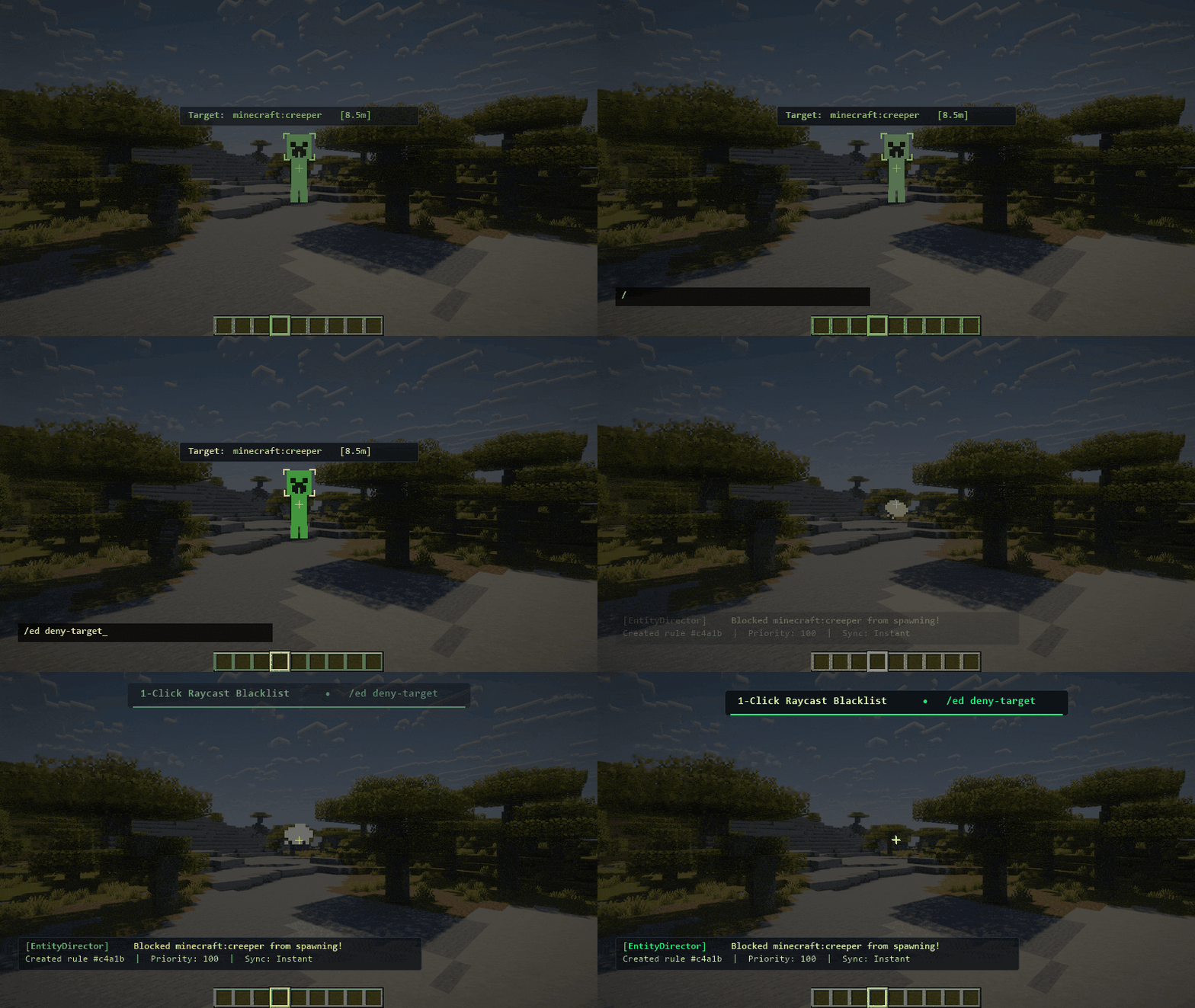
| Target Blacklisting | Manually find registry ID | 1-click raycast blacklist (/ed deny-target) |
| Lag Prevention | Static spawn caps | Live 5×5 chunk density grid (/eddensity) |
| Performance Overhead | Constant event processing | CPU L1 cache gates |
Core Capabilities
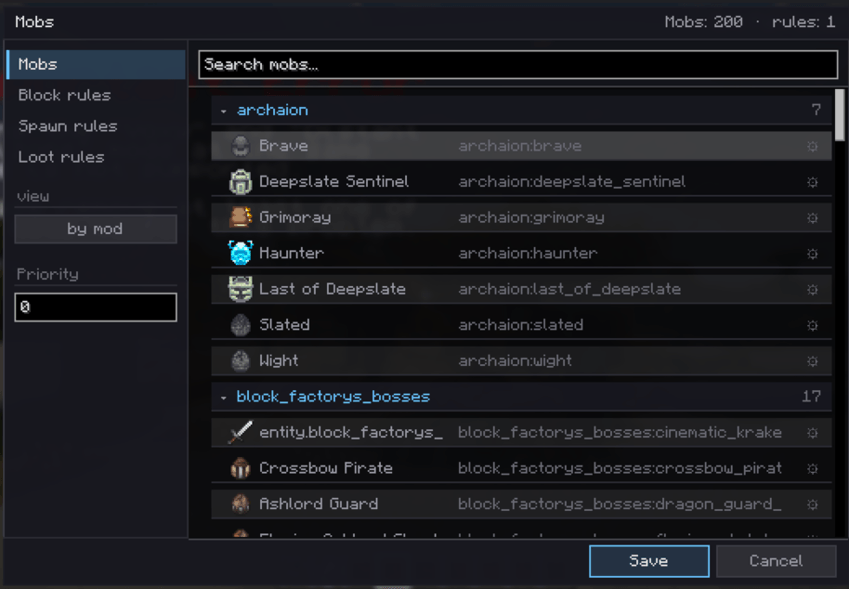
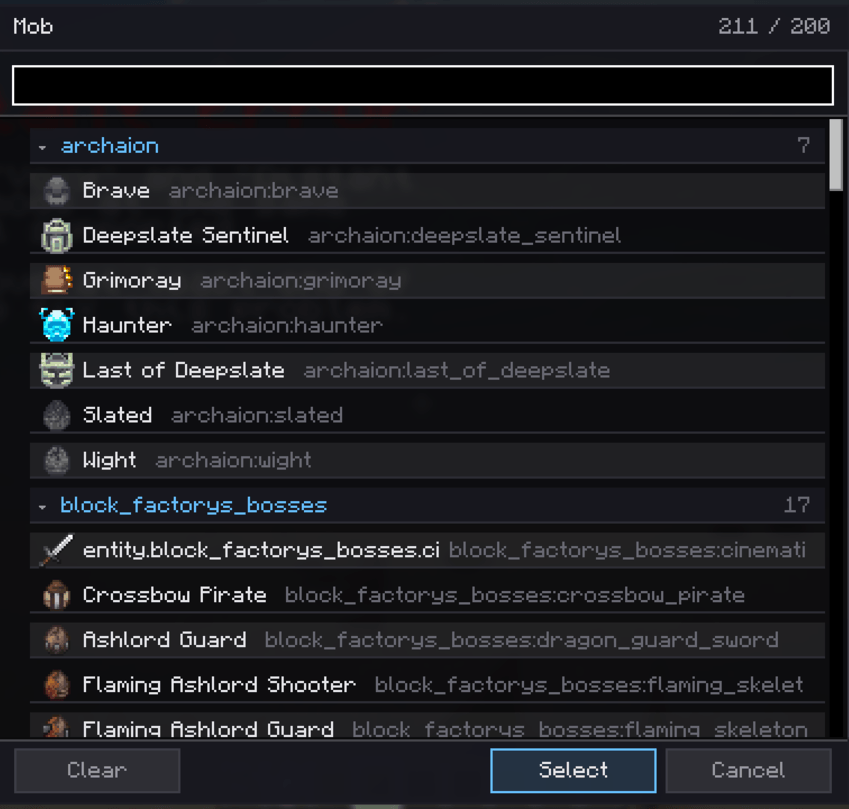
- In-Game Rule Manager (Key: '): Create, reorder with one-click top/bottom buttons, toggle, and edit spawn rules. Full auto-complete for Mob IDs, Dimensions, Biomes, and Structures.
- Granular Conditions: Filter by Dimension, Biome, Structure, Setpiece, Y range, Light level, Time, Weather, Moon phase, and nearby entity density.
- Sandbox Simulation (
/ed test <mob>): Stand at any location and simulate spawn evaluation without waiting for natural spawn ticks. - Target Blacklisting (
/ed deny-target): Aim your crosshair at any mob within 32 blocks to immediately block it from spawning again.
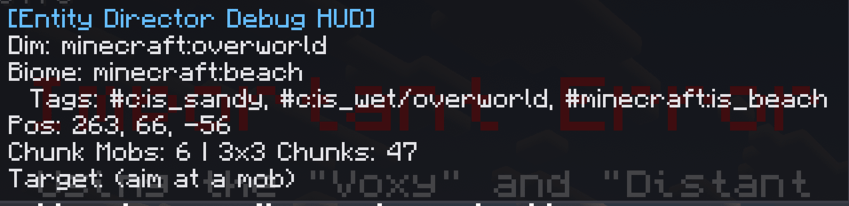
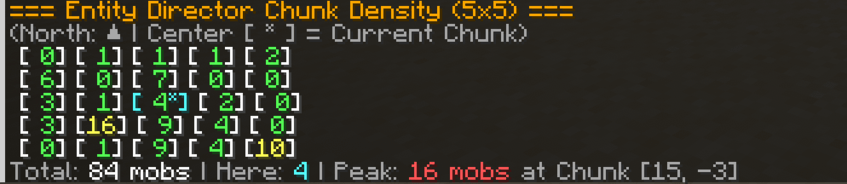
- Density & Heatmap Tools: Run
/eddensityfor a 5×5 chunk density map or/edheatmapfor in-world particle indicators on high-density hotspots. - Custom Spawners & Drops: Inject timed ambient mob spawns and modify mob drops with player-kill checks and drop rate weights.
- Import / Export System: Copy and paste full rule presets to/from your system clipboard with a single click.
Command Reference
/edgui(or press '): Open the rule management interface./ed test <mob_id>: Evaluate spawn rules at your current position./ed deny-target: Instantly blacklist the entity currently in your crosshairs./ed density: Print a 5×5 chunk mob count matrix to chat./edheatmap: Toggle visual flame particles on chunks with >= 20 mobs./edhud(or F8): Toggle the real-time debug inspection overlay./ed reload: Force reload configuration files from disk.
Technical Specifications & Compatibility
- Loader: NeoForge 1.21.1+ (Java 21)
- Environment: Client & Server required for in-game GUI. Can run purely server-side on headless dedicated servers (JSON config mode).
- Performance: Spawn listeners evaluate via CPU L1 cache gates when no rules apply. Zero allocations on rejected paths.
YouTubers & Modpack Creators
Making a video, mod showcase, or modpack with this mod?
Go for it! You are free to showcase, review, record, and feature this mod in your content.
If you do, I'd love it if you could link the mod page in your description so other players can find it too.
If the mod ends up helping your project, consider supporting me — I'm using donations to help fund my short films. 🎬
FAQ
Do I need to restart the server after changing rules?
No. Rules can be edited, toggled, and tested while the game is running.
Can I use Entity Director in a modpack?
Yes. You are free to include Entity Director in your modpack.
Can I make YouTube videos or mod showcases?
Absolutely. Feel free to showcase, review, or feature Entity Director in your content. A link to the mod page is appreciated.
Can I make and upload an unofficial port?
Not without permission. If you'd like to port Entity Director to another Minecraft version or loader, contact me first.
Project description from CurseForge.
Pick your setup
Entity Director by Minecraft version and loader
Choose the version and loader you play, then open the matching release.
Check the dependencies, then try the file in a copied instance before changing a world you care about.
Recent files
Entity Director versions and loaders
entitydirector-1.1.0-neoforge-1.21.1.jar
24 Sept 2026
Client Source doesn’t say Server Source doesn’t say Dependencies No extras listed Listed on Release listing
Check the 1.21.1 · NeoForge setup 1.21.1NeoForge release
entitydirector-1.0.0.neoforge+mc1.21.1.jar
entitydirector-1.0.0.jar
20 Sept 2026
Client Source doesn’t say Server Source doesn’t say Dependencies No extras listed Listed on Release listing
Check the 1.21.1 · NeoForge setup 1.21.1NeoForge release
Looking for an older file? The official CurseForge project page is in Resources.
 mod
mod CurseForge + Modrinth · Minecraft
Big Sign Writer
Easily write large, multi-line characters and symbols on signs!
 mod
mod CurseForge + Modrinth · Minecraft
Fzzy Config
Config API with automatic GUIs, powerful validation options, server-client sync, and more!
 mod
mod CurseForge · Minecraft
Infused Mobs
Hostile mobs spawn with occult-infused tiers and randomized abilities — fully configurable via JSON.